





GraphQL
GitLab v19.4요약
프론트엔드 개발에서 GraphQL을 사용할 때는 Apollo(구체적으로 Apollo Client)와 Vue Apollo를 사용합니다. Vue 애플리케이션에서 GraphQL을 사용한다면 Vue에서의 사용 섹션에서 Vue Apollo를 통합하는 방법을 알아볼 수 있습니다.
시작하기#
유용한 자료#
일반 자료:
GitLab의 GraphQL:
- GitLab Unfiltered GraphQL 재생 목록
- GraphQL at GitLab: Deep Dive (동영상), Nick Thomas 발표
- GitLab의 GraphQL 역사에 대한 개요입니다(프론트엔드에 한정되지 않음).
- GitLab Feature Walkthrough with GraphQL and Vue Apollo (동영상), Natalia Tepluhina 발표
- GraphQL을 사용해 GitLab의 프론트엔드 기능을 구현하는 실제 사례입니다.
- History of client-side GraphQL at GitLab (동영상), Illya Klymov 및 Natalia Tepluhina 발표
- From Vuex to Apollo (동영상), Natalia Tepluhina 발표
- Vuex보다 Apollo가 더 나은 선택이 될 수 있는 경우와 전환 방법에 대한 개요입니다.
- 🛠 Vuex -> Apollo Migration: a proof-of-concept project
- Vue+GraphQL+(Vuex 또는 Apollo) 애플리케이션의 상태 관리에 사용할 수 있는 접근 방식을 보여 주는 예제 모음입니다.
라이브러리#
프론트엔드 개발에서 GraphQL을 사용할 때는 Apollo(구체적으로 Apollo Client)와 Vue Apollo를 사용합니다.
Vue 애플리케이션에서 GraphQL을 사용한다면 Vue에서의 사용 섹션에서 Vue Apollo를 통합하는 방법을 알아볼 수 있습니다.
그 외의 사용 사례는 Vue 외부에서의 사용 섹션을 참고합니다.
불변 캐시 업데이트에는 Immer를 사용합니다. 자세한 내용은 불변성과 캐시 업데이트를 참고합니다.
도구#
Apollo GraphQL VS Code 확장 프로그램#
VS Code를 사용한다면 Apollo GraphQL 확장 프로그램이 .graphql 파일에서 자동 완성을 지원합니다. GraphQL 확장 프로그램을
설정하려면 다음 단계를 따릅니다.
-
스키마를 생성합니다:
bundle exec rake gitlab:graphql:schema:dump -
로컬
gitlab디렉터리의 루트에apollo.config.js파일을 추가합니다. -
파일에 다음 내용을 입력합니다.
module.exports = { client: { includes: ['./app/assets/javascripts/**/*.graphql', './ee/app/assets/javascripts/**/*.graphql'], service: { name: 'GitLab', localSchemaFile: './tmp/tests/graphql/gitlab_schema.graphql', }, }, }; -
VS Code를 다시 시작합니다.
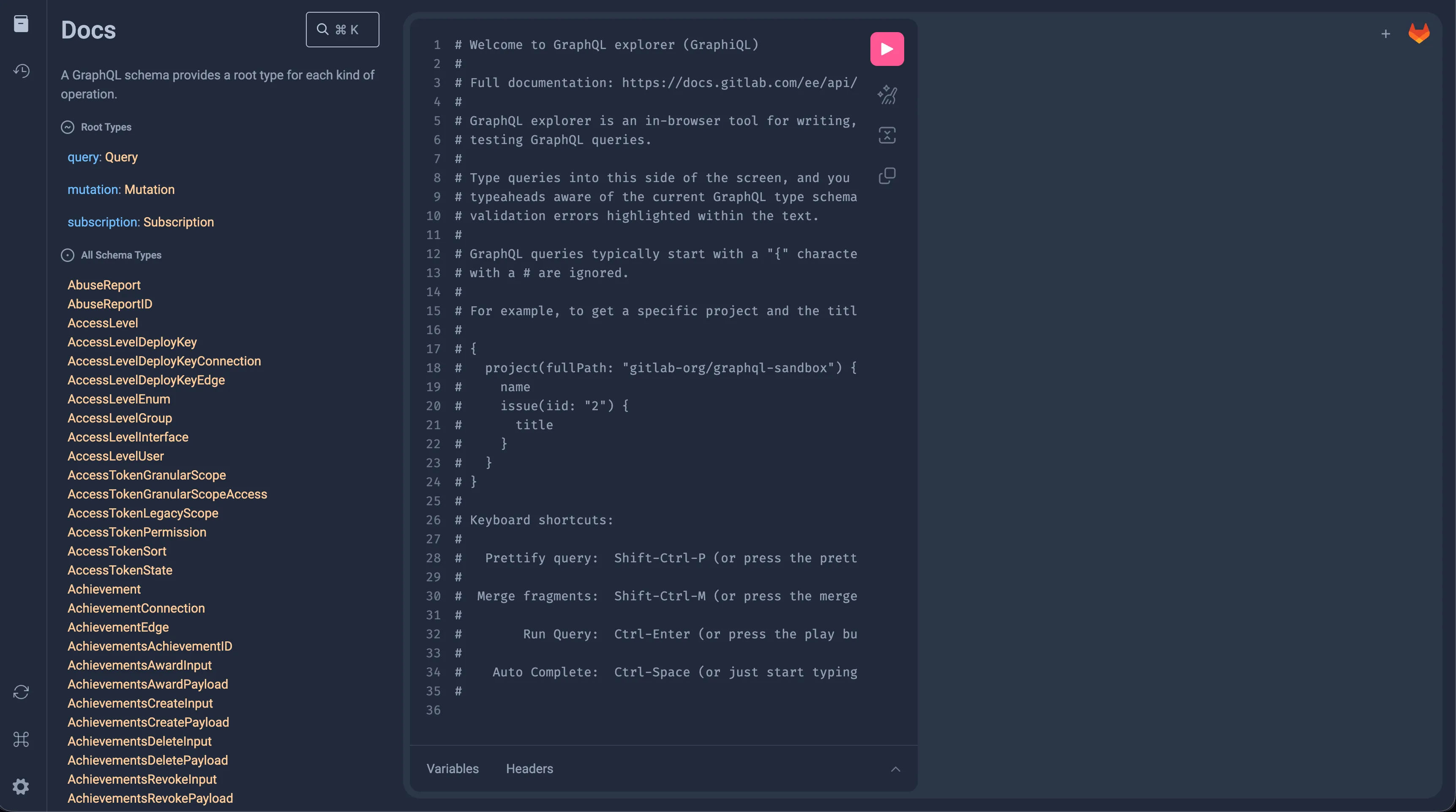
GraphQL API 탐색#
GraphQL API는 GraphiQL을 통해 인스턴스의
/-/graphql-explorer 또는 GitLab.com에서 탐색할 수 있습니다.
필요할 때 GitLab GraphQL API 레퍼런스 문서를
참고합니다.
사용 가능한 모든 쿼리와 뮤테이션을 보려면 GraphiQL 탐색기 왼쪽에서 Show Documentation Explorer를 선택합니다. 작성한 쿼리와 뮤테이션을 실행하려면 오른쪽 위에 있는 Execute query 재생 버튼을 선택합니다.
Apollo Client#
앱마다 클라이언트가 중복 생성되는 일을 막기 위해 사용해야 하는 기본 클라이언트가 있습니다. 이 클라이언트는 올바른 URL로 Apollo 클라이언트를 설정하고 CSRF 헤더도 설정합니다.
기본 클라이언트는 resolvers와 config 두 가지 매개변수를 받습니다.
resolvers매개변수는 로컬 상태 관리 쿼리와 뮤테이션을 위한 리졸버 객체를 받도록 만들어졌습니다.config매개변수는 설정 객체를 받습니다.cacheConfig필드는 Apollo 캐시를 사용자 지정하는 선택적 설정 객체를 받습니다.baseUrl을 사용하면 기본 엔드포인트와 다른 GraphQL 엔드포인트의 URL(예:${gon.relative_url_root}/api/graphql)을 전달할 수 있습니다.fetchPolicy는 컴포넌트가 Apollo 캐시와 상호작용하는 방식을 결정합니다. 기본값은 "cache-first"입니다.
같은 객체에 대한 여러 클라이언트 쿼리#
같은 Apollo 클라이언트 객체에 여러 쿼리를 실행하면 다음 오류가 발생할 수 있습니다. Cache data may be lost when replacing the someProperty field of a Query object. To address this problem, either ensure all objects of SomeEntity have an id or a custom merge function. id가 있는 모든 GraphQL 타입에서 id 존재 여부를 이미 확인하고 있으므로 이 오류는 발생하지 않아야 합니다(단위 테스트를 실행할 때 이 경고가 보이는 경우는 예외입니다. 이때는 목 응답이 id를 요청할 때마다 id를 포함하는지 확인합니다).
GraphQL 스키마에서 SomeEntity 타입에 id 속성이 없다면, 이 경고를 해결하기 위해 사용자 지정 병합 함수를 정의해야 합니다.
기본 클라이언트에는 merge: true로 정의된 클라이언트 전역 타입이 typePolicies에 일부 있습니다(후속 쿼리에서 Apollo가 기존 응답과 새 응답을 병합한다는 뜻입니다). SomeEntity를 그곳에 추가하거나 이 타입을 위한 사용자 지정 병합 함수를 정의하는 방법을 검토합니다.
쿼리 중복 제거(그리고 이를 비활성화해야 하는 경우)#
기본적으로 Apollo Client는 쿼리 중복 제거를 활성화합니다.
중복 제거가 켜져 있으면 작업은 새 요청을 보내는 대신 이미 진행 중인 동일한 요청(같은 쿼리 문서와 같은 변수)을 재사용합니다. 앞선 동일한 요청이 아직 진행 중일 때 발생한 refetch는 네트워크에 도달하지 않습니다. refetch는 이미 진행 중인 요청의 응답을 받습니다.
이 동작은 대체로 도움이 됩니다. 예를 들어 여러 컴포넌트가 동시에 마운트되어 같은 데이터를 요청하더라도 네트워크 호출은 한 번으로 처리됩니다.
그러나 쿼리가 refetch되는 도중에 앞선 동일한 refetch가 아직 진행 중이고 그 사이에 뮤테이션이 반영되면
중복 제거가 문제를 일으킬 수 있습니다.
나중의 refetch는 네트워크에 도달하지 않습니다.
앞선 요청의 응답을 재사용하는데, 이 응답에는 뮤테이션 이전의 스냅샷이 반영되어 있습니다.
그러면 페이지를 새로 고칠 때까지 UI에 잘못된 상태가 표시됩니다.
refetch는 refetch()를 통해 명시적으로 발생합니다.
cache-and-network 쿼리가 캐시 쓰기 이후 다시 실행될 때도 암묵적으로 발생합니다.
이 경합은 실제 사용에서 접수되는 버그 보고보다 불안정한(flaky) 테스트로 드러날 가능성이 더 큽니다. 사람은 두 동작 사이에 자동화된 테스트보다 눈에 띄게 오래 걸리므로, 같은 두 동작을 연달아 실행하는 테스트는 첫 번째 refetch가 아직 진행 중일 때 두 번째 디스패치를 포착할 가능성이 더 큽니다.
앞선 디스패치가 아직 진행 중인데 다시 디스패치될 수 있는 쿼리(같은 문서와 같은 변수)에 대해, 나중의 디스패치가 다음 이유 중 하나로 실제로 새로운 왕복 통신을 필요로 한다면 중복 제거를 비활성화합니다.
- 뮤테이션 경합에서의 최신성: 두 디스패치 사이에 뮤테이션이 상태를 바꿀 수 있지만 중복 제거된 호출은 다시 가져오는 대신 앞선 오래된 응답을 물려받습니다.
- 호출별 취소 또는 식별: 호출이 자체
AbortController시그널이나 다른 호출별 컨텍스트를 가지고 있어서, 앞선 호출의 공유된 요청에 조용히 묻어가지 않고 자기 요청에 연결되어야 합니다. - 온디맨드 확인 시맨틱: 호출이 명령형 "지금 가져오기"(
refetch(),refresh(),client.query())여서, 진행 중인 동일한 호출이 우연히 반환하는 결과가 아니라 매번 실제 왕복 통신을 만들어야 합니다.
쿼리 하나에서 중복 제거를 비활성화하려면 쿼리 옵션에
context: { queryDeduplication: false }를 추가합니다.
Vue 스마트 쿼리는 context를 watchQuery에 전달하므로 같은 옵션이 그곳에서도 동작합니다.
apollo: {
  items: {
    query: itemsQuery,
    fetchPolicy: fetchPolicies.CACHE_AND_NETWORK,
    context: { queryDeduplication: false },
  },
},
중복 제거를 끄면 모든 fetch가 별도의 네트워크 요청이 됩니다. Apollo는 감시 중인 각 쿼리에 대해 가장 최근 요청의 결과만 유지합니다. Apollo는 대체된 요청의 오래된 응답을 캐시에 쓰지 않고 폐기합니다.
여러 컴포넌트가 동시에 가져오는 쿼리에서는 중복 제거를 비활성화하지 않습니다. 중복 제거의 목적은 이러한 요청을 공유하는 것입니다.
GraphQL 쿼리#
런타임에 쿼리를 컴파일하는 비용을 줄이기 위해 webpack은 .graphql
파일을 직접 가져올 수 있습니다. 덕분에 클라이언트가 쿼리를 컴파일하는 대신
webpack이 컴파일 시점에 쿼리를 미리 처리합니다.
쿼리를 뮤테이션 및 프래그먼트와 구분하기 위해 다음 명명 규칙을 권장합니다.
- 쿼리는
all_users.query.graphql - 뮤테이션은
add_user.mutation.graphql - 프래그먼트는
basic_user.fragment.graphql
CustomersDot GraphQL 엔드포인트용 쿼리를 사용한다면 파일 이름을 .customer.query.graphql, .customer.mutation.graphql 또는 .customer.fragment.graphql로 끝냅니다.
기능 카테고리 요구 사항#
모든 GraphQL 쿼리, 뮤테이션, 서브스크립션 파일에는 기능 카테고리를 지정하는 주석이 있어야 합니다. 이 요구 사항은 local-rules/graphql-require-feature-category ESLint 규칙으로 적용됩니다.
.graphql 파일 맨 위에 다음 형식으로 주석을 추가합니다.
# @feature_category: <category>
카테고리는 config/feature_categories.yml에 정의된 유효한 카테고리 중 하나여야 합니다.
Urgency 태그(선택 사항)#
GraphQL 쿼리, 뮤테이션, 서브스크립션 파일에는 작업의 성능 기대치를 나타내는 @urgency 주석을 선택적으로 포함할 수 있습니다. 이는 local-rules/graphql-require-valid-urgency ESLint 규칙으로 검증됩니다.
urgency 주석이 있는 경우 다음 유효한 값 중 하나를 사용해야 합니다.
high- 중요하고 시간에 민감한 작업용medium- 중간 정도로 중요한 작업용default- 표준 작업용low- 중요하지 않은 백그라운드 작업용
urgency 태그는 선택 사항입니다. 생략해도 린터 오류는 발생하지 않습니다. 그러나 포함한다면 값은 위에 나열된 유효한 옵션 중 하나여야 합니다.
형식#
# @urgency: <value>
프래그먼트#
프래그먼트는 복잡한 GraphQL 쿼리를 더 읽기 쉽고 재사용하기 쉽게 만드는 방법입니다. 다음은 GraphQL 프래그먼트의 예시입니다.
fragment DesignListItem on Design {
  id
  image
  event
  filename
  notesCount
}
프래그먼트는 별도의 파일에 저장해 두고 쿼리, 뮤테이션 또는 다른 프래그먼트에서 가져와 사용할 수 있습니다.
#import "./design_list.fragment.graphql"
#import "./diff_refs.fragment.graphql"

fragment DesignItem on Design {
  ...DesignListItem
  fullPath
  diffRefs {
    ...DesignDiffRefs
  }
}
프래그먼트에 대한 자세한 내용은 GraphQL 문서를 참고합니다.
글로벌 ID#
GitLab GraphQL API는 id 필드를 PostgreSQL 기본 키 id가 아닌 글로벌 ID로 표현합니다.
글로벌 ID는 클라이언트 측 라이브러리에서 캐싱과 가져오기에 사용하는
규약입니다.
글로벌 ID를 기본 키 id로 변환하려면 getIdFromGraphQLId를 사용할 수 있습니다.
import { getIdFromGraphQLId } from '~/graphql_shared/utils';

const primaryKeyId = getIdFromGraphQLId(data.id);
스키마에 id가 있는 모든 GraphQL 타입에서는 글로벌 id를 쿼리해야 합니다.
query allReleases(...) {
  project(...) {
    id // Project has an ID in GraphQL schema so should fetch it
    releases(...) {
      nodes {
        // Release has no ID property in GraphQL schema
        name
        tagName
        tagPath
        assets {
          count
          links {
            nodes {
              id // Link has an ID in GraphQL schema so should fetch it
              name
            }
          }
        }
      }
      pageInfo {
        // PageInfo no ID property in GraphQL schema
        startCursor
        hasPreviousPage
        hasNextPage
        endCursor
      }
    }
  }
}
비동기 변수가 있는 쿼리 건너뛰기#
쿼리에 다른 쿼리가 먼저 실행되어야 하는 변수가 하나 이상 있다면, 모든 관계를 포함한 skip() 속성을 쿼리에 추가하는 것이 필수입니다.
그렇게 하지 않으면 쿼리가 두 번 실행됩니다. 한 번은 기본값(data 속성에 정의된 값 또는 undefined)으로 실행되고, 처음 쿼리가 해결된 뒤 새 변수 값이 스마트 쿼리에 주입되어 Apollo가 다시 가져오면서 한 번 더 실행됩니다.
data() {
  return {
    // Define data properties for all apollo queries
    project: null,
    issues: null
  }
},
apollo: {
  project: {
    query: getProject,
    variables() {
      return {
        projectId: this.projectId
      }
    }
  },
  releaseName: {
    query: getReleaseName,
    // Without this skip, the query would run initially with `projectName: null`
    // Then when `getProject` resolves, it will run again.
    skip() {
      return !this.project?.name
    },
    variables() {
      return {
        projectName: this.project?.name
      }
    }
  }
}
GraphQL에서 쿼리 분할#
Apollo에서 쿼리를 분할하는 것은 크고 단일한 쿼리를 더 작고 관리하기 쉬운 조각으로 나누어 데이터 가져오기를 최적화하기 위한 경우가 많습니다.
GraphQL에서 쿼리를 분할하는 이유#
- 쿼리 복잡도 증가 GraphQL 쿼리에는 준수해야 하는 제한이 있습니다.
- 성능 작고 목적이 분명한 쿼리는 서버 응답 시간이 더 빠른 경우가 많으며, 클라이언트가 데이터를 더 일찍 받으므로 프론트엔드에 직접적인 이점이 됩니다.
- 더 나은 컴포넌트 분리와 유지 관리성 각 컴포넌트가 자체 데이터 요구 사항을 처리할 수 있으므로, 크고 공유되는 쿼리에 접근하지 않고도 앱 전체에서 컴포넌트를 재사용하기가 더 쉽습니다.
쿼리를 분할하는 방법#
- 여러 쿼리를 정의하고 컴포넌트 계층 구조의 여러 부분에서 독립적으로 사용합니다. 이렇게 하면 각 컴포넌트는 필요한 데이터만 가져옵니다.
작업 항목 쿼리 아키텍처를 보면, 쿼리 복잡도와 관심 데이터 분리라는 같은 이유로 대부분의 위젯에 대해 쿼리를 분할했습니다.
#import "ee_else_ce/work_items/graphql/work_item_development.fragment.graphql"

query workItemDevelopment($id: WorkItemID!) {
  workItem(id: $id) {
    id
    iid
    namespace {
      id
    }
    widgets {
      ... on WorkItemWidgetDevelopment {
        ...WorkItemDevelopmentFragment
      }
    }
  }
}
#import "~/graphql_shared/fragments/user.fragment.graphql"

query workItemParticipants($fullPath: ID!, $iid: String!) {
  namespace(fullPath: $fullPath) {
    id
    workItem(iid: $iid) {
      id
      widgets {
        ... on WorkItemWidgetParticipants {
          type
          participants {
            nodes {
              ...User
            }
          }
        }
      }
    }
  }
}
@include및@skip디렉티브를 사용한 조건부 쿼리
Apollo는 이러한 디렉티브를 사용한 조건부 쿼리를 지원하므로, 컴포넌트의 상태나 다른 조건에 따라 쿼리를 분할할 수 있습니다.
query projectWorkItems(
  $searchTerm: String
  $fullPath: ID!
  $types: [IssueType!]
  $in: [IssuableSearchableField!]
  $iid: String = null
  $searchByIid: Boolean = false
  $searchByText: Boolean = true
) {
  namespace: project(fullPath: $fullPath) {
    id
    workItems(search: $searchTerm, types: $types, in: $in) @include(if: $searchByText) {
      nodes {
        ...
      }
    }
    workItemsByIid: workItems(iid: $iid, types: $types) @include(if: $searchByIid) {
      nodes {
        ...
      }
    }
  }
}
#import "../fragments/user.fragment.graphql"
#import "~/graphql_shared/fragments/user_availability.fragment.graphql"

query workspaceAutocompleteUsersSearch(
  $search: String!
  $fullPath: ID!
  $isProject: Boolean = true
) {
  groupWorkspace: group(fullPath: $fullPath) @skip(if: $isProject) {
    id
    users: autocompleteUsers(search: $search) {
      ...
    }
  }
  namespace: project(fullPath: $fullPath) {
    id
    users: autocompleteUsers(search: $search) {
      ...
    }
  }
}
주의 쿼리를 분할할 때 기존 GraphQL 쿼리를 무효화하지 않도록 주의해야 합니다. 쿼리를 분할한 뒤 인스펙터에서 같은 쿼리가 여러 번 호출되지 않는지 확인해야 합니다.
불변성과 캐시 업데이트#
Apollo 3.0.0 버전부터 모든 캐시 업데이트는 불변이어야 합니다. 캐시를 새로 업데이트된 객체로 완전히 교체해야 합니다.
캐시를 업데이트하고 새 객체를 반환하는 과정을 쉽게 하기 위해 Immer 라이브러리를 사용합니다. 다음 규칙을 따릅니다.
- 업데이트된 캐시의 이름은
data로 합니다. - 원본 캐시 데이터의 이름은
sourceData로 합니다.
일반적인 업데이트 과정은 다음과 같습니다.
...
const sourceData = client.readQuery({ query });

const data = produce(sourceData, draftState => {
  draftState.commits.push(newCommit);
});

client.writeQuery({
  query,
  data,
});
...
코드 예시처럼 produce를 사용하면 draftState를 직접 조작할 수 있습니다. 또한 immer는
draftState의 변경 사항이 반영된 새 상태가 생성됨을 보장합니다.
Vue에서의 사용#
Vue Apollo를 사용하려면 Vue Apollo 플러그인과 기본 클라이언트를 가져옵니다. 이는 Vue 애플리케이션이 마운트되는 시점에 생성해야 합니다.
import Vue from 'vue';
import VueApollo from 'vue-apollo';
import createDefaultClient from '~/lib/graphql';
Vue.use(VueApollo);

const apolloProvider = new VueApollo({
  defaultClient: createDefaultClient(),
});

new Vue({
  ...,
  apolloProvider,
  ...
});
Vue Apollo에 대한 자세한 내용은 Vue Apollo 문서를 참고합니다.
Apollo를 사용한 로컬 상태#
기본 클라이언트를 만들 때 Apollo로 애플리케이션 상태를 관리할 수 있습니다.
클라이언트 측 리졸버 사용#
기본 상태는 기본 클라이언트를 설정한 뒤 캐시에 값을 써서 지정할 수 있습니다. 아래
예시에서는 @client Apollo 디렉티브가 있는 쿼리로 초기 데이터를
Apollo 캐시에 쓴 다음, Vue 컴포넌트에서 이 상태를 가져옵니다.
// user.query.graphql

query User {
  user @client {
    name
    surname
    age
  }
}
// index.js

import Vue from 'vue';
import VueApollo from 'vue-apollo';
import createDefaultClient from '~/lib/graphql';
import userQuery from '~/user/user.query.graphql'
Vue.use(VueApollo);

const defaultClient = createDefaultClient();

defaultClient.cache.writeQuery({
  query: userQuery,
  data: {
    user: {
      name: 'John',
      surname: 'Doe',
      age: 30
    },
  },
});

const apolloProvider = new VueApollo({
  defaultClient,
});
// App.vue
import userQuery from '~/user/user.query.graphql'

export default {
  apollo: {
    user: {
      query: userQuery
    }
  }
}
writeQuery를 사용하는 대신, 캐시에서 userQuery를 읽으려고 시도할 때마다 user를 반환하는 타입 정책을 만들 수 있습니다.
const defaultClient = createDefaultClient({}, {
  cacheConfig: {
    typePolicies: {
      Query: {
        fields: {
          user: {
            read(data) {
              return data || {
                user: {
                  name: 'John',
                  surname: 'Doe',
                  age: 30
                },
              }
            }
          }
        }
      }
    }
  }
});
로컬 데이터를 만드는 것과 함께, @client 필드로 기존 GraphQL 타입을 확장할 수도 있습니다. 이는 아직 GraphQL API에 추가되지 않은 필드의 API 응답을 목으로 만들어야 할 때 매우 유용합니다.
로컬 Apollo 캐시로 API 응답 모킹#
일부 GraphQL API 응답, 쿼리 또는 뮤테이션을 로컬에서 모킹해야 할 이유가 있을 때(아직 실제 API에 추가되지 않은 경우 등) 로컬 Apollo 캐시가 유용합니다.
예를 들어 쿼리에서 사용하는 DesignVersion에 대한 프래그먼트가 있습니다.
fragment VersionListItem on DesignVersion {
  id
  sha
}
버전 드롭다운 목록에 표시하려면 버전 작성자와 created at 속성도 가져와야 합니다. 그러나 이러한 변경은 아직 API에 구현되어 있지 않습니다. 기존 프래그먼트를 변경해 이 새 필드에 대한 모킹 응답을 받을 수 있습니다.
fragment VersionListItem on DesignVersion {
  id
  sha
  author @client {
    avatarUrl
    name
  }
  createdAt @client
}
이제 Apollo는 @client 디렉티브가 표시된 모든 필드의 리졸버 를 찾으려고 시도합니다. DesignVersion 타입의 리졸버를 만들어 봅니다(DesignVersion인 이유는 프래그먼트가 이 타입에 대해 만들어졌기 때문입니다).
// resolvers.js

const resolvers = {
  DesignVersion: {
    author: () => ({
      avatarUrl:
        'https://www.gravatar.com/avatar/e64c7d89f26bd1972efa854d13d7dd61?s=80&d=identicon',
      name: 'Administrator',
      __typename: 'User',
    }),
    createdAt: () => '2019-11-13T16:08:11Z',
  },
};

export default resolvers;
기존 Apollo Client에 리졸버 객체를 전달해야 합니다.
// graphql.js

import createDefaultClient from '~/lib/graphql';
import resolvers from './graphql/resolvers';

const defaultClient = createDefaultClient(resolvers);
버전을 가져오려고 시도할 때마다 클라이언트는 원격 API 엔드포인트에서 id와 sha를 가져옵니다. 그런 다음 하드코딩된 값을 버전의 author 및 createdAt 속성에 할당합니다. 이 데이터를 사용하면 프론트엔드 개발자는 백엔드에 막히지 않고 UI 작업을 진행할 수 있습니다. 응답이 API에 추가되면 사용자 지정 로컬 리졸버를 제거할 수 있습니다. 쿼리/프래그먼트에서 바꿀 부분은 @client 디렉티브를 제거하는 것뿐입니다.
Apollo를 사용한 로컬 상태 관리에 대한 자세한 내용은 Vue Apollo 문서를 참고합니다.
Pinia와 함께 사용#
하나의 Vue 애플리케이션에서 Pinia와 Apollo를 함께 사용하는 것은 일반적으로 권장하지 않습니다. Apollo와 Pinia를 함께 사용할 때의 제약과 상황에 대해 알아봅니다.
Vuex와 함께 사용#
Vuex와 Apollo Client를 함께 사용하는 것은 권장하지 않습니다. Vuex는 GitLab에서 사용 중단되었습니다. Apollo와 함께 사용되는 기존 Vuex 스토어가 있다면 Vuex에서 완전히 벗어나는 마이그레이션을 강력히 권장합니다. GitLab의 상태 관리에 대해 자세히 알아봅니다.
프론트엔드와 백엔드가 동기화되지 않은 상태에서 GraphQL 기반 기능 작업#
GraphQL 쿼리/뮤테이션을 생성하거나 업데이트해야 하는 기능은 신중하게 계획해야 합니다. 프론트엔드와 백엔드 담당자는 클라이언트 측과 서버 측 요구 사항을 모두 충족하는 스키마에 합의해야 합니다. 이렇게 하면 두 부서가 서로를 막지 않고 각자의 부분을 구현하기 시작할 수 있습니다.
이상적으로는 백엔드 구현을 프론트엔드보다 먼저 완료해서 클라이언트가 부서 간 왕복을 최소화하면서 바로 API를 쿼리하기 시작할 수 있어야 합니다. 그러나 우선순위가 항상 일치하지는 않는다는 점을 인정합니다. 반복 개선과 약속한 작업의 전달을 위해, 프론트엔드를 백엔드보다 먼저 구현해야 할 수도 있습니다.
백엔드보다 먼저 프론트엔드 쿼리와 뮤테이션 구현#
이 경우 프론트엔드는 아직 어떤 백엔드 리졸버에도 대응하지 않는 GraphQL 스키마나 필드를 정의합니다.
구현에 기능 플래그가 제대로 적용되어 있어 제품에서 사용자에게 보이는 오류로
이어지지 않는다면 문제가 없습니다. 다만 클라이언트 측
쿼리/뮤테이션은 graphql-verify CI job으로 백엔드 GraphQL 스키마에 대해 검증합니다.
백엔드가 실제로 지원하기 전에 변경 사항을 머지하려면
검증을 통과하는지 확인해야 합니다. 다음은 이를 처리하는 몇 가지 제안입니다.
@client 디렉티브 사용#
권장하는 방법은 백엔드에서 아직 지원하지 않는 새 쿼리, 뮤테이션 또는 필드에
@client 디렉티브를 사용하는 것입니다. 이 디렉티브가 있는 엔터티는
graphql-verify 검증 job에서 건너뜁니다.
또한 Apollo는 이를 클라이언트 측에서 해결하려고 시도하며, 이는 로컬 Apollo 캐시로 API 응답 모킹과 함께 사용할 수 있습니다. 이렇게 하면 클라이언트 측에서 정의한 가짜 데이터로 기능을 편리하게 테스트할 수 있습니다. 변경 사항에 대한 머지 리퀘스트를 열 때는 리뷰어가 GDK에 적용해 작업을 쉽게 스모크 테스트할 수 있도록 로컬 리졸버를 패치로 제공하는 것이 좋습니다.
디렉티브 제거는 후속 이슈로, 또는 백엔드 구현 계획의 일부로 추적해야 합니다.
알려진 실패 목록에 예외 추가#
GraphQL 쿼리/뮤테이션 검증은 특정 파일의
경로를
config/known_invalid_graphql_queries.yml
파일에 추가하면 해당 파일에 대해 완전히 끌 수 있습니다. 이는 .eslintignore 파일로 일부 파일의
ESLint를 비활성화하는 것과 비슷합니다.
여기에 나열된 파일은 전혀 검증되지 않는다는 점에 유의합니다. 따라서 기존 쿼리에 필드만 추가한다면
쿼리의 나머지 부분은 계속 검증되도록 @client 디렉티브 방식을 사용합니다.
이러한 재정의는 가능한 한 짧게 유지되도록 해당 이슈에서 제거를 추적해야 합니다.
기능 플래그가 적용된 쿼리#
백엔드는 완성되었고 프론트엔드를 기능 플래그 뒤에서 구현하는 경우, GraphQL 쿼리에서 기능 플래그를 활용하는 몇 가지 옵션이 있습니다.
@include 디렉티브#
@include(또는 그 반대인 @skip)를 사용해 엔터티를 쿼리에
포함할지 제어할 수 있습니다. @include 디렉티브가 false로 평가되면 엔터티의 리졸버는
호출되지 않으며 엔터티는 응답에서 제외됩니다. 예를 들면 다음과 같습니다.
query getAuthorData($authorNameEnabled: Boolean = false) {
  username
  name @include(if: $authorNameEnabled)
}
그런 다음 쿼리를 호출하는 Vue(또는 JavaScript) 코드에서 기능 플래그를 전달할 수 있습니다. 이 기능 플래그는 이미 올바르게 설정되어 있어야 합니다. 올바른 방법은 기능 플래그 문서를 참고합니다.
export default {
  apollo: {
    user: {
      query: QUERY_IMPORT,
      variables() {
        return {
          authorNameEnabled: gon?.features?.authorNameEnabled,
        };
      },
    }
  },
};
디렉티브가 false로 평가되더라도 보호된 엔터티는 백엔드로 전송되고
GraphQL 스키마와 대조됩니다. 따라서 이 방식은 기능 플래그가 비활성화되어 있더라도
기능 플래그가 적용된 엔터티가 스키마에 존재해야 합니다. 기능 플래그가 꺼져 있을 때는
최소한 프론트엔드와 같은 기능 플래그를 사용해 리졸버가 null을 반환하도록 하는 것을 권장합니다. API GraphQL 가이드를 참고합니다.
쿼리의 여러 버전#
표준 쿼리를 복제하는 또 다른 방식이 있으며, 이는 피해야 합니다. 복사본에는 새 엔터티가 포함되고 원본은 그대로 유지됩니다. 기능 플래그의 상태에 따라 올바른 쿼리를 실행하는 것은 프로덕션 코드가 담당합니다. 예를 들면 다음과 같습니다.
export default {
  apollo: {
    user: {
      query() {
        return this.glFeatures.authorNameEnabled ? NEW_QUERY : ORIGINAL_QUERY,
      }
    }
  },
};
여러 쿼리 버전 피하기#
여러 버전을 두는 방식은 머지 리퀘스트가 커지고 기능 플래그가 존재하는 동안
비슷한 쿼리 두 개를 유지 관리해야 하므로 권장하지 않습니다. 새 GraphQL 엔터티가 아직 스키마에 포함되지 않았거나
스키마 수준에서 기능 플래그가 적용된 경우(new_entity: :feature_flag)에는
여러 버전을 사용할 수 있습니다.
쿼리 수동 실행#
컴포넌트의 apollo 속성에 있는 쿼리는 컴포넌트가 생성될 때 자동으로 실행됩니다.
일부 컴포넌트는 지연 로딩되는 항목이 있는 드롭다운 목록처럼 네트워크 요청을 필요할 때 실행하기를 원합니다.
이를 위한 방법은 두 가지입니다.
skip속성 사용
export default {
  apollo: {
    user: {
      query: QUERY_IMPORT,
      skip() {
        // only make the query when dropdown is open
        return !this.isOpen;
      },
    }
  },
};
addSmartQuery사용
메서드에서 스마트 쿼리를 직접 생성할 수 있습니다.
handleClick() {
  this.$apollo.addSmartQuery('user', {
    // this takes the same values as you'd have in the `apollo` section
    query: QUERY_IMPORT,
  }),
};
페이지네이션 사용#
GitLab GraphQL API는 연결(connection) 타입에 Relay 스타일 커서 페이지네이션을 사용합니다. 이는 "커서"를 사용해 데이터 세트에서 다음 항목을 어디서부터 가져올지 추적한다는 뜻입니다. GraphQL Ruby Connection Concepts는 연결에 대한 좋은 개요이자 입문 자료입니다.
모든 연결 타입(예: DesignConnection, DiscussionConnection)에는 페이지네이션에 필요한 정보를 담은 pageInfo 필드가 있습니다.
pageInfo {
  endCursor
  hasNextPage
  hasPreviousPage
  startCursor
}
여기서 각 필드는 다음과 같습니다.
startCursor는 첫 번째 항목의 커서를,endCursor는 마지막 항목의 커서를 나타냅니다.hasPreviousPage와hasNextPage로 현재 페이지 앞이나 뒤에 더 많은 페이지가 있는지 확인할 수 있습니다.
연결 타입으로 데이터를 가져올 때는 커서를 after 또는 before
매개변수로 전달해 페이지네이션의 시작점이나 끝점을 지정할 수 있습니다. 그 뒤에는
주어진 지점 이후나 이전에 몇 개 의 항목을 가져올지 나타내는
first 또는 last 매개변수가 와야 합니다.
예를 들어 다음은 커서 이후의 디자인 10개를 가져오는 쿼리입니다(이를 projectQuery라고 부릅니다).
#import "~/graphql_shared/fragments/page_info.fragment.graphql"

query {
  project(fullPath: "root/my-project") {
    id
    issue(iid: "42") {
      designCollection {
        designs(atVersion: null, after: "Ihwffmde0i", first: 10) {
          edges {
            node {
              id
            }
          }
          pageInfo {
            ...PageInfo
          }
        }
      }
    }
  }
}
pageInfo 정보를 채우기 위해 page_info.fragment.graphql을 사용한다는 점에 유의합니다.
컴포넌트에서 fetchMore 메서드 사용#
이 방식은 사용자가 직접 처리하는 페이지네이션에 적합합니다. 예를 들어 스크롤해서 더 많은 데이터를 가져오거나 Next Page 버튼을 명시적으로 선택하는 경우입니다. 처음부터 모든 데이터를 가져와야 한다면 대신 (스마트가 아닌) 쿼리를 사용하는 것을 권장합니다.
초기 fetch를 수행할 때는 보통 페이지네이션을 처음부터 시작하려고 합니다. 이 경우 다음 중 하나를 할 수 있습니다.
- 커서를 전달하지 않습니다.
after에null을 명시적으로 전달합니다.
데이터를 가져온 뒤에는 update 훅을 사용해
Vue 컴포넌트 속성에 설정되는 데이터를 사용자 지정할 수 있습니다.
이렇게 하면 다른 데이터와 함께 pageInfo 객체를 확보할 수 있습니다.
result 훅에서는 pageInfo 객체를 살펴보고 다음 페이지를 가져와야 하는지 확인할 수 있습니다.
애플리케이션이 다음 페이지를 무한정 요청하지 않도록
requestCount도 함께 유지한다는 점에 유의합니다.
data() {
  return {
    pageInfo: null,
    requestCount: 0,
  }
},
apollo: {
  designs: {
    query: projectQuery,
    variables() {
      return {
        // ... The rest of the design variables
        first: 10,
      };
    },
    update(data) {
      const { id = null, issue = {} } = data.project || {};
      const { edges = [], pageInfo } = issue.designCollection?.designs || {};

      return {
        id,
        edges,
        pageInfo,
      };
    },
    result() {
      const { pageInfo } = this.designs;

      // Increment the request count with each new result
      this.requestCount += 1;
      // Only fetch next page if we have more requests and there is a next page to fetch
      if (this.requestCount < MAX_REQUEST_COUNT && pageInfo?.hasNextPage) {
        this.fetchNextPage(pageInfo.endCursor);
      }
    },
  },
},
다음 페이지로 이동하려면 Apollo fetchMore 메서드에
새 커서(그리고 선택적으로 새 변수)를 전달합니다.
fetchNextPage(endCursor) {
  this.$apollo.queries.designs.fetchMore({
    variables: {
      // ... The rest of the design variables
      first: 10,
      after: endCursor,
    },
  });
}
필드 병합 정책 정의#
기존 결과와 새로 들어온 결과를 어떻게 병합할지 지정하는 필드 정책도 정의해야 합니다. 예를 들어 Previous/Next 버튼이 있다면 기존 결과를 새 결과로 교체하는 것이 적절합니다.
const apolloProvider = new VueApollo({
  defaultClient: createDefaultClient(
    {},
    {
      cacheConfig: {
        typePolicies: {
          DesignCollection: {
            fields: {
              designs: {
                merge(existing, incoming) {
                  if (!incoming) return existing;
                  if (!existing) return incoming;

                  // We want to save only incoming nodes and replace existing ones
                  return incoming
                }
              }
            }
          }
        }
      },
    },
  ),
});
무한 스크롤이 있는 경우에는 들어오는 designs 노드를 기존 노드와 교체하는 대신 추가하는 것이 적절합니다. 이 경우 병합 함수는 약간 다릅니다.
const apolloProvider = new VueApollo({
  defaultClient: createDefaultClient(
    {},
    {
      cacheConfig: {
        typePolicies: {
          DesignCollection: {
            fields: {
              designs: {
                merge(existing, incoming) {
                  if (!incoming) return existing;
                  if (!existing) return incoming;

                  const { nodes, ...rest } = incoming;
                  // We only need to merge the nodes array.
                  // The rest of the fields (pagination) should always be overwritten by incoming
                  let result = rest;
                  result.nodes = [...existing.nodes, ...nodes];
                  return result;
                }
              }
            }
          }
        }
      },
    },
  ),
});
apollo-client는 페이지네이션된 쿼리에 사용할 수 있는
필드 정책을 몇 가지 제공합니다. 다음은 concatPagination 정책으로 무한 스크롤
페이지네이션을 구현하는 또 다른 방법입니다.
import { concatPagination } from '@apollo/client/utilities';
import Vue from 'vue';
import VueApollo from 'vue-apollo';
import createDefaultClient from '~/lib/graphql';

Vue.use(VueApollo);

export default new VueApollo({
  defaultClient: createDefaultClient(
    {},
    {
      cacheConfig: {
        typePolicies: {
          Project: {
            fields: {
              dastSiteProfiles: {
                keyArgs: ['fullPath'], // You might need to set the keyArgs option to enforce the cache's integrity
              },
            },
          },
          DastSiteProfileConnection: {
            fields: {
              nodes: concatPagination(),
            },
          },
        },
      },
    },
  ),
});
새 페이지 결과가 이전 결과 뒤에 추가된다는 점에서 위의 DesignCollection 예시와
비슷합니다.
일부 경우에는 모든 필드가 업데이트되기 때문에 필드에 맞는 keyArgs를 정의하기 어렵습니다.
이때는 keyArgs를 false로 설정할 수 있습니다. 이렇게 하면
Apollo Client가 자동 병합을 수행하지 않고, merge 함수에 작성한
로직에 전적으로 의존합니다.
예를 들어 다음과 같은 쿼리가 있습니다.
query searchGroupsWhereUserCanTransfer {
  currentUser {
    id
    groups(after: 'somecursor') {
      nodes {
        id
        fullName
      }
      pageInfo {
        ...PageInfo
      }
    }
  }
}
여기서 groups 필드에는 keyArgs로 쓸 만한 적당한 후보가 없습니다. 후속 페이지를 요청할 때 after 인수가 바뀌므로 이를 고려하고 싶지 않습니다. keyArgs를 false로 설정하면 업데이트가 의도한 대로 동작합니다.
typePolicies: {
  UserCore: {
    fields: {
      groups: {
        keyArgs: false,
      },
    },
  },
  GroupConnection: {
    fields: {
      nodes: concatPagination(),
    },
  },
}
컴포넌트에서 재귀 쿼리 사용#
처음에 페이지네이션된 모든 데이터를 가져와야 할 때는 Apollo 쿼리로 해결할 수 있습니다.
사용자 상호작용에 따라 다음 페이지를 가져와야 한다면 fetchMore 훅과 함께 smartQuery를 사용하는 것을 권장합니다.
쿼리가 해결되면 컴포넌트 데이터를 업데이트하고 pageInfo 객체를 살펴볼 수 있습니다. 이를 통해
다음 페이지를 가져와야 하는지 확인하고 메서드를 재귀적으로 호출할 수 있습니다.
애플리케이션이 다음 페이지를 무한정
요청하지 않도록 requestCount도 함께 유지한다는 점에 유의합니다.
data() {
  return {
    requestCount: 0,
    isLoading: false,
    designs: {
      edges: [],
      pageInfo: null,
    },
  }
},
created() {
  this.fetchDesigns();
},
methods: {
  handleError(error) {
    this.isLoading = false;
    // Do something with `error`
  },
  fetchDesigns(endCursor) {
    this.isLoading = true;

    return this.$apollo
      .query({
        query: projectQuery,
        variables() {
          return {
            // ... The rest of the design variables
            first: 10,
            endCursor,
          };
        },
      })
      .then(({ data }) => {
        const { id = null, issue = {} } = data.project || {};
        const { edges = [], pageInfo } = issue.designCollection?.designs || {};

        // Update data
        this.designs = {
          id,
          edges: [...this.designs.edges, ...edges];
          pageInfo: pageInfo;
        };

        // Increment the request count with each new result
        this.requestCount += 1;
        // Only fetch next page if we have more requests and there is a next page to fetch
        if (this.requestCount < MAX_REQUEST_COUNT && pageInfo?.hasNextPage) {
          this.fetchDesigns(pageInfo.endCursor);
        } else {
          this.isLoading = false;
        }
      })
      .catch(this.handleError);
  },
},
페이지네이션과 낙관적 업데이트#
Apollo가 페이지네이션된 데이터를 클라이언트 측에 캐시할 때는 캐시 키에 pageInfo 변수가 포함됩니다.
그 데이터를 낙관적으로 업데이트하려면
.readQuery()
또는 .writeQuery()로
캐시와 상호작용할 때 pageInfo 변수를 제공해야 합니다. 이는 번거롭고 직관적이지 않을 수 있습니다.
캐시된 페이지네이션 쿼리를 더 쉽게 다루도록 Apollo는 @connection 디렉티브를 제공합니다.
이 디렉티브는 데이터를 캐시할 때 정적 키로 사용되는 key 매개변수를 받습니다.
그러면 페이지네이션 관련 변수를 제공하지 않고도 데이터를 가져올 수 있습니다.
다음은 @connection 디렉티브를 사용하는 쿼리의 예시입니다.
#import "~/graphql_shared/fragments/page_info.fragment.graphql"

query DastSiteProfiles($fullPath: ID!, $after: String, $before: String, $first: Int, $last: Int) {
  project(fullPath: $fullPath) {
    siteProfiles: dastSiteProfiles(after: $after, before: $before, first: $first, last: $last)
      @connection(key: "dastSiteProfiles") {
      pageInfo {
        ...PageInfo
      }
      edges {
        cursor
        node {
          id
          # ...
        }
      }
    }
  }
}
이 예시에서 Apollo는 안정적인 dastSiteProfiles 캐시 키로 데이터를 저장합니다.
그 데이터를 캐시에서 가져오려면 $fullPath 변수만 제공하면 되며,
after나 before 같은 페이지네이션 관련 변수는 생략합니다.
const data = store.readQuery({
  query: dastSiteProfilesQuery,
  variables: {
    fullPath: 'namespace/project',
  },
});
@connection 디렉티브에 대한 자세한 내용은 Apollo 문서를 참고합니다.
유사한 쿼리 일괄 처리#
기본적으로 Apollo 클라이언트는 쿼리마다 브라우저에서 HTTP 요청을 하나씩 보냅니다. batchKey를 정의하면 여러 쿼리를 하나의 나가는 요청으로 묶어 요청 수를 줄일 수 있습니다.
이는 같은 컴포넌트에서 쿼리를 여러 번 호출하지만 UI는 한 번만 업데이트하려는 경우에 유용합니다. 이 예시에서는 컴포넌트 이름을 키로 사용합니다.
export default {
  name: 'MyComponent'
  apollo: {
    user: {
      query: QUERY_IMPORT,
      context: {
        batchKey: 'MyComponent',
      },
    }
  },
};
배치 키는 컴포넌트 이름으로 지정할 수 있습니다.
폴링과 성능#
Apollo 클라이언트는 단순한 폴링을 지원하지만, 성능상의 이유로 매번 데이터베이스에 접근하는 것보다 ETag 기반 캐싱을 권장합니다.
백엔드에서 ETag 리소스를 캐시하도록 설정한 뒤에는 프론트엔드에서 몇 가지를 변경해야 합니다.
먼저 백엔드에서 URL 경로 형태의 ETag 리소스를 가져옵니다. 파이프라인 그래프의 예시에서는 이를 graphql_resource_etag라고 하며, Apollo 컨텍스트에 추가할 새 헤더를 만드는 데 사용합니다.
/* pipelines/components/graph/utils.js */

/* eslint-disable @gitlab/require-i18n-strings */
const getQueryHeaders = (etagResource) => {
  return {
    fetchOptions: {
      method: 'GET',
    },
    headers: {
      /* This will depend on your feature */
      'X-GITLAB-GRAPHQL-FEATURE-CORRELATION': 'verify/ci/pipeline-graph',
      'X-GITLAB-GRAPHQL-RESOURCE-ETAG': etagResource,
      'X-REQUESTED-WITH': 'XMLHttpRequest',
    },
  };
};
/* eslint-enable @gitlab/require-i18n-strings */

/* component.vue */

apollo: {
  pipeline: {
    context() {
      return getQueryHeaders(this.graphqlResourceEtag);
    },
    query: getPipelineDetails,
    pollInterval: 10000,
    ..
  },
},
여기서 apollo 쿼리는 graphqlResourceEtag의 변경을 감시합니다. ETag 리소스가 동적으로 바뀐다면 쿼리 헤더로 보내는 리소스도 함께 업데이트되도록 해야 합니다. 이를 위해 로컬 캐시에 ETag 리소스를 저장하고 동적으로 업데이트할 수 있습니다.
이에 대한 예시는 파이프라인 에디터의 파이프라인 상태에서 볼 수 있습니다. 파이프라인 에디터는 최신 파이프라인의 변경을 감시합니다. 사용자가 새 커밋을 만들면 새 파이프라인의 변경을 폴링하도록 파이프라인 쿼리를 업데이트합니다.
# pipeline_etag.query.graphql

query getPipelineEtag {
  pipelineEtag @client
}
/* pipeline_editor/components/header/pipeline_editor_header.vue */

import getPipelineEtag from '~/ci/pipeline_editor/graphql/queries/client/pipeline_etag.query.graphql';

apollo: {
  pipelineEtag: {
    query: getPipelineEtag,
  },
  pipeline: {
    context() {
      return getQueryHeaders(this.pipelineEtag);
    },
    query: getPipelineIidQuery,
    pollInterval: PIPELINE_POLL_INTERVAL,
  },
}

/* pipeline_editor/components/commit/commit_section.vue */

await this.$apollo.mutate({
  mutation: commitCIFile,
  update(store, { data }) {
    const pipelineEtag = data?.commitCreate?.commit?.commitPipelinePath;

    if (pipelineEtag) {
      store.writeQuery({ query: getPipelineEtag, data: { pipelineEtag } });
    }
  },
});
마지막으로 가시성 검사를 추가해 브라우저 탭이 활성 상태가 아닐 때 컴포넌트가 폴링을 일시 중지하도록 할 수 있습니다. 이렇게 하면 페이지의 요청 부하가 줄어듭니다.
/* component.vue */

import { setupQueryPollingByVisibility } from '~/pipelines/components/graph/utils';

export default {
  mounted() {
    setupQueryPollingByVisibility(this.$apollo.queries.pipeline, POLL_INTERVAL);
  },
};
프론트엔드에서 ETag 캐싱을 완전히 구현하는 방법은 이 머지 리퀘스트를 참고할 수 있습니다.
서브스크립션이 성숙해지면 이 과정을 서브스크립션으로 대체할 수 있고, 별도의 링크 라이브러리를 제거하고 쿼리 일괄 처리로 돌아갈 수 있습니다.
ETag 캐싱 테스트 방법#
네트워크 탭에서 요청을 확인해 구현이 동작하는지 테스트할 수 있습니다. ETag 리소스에 변경이 없다면 폴링된 모든 요청은 다음 조건을 만족해야 합니다.
POST요청이 아니라GET요청이어야 합니다.- HTTP 상태가
200이 아니라304여야 합니다.
테스트할 때는 개발자 도구에서 캐싱이 비활성화되어 있지 않은지 확인합니다.
Chrome을 사용하는데 계속 200 HTTP 상태 코드가 보인다면 이 버그일 수 있습니다: Developer tools show 200 instead of 304. 이 경우 응답 헤더의 소스를 확인해 요청이 실제로 캐시되었고 304 상태 코드로 반환되었는지 확인합니다.
서브스크립션#
웹소켓을 통해 GraphQL API의 실시간 업데이트를 받기 위해 서브스크립션을 사용합니다. 현재 존재하는 서브스크립션의 수는 제한적입니다. 사용 가능한 서브스크립션 목록은 GraphiQL 탐색기에서 확인할 수 있습니다.
서브스크립션에 대한 포괄적인 소개는 실시간 위젯 개발자 가이드를 참고합니다.
서브스크립션을 사용하는 경우#
서브스크립션은 드물게 사용합니다. 대부분의 경우 폴링으로 충분합니다. 다음 사용 사례에서는 서브스크립션을 사용해야 합니다(이에 국한되지는 않습니다).
- 낮은 지연 시간의 실시간 업데이트: 10~15초(표준 폴링)의 지연도 사용자 경험에 부정적인 영향을 주는 경우
- 빈번한 상태 변경: 객체가 짧은 시간 안에 여러 번 상태를 바꾸는 경우. 서브스크립션은 모든 상태 변경을 "푸시"하지만, 폴링은 간격 사이의 중간 단계를 놓칠 수 있습니다.
- 대형 객체의 효율성: 대형 객체를 반복적으로 폴링하는 것은 비용이 크며, 특히 객체의 대부분 필드가 거의 바뀌지 않는 경우(예: 속성이 50개 이상인 Pipeline)에 그렇습니다. 서브스크립션을 사용하면 서버가 실제로 변경되는 특정 필드(status나 finished_at 등)만 푸시할 수 있어, 클라이언트와 서버 모두의 데이터 전송량과 처리 부하를 크게 줄일 수 있습니다.
서브스크립션 모범 사례#
서브스크립션을 구현할 때는 성능 문제와 메모리 누수를 피하기 위해 다음 패턴을 따릅니다.
result 훅을 사용하는 경우#
대부분의 경우 서브스크립션에는 Apollo 쿼리 정의의 subscribeToMore 훅을 사용하는 패턴이 적합합니다. 그러나 result 훅과 수동 subscribeToMore 호출을 사용해야 하는 사용 사례도 있습니다.
- 쿼리 데이터에서 파생되는 서브스크립션 대상: 서브스크립션 변수(예: 파이프라인 ID)가 부모 쿼리의 결과에서 나오는 경우
subscribeToMore가 쿼리 데이터를 사용할 수 있기 전에 실행되어undefined변수 오류가 발생합니다.result훅을 사용하면 유효한 데이터가 준비될 때까지 기다린 뒤 구독할 수 있습니다. - 복잡한 skip 로직: 구독 여부를 결정하는 조건이 쿼리 결과의 여러 필드에 의존하여
skip함수로 쉽게 표현할 수 없는 경우 - 데이터 변경 시 서브스크립션 정리: 쿼리 결과의 특정 조건에 따라 명시적으로 구독을 해제하고 다시 구독해야 하는 경우
result() {
  const currentPipelineId = this.commit?.pipeline?.id;

  // If pipeline ID changed, reset subscription state
  if (this.subscribedPipelineId && this.subscribedPipelineId !== currentPipelineId) {
    this.pipelineSubscription?.unsubscribe();
    this.isSubscribed = false;
  }

  // Subscribe only once we have a valid pipeline ID
  if (currentPipelineId && !this.isSubscribed) {
    this.isSubscribed = true;
    this.subscribedPipelineId = currentPipelineId;

    this.pipelineSubscription = this.$apollo.queries.commit.subscribeToMore({
      document: pipelineStatusUpdatedSubscription,
      variables: {
        pipelineId: currentPipelineId,
      },
      updateQuery(previousData, { subscriptionData }) {
        if (Visibility.hidden()) return previousData;
        // Update logic...
        return previousData;
      },
    });
  }
},
refetch와 함께 얇은 페이로드 사용#
result 훅 패턴과 네트워크 작업을 사용할 때는 서브스크립션 응답에서 id만 반환하고 전체 데이터는 별도로 가져옵니다. 이 신호 후 가져오기(signal and fetch) 방식은 WebSocket 오버헤드를 줄이고 이미 최적화된 기존 쿼리를 활용합니다.
subscription pipelineUpdated($projectId: ID!) {
  pipelineUpdated(projectId: $projectId) {
    id # Only return the ID, fetch full data separately
  }
}
가시성 검사로 서브스크립션 보호#
updateQuery가 네트워크 호출을 발생시킬 때는 탭이 숨겨져 있을 때 이러한 작업을 보호합니다. 이렇게 하면 사용자가 보고 있지 않은 동안 불필요한 fetch를 건너뜁니다.
updateQuery(prev, { subscriptionData }) {
  // Skip network operations while tab is hidden
  if (Visibility.hidden()) return prev;
},
사용자가 돌아오면 한 번만 refetch를 실행해 동기화합니다.
import Visibility from 'visibilityjs';

export default {
  created() {
    this.visibilityId = Visibility.change(() => {
      if (!Visibility.hidden()) {
        this.$apollo.queries.pipelines.refetch();
      }
    });
  },
  beforeDestroy() {
    Visibility.unbind(this.visibilityId);
  },
};
서브스크립션에서 트리거되는 fetch 일괄 처리#
목록 보기의 updateQuery 안에서는 네트워크 요청을 즉시 실행하지 않습니다. CI/CD처럼 활동이 많은 환경에서는 수 초 안에 많은 항목이 업데이트될 수 있습니다. 디바운스가 적용된 배처를 사용해 ID를 모아 한 번의 요청으로 가져옵니다.
import { debounce } from 'lodash-es';
import { createAlert } from '~/alert';
import Sentry from '~/sentry/sentry_bundle';

const BATCH_DEBOUNCE = 3000;
const MAX_BATCH_SIZE = 15;

export default {
  data() {
    return {
      pendingIds: new Set(),
    };
  },
  created() {
    this.fetchUpdatedPipelines = debounce(this.processPendingUpdates, BATCH_DEBOUNCE);
  },
  beforeDestroy() {
    this.fetchUpdatedPipelines?.cancel();
    this.pendingIds.clear();
  },
  methods: {
    // Called from subscription updateQuery
    queuePipelineUpdate(pipelineId) {
      this.pendingIds.add(pipelineId);
      this.fetchUpdatedPipelines();
    },
    async processPendingUpdates() {
      if (this.pendingIds.size === 0) return;

      const idsToFetch = Array.from(this.pendingIds).slice(0, MAX_BATCH_SIZE);
      idsToFetch.forEach((id) => this.pendingIds.delete(id));

      try {
        await this.$apollo.query({
          query: getPipelinesQuery,
          fetchPolicy: 'network-only',
          variables: { fullPath: this.fullPath, ids: idsToFetch },
        });

        // Process remaining IDs if any
        if (this.pendingIds.size > 0) {
          this.fetchUpdatedPipelines();
        }
      } catch (error) {
        createAlert({
          message: s__('Pipelines|Something went wrong while updating pipeline information'),
        });
        Sentry.captureException(error);
      }
    },
  },
};
폴링을 안전망으로 사용#
WebSocket 연결이 조용히 끊어지는 경우를 처리하기 위해 서브스크립션과 함께 가시성을 인식하는 폴링을 사용합니다. ETag 캐싱 덕분에 이러한 폴링 요청은 가볍습니다.
import { setupQueryPollingByVisibility, etagQueryHeaders } from '~/graphql_shared/utils';

const POLL_INTERVAL = 60000;

export default {
  apollo: {
    pipelines: {
      query: getPipelinesQuery,
      pollInterval: POLL_INTERVAL,
      context() {
        return etagQueryHeaders('ci/pipelines-page', this.projectPipelinesEtagPath);
      },
    },
  },
  created() {
    setupQueryPollingByVisibility(this.$apollo.queries.pipelines, POLL_INTERVAL);
  },
};
서브스크립션 누적 방지#
메모리 누수의 흔한 원인은 이전 서브스크립션을 정리하지 않고 새 서브스크립션을 만드는 것입니다. 이는 상태를 추적하지 않은 채 result()마다 subscribeToMore를 호출할 때 주로 발생합니다.
// BAD: Subscriptions accumulate on every result()
result() {
  this.$apollo.queries.commit.subscribeToMore({ ... });
}

// GOOD: Track subscription state explicitly
result() {
  if (this.isSubscribed) return;
  this.isSubscribed = true;
  this.subscription = this.$apollo.queries.commit.subscribeToMore({ ... });
}
모범 사례#
뮤테이션에서 update 훅을 사용하는 경우와 사용하지 않는 경우#
Apollo Client의 .mutate()
메서드는 뮤테이션 수명 주기 동안 두 번 호출되는 update 훅을 제공합니다.
- 처음에 한 번, 즉 뮤테이션이 완료되기 전입니다.
- 뮤테이션이 완료된 후에 한 번입니다.
이 훅은 스토어(즉, ApolloCache)에 항목을 추가하거나 제거할 때만
사용해야 합니다. 기존 항목을 업데이트 하는 경우에는 보통 글로벌 id로
표현됩니다.
이때는 뮤테이션 쿼리 정의에 이 id가 있으면 스토어가 자동으로
업데이트됩니다. 다음은 id가 포함된 일반적인 뮤테이션 쿼리의 예시입니다.
mutation issueSetWeight($input: IssueSetWeightInput!) {
  issuableSetWeight: issueSetWeight(input: $input) {
    issuable: issue {
      id
      weight
    }
    errors
  }
}
테스트#
GraphQL 스키마 생성#
일부 테스트는 스키마 JSON 파일을 로드합니다. 이 파일을 생성하려면 다음을 실행합니다.
bundle exec rake gitlab:graphql:schema:dump
업스트림에서 pull한 후나 브랜치를 리베이스할 때 이 태스크를 실행해야 합니다.
이 태스크는 gdk update의 일부로 자동 실행됩니다.
RubyMine IDE를 사용하고 tmp 디렉터리를
"Excluded"로 표시했다면 gitlab/tmp/tests/graphql에 대해
"Mark Directory As -> Not Excluded"를 선택해야 합니다. 그러면 JS GraphQL 플러그인이
스키마를 자동으로 찾아 인덱싱할 수 있습니다.
Apollo Client 모킹#
Apollo 작업이 있는 컴포넌트를 테스트하려면 단위 테스트에서 Apollo Client를 모킹해야 합니다. 쿼리 해결을 제어할 수 있는 사용자 지정 Apollo Link 구현을 제공하는 mock_apollo_helper를 사용합니다.
Vue.use(VueApollo)를 호출해 Vue 인스턴스에 VueApollo를 주입해야 합니다. 이렇게 하면 파일의 모든 테스트에 VueApollo가 전역으로 설치됩니다. Vue.use(VueApollo)는 import 문 바로 뒤에서 호출하는 것을 권장합니다.
import VueApollo from 'vue-apollo';
import Vue from 'vue';

Vue.use(VueApollo);

describe('Some component with Apollo mock', () => {
  let wrapper;

  function createComponent(options = {}) {
    wrapper = shallowMount(...);
  }
})
그다음 모킹된 Apollo 프로바이더를 만들어야 합니다.
import createMockApollo from 'helpers/mock_apollo_helper';

describe('Some component with Apollo mock', () => {
  let wrapper;
  let mockApollo;

  function createComponent(options = {}) {
    mockApollo = createMockApollo(...)

    wrapper = shallowMount(SomeComponent, {
      apolloProvider: mockApollo
    });
  }

  afterEach(() => {
    // we need to ensure we don't have provider persisted between tests
    mockApollo = null
  })
})
이제 모든 쿼리나 뮤테이션에 대한 핸들러 배열을 정의해야 합니다. 핸들러는 올바른 쿼리 응답이나 오류를 반환하는 목 함수여야 합니다.
import getDesignListQuery from '~/design_management/graphql/queries/get_design_list.query.graphql';
import permissionsQuery from '~/design_management/graphql/queries/design_permissions.query.graphql';
import moveDesignMutation from '~/design_management/graphql/mutations/move_design.mutation.graphql';

describe('Some component with Apollo mock', () => {
  let wrapper;
  let mockApollo;

  function createComponent(options = {
    designListHandler: jest.fn().mockResolvedValue(designListQueryResponse)
  }) {
    mockApollo = createMockApollo([
       [getDesignListQuery, options.designListHandler],
       [permissionsQuery, jest.fn().mockResolvedValue(permissionsQueryResponse)],
       [moveDesignMutation, jest.fn().mockResolvedValue(moveDesignMutationResponse)],
    ])

    wrapper = shallowMount(SomeComponent, {
      apolloProvider: mockApollo
    });
  }
})
해결된 값을 모킹할 때는 응답의 구조가 실제 API 응답과 같은지
확인합니다. 예를 들어 루트 속성은 data여야 합니다.
const designListQueryResponse = {
  data: {
    project: {
      id: '1',
      issue: {
        id: 'issue-1',
        designCollection: {
          copyState: 'READY',
          designs: {
            nodes: [
              {
                id: '3',
                event: 'NONE',
                filename: 'fox_3.jpg',
                notesCount: 1,
                image: 'image-3',
                imageV432x230: 'image-3',
                currentUserTodos: {
                  nodes: [],
                },
              },
            ],
          },
          versions: {
            nodes: [],
          },
        },
      },
    },
  },
};
쿼리를 테스트할 때는 쿼리가 프로미스이므로 결과를 렌더링하려면 해결 되어야 한다는 점에 유의합니다. 해결하지 않으면 쿼리의 loading 상태를 확인할 수 있습니다.
it('renders a loading state', () => {
  const wrapper = createComponent();

  expect(wrapper.findComponent(LoadingSpinner).exists()).toBe(true)
});

it('renders designs list', async () => {
  const wrapper = createComponent();

  await waitForPromises()

  expect(findDesigns()).toHaveLength(3);
});
쿼리 오류를 테스트해야 한다면 요청 핸들러로 거부된 값을 모킹해야 합니다.
it('renders error if query fails', async () => {
  const wrapper = createComponent({
    designListHandler: jest.fn().mockRejectedValue('Houston, we have a problem!')
  });

  await waitForPromises()

  expect(wrapper.find('.test-error').exists()).toBe(true)
})
뮤테이션도 같은 방식으로 테스트할 수 있습니다.
  const moveDesignHandlerSuccess = jest.fn().mockResolvedValue(moveDesignMutationResponse)

  function createComponent(options = {
    designListHandler: jest.fn().mockResolvedValue(designListQueryResponse),
    moveDesignHandler: moveDesignHandlerSuccess
  }) {
    mockApollo = createMockApollo([
       [getDesignListQuery, options.designListHandler],
       [permissionsQuery, jest.fn().mockResolvedValue(permissionsQueryResponse)],
       [moveDesignMutation, moveDesignHandler],
    ])

    wrapper = shallowMount(SomeComponent, {
      apolloProvider: mockApollo
    });
  }

it('calls a mutation with correct parameters and reorders designs', async () => {
  const wrapper = createComponent();

  wrapper.find(VueDraggable).vm.$emit('change', {
    moved: {
      newIndex: 0,
      element: designToMove,
    },
  });

  expect(moveDesignHandlerSuccess).toHaveBeenCalled();

  await waitForPromises();

  expect(
    findDesigns()
      .at(0)
      .props('id'),
  ).toBe('2');
});
성공과 실패 등 여러 쿼리 응답 상태를 모킹하려면 Apollo Client의 기본 재시도 동작을 Jest의 목 함수와 결합해 일련의 응답을 만들 수 있습니다. 이러한 응답은 수동으로 진행시킬 필요는 없지만 특정한 방식으로 기다려야 합니다.
describe('when query times out', () => {
  const advanceApolloTimers = async () => {
    jest.runOnlyPendingTimers();
    await waitForPromises()
  };

  beforeEach(async () => {
    const failSucceedFail = jest
      .fn()
      .mockResolvedValueOnce({ errors: [{ message: 'timeout' }] })
      .mockResolvedValueOnce(mockPipelineResponse)
      .mockResolvedValueOnce({ errors: [{ message: 'timeout' }] });

    createComponentWithApollo(failSucceedFail);
    await waitForPromises();
  });

  it('shows correct errors and does not overwrite populated data when data is empty', async () => {
    /* fails at first, shows error, no data yet */
    expect(getAlert().exists()).toBe(true);
    expect(getGraph().exists()).toBe(false);

    /* succeeds, clears error, shows graph */
    await advanceApolloTimers();
    expect(getAlert().exists()).toBe(false);
    expect(getGraph().exists()).toBe(true);

    /* fails again, alert returns but data persists */
    await advanceApolloTimers();
    expect(getAlert().exists()).toBe(true);
    expect(getGraph().exists()).toBe(true);
  });
});
예전에는 Apollo 기능을 테스트하기 위해 mount에 { mocks: { $apollo ...}}를 사용했습니다. 이 방식은 권장하지 않습니다. $apollo를 제대로 모킹하려면 구현 세부 사항이 테스트에 많이 노출됩니다. 모킹된 Apollo 프로바이더로 대체하는 방안을 검토합니다.
wrapper = mount(SomeComponent, {
  mocks: {
    // avoid! Mock real graphql queries and mutations instead
    $apollo: {
      mutate: jest.fn(),
      queries: {
        groups: {
          loading,
        },
      },
    },
  },
});
서브스크립션 테스트#
서브스크립션을 테스트할 때는 vue-apollo@4에서 서브스크립션의 기본 동작이 오류 시 다시 구독하고 즉시 새 요청을 보내는 것임을 알고 있어야 합니다(skip 값이 이를 제한하는 경우는 예외입니다).
import waitForPromises from 'helpers/wait_for_promises';

// subscriptionMock is registered as handler function for subscription
// in our helper
const subcriptionMock = jest.fn().mockResolvedValue(okResponse);

// ...

it('testing error state', () => {
  // Avoid: will stuck below!
  subscriptionMock = jest.fn().mockRejectedValue({ errors: [] });

  // component calls subscription mock as part of
  createComponent();
  // will be stuck forever:
  // * rejected promise will trigger resubscription
  // * re-subscription will call subscriptionMock again, resulting in rejected promise
  // * rejected promise will trigger next re-subscription,
  await waitForPromises();
  // ...
})
vue@3와 vue-apollo@4를 사용할 때 이러한 무한 루프를 피하려면 일회성 거부를 사용하는 방안을 검토합니다.
it('testing failure', () => {
  // OK: subscription will fail once
  subscriptionMock.mockRejectedValueOnce({ errors: [] });
  // component calls subscription mock as part of
  createComponent();
  await waitForPromises();

  // code below now will be executed
})
@client 쿼리 테스트#
목 리졸버 사용#
애플리케이션에 @client 쿼리가 있는 경우 핸들러만 전달하면
다음과 같은 Apollo Client 경고가 표시됩니다.
Unexpected call of console.warn() with:
Warning: mock-apollo-client - The query is entirely client-side (using @client directives) and resolvers have been configured. The request handler will not be called.
이 문제를 해결하려면 목 handlers 대신
목 resolvers를 정의해야 합니다. 예를 들어 다음과 같은 @client 쿼리가 있다고 가정합니다.
query getBlobContent($path: String, $ref: String!) {
  blobContent(path: $path, ref: $ref) @client {
    rawData
  }
}
그리고 실제 클라이언트 측 리졸버는 다음과 같습니다.
import Api from '~/api';

export const resolvers = {
  Query: {
    blobContent(_, { path, ref }) {
      return {
        __typename: 'BlobContent',
        rawData: Api.getRawFile(path, { ref }).then(({ data }) => {
          return data;
        }),
      };
    },
  },
};

export default resolvers;
같은 형태의 데이터를 반환하는 목 리졸버를 사용하고, 결과는 목 함수로 모킹할 수 있습니다.
let mockApollo;
let mockBlobContentData; // mock function, jest.fn();

const mockResolvers = {
  Query: {
    blobContent() {
      return {
        __typename: 'BlobContent',
        rawData: mockBlobContentData(), // the mock function can resolve mock data
      };
    },
  },
};

const createComponentWithApollo = ({ props = {} } = {}) => {
  mockApollo = createMockApollo([], mockResolvers); // resolvers are the second parameter

  wrapper = shallowMount(MyComponent, {
    propsData: {},
    apolloProvider: mockApollo,
    // ...
  })
};
그런 다음 필요한 값을 해결하거나 거부할 수 있습니다.
beforeEach(() => {
  mockBlobContentData = jest.fn();
});

it('shows data', async() => {
  mockBlobContentData.mockResolvedValue(data); // you may resolve or reject to mock the result

  createComponentWithApollo();

  await waitForPromises(); // wait on the resolver mock to execute

  expect(findContent().text()).toBe(mockCiYml);
});
cache.writeQuery 사용#
로컬 쿼리의 result 훅을 테스트하고 싶을 때가 있습니다. 이 훅이 실행되도록 하려면 이 쿼리로 가져올 올바른 데이터를 캐시에 채워 넣어야 합니다.
query fetchLocalUser {
  fetchLocalUser @client {
    name
  }
}
import fetchLocalUserQuery from '~/design_management/graphql/queries/fetch_local_user.query.graphql';

describe('Some component with Apollo mock', () => {
  let wrapper;
  let mockApollo;

  function createComponent(options = {
    designListHandler: jest.fn().mockResolvedValue(designListQueryResponse)
  }) {
    mockApollo = createMockApollo([...])
    mockApollo.clients.defaultClient.cache.writeQuery({
      query: fetchLocalUserQuery,
      data: {
        fetchLocalUser: {
          __typename: 'User',
          name: 'Test',
        },
      },
    });

    wrapper = shallowMount(SomeComponent, {
      apolloProvider: mockApollo
    });
  }
})
모킹된 apollo 클라이언트의 캐싱 동작을 설정해야 할 때는 모킹된 클라이언트 인스턴스를 만들 때 추가 캐시 옵션을 제공합니다. 제공한 옵션은 기본 캐시 옵션과 병합됩니다.
const defaultCacheOptions = {
  fragmentMatcher: { match: () => true },
  addTypename: false,
};
mockApollo = createMockApollo(
  requestHandlers,
  {},
  {
    dataIdFromObject: (object) =>
      // eslint-disable-next-line no-underscore-dangle
      object.__typename === 'Requirement' ? object.iid : defaultDataIdFromObject(object),
  },
);
Mock Apollo 헬퍼(제어된 해결)#
mock_apollo_helper는 mock-apollo-client 라이브러리를 사용자 지정 Apollo Link로 대체합니다.
쿼리와 뮤테이션은 명시적으로 해결하기 전까지 대기 상태로 유지되므로 로딩 상태를 정밀하게 제어할 수 있습니다. 모든 새 테스트에서 이 헬퍼를 사용합니다.
가져오기와 반환 형태#
이 헬퍼는 두 가지를 내보냅니다.
createControlledMockApollo(이름 있는 export) - 제어 모드: 쿼리가 명시적으로 해결되기 전까지 대기합니다.createMockApollo(기본 export) - 레거시 모드: 쿼리가 즉시 해결됩니다.
둘 다 (handlers, resolvers, cacheOptions)를 받습니다.
제어 모드(createControlledMockApollo 이름 있는 export)#
쿼리와 뮤테이션은 명시적으로 해결하기 전까지 대기 상태로 유지되므로 로딩 상태를 정밀하게 검증할 수 있습니다.
import { createControlledMockApollo } from 'helpers/mock_apollo_helper';

const handler = jest.fn().mockResolvedValue(mockResponse);
const { apolloProvider, resolveQuery } = createControlledMockApollo([[projectQuery, handler]]);

wrapper = shallowMount(Component, { apolloProvider });
await waitForPromises();
// Component is still in loading state

await resolveQuery(projectQuery);
// Component now shows data
해결 메서드는 타입 안전합니다. resolveQuery/rejectQuery는 쿼리 문서만,
resolveMutation/rejectMutation은 뮤테이션 문서만 받습니다. 잘못된 타입을 전달하면
오류가 발생합니다. 모든 해결 메서드는 프로미스를 반환하므로(내부적으로 waitForPromises()를 호출합니다)
직접 await할 수 있습니다.
레거시 모드(기본 export)#
기본 export는 핸들러를 즉시 해결합니다. 이는 이전
mock-apollo-client 기반 구현의 동작과 일치합니다. 기존 테스트에서 사용합니다.
import createMockApollo from 'helpers/mock_apollo_helper';

const handler = jest.fn().mockResolvedValue({ data: { project: { id: '1' } } });
const apolloProvider = createMockApollo([[projectQuery, handler]]);

wrapper = shallowMount(Component, { apolloProvider });
await waitForPromises();
expect(handler).toHaveBeenCalledWith({ id: '1' });
resolveAll()을 사용하면 대기 중인 모든 작업을 재귀적으로 해결합니다. 현재
묶음을 해결하고, 프로미스를 기다린 뒤, 새 작업이 나타나면 반복합니다.
이는 쿼리 하나를 해결하면 다른 쿼리가 실행되는 연쇄 쿼리를 처리합니다.
대기 중인 작업이 없으면 resolveAll()은 오류를 발생시킵니다. 대기 중인 작업 없이
마이크로태스크를 비우려면 waitForPromises()를 사용합니다.
실패를 시뮬레이션하려면 rejectQuery(queryDoc, error) 또는 rejectMutation(mutationDoc, error)를 사용합니다.
등록된 핸들러가 없는 작업은 오류를 발생시키며, 이는 핸들러 설정 누락을 조기에 발견하는 데 도움이 됩니다.
핸들러 형식#
핸들러는 목 함수 또는 일반 데이터 객체일 수 있습니다.
// Function handler (recommended when you need to assert on calls)
const handler = jest.fn().mockResolvedValue({ data: { project: { id: '1' } } });

// Plain data handler (simpler, no assertion support)
const handlers = [[projectQuery, { data: { project: { id: '1' } } }]];
레거시 모드에서 제어 모드로 마이그레이션#
기본 import를 사용하는 테스트는 레거시 모드(자동 해결)로 동작합니다. 제어 모드로 마이그레이션하려면 다음을 수행합니다.
-
이름 있는 import를 사용하고 반환 값을 구조 분해합니다.
// Legacy mode (default export) import createMockApollo from 'helpers/mock_apollo_helper'; const apolloProvider = createMockApollo([...]); // Controlled mode (named export) import { createControlledMockApollo } from 'helpers/mock_apollo_helper'; const { apolloProvider, resolveQuery } = createControlledMockApollo([...]); -
마운트 호출이 구조 분해한 프로바이더를 사용하도록 업데이트합니다.
wrapper = shallowMount(SomeComponent, { apolloProvider }); -
await waitForPromises()를 명시적인 해결로 교체합니다.// Legacy mode await waitForPromises(); // Controlled mode await resolveQuery(projectQuery); // or resolve all pending operations: await resolveAll(); -
캐시 옵션은 세 번째 인수로 계속 사용할 수 있습니다.
const { apolloProvider } = createControlledMockApollo(handlers, resolvers, {
  dataIdFromObject: (object) => object.iid,
});
오류 처리#
GitLab GraphQL 뮤테이션에는 최상위 오류와 데이터로서의 오류라는 두 가지 뚜렷한 오류 모드가 있습니다.
GraphQL 뮤테이션을 사용할 때는 오류가 발생했을 때 사용자가 적절한 피드백을 받을 수 있도록 두 오류 모드를 모두 처리하는 방안을 검토합니다.
최상위 오류#
이러한 오류는 GraphQL 응답의 "최상위"에 있습니다. 인수 오류와 구문 오류를 포함한 복구할 수 없는 오류이며, 사용자에게 직접 표시해서는 안 됩니다.
최상위 오류 처리#
Apollo는 최상위 오류를 인식하므로 Apollo의 여러 오류 처리 메커니즘을 활용해 이러한 오류를 처리할 수 있습니다. 예를 들어 mutate 메서드를 호출한 뒤 Promise 거부를 처리하거나, ApolloMutation 컴포넌트가 내보내는 error 이벤트를 처리합니다.
이러한 오류는 사용자를 위한 것이 아니므로, 최상위 오류의 오류 메시지는 클라이언트 측에서 정의해야 합니다.
데이터로서의 오류#
이러한 오류는 GraphQL 응답의 data 객체 안에 중첩되어 있습니다. 복구할 수 있는 오류이며, 이상적으로는 사용자에게 직접 표시할 수 있습니다.
데이터로서의 오류 처리#
먼저 뮤테이션 객체에 errors를 추가해야 합니다.
mutation createNoteMutation($input: String!) {
  createNoteMutation(input: $input) {
+   errors
    note {
      id
    }
  }
이제 이 뮤테이션을 커밋했을 때 오류가 발생하면 응답에 처리할 errors가 포함됩니다.
{
  data: {
    mutationName: {
      errors: ["Sorry, we were not able to update the note."]
    }
  }
}
데이터로서의 오류를 처리할 때는 응답에 담긴 오류 메시지를 사용자에게 표시할지, 클라이언트 측에서 정의한 다른 메시지를 표시할지 스스로 판단해서 결정합니다.
Vue 외부에서의 사용#
기본 클라이언트를 직접 가져와서 쿼리와 함께 사용하면 Vue 외부에서도 GraphQL을 사용할 수 있습니다.
import createDefaultClient from '~/lib/graphql';
import query from './query.graphql';

const defaultClient = createDefaultClient();

defaultClient.query({ query })
  .then(result => console.log(result));
Vuex를 사용하는 경우에는 다음 상황에서 캐시를 비활성화합니다.
- 데이터가 다른 곳에 캐시되고 있는 경우
- 사용 사례에 캐싱이 필요하지 않은 경우
import createDefaultClient, { fetchPolicies } from '~/lib/graphql';

const defaultClient = createDefaultClient(
  {},
  {
    fetchPolicy: fetchPolicies.NO_CACHE,
  },
);
GraphQL 시작 호출로 초기 쿼리를 일찍 실행#
성능을 개선하기 위해 초기 GraphQL 쿼리를 일찍 실행하고 싶을 때가 있습니다. 이를 위해 다음 단계에 따라 시작 호출(startup calls) 에 쿼리를 추가할 수 있습니다.
-
애플리케이션에서 처음에 필요한 모든 쿼리를
app/graphql/queries로 옮깁니다. -
중첩된 모든 쿼리 수준에
__typename속성을 추가합니다.query getPermissions($projectPath: ID!) { project(fullPath: $projectPath) { __typename userPermissions { __typename pushCode forkProject createMergeRequestIn } } } -
쿼리에 프래그먼트가 포함되어 있다면 프래그먼트를 가져오는 대신 쿼리 파일에 직접 옮겨야 합니다.
fragment PageInfo on PageInfo { __typename hasNextPage hasPreviousPage startCursor endCursor } query getFiles( $projectPath: ID! $path: String $ref: String! ) { project(fullPath: $projectPath) { __typename repository { __typename tree(path: $path, ref: $ref) { __typename pageInfo { ...PageInfo } } } } } } -
프래그먼트를 한 번만 사용한다면 프래그먼트를 완전히 제거할 수도 있습니다.
query getFiles( $projectPath: ID! $path: String $ref: String! ) { project(fullPath: $projectPath) { __typename repository { __typename tree(path: $path, ref: $ref) { __typename pageInfo { __typename hasNextPage hasPreviousPage startCursor endCursor } } } } } } -
애플리케이션의 뷰 역할을 하는 HAML 파일에 올바른 변수가 포함된 시작 호출을 추가합니다. GraphQL 시작 호출을 추가하려면
add_page_startup_graphql_call헬퍼를 사용합니다. 첫 번째 매개변수는 쿼리의 경로이고 두 번째 매개변수는 쿼리 변수를 담은 객체입니다. 쿼리 경로는app/graphql/queries폴더를 기준으로 한 상대 경로입니다. 예를 들어app/graphql/queries/repository/files.query.graphql쿼리가 필요하다면 경로는repository/files입니다.
문제 해결#
모킹된 클라이언트가 목 응답 대신 빈 객체를 반환함#
응답에 목 데이터 대신 빈 객체가 포함되어 단위 테스트가 실패한다면
모킹된 응답에 __typename 필드를 추가합니다.
또는 GraphQL 쿼리 픽스처를 사용하면
생성 시 __typename이 자동으로 추가됩니다.
캐시 데이터 손실 경고#
콘솔에 Cache data may be lost when replacing the someProperty field of a Query object. To address this problem, either ensure all objects of SomeEntity have an id or a custom merge function 경고가 표시될 때가 있습니다. 문제를 해결하려면 여러 쿼리에 대한 섹션을 확인합니다.
- current_route_path = request.fullpath.match(/-\/tree\/[^\/]+\/(.+$)/).to_a[1]
- add_page_startup_graphql_call('repository/path_last_commit', { projectPath: @project.full_path, ref: current_ref, path: current_route_path || "" })
- add_page_startup_graphql_call('repository/permissions', { projectPath: @project.full_path })
- add_page_startup_graphql_call('repository/files', { nextPageCursor: "", pageSize: 100, projectPath: @project.full_path, ref: current_ref, path: current_route_path || "/"})