





그룹 SAML 및 SCIM 구성 예시
GitLab v19.5Offering: GitLab.com
요약
이 내용은 GitLab 지원 팀이 문제 해결 시 사용하지만 공식 문서에 포함하기 어려운 그룹 SAML 및 SCIM에 관한 참고 사항 및 스크린샷입니다. 기능 및 설정 방법에 대한 정보는 GitLab 그룹 SAML 문서를 참조하세요.
이 내용은 GitLab 지원 팀이 문제 해결 시 사용하지만 공식 문서에 포함하기 어려운 그룹 SAML 및 SCIM에 관한 참고 사항 및 스크린샷입니다. GitLab은 지원 팀이 수집한 지식을 누구나 활용할 수 있도록 이를 공개합니다.
기능 및 설정 방법에 대한 정보는 GitLab 그룹 SAML 문서를 참조하세요.
SAML 구성 문제를 해결할 때 GitLab 팀 멤버는 주로 SAML 문제 해결 섹션부터 시작합니다.
그런 다음 원하는 ID 공급자의 테스트 구성을 설정할 수 있습니다. 이 섹션에는 예시 스크린샷이 포함되어 있습니다.
SAML 및 SCIM 스크린샷#
이 섹션에는 그룹 SAML 및 그룹 SCIM의 다음 예시 구성에 관한 관련 스크린샷이 포함되어 있습니다:
이 스크린샷은 GitLab 지원에 필요한 경우에만 업데이트됩니다. 이는 공식 문서가 아닙니다.
현재 GitLab 문제가 있는 경우 지원 옵션을 확인하세요.
Azure Active Directory#
이 섹션에는 Azure Active Directory 구성 요소에 대한 스크린샷이 포함되어 있습니다.
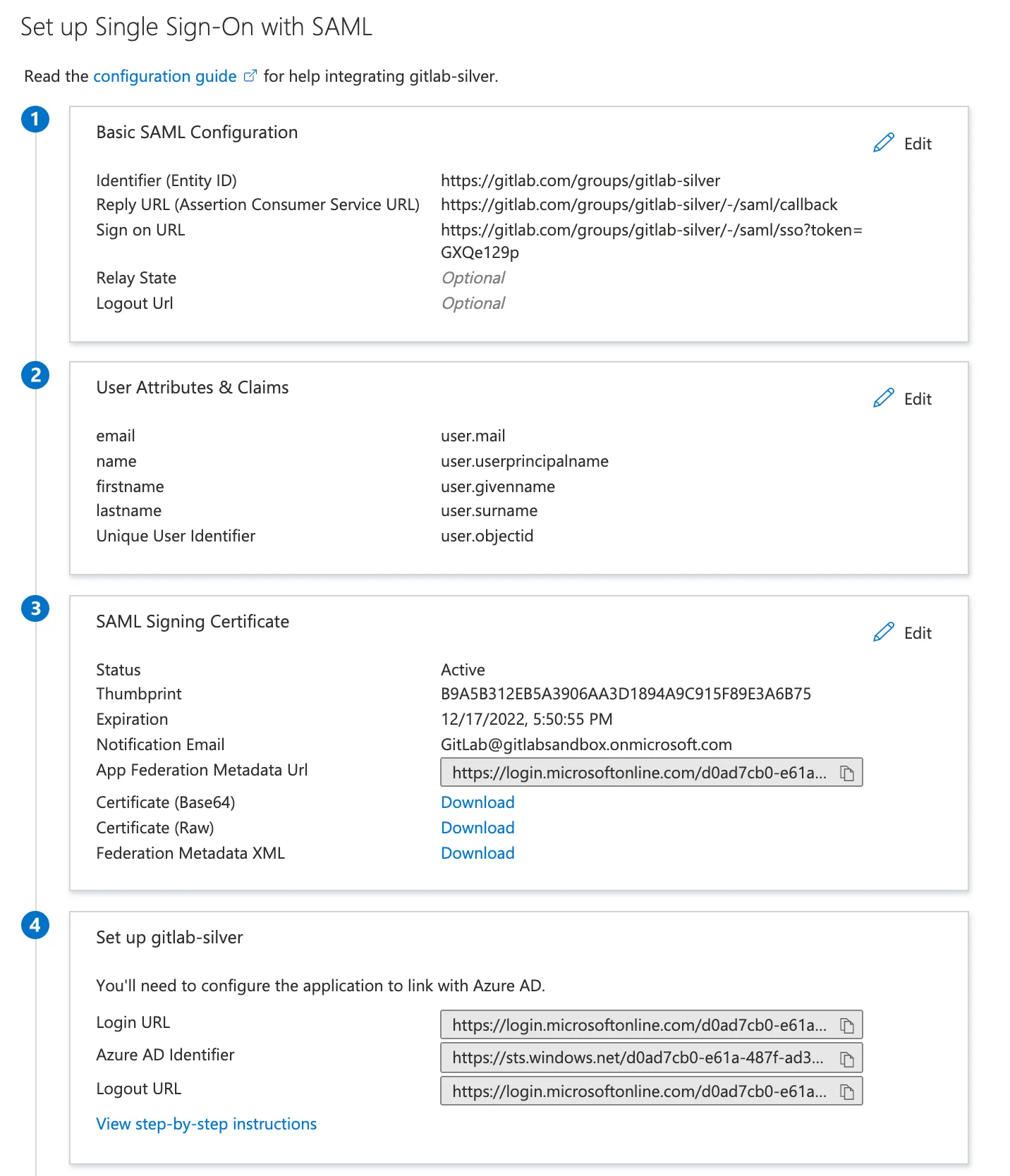
기본 SAML 앱 구성#
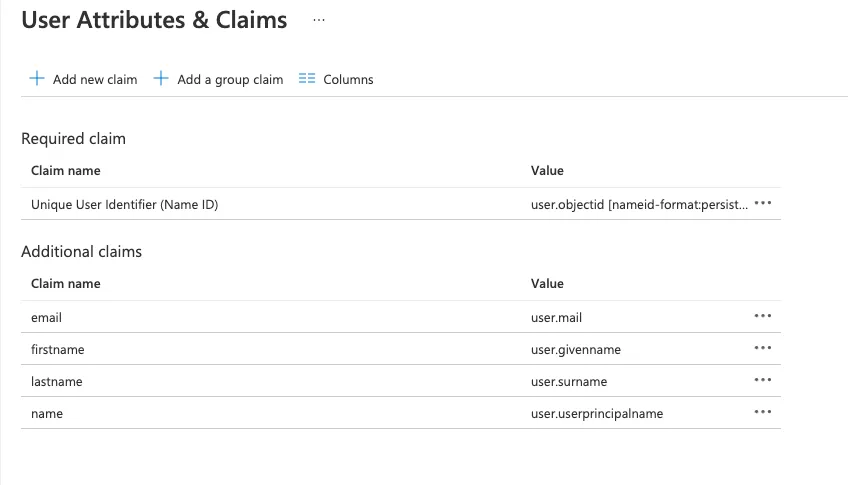
사용자 클레임 및 속성#
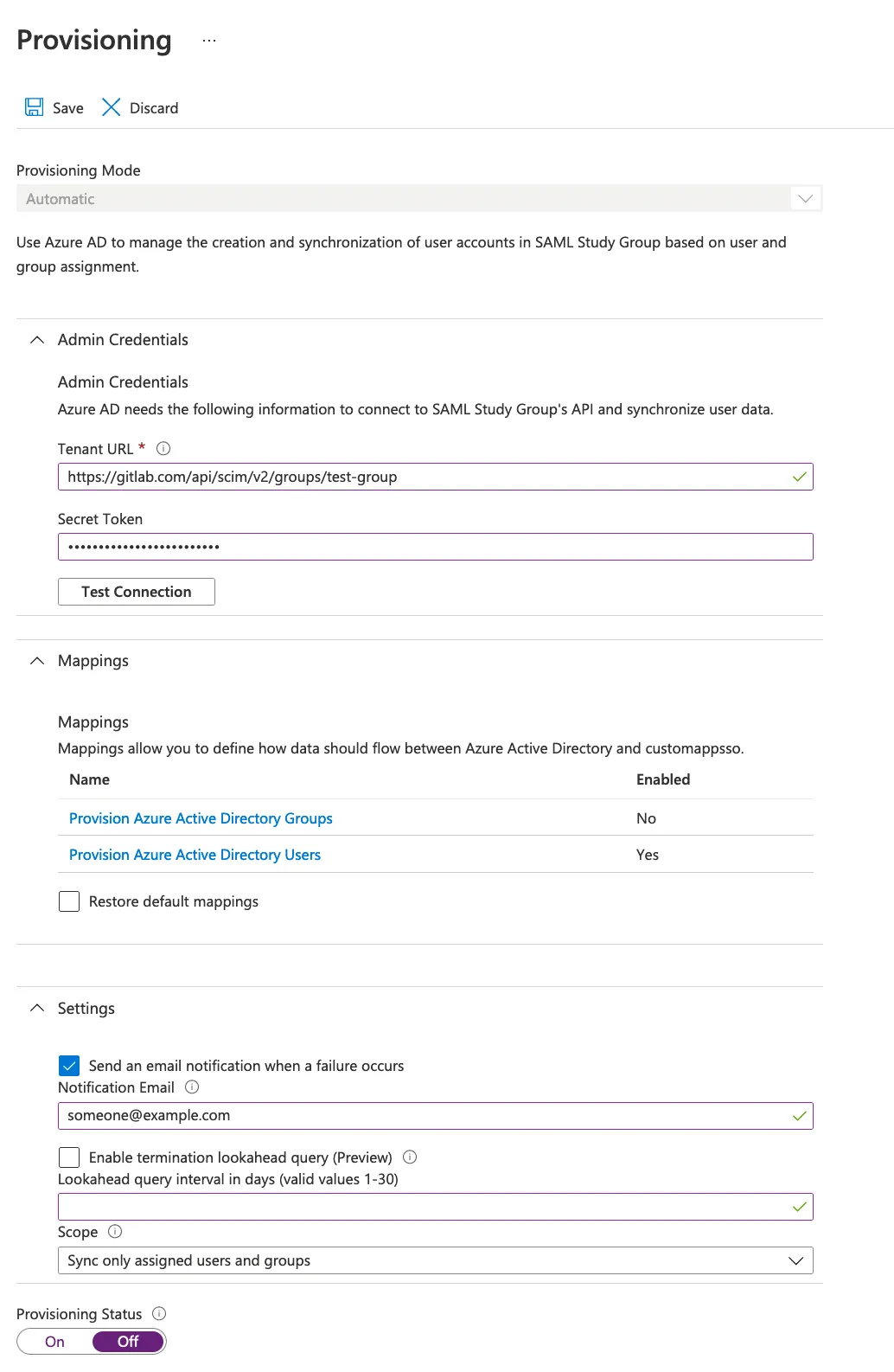
SCIM 매핑#
프로비저닝:
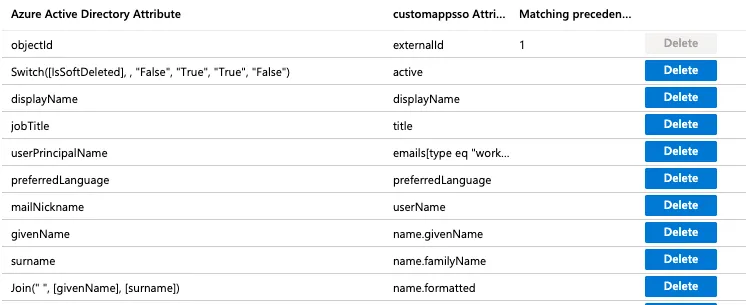
속성 매핑#
그룹 동기화#
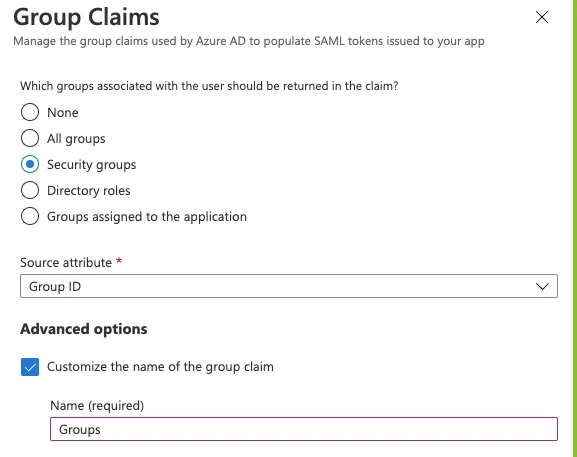
그룹 ID 소스 속성을 사용하는 경우 SAML 그룹 링크를 구성할 때 그룹 ID 또는 객체 ID를 입력해야 합니다.
가능한 경우 사용자 친화적인 그룹 이름을 대신 추가할 수 있습니다. Azure 그룹 클레임을 설정할 때:
- sAMAccountName 소스 속성을 선택합니다.
- 그룹 이름을 입력합니다. 최대 256자까지 이름을 지정할 수 있습니다.
- 속성이 어설션의 일부가 되도록 하려면 클라우드 전용 그룹의 그룹 이름 내보내기를 선택합니다.
Azure AD는 SAML 응답에서 보낼 수 있는 그룹 수를 150개로 제한합니다. 사용자가 150개 이상의 그룹에 속한 경우 Azure는 SAML 응답에 해당 사용자의 그룹 클레임을 포함하지 않습니다.
Google Workspace#
기본 SAML 앱 구성#
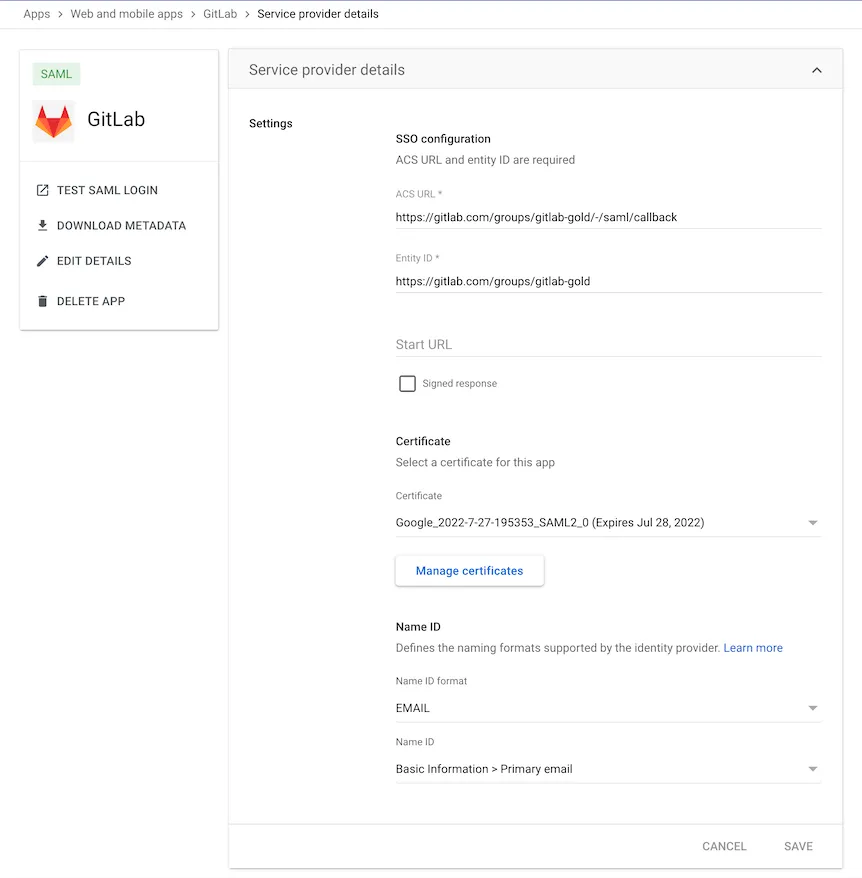
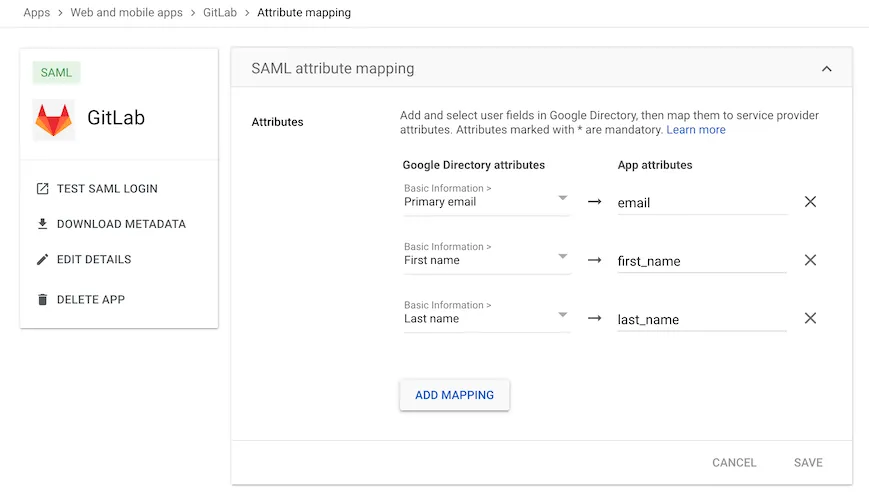
사용자 클레임 및 속성#
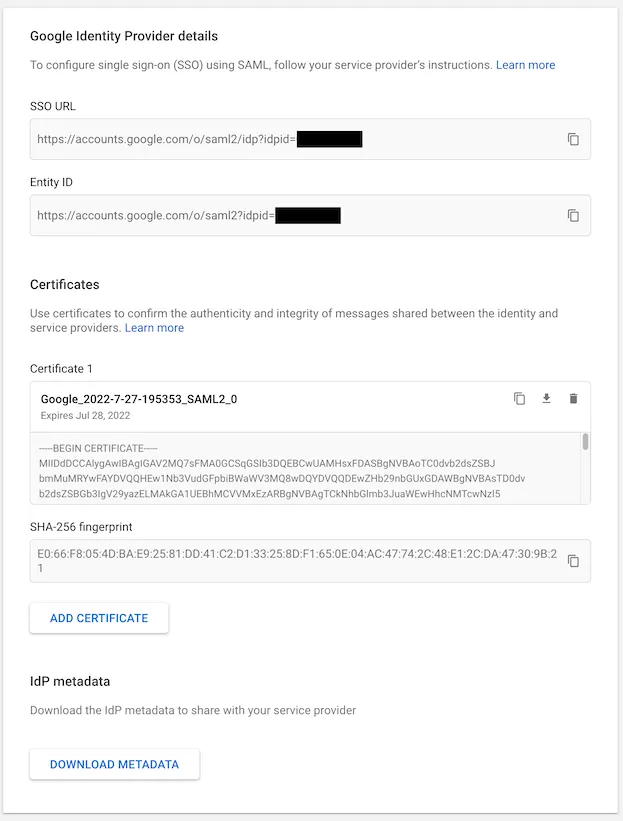
IdP 링크 및 인증서#
Okta#
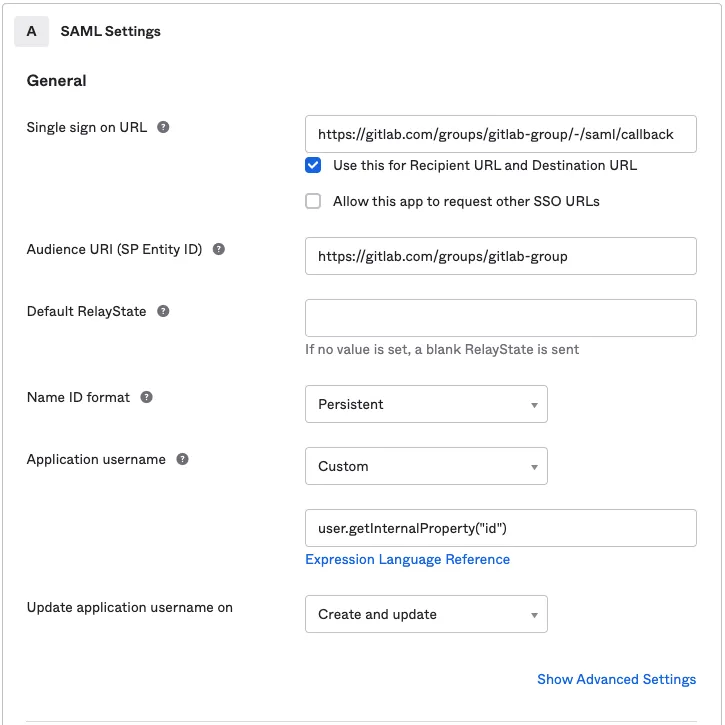
GitLab.com 그룹을 위한 기본 SAML 앱 구성#
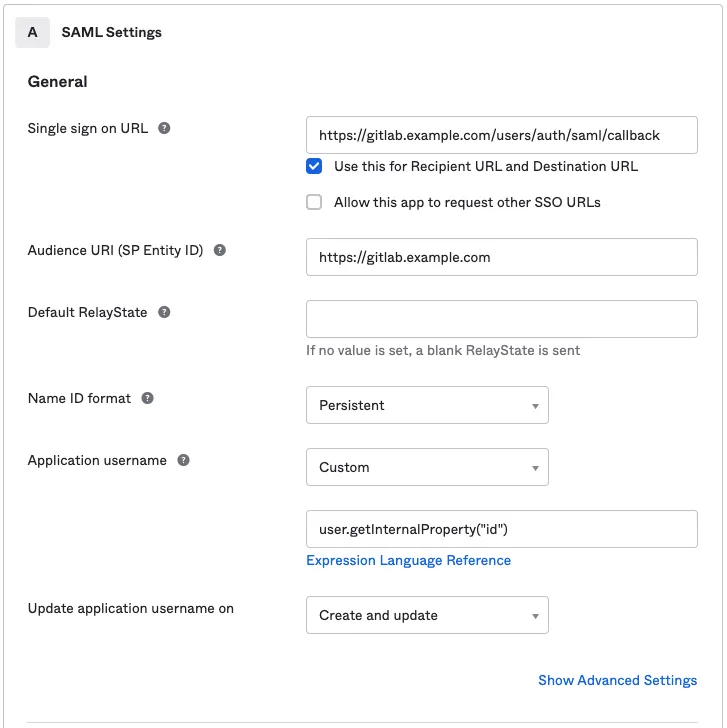
GitLab Self-Managed를 위한 기본 SAML 앱 구성#
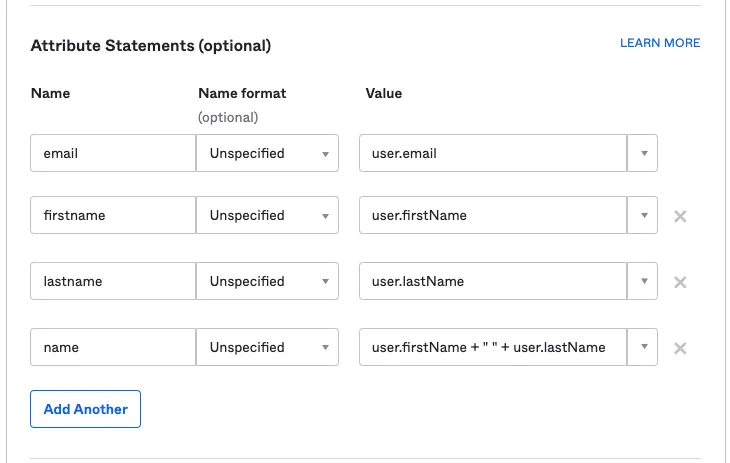
사용자 클레임 및 속성#
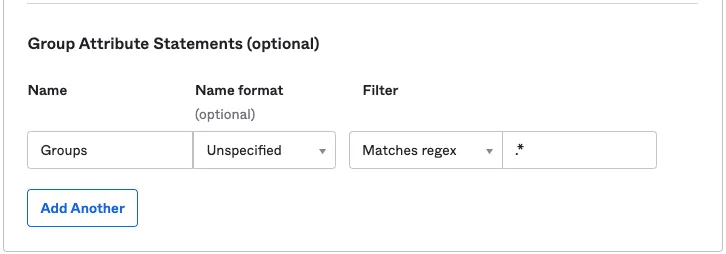
그룹 동기화#
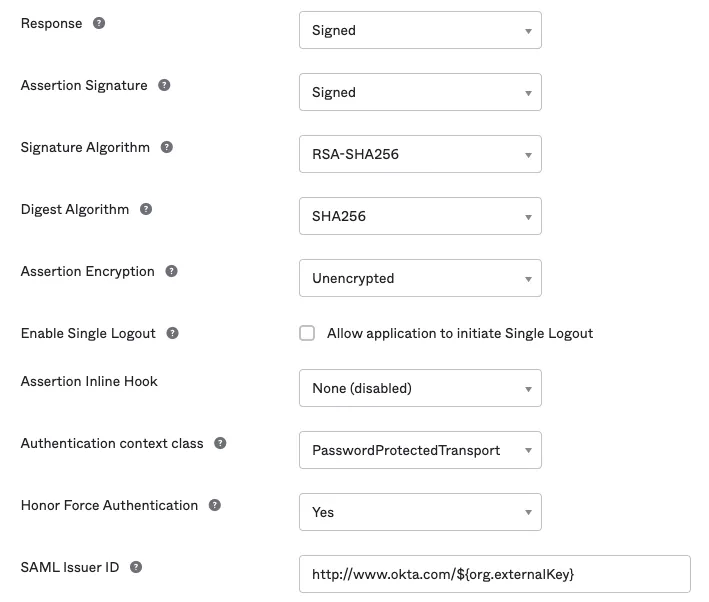
고급 SAML 앱 설정 (기본값)#
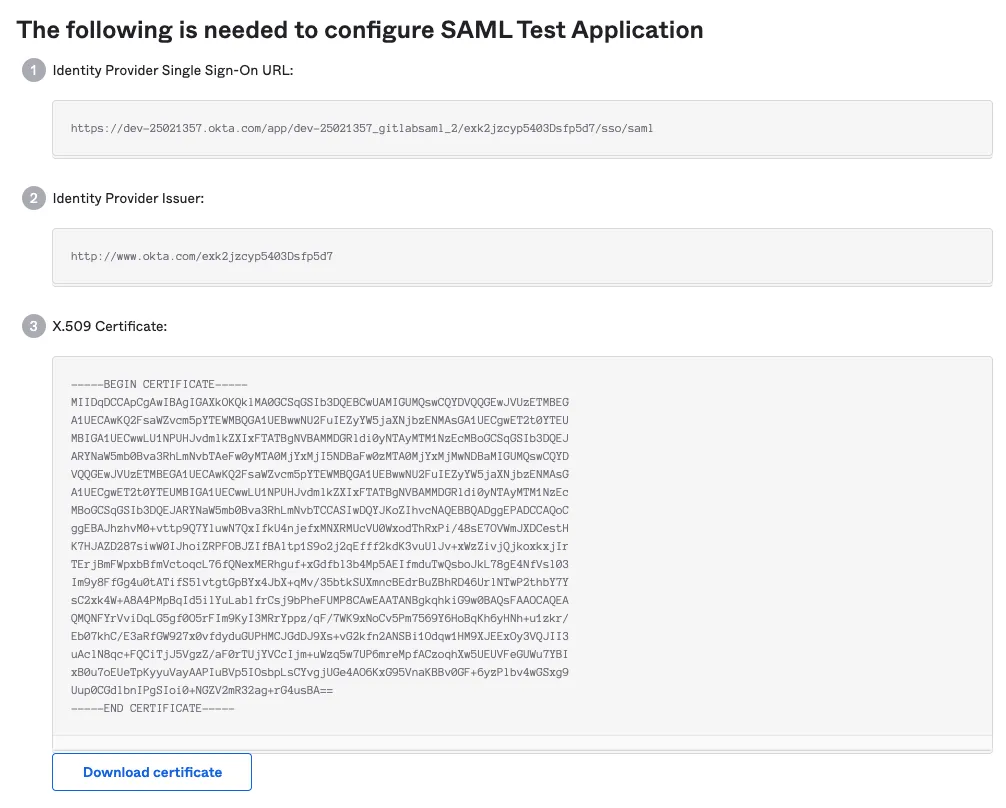
IdP 링크 및 인증서#
SAML 로그온 설정#
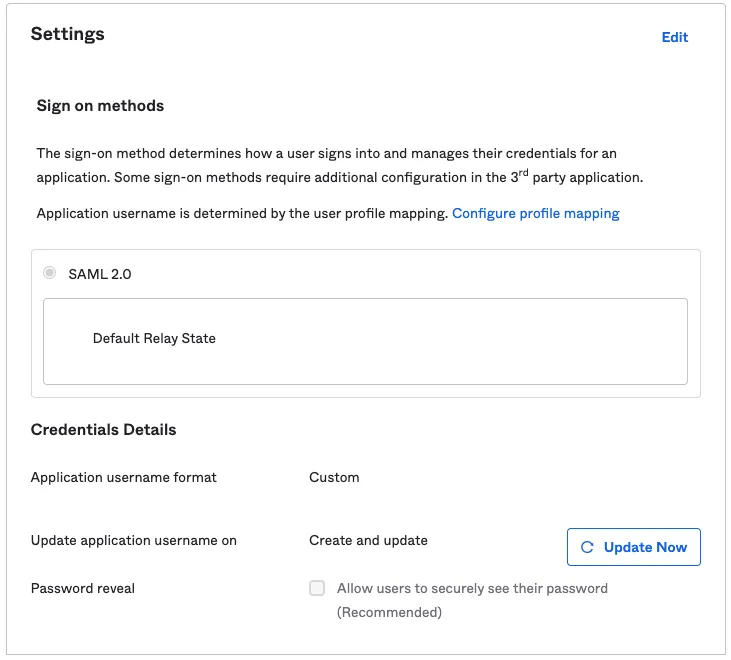
SCIM 설정#
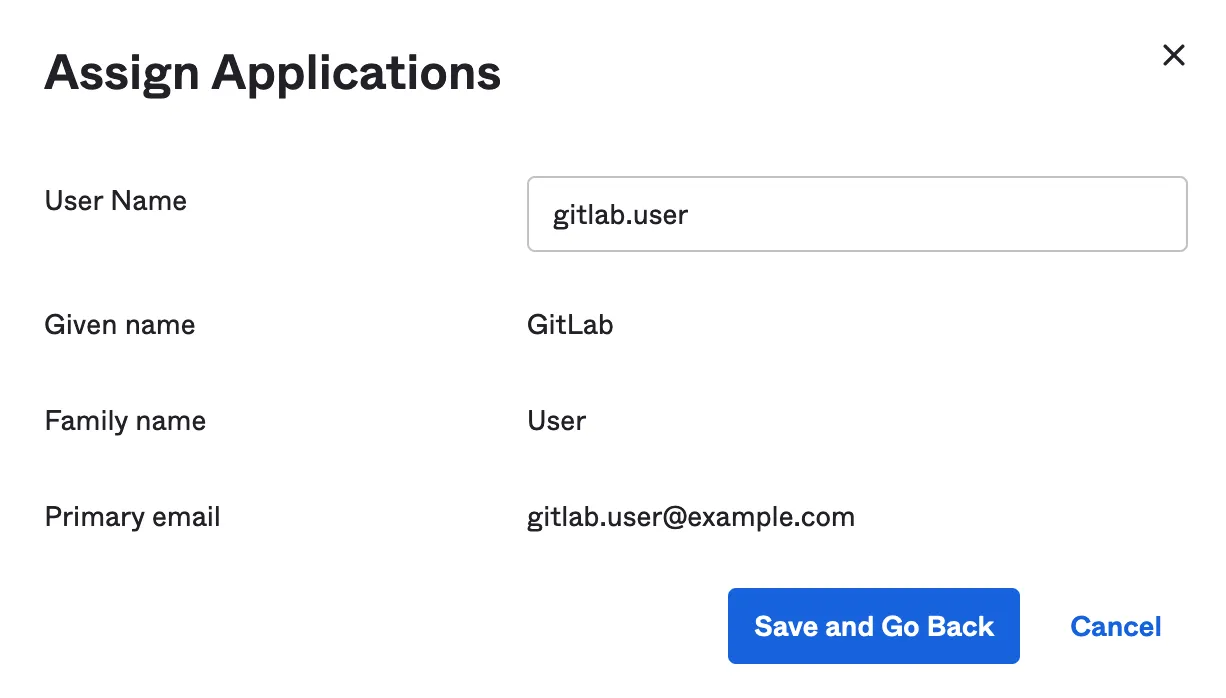
SCIM 앱을 할당할 때 새로 프로비저닝된 사용자의 사용자 이름 설정:
OneLogin#
기본 SAML 앱 구성#
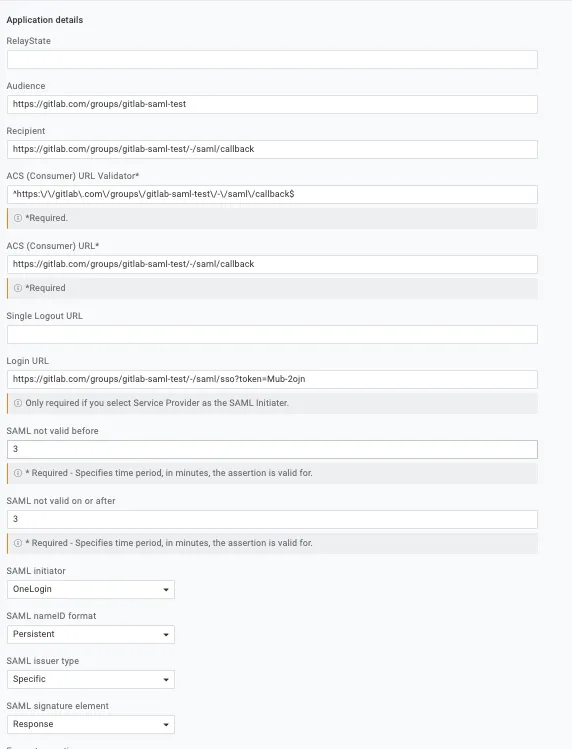
매개변수#

사용자 추가#

SSO 설정#
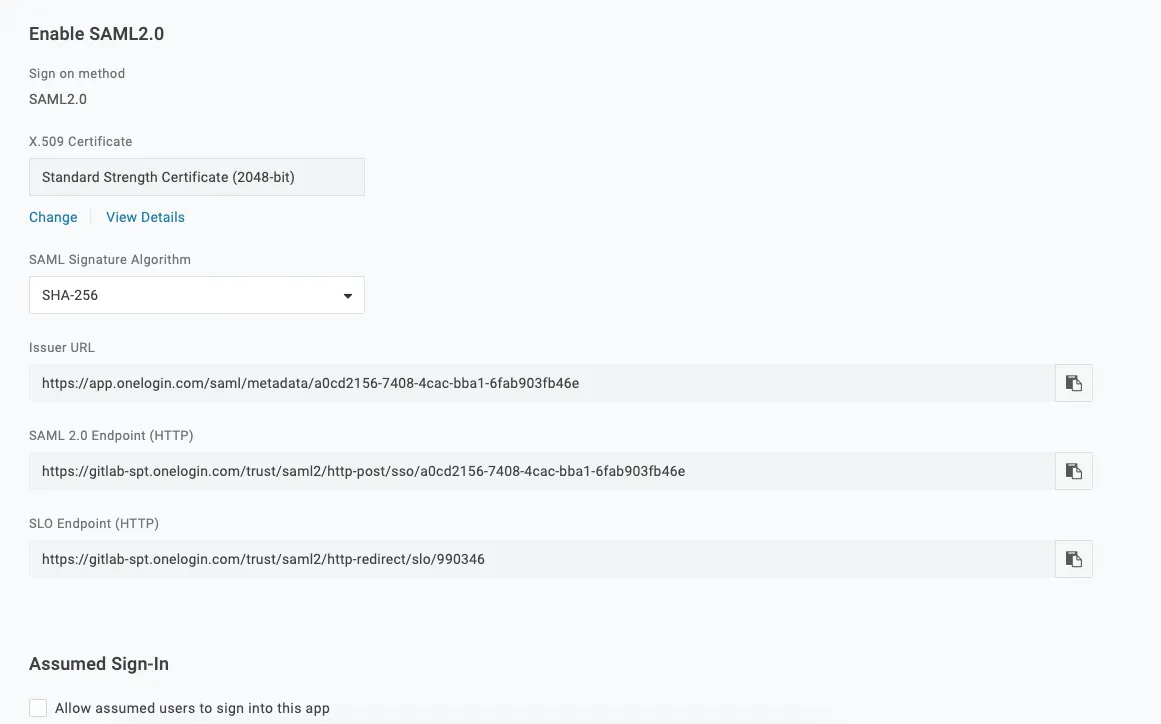
AWS IAM Identity Center#
AWS IAM Identity Center를 다음 표의 값으로 구성합니다. 전체 설정 지침은 AWS IAM Identity Center를 참조하세요.
애플리케이션 속성#
AWS IAM Identity Center에서 SAML 2.0 애플리케이션을 직접 설정할 때 다음 애플리케이션 속성을 구성합니다:
| AWS Identity Center 필드 | 값 |
|---|---|
| Application ACS URL | 그룹의 어설션 소비자 서비스 URL (GitLab SAML SSO 설정에서) |
| Application SAML audience | 그룹의 식별자 (GitLab SAML SSO 설정에서) |
| Application start URL | 그룹의 GitLab 단일 사인온 URL (GitLab SAML SSO 설정에서) |
SP 시작 로그인을 위해 Application start URL을 설정하세요. 이 설정이 없으면 기존 사용자가 계정을 연결할 수 없습니다.
속성 매핑#
| 속성 | 값 | 형식 |
|---|---|---|
| Subject | ${user:email} | unspecified |
| ${user:email} | unspecified | |
| first_name | ${user:givenName} | unspecified |
| last_name | ${user:familyName} | unspecified |
Subject (NameID) 형식을 unspecified로 설정해야 합니다. 형식을 persistent 또는 transient로 설정하면 기존 GitLab 사용자가 SAML을 통해 계정을 연결하려고 할 때 403 오류가 발생합니다. 이 오류는 계정 연결 시에만 발생하며 AWS IAM Identity Center를 통해 프로비저닝된 새 사용자에게는 영향을 미치지 않습니다.
GitLab SAML SSO 설정#
| GitLab 필드 | 값 |
|---|---|
| Identity provider single sign-on URL | IAM Identity Center 로그인 URL (애플리케이션의 IAM Identity Center SAML 메타데이터 섹션에서) |
| Certificate fingerprint | AWS Identity Center에서 다운로드한 인증서의 SHA1 지문 |
SAML 응답 예시#
사용자가 SAML을 사용하여 로그인하면 GitLab은 SAML 응답을 받습니다. SAML 응답은 production.log 로그에서 base64로 인코딩된 메시지로 찾을 수 있습니다. SAMLResponse를 검색하여 응답을 찾으세요. 디코딩된 SAML 응답은 XML 형식입니다. 예시:
<?xml version="1.0" encoding="UTF-8"?>
<saml2p:Response xmlns:saml2p="urn:oasis:names:tc:SAML:2.0:protocol" xmlns:xs="http://www.w3.org/2001/XMLSchema" Destination="https://gitlabexample/-/saml/callback" ID="id4898983630840142426821432" InResponseTo="_c65e4c88-9425-4472-b42c-37f4186ac0ee" IssueInstant="2022-05-30T21:30:35.696Z" Version="2.0">
 <saml2:Issuer xmlns:saml2="urn:oasis:names:tc:SAML:2.0:assertion" Format="urn:oasis:names:tc:SAML:2.0:nameid-format:entity">http://www.okta.com/exk2y6j57o1Pdr2lI8qh7</saml2:Issuer>
 <ds:Signature xmlns:ds="http://www.w3.org/2000/09/xmldsig#">
   <ds:SignedInfo>
     <ds:CanonicalizationMethod Algorithm="http://www.w3.org/2001/10/xml-exc-c14n#"/>
     <ds:SignatureMethod Algorithm="http://www.w3.org/2001/04/xmldsig-more#rsa-sha256"/>
     <ds:Reference URI="#id4898983630840142426821432">
       <ds:Transforms>
         <ds:Transform Algorithm="http://www.w3.org/2000/09/xmldsig#enveloped-signature"/>
         <ds:Transform Algorithm="http://www.w3.org/2001/10/xml-exc-c14n#">
           <ec:InclusiveNamespaces xmlns:ec="http://www.w3.org/2001/10/xml-exc-c14n#" PrefixList="xs"/>
         </ds:Transform>
       </ds:Transforms>
       <ds:DigestMethod Algorithm="http://www.w3.org/2001/04/xmlenc#sha256"/>
       <ds:DigestValue>neiQvv9d3OgS4GZW8Nptp4JhjpKs3GCefibn+vmRgk4=</ds:DigestValue>
     </ds:Reference>
   </ds:SignedInfo>
   <ds:SignatureValue>dMsQX8ivi...HMuKGhyLRvabGU6CuPrf7==</ds:SignatureValue>
   <ds:KeyInfo>
     <ds:X509Data>
       <ds:X509Certificate>MIIDq...cptGr3vN9TQ==</ds:X509Certificate>
     </ds:X509Data>
   </ds:KeyInfo>
 </ds:Signature>
 <saml2p:Status xmlns:saml2p="urn:oasis:names:tc:SAML:2.0:protocol">
   <saml2p:StatusCode Value="urn:oasis:names:tc:SAML:2.0:status:Success"/>
 </saml2p:Status>
 <saml2:Assertion xmlns:saml2="urn:oasis:names:tc:SAML:2.0:assertion" xmlns:xs="http://www.w3.org/2001/XMLSchema" ID="id489" IssueInstant="2022-05-30T21:30:35.696Z" Version="2.0">
   <saml2:Issuer xmlns:saml2="urn:oasis:names:tc:SAML:2.0:assertion" Format="urn:oasis:names:tc:SAML:2.0:nameid-format:entity">http://www.okta.com/exk2y6j57o1Pdr2lI8qh7</saml2:Issuer>
   <ds:Signature xmlns:ds="http://www.w3.org/2000/09/xmldsig#">
     <ds:SignedInfo>
       <ds:CanonicalizationMethod Algorithm="http://www.w3.org/2001/10/xml-exc-c14n#"/>
       <ds:SignatureMethod Algorithm="http://www.w3.org/2001/04/xmldsig-more#rsa-sha256"/>
       <ds:Reference URI="#id48989836309833801859473359">
         <ds:Transforms>
           <ds:Transform Algorithm="http://www.w3.org/2000/09/xmldsig#enveloped-signature"/>
           <ds:Transform Algorithm="http://www.w3.org/2001/10/xml-exc-c14n#">
             <ec:InclusiveNamespaces xmlns:ec="http://www.w3.org/2001/10/xml-exc-c14n#" PrefixList="xs"/>
           </ds:Transform>
         </ds:Transforms>
         <ds:DigestMethod Algorithm="http://www.w3.org/2001/04/xmlenc#sha256"/>
         <ds:DigestValue>MaIsoi8hbT9gsi/mNZsz449mUuAcuEWY0q3bc4asOQs=</ds:DigestValue>
       </ds:Reference>
     </ds:SignedInfo>
     <ds:SignatureValue>dMsQX8ivi...HMuKGhyLRvabGU6CuPrf7==<</ds:SignatureValue>
     <ds:KeyInfo>
       <ds:X509Data>
         <ds:X509Certificate>MIIDq...cptGr3vN9TQ==</ds:X509Certificate>
       </ds:X509Data>
     </ds:KeyInfo>
   </ds:Signature>
   <saml2:Subject xmlns:saml2="urn:oasis:names:tc:SAML:2.0:assertion">
     <saml2:NameID Format="urn:oasis:names:tc:SAML:2.0:nameid-format:persistent">useremail@domain.com</saml2:NameID>
     <saml2:SubjectConfirmation Method="urn:oasis:names:tc:SAML:2.0:cm:bearer">
       <saml2:SubjectConfirmationData InResponseTo="_c65e4c88-9425-4472-b42c-37f4186ac0ee" NotOnOrAfter="2022-05-30T21:35:35.696Z" Recipient="https://gitlab.example.com/-/saml/callback"/>
     </saml2:SubjectConfirmation>
   </saml2:Subject>
   <saml2:Conditions xmlns:saml2="urn:oasis:names:tc:SAML:2.0:assertion" NotBefore="2022-05-30T21:25:35.696Z" NotOnOrAfter="2022-05-30T21:35:35.696Z">
     <saml2:AudienceRestriction>
       <saml2:Audience>https://gitlab.example.com/</saml2:Audience>
     </saml2:AudienceRestriction>
   </saml2:Conditions>
   <saml2:AuthnStatement xmlns:saml2="urn:oasis:names:tc:SAML:2.0:assertion" AuthnInstant="2022-05-30T21:30:35.696Z" SessionIndex="_c65e4c88-9425-4472-b42c-37f4186ac0ee">
     <saml2:AuthnContext>
       <saml2:AuthnContextClassRef>urn:oasis:names:tc:SAML:2.0:ac:classes:PasswordProtectedTransport</saml2:AuthnContextClassRef>
     </saml2:AuthnContext>
   </saml2:AuthnStatement>
   <saml2:AttributeStatement xmlns:saml2="urn:oasis:names:tc:SAML:2.0:assertion">
     <saml2:Attribute Name="email" NameFormat="urn:oasis:names:tc:SAML:2.0:attrname-format:unspecified">
       <saml2:AttributeValue xmlns:xs="http://www.w3.org/2001/XMLSchema" xmlns:xsi="http://www.w3.org/2001/XMLSchema-instance" xsi:type="xs:string">useremail@domain.com</saml2:AttributeValue>
     </saml2:Attribute>
     <saml2:Attribute Name="firstname" NameFormat="urn:oasis:names:tc:SAML:2.0:attrname-format:unspecified">
       <saml2:AttributeValue xmlns:xs="http://www.w3.org/2001/XMLSchema" xmlns:xsi="http://www.w3.org/2001/XMLSchema-instance" xsi:type="xs:string">John</saml2:AttributeValue>
     </saml2:Attribute>
     <saml2:Attribute Name="lastname" NameFormat="urn:oasis:names:tc:SAML:2.0:attrname-format:unspecified">
       <saml2:AttributeValue xmlns:xs="http://www.w3.org/2001/XMLSchema" xmlns:xsi="http://www.w3.org/2001/XMLSchema-instance" xsi:type="xs:string">Doe</saml2:AttributeValue>
     </saml2:Attribute>
     <saml2:Attribute Name="Groups" NameFormat="urn:oasis:names:tc:SAML:2.0:attrname-format:unspecified">
       <saml2:AttributeValue xmlns:xs="http://www.w3.org/2001/XMLSchema" xmlns:xsi="http://www.w3.org/2001/XMLSchema-instance" xsi:type="xs:string">Super-awesome-group</saml2:AttributeValue>
     </saml2:Attribute>
   </saml2:AttributeStatement>
 </saml2:Assertion>
</saml2p:Response>