





InfoGrab DocsInfoGrab Docs

Teleport 데이터베이스 상태 확인

요약

Teleport 18부터 제공되는 데이터베이스 상태 확인(health check)은 Teleport Database Service 인스턴스에서 Teleport 클러스터에 등록된 데이터베이스로의 연결 상태를 모니터링하는 데 사용됩니다.

Teleport 18부터 제공되는 데이터베이스 상태 확인(health check)은 Teleport Database Service 인스턴스에서 Teleport 클러스터에 등록된 데이터베이스로의 연결 상태를 모니터링하는 데 사용됩니다.

이 페이지에서는 데이터베이스 상태 확인의 작동 방식과 health_check_config 리소스를 사용하여 이를 구성하는 방법을 설명합니다.

상태 확인으로 데이터베이스 연결을 모니터링해야 하는 이유는 무엇일까요?

  • 관찰 가능성(Observability): 사용자가 데이터베이스에 연결을 시도하기 전에 네트워킹 문제를 발견할 수 있습니다. 상태가 불량한(unhealthy) 데이터베이스는 Teleport 웹 UI에서 강조 표시되며, Teleport 클러스터의 API를 통해 프로그래밍 방식으로도 확인할 수 있습니다.
  • 고가용성(High Availability): 동일하게 등록된 데이터베이스에 대한 연결을 프록시하기 위해 여러 개의 Teleport Database Service 인스턴스를 배포할 수 있습니다. Teleport는 데이터베이스 엔드포인트에 도달할 수 없는 인스턴스보다 도달할 수 있는 Database Service 인스턴스를 통해 사용자 연결을 우선적으로 라우팅합니다.

작동 방식#

사용자가 Teleport를 통해 데이터베이스에 연결하면, 해당 연결은 Teleport Database Service 인스턴스를 통해 라우팅됩니다. Database Service는 연결을 프록시하기 위해 데이터베이스의 엔드포인트에 도달할 수 있어야 합니다.

상태 확인 구성(health check config)은 특정 라벨을 가진 등록된 데이터베이스에 대해 상태 확인을 활성화하는 Teleport 동적 리소스입니다. 구성이 생성, 업데이트 또는 삭제되면, 모든 Teleport Database Service 인스턴스는 자신이 프록시하는 각 등록된 데이터베이스에 어떤 상태 확인 구성이 적용되는지를 다시 평가합니다.

일치하는 데이터베이스에 대해 Teleport Database Service 인스턴스는 정기적으로 상태 확인을 수행합니다. 데이터베이스와 일치하는 상태 확인 구성이 없으면, 해당 데이터베이스에 대한 상태 확인은 활성화되지 않습니다.

Database Service 인스턴스가 상태 확인을 실행할 때, 확인의 성격은 데이터베이스가 Teleport에 등록될 당시의 프로토콜에 따라 달라집니다. MySQL 데이터베이스의 경우 Database Service는 데이터베이스에 연결을 시도하고 MySQL 인증 핸드셰이크를 수행하는데, 이 핸드셰이크는 데이터베이스 서버의 수신 연결 제한을 우회하기 위한 것으로 성공할 필요는 없습니다. 다른 프로토콜의 경우 Database Service 인스턴스는 데이터베이스의 엔드포인트로 TCP 연결을 설정하려고 시도하고 연결 성공 여부를 보고합니다.

데이터베이스가 등록되면 처음에는 상태가 "unknown"(알 수 없음)으로 설정됩니다. 상태 확인이 비활성화된 경우 상태는 계속 "unknown"으로 유지됩니다. 상태 확인이 활성화된 경우, 첫 번째 상태 확인 결과에 따라 데이터베이스의 상태가 "healthy"(정상) 또는 "unhealthy"(비정상)로 결정됩니다.

데이터베이스에 대한 첫 번째 상태 확인 이후에는, 연속으로 성공하거나 실패한 상태 확인 횟수가 구성 가능한 임계값에 도달해야만 상태가 변경됩니다.

Warning

MySQL 프로토콜을 사용하는 데이터베이스 상태 확인은 Teleport 18.5.1부터 제공됩니다.

구성#

Teleport의 health_check_config 리소스는 어떤 데이터베이스에 대해 상태 확인을 활성화할지, 그리고 해당 확인에 어떤 설정을 사용할지를 결정합니다:

kind: health_check_config
version: v1
metadata:
  name: example
  description: Example healthcheck configuration
spec:
  # interval is the time between each health check. Default 30s.
  interval: 30s
  # timeout is the health check connection establishment timeout. Default 5s.
  timeout: 5s
  # healthy_threshold is the number of consecutive passing health checks
  # after which a target's health status becomes "healthy". Default 2.
  healthy_threshold: 2
  # unhealthy_threshold is the number of consecutive failing health checks
  # after which a target's health status becomes "unhealthy". Default 1.
  unhealthy_threshold: 1
  # match is used to select databases that these settings apply to.
  # Databases are matched by label selectors and at least one label selector
  # must be set.
  # If multiple `health_check_config` databases match the same database, then
  # the matching health check configs are sorted by name and only the first
  # config applies.
  match:
    # db_labels matches database labels. An empty value is ignored.
    # If db_labels_expression is also set, then the match result is the logical
    # AND of both.
    db_labels:
      - name: env
        values:
          - dev
          - staging
    # db_labels_expression is a label predicate expression to match databases.
    # An empty value is ignored.
    # If db_labels is also set, then the match result is the logical AND of both.
    db_labels_expression: 'labels["owner"] == "database-team"'

클러스터에는 여러 개의 health_check_config가 존재할 수 있으며, 각 구성은 서로 다른 데이터베이스 집합에 대해 서로 다른 설정을 제공할 수 있습니다. 동일한 데이터베이스에 둘 이상의 health_check_config가 일치하는 경우, 일치하는 상태 확인 구성들은 이름의 오름차순으로 정렬되며 그중 첫 번째 구성만 적용됩니다(예: "00-my-config"라는 이름이 "10-my-config"보다 우선순위가 높습니다).

구성 관리#

클러스터의 health_check_config 리소스를 관리하려면 tctl을 사용하세요.

Teleport 18부터는 프리셋 형태의 기본 health_check_config가 생성됩니다. 이 기본 구성은 등록된 모든 데이터베이스에 대해 TCP 상태 확인을 활성화합니다.

tctl을 사용하여 기본 구성을 확인해 보세요:

$ tctl get health_check_config/default
kind: health_check_config
metadata:
  description: Enables all health checks by default
  labels:
    teleport.internal/resource-type: preset
  name: default
  namespace: default
spec:
  match:
    db_labels:
    - name: '*'
      values:
      - '*'
version: v1

tctl create를 사용하여 자체 상태 확인 구성을 생성할 수 있습니다:

$ tctl create health_check_config.yaml

또는 tctl edit를 사용하여 기존 구성을 대화형으로 업데이트할 수 있습니다:

$ tctl edit health_check_config/example

상태 확인 구성을 삭제하려면 다음을 실행하세요:

$ tctl rm health_check_config/example

타깃 상태#

타깃 상태 정보는 Teleport Database Service 인스턴스가 프록시하는 각 데이터베이스에 대해 db_server 하트비트 객체에 보고됩니다. 이 정보에는 상태 필드가 포함되어 있습니다. 상태는 다음 세 가지 중 하나입니다:

  • "unknown": 이 데이터베이스에 대한 상태 확인이 비활성화되어 있거나 아직 초기화 중임
  • "healthy": Teleport 서비스가 데이터베이스의 엔드포인트에 도달할 수 있음
  • "unhealthy": Teleport 서비스가 데이터베이스의 엔드포인트에 도달할 수 없음
Note

상태 확인을 지원하지 않는 버전의 Teleport를 실행 중인 Teleport Database Service 인스턴스는 자신이 프록시하는 데이터베이스에 대한 타깃 상태 정보를 보고하지 않습니다.

다음 예시와 같이 tctl을 사용하여 db_server.status.target_health에서 타깃 상태 정보를 확인할 수 있습니다:

$ tctl get db_server/example-postgres-db | yq -y .status
target_health:
  # address is the database address.
  address: "localhost:5432"
  # message is additional information meant for a user.
  message: "1 health check failed"
  # protocol is the health check connection protocol, such as "TCP".
  protocol: "TCP"
  # status is the health status, one of "unknown", "healthy", or "unhealthy".
  status: "unhealthy"
  # transition_reason is a unique reason for the last transition: one of "initialized", "disabled", "threshold_reached", or "internal_error".
  transition_reason: "threshold_reached"
  # transition_timestamp is the time that the last status transition occurred.
  transition_timestamp: "2025-06-09T22:40:24.147753Z"
  # transition_error shows the health check error observed when the transition to "unhealthy" happened.
  transition_error: "dial tcp 127.0.0.1:5432: connect: connection refused"

문제 해결#

Teleport 웹 UI는 상태가 불량한 데이터베이스를 강조 표시합니다. 강조 표시된 데이터베이스를 클릭하면 상태 확인 실패에 대한 세부 정보나 기타 경고를 확인할 수 있습니다:
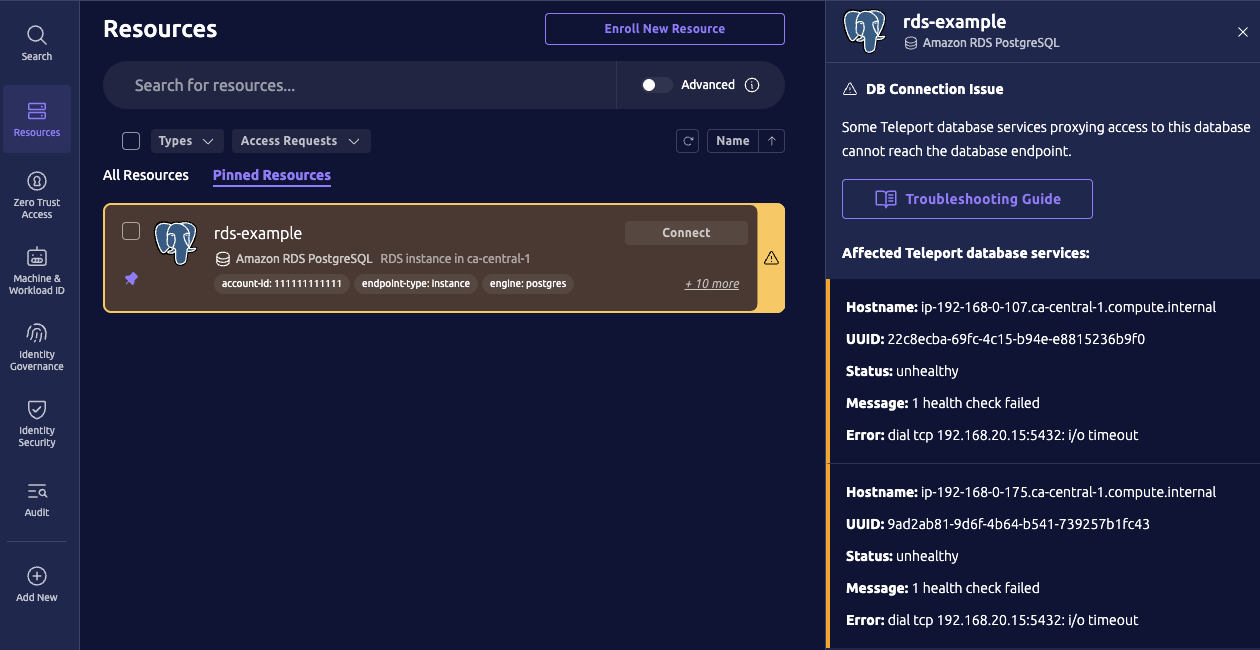
웹 UI의 상태 확인 경고 표시기

이 AWS RDS 데이터베이스 예시에서 상태 확인 오류는 연결 다이얼 타임아웃이며, 이는 일반적으로 AWS 보안 그룹이 데이터베이스에 대한 연결을 차단하기 때문에 발생합니다.

tctl을 사용하여 영향을 받은 Teleport Database Service에 대한 더 자세한 정보를 확인할 수 있습니다. 예를 들어 스크린샷에 표시된, 영향을 받은 Teleport Database Service 인스턴스는 Teleport AWS RDS 등록 마법사를 사용하여 배포되었으며, 이는 teleport.dev/awsoidc-agent 라벨로 표시됩니다:

$ tctl get db_service/22c8ecba-69fc-4c15-b94e-e8815236b9f0
kind: db_service
metadata:
  expires: "2025-06-29T03:55:52Z"
  labels:
    teleport.dev/awsoidc-agent: "true"
  name: 22c8ecba-69fc-4c15-b94e-e8815236b9f0
  revision: 089129ef-52e2-4a8f-8451-c1e91879c14e
spec:
  hostname: ip-192-168-0-107.ca-central-1.compute.internal
  resources:
  - aws: {}
    labels:
      account-id: "111111111111"
      region: ca-central-1
      vpc-id: vpc-abc123abc123abc12
version: v1

일반적인 문제 해결 단계는 Database Service 문제 해결 가이드를 참조하세요.

FAQ#

MySQL 상태 확인은 왜 MySQL 프로토콜을 사용하나요?#

MySQL 데이터베이스에 대한 상태 확인은 MySQL 인증 핸드셰이크로 시작되며, 상태 확인이 성공하기 위해 이 핸드셰이크가 완료될 필요는 없습니다. 그 이유는 MySQL이 데이터베이스에 연결을 시도하는 각 원격 호스트에 대한 연결 오류를 추적하기 때문입니다. 초기 인증 핸드셰이크가 없으면 각 TCP 상태 확인은 연결 오류로 집계되고, 결국 sum_connect_errors >= max_connect_errors가 되면 MySQL은 해당 호스트를 차단합니다. 그 결과, TCP 상태 확인은 결국 MySQL 데이터베이스가 Teleport를 차단하게 만듭니다.

데이터베이스 상태 확인을 비활성화하려면 어떻게 해야 하나요?#

클러스터의 health_check_config 리소스를 업데이트하여 특정 데이터베이스에만 일치하도록 설정하면 데이터베이스에 대한 상태 확인을 비활성화할 수 있습니다.

예를 들어, 기본 프리셋 구성을 업데이트하여 라벨이 "healthcheck": "enabled"인 데이터베이스에만 일치하도록 만들 수 있습니다:

$ tctl create <

상태 확인은 프록시 환경 변수를 준수하나요?#

상태 확인은 다음 Teleport 데이터베이스 프로토콜에 대해 HTTP 프록시 환경 변수를 준수합니다:

  • clickhouse-http
  • dynamodb
  • opensearch

다음 환경 변수는 대문자와 소문자 형식 모두 지원됩니다:

  • http_proxy
  • https_proxy
  • no_proxy

HTTP 프록시 환경 변수가 데이터베이스 엔드포인트에 대한 프록시를 구성하는 경우, TCP 상태 확인은 엔드포인트가 아닌 프록시로 다이얼합니다.

상태가 불량한 모든 데이터베이스를 나열하려면 어떻게 해야 하나요?#

$ tctl db ls --query 'health.status == "unhealthy"' 

Teleport 데이터베이스 상태 확인

Teleport v18.9
원문 보기
요약

Teleport 18부터 제공되는 데이터베이스 상태 확인(health check)은 Teleport Database Service 인스턴스에서 Teleport 클러스터에 등록된 데이터베이스로의 연결 상태를 모니터링하는 데 사용됩니다.

Teleport 18부터 제공되는 데이터베이스 상태 확인(health check)은 Teleport Database Service 인스턴스에서 Teleport 클러스터에 등록된 데이터베이스로의 연결 상태를 모니터링하는 데 사용됩니다.

이 페이지에서는 데이터베이스 상태 확인의 작동 방식과 health_check_config 리소스를 사용하여 이를 구성하는 방법을 설명합니다.

상태 확인으로 데이터베이스 연결을 모니터링해야 하는 이유는 무엇일까요?

  • 관찰 가능성(Observability): 사용자가 데이터베이스에 연결을 시도하기 전에 네트워킹 문제를 발견할 수 있습니다. 상태가 불량한(unhealthy) 데이터베이스는 Teleport 웹 UI에서 강조 표시되며, Teleport 클러스터의 API를 통해 프로그래밍 방식으로도 확인할 수 있습니다.
  • 고가용성(High Availability): 동일하게 등록된 데이터베이스에 대한 연결을 프록시하기 위해 여러 개의 Teleport Database Service 인스턴스를 배포할 수 있습니다. Teleport는 데이터베이스 엔드포인트에 도달할 수 없는 인스턴스보다 도달할 수 있는 Database Service 인스턴스를 통해 사용자 연결을 우선적으로 라우팅합니다.

작동 방식#

사용자가 Teleport를 통해 데이터베이스에 연결하면, 해당 연결은 Teleport Database Service 인스턴스를 통해 라우팅됩니다. Database Service는 연결을 프록시하기 위해 데이터베이스의 엔드포인트에 도달할 수 있어야 합니다.

상태 확인 구성(health check config)은 특정 라벨을 가진 등록된 데이터베이스에 대해 상태 확인을 활성화하는 Teleport 동적 리소스입니다. 구성이 생성, 업데이트 또는 삭제되면, 모든 Teleport Database Service 인스턴스는 자신이 프록시하는 각 등록된 데이터베이스에 어떤 상태 확인 구성이 적용되는지를 다시 평가합니다.

일치하는 데이터베이스에 대해 Teleport Database Service 인스턴스는 정기적으로 상태 확인을 수행합니다. 데이터베이스와 일치하는 상태 확인 구성이 없으면, 해당 데이터베이스에 대한 상태 확인은 활성화되지 않습니다.

Database Service 인스턴스가 상태 확인을 실행할 때, 확인의 성격은 데이터베이스가 Teleport에 등록될 당시의 프로토콜에 따라 달라집니다. MySQL 데이터베이스의 경우 Database Service는 데이터베이스에 연결을 시도하고 MySQL 인증 핸드셰이크를 수행하는데, 이 핸드셰이크는 데이터베이스 서버의 수신 연결 제한을 우회하기 위한 것으로 성공할 필요는 없습니다. 다른 프로토콜의 경우 Database Service 인스턴스는 데이터베이스의 엔드포인트로 TCP 연결을 설정하려고 시도하고 연결 성공 여부를 보고합니다.

데이터베이스가 등록되면 처음에는 상태가 "unknown"(알 수 없음)으로 설정됩니다. 상태 확인이 비활성화된 경우 상태는 계속 "unknown"으로 유지됩니다. 상태 확인이 활성화된 경우, 첫 번째 상태 확인 결과에 따라 데이터베이스의 상태가 "healthy"(정상) 또는 "unhealthy"(비정상)로 결정됩니다.

데이터베이스에 대한 첫 번째 상태 확인 이후에는, 연속으로 성공하거나 실패한 상태 확인 횟수가 구성 가능한 임계값에 도달해야만 상태가 변경됩니다.

Warning

MySQL 프로토콜을 사용하는 데이터베이스 상태 확인은 Teleport 18.5.1부터 제공됩니다.

구성#

Teleport의 health_check_config 리소스는 어떤 데이터베이스에 대해 상태 확인을 활성화할지, 그리고 해당 확인에 어떤 설정을 사용할지를 결정합니다:

kind: health_check_config
version: v1
metadata:
  name: example
  description: Example healthcheck configuration
spec:
  # interval is the time between each health check. Default 30s.
  interval: 30s
  # timeout is the health check connection establishment timeout. Default 5s.
  timeout: 5s
  # healthy_threshold is the number of consecutive passing health checks
  # after which a target's health status becomes "healthy". Default 2.
  healthy_threshold: 2
  # unhealthy_threshold is the number of consecutive failing health checks
  # after which a target's health status becomes "unhealthy". Default 1.
  unhealthy_threshold: 1
  # match is used to select databases that these settings apply to.
  # Databases are matched by label selectors and at least one label selector
  # must be set.
  # If multiple `health_check_config` databases match the same database, then
  # the matching health check configs are sorted by name and only the first
  # config applies.
  match:
    # db_labels matches database labels. An empty value is ignored.
    # If db_labels_expression is also set, then the match result is the logical
    # AND of both.
    db_labels:
      - name: env
        values:
          - dev
          - staging
    # db_labels_expression is a label predicate expression to match databases.
    # An empty value is ignored.
    # If db_labels is also set, then the match result is the logical AND of both.
    db_labels_expression: 'labels["owner"] == "database-team"'

클러스터에는 여러 개의 health_check_config가 존재할 수 있으며, 각 구성은 서로 다른 데이터베이스 집합에 대해 서로 다른 설정을 제공할 수 있습니다. 동일한 데이터베이스에 둘 이상의 health_check_config가 일치하는 경우, 일치하는 상태 확인 구성들은 이름의 오름차순으로 정렬되며 그중 첫 번째 구성만 적용됩니다(예: "00-my-config"라는 이름이 "10-my-config"보다 우선순위가 높습니다).

구성 관리#

클러스터의 health_check_config 리소스를 관리하려면 tctl을 사용하세요.

Teleport 18부터는 프리셋 형태의 기본 health_check_config가 생성됩니다. 이 기본 구성은 등록된 모든 데이터베이스에 대해 TCP 상태 확인을 활성화합니다.

tctl을 사용하여 기본 구성을 확인해 보세요:

$ tctl get health_check_config/default
kind: health_check_config
metadata:
  description: Enables all health checks by default
  labels:
    teleport.internal/resource-type: preset
  name: default
  namespace: default
spec:
  match:
    db_labels:
    - name: '*'
      values:
      - '*'
version: v1

tctl create를 사용하여 자체 상태 확인 구성을 생성할 수 있습니다:

$ tctl create health_check_config.yaml

또는 tctl edit를 사용하여 기존 구성을 대화형으로 업데이트할 수 있습니다:

$ tctl edit health_check_config/example

상태 확인 구성을 삭제하려면 다음을 실행하세요:

$ tctl rm health_check_config/example

타깃 상태#

타깃 상태 정보는 Teleport Database Service 인스턴스가 프록시하는 각 데이터베이스에 대해 db_server 하트비트 객체에 보고됩니다. 이 정보에는 상태 필드가 포함되어 있습니다. 상태는 다음 세 가지 중 하나입니다:

  • "unknown": 이 데이터베이스에 대한 상태 확인이 비활성화되어 있거나 아직 초기화 중임
  • "healthy": Teleport 서비스가 데이터베이스의 엔드포인트에 도달할 수 있음
  • "unhealthy": Teleport 서비스가 데이터베이스의 엔드포인트에 도달할 수 없음
Note

상태 확인을 지원하지 않는 버전의 Teleport를 실행 중인 Teleport Database Service 인스턴스는 자신이 프록시하는 데이터베이스에 대한 타깃 상태 정보를 보고하지 않습니다.

다음 예시와 같이 tctl을 사용하여 db_server.status.target_health에서 타깃 상태 정보를 확인할 수 있습니다:

$ tctl get db_server/example-postgres-db | yq -y .status
target_health:
  # address is the database address.
  address: "localhost:5432"
  # message is additional information meant for a user.
  message: "1 health check failed"
  # protocol is the health check connection protocol, such as "TCP".
  protocol: "TCP"
  # status is the health status, one of "unknown", "healthy", or "unhealthy".
  status: "unhealthy"
  # transition_reason is a unique reason for the last transition: one of "initialized", "disabled", "threshold_reached", or "internal_error".
  transition_reason: "threshold_reached"
  # transition_timestamp is the time that the last status transition occurred.
  transition_timestamp: "2025-06-09T22:40:24.147753Z"
  # transition_error shows the health check error observed when the transition to "unhealthy" happened.
  transition_error: "dial tcp 127.0.0.1:5432: connect: connection refused"

문제 해결#

Teleport 웹 UI는 상태가 불량한 데이터베이스를 강조 표시합니다. 강조 표시된 데이터베이스를 클릭하면 상태 확인 실패에 대한 세부 정보나 기타 경고를 확인할 수 있습니다:

웹 UI의 상태 확인 경고 표시기

이 AWS RDS 데이터베이스 예시에서 상태 확인 오류는 연결 다이얼 타임아웃이며, 이는 일반적으로 AWS 보안 그룹이 데이터베이스에 대한 연결을 차단하기 때문에 발생합니다.

tctl을 사용하여 영향을 받은 Teleport Database Service에 대한 더 자세한 정보를 확인할 수 있습니다. 예를 들어 스크린샷에 표시된, 영향을 받은 Teleport Database Service 인스턴스는 Teleport AWS RDS 등록 마법사를 사용하여 배포되었으며, 이는 teleport.dev/awsoidc-agent 라벨로 표시됩니다:

$ tctl get db_service/22c8ecba-69fc-4c15-b94e-e8815236b9f0
kind: db_service
metadata:
  expires: "2025-06-29T03:55:52Z"
  labels:
    teleport.dev/awsoidc-agent: "true"
  name: 22c8ecba-69fc-4c15-b94e-e8815236b9f0
  revision: 089129ef-52e2-4a8f-8451-c1e91879c14e
spec:
  hostname: ip-192-168-0-107.ca-central-1.compute.internal
  resources:
  - aws: {}
    labels:
      account-id: "111111111111"
      region: ca-central-1
      vpc-id: vpc-abc123abc123abc12
version: v1

일반적인 문제 해결 단계는 Database Service 문제 해결 가이드를 참조하세요.

FAQ#

MySQL 상태 확인은 왜 MySQL 프로토콜을 사용하나요?#

MySQL 데이터베이스에 대한 상태 확인은 MySQL 인증 핸드셰이크로 시작되며, 상태 확인이 성공하기 위해 이 핸드셰이크가 완료될 필요는 없습니다. 그 이유는 MySQL이 데이터베이스에 연결을 시도하는 각 원격 호스트에 대한 연결 오류를 추적하기 때문입니다. 초기 인증 핸드셰이크가 없으면 각 TCP 상태 확인은 연결 오류로 집계되고, 결국 sum_connect_errors >= max_connect_errors가 되면 MySQL은 해당 호스트를 차단합니다. 그 결과, TCP 상태 확인은 결국 MySQL 데이터베이스가 Teleport를 차단하게 만듭니다.

데이터베이스 상태 확인을 비활성화하려면 어떻게 해야 하나요?#

클러스터의 health_check_config 리소스를 업데이트하여 특정 데이터베이스에만 일치하도록 설정하면 데이터베이스에 대한 상태 확인을 비활성화할 수 있습니다.

예를 들어, 기본 프리셋 구성을 업데이트하여 라벨이 "healthcheck": "enabled"인 데이터베이스에만 일치하도록 만들 수 있습니다:

$ tctl create <

상태 확인은 프록시 환경 변수를 준수하나요?#

상태 확인은 다음 Teleport 데이터베이스 프로토콜에 대해 HTTP 프록시 환경 변수를 준수합니다:

  • clickhouse-http
  • dynamodb
  • opensearch

다음 환경 변수는 대문자와 소문자 형식 모두 지원됩니다:

  • http_proxy
  • https_proxy
  • no_proxy

HTTP 프록시 환경 변수가 데이터베이스 엔드포인트에 대한 프록시를 구성하는 경우, TCP 상태 확인은 엔드포인트가 아닌 프록시로 다이얼합니다.

상태가 불량한 모든 데이터베이스를 나열하려면 어떻게 해야 하나요?#

$ tctl db ls --query 'health.status == "unhealthy"'