InfoGrab Docs

MCP 액세스 문제 해결

요약

이 섹션은 Teleport로 MCP 서버 액세스를 관리할 때 발생할 수 있는 일반적인 문제와 해결 또는 우회 방법을 설명합니다. 기본적으로 Teleport 역할에서는 어떤 MCP 도구도 허용되지 않습니다. 사용자에게 access 프리셋 역할이 할당된 경우, 기본적으로 사용 가능한 MCP 도구는 역할 정의의 {{internal.mcp_tools}} 소스에 의해 제어됩니다.

이 섹션은 Teleport로 MCP 서버 액세스를 관리할 때 발생할 수 있는 일반적인 문제와 해결 또는 우회 방법을 설명합니다.

MCP 서버가 비활성화되거나 MCP 서버에서 도구가 누락된 경우#

기본적으로 Teleport 역할에서는 어떤 MCP 도구도 허용되지 않습니다. tsh mcp ls를 실행하여 특정 도구가 허용되는지 확인할 수 있습니다:

$ tsh mcp ls
Name              Description                                        Type  Allowed Tools Labels
----------------- -------------------------------------------------- ----- ------------- ------
teleport-mcp-demo A demo MCP server that shows current user and s... stdio (none) [!]

[!] Warning: you do not have access to any tools on the MCP server.
Please contact your Teleport administrator to ensure your Teleport role has
appropriate 'allow.mcp.tools' set. For details on MCP access RBAC, see:
https://goteleport.com/docs/enroll-resources/mcp-access/rbac/

사용자에게 access 프리셋 역할이 할당된 경우, 기본적으로 사용 가능한 MCP 도구는 역할 정의의 {{internal.mcp_tools}} 소스에 의해 제어됩니다. 이 값은 사용자 트레이트(trait)를 통해 설정할 수 있습니다:

kind: role
metadata:
  name: access
spec:
  allow:
    mcp:
      tools:
      - "{{internal.mcp_tools}}"

tctl을 사용하여 Teleport 사용자 에게 이 사용자 트레이트를 설정할 수 있습니다:

$ tctl users update  --set-mcp-tools "*"

또는 모든 MCP 서버와 그 도구에 대한 액세스를 허용하는 프리셋 역할 mcp-user를 Teleport 사용자에게 할당할 수 있습니다. 허용되는 MCP 도구를 명시적으로 지정하는 사용자 정의 역할을 만들어 Teleport 사용자에게 할당할 수도 있습니다. 자세한 내용은 RBAC를 참조하세요.

MCP 서버 시작 시 서버 연결 끊김#

MCP 클라이언트가 MCP 서버를 시작할 때 "Server disconnected" 오류 또는 유사한 오류가 발생할 수 있습니다.
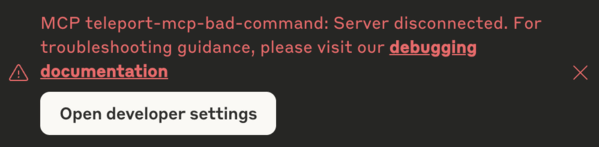
서버 연결 끊김 오류

먼저 클라이언트 설정이 올바른지, tsh 세션이 활성 상태인지 확인하세요. 자세한 내용은 MCP 클라이언트 연결을 참조하세요.

문제가 지속되면 MCP 클라이언트의 특정 가이드라인을 따라 MCP 서버 실행의 디버그 로그를 확인하세요.

디버그 로그에서 "Lost server connection" 오류가 발생하거나 tsh 명령이 즉시 종료되는 경우, 일반적으로 Teleport Application Service 인스턴스에서 stdio MCP 서버를 실행하는 데 사용된 명령이 제대로 실행되지 않았음을 나타냅니다.

이를 확인하려면 Application Service 로그에서 MCP 서버 프로세스 시작 실패를 나타내는 경고를 확인하세요 — 일반적으로 exec.ExitError이지만 다른 관련 실행 또는 런타임 오류도 포함될 수 있습니다. 이러한 오류는 일반적으로 클라이언트 연결이 수립된 직후에 나타납니다:

WARN [APP:SERVICE] Failed to handle client connection. error:[
ERROR REPORT:
Original Error: *exec.ExitError exit status 1

문제를 해결하려면 MCP 서버를 시작하는 데 사용된 Teleport 앱 정의가 올바르게 설정되어 있는지 확인하세요. Teleport를 사용하지 않고 Teleport Application Service가 실행되는 호스트에서 직접 app.mcp.commandapp.mcp.args를 수동으로 실행하여 테스트할 수 있습니다. 또한 mcp.run_as_host_user에 설정된 호스트 사용자가 호스트에 존재하고 설정된 명령을 실행할 충분한 권한이 있는지 확인하세요.

MCP 클라이언트에서의 tsh 경로 오류#

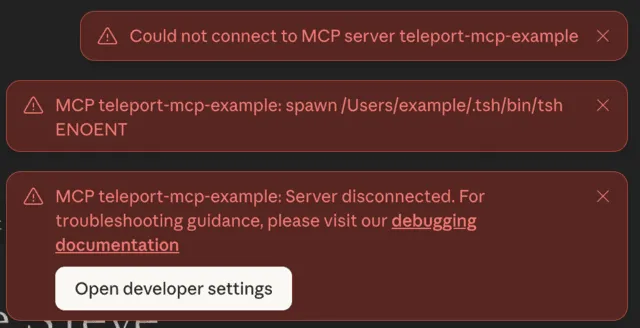
When starting your MCP client, you might see an error such as spawn <tsh-path> ENOENT or command not found:

ENOENT error

This error indicates the path to the tsh binary is misconfigured in the client’s settings. To fix it, re-run the tsh mcp config command to update the path, or manually correct it in the client’s configuration file. See connect MCP clients for more details.

This issue can also occur due to a bug from the managed update feature, which has been fixed in version 18.2.3. If your Teleport cluster has managed update enabled for tools, check your tsh version by:

$ tsh version
Teleport v18.2.3 git:v18.2.3-0-xxxxxxxx go1.24.7
Proxy version: 18.2.0
Proxy: teleport.example.com:443
Re-executed from version: 18.2.0

The first line shows the version of the tsh binary from the managed update, and the last line shows the version from your original installation. Both versions must be at least 18.2.3 to fully resolve this issue.

If the version shown on the first line is outdated, contact your Teleport administrator to raise the version for tools update. If the version shown in the "Re-executed from version" is outdated, find the tsh binary from your original installation (e.g. which tsh), uninstall it and install a newer release.

Once tsh has been updated, re-run the tsh mcp config commands to reconfigure your MCP client.

MCP 액세스 문제 해결

원문 보기
요약

이 섹션은 Teleport로 MCP 서버 액세스를 관리할 때 발생할 수 있는 일반적인 문제와 해결 또는 우회 방법을 설명합니다. 기본적으로 Teleport 역할에서는 어떤 MCP 도구도 허용되지 않습니다. 사용자에게 access 프리셋 역할이 할당된 경우, 기본적으로 사용 가능한 MCP 도구는 역할 정의의 {{internal.mcp_tools}} 소스에 의해 제어됩니다.

이 섹션은 Teleport로 MCP 서버 액세스를 관리할 때 발생할 수 있는 일반적인 문제와 해결 또는 우회 방법을 설명합니다.

MCP 서버가 비활성화되거나 MCP 서버에서 도구가 누락된 경우#

기본적으로 Teleport 역할에서는 어떤 MCP 도구도 허용되지 않습니다. tsh mcp ls를 실행하여 특정 도구가 허용되는지 확인할 수 있습니다:

$ tsh mcp ls
Name              Description                                        Type  Allowed Tools Labels
----------------- -------------------------------------------------- ----- ------------- ------
teleport-mcp-demo A demo MCP server that shows current user and s... stdio (none) [!]

[!] Warning: you do not have access to any tools on the MCP server.
Please contact your Teleport administrator to ensure your Teleport role has
appropriate 'allow.mcp.tools' set. For details on MCP access RBAC, see:
https://goteleport.com/docs/enroll-resources/mcp-access/rbac/

사용자에게 access 프리셋 역할이 할당된 경우, 기본적으로 사용 가능한 MCP 도구는 역할 정의의 {{internal.mcp_tools}} 소스에 의해 제어됩니다. 이 값은 사용자 트레이트(trait)를 통해 설정할 수 있습니다:

kind: role
metadata:
  name: access
spec:
  allow:
    mcp:
      tools:
      - "{{internal.mcp_tools}}"

tctl을 사용하여 Teleport 사용자 에게 이 사용자 트레이트를 설정할 수 있습니다:

$ tctl users update  --set-mcp-tools "*"

또는 모든 MCP 서버와 그 도구에 대한 액세스를 허용하는 프리셋 역할 mcp-user를 Teleport 사용자에게 할당할 수 있습니다. 허용되는 MCP 도구를 명시적으로 지정하는 사용자 정의 역할을 만들어 Teleport 사용자에게 할당할 수도 있습니다. 자세한 내용은 RBAC를 참조하세요.

MCP 서버 시작 시 서버 연결 끊김#

MCP 클라이언트가 MCP 서버를 시작할 때 "Server disconnected" 오류 또는 유사한 오류가 발생할 수 있습니다.

서버 연결 끊김 오류

먼저 클라이언트 설정이 올바른지, tsh 세션이 활성 상태인지 확인하세요. 자세한 내용은 MCP 클라이언트 연결을 참조하세요.

문제가 지속되면 MCP 클라이언트의 특정 가이드라인을 따라 MCP 서버 실행의 디버그 로그를 확인하세요.

디버그 로그에서 "Lost server connection" 오류가 발생하거나 tsh 명령이 즉시 종료되는 경우, 일반적으로 Teleport Application Service 인스턴스에서 stdio MCP 서버를 실행하는 데 사용된 명령이 제대로 실행되지 않았음을 나타냅니다.

이를 확인하려면 Application Service 로그에서 MCP 서버 프로세스 시작 실패를 나타내는 경고를 확인하세요 — 일반적으로 exec.ExitError이지만 다른 관련 실행 또는 런타임 오류도 포함될 수 있습니다. 이러한 오류는 일반적으로 클라이언트 연결이 수립된 직후에 나타납니다:

WARN [APP:SERVICE] Failed to handle client connection. error:[
ERROR REPORT:
Original Error: *exec.ExitError exit status 1

문제를 해결하려면 MCP 서버를 시작하는 데 사용된 Teleport 앱 정의가 올바르게 설정되어 있는지 확인하세요. Teleport를 사용하지 않고 Teleport Application Service가 실행되는 호스트에서 직접 app.mcp.commandapp.mcp.args를 수동으로 실행하여 테스트할 수 있습니다. 또한 mcp.run_as_host_user에 설정된 호스트 사용자가 호스트에 존재하고 설정된 명령을 실행할 충분한 권한이 있는지 확인하세요.

MCP 클라이언트에서의 tsh 경로 오류#

When starting your MCP client, you might see an error such as spawn <tsh-path> ENOENT or command not found:

ENOENT error

This error indicates the path to the tsh binary is misconfigured in the client’s settings. To fix it, re-run the tsh mcp config command to update the path, or manually correct it in the client’s configuration file. See connect MCP clients for more details.

This issue can also occur due to a bug from the managed update feature, which has been fixed in version 18.2.3. If your Teleport cluster has managed update enabled for tools, check your tsh version by:

$ tsh version
Teleport v18.2.3 git:v18.2.3-0-xxxxxxxx go1.24.7
Proxy version: 18.2.0
Proxy: teleport.example.com:443
Re-executed from version: 18.2.0

The first line shows the version of the tsh binary from the managed update, and the last line shows the version from your original installation. Both versions must be at least 18.2.3 to fully resolve this issue.

If the version shown on the first line is outdated, contact your Teleport administrator to raise the version for tools update. If the version shown in the "Re-executed from version" is outdated, find the tsh binary from your original installation (e.g. which tsh), uninstall it and install a newer release.

Once tsh has been updated, re-run the tsh mcp config commands to reconfigure your MCP client.