





InfoGrab Docs

Managed Updates 리소스 레퍼런스

요약

이 문서는 Managed Updates v2 리소스에 대한 상세 레퍼런스 정보를 제공합니다. Managed Updates는 두 가지 사용자 대면 리소스를 통해 구성됩니다: 업데이트가 적용되는 방법과 시기를 설명합니다. 에이전트가 업데이트해야 하는 버전을 지정합니다.

이 문서는 Managed Updates v2 리소스에 대한 상세 레퍼런스 정보를 제공합니다. 참고:

Managed Updates v2 리소스#

사용자 대면#

Managed Updates는 두 가지 사용자 대면 리소스를 통해 구성됩니다:

autoupdate_config#

업데이트가 적용되는 방법과 시기를 설명합니다. 설정 변경은 다음 롤아웃 시 적용됩니다.

kind: autoupdate_config
metadata:
  # autoupdate_config is a singleton resource. There can be only one instance
  # of this resource in the Teleport cluster, and it must be named `autoupdate-config`.
  name: autoupdate-config
spec:
  agents:
    # mode allows users to enable, disable, or suspend agent updates at the
    # cluster level. Disable agent automatic updates only if self-managed
    # updates are in place. This value may also be set in autoupdate_version.
    # If set in both places, disabled overrides suspended, which overrides enabled.
    # Possible values: "enabled", "disabled", "suspended"
    # Default: "disabled" (unless specified in autoupdate_version)
    mode: enabled

    # strategy used to roll out updates to agents. Applies to every group.
    # The halt-on-error strategy ensures that groups earlier in the schedule are
    # given the opportunity to update to the target_version before groups that are
    # later in the schedule. (Currently, the schedule must be stopped manually by
    # setting the mode to "suspended" or "disabled". In the future, errors will be
    # detected automatically).
    # The time-based strategy ensure that each group updates within a defined
    # time window, with no dependence between groups.
    # Possible values: "halt-on-error" or "time-based"
    # Default: "halt-on-error"
    strategy: halt-on-error

    # maintenance_window_duration configures the duration after the start_hour
    # when updates may occur. Only valid for the time-based strategy.
    # maintenance_window_duration: 1h

    # schedules define groups of agents with different update times.
    # Currently, only the regular schedule is configurable.
    schedules:
      regular:

        # name of each group, configured locally via "teleport-update enable --group".
        # Agents presenting a missing or empty group are placed in the last group in the list.
        - name: staging

          # start_hour of the update, in UTC
          start_hour: 4

          # days that the update may occur on
          # Days are not configurable for most Enterprise cloud-hosted users.
          # Possible values: "Mon", "Tue", "Wed", "Thu", "Fri", "Sat", "Sun", and "*"
          # Default: [ "Mon", "Tue", "Wed", "Thu" ]
          days: [ "Mon", "Tue", "Wed", "Thu" ]

        - name: production
          start_hour: 5

          # wait_hours ensures that the group executes at least a specific number of hours
          # after the previous group. Only valid for the halt-on-error schedule.
          # Default: 0
          wait_hours: 24

          # canary_count specifies the number of agents to update and verify before the rest
          # of the group. Only valid for the halt-on-error schedule.
          # Possible values: 0-5
          # Default: 0
          canary_count: 5

  tools:
    # mode allows users to enable or disable client tool updates at the
    # cluster level. Disable client tool automatic updates only if self-managed
    # updates are in place.
    # Possible values: "enabled" or "disabled"
    # Default: "disabled"
    mode: enabled

autoupdate_version#

에이전트가 업데이트해야 하는 버전을 지정합니다. 시작 또는 대상 버전을 변경하면 새 롤아웃이 생성됩니다.

Note

이 리소스는 클라우드 관리 Teleport Enterprise에서는 편집할 수 없습니다. 이는 모든 클라이언트가 보안 패치를 받고 클러스터 버전과 호환성을 유지하도록 보장합니다.

kind: autoupdate_version
metadata:
  # autoupdate_version is a singleton resource. There can be only one instance
  # of this resource in the Teleport cluster, and it must be named `autoupdate-version`.
  name: autoupdate-version
spec:
  agents:
    # start_version is the version used to install new agents before their
    # group's scheduled update time. Agents never update to the start_version
    # automatically, but may be required to via "teleport-update update --now".
    start_version: v17.2.0

    # target_version is the version that agents update to during their group's
    # scheduled update time. New agents also use this version after their group's
    # scheduled update time.
    target_version: v17.2.1

    # schedule used to roll out updates.
    # The regular schedule is defined in the autoupdate_config resource.
    # The immediate schedule updates all agents to target_version immediately.
    # Possible values: "regular" or "immediate"
    # Default: "regular"
    schedule: regular

    # mode allows users to enable, disable, or suspend agent updates at the
    # cluster level. Disable agent automatic updates only if self-managed
    # updates are in place. This value may also be set in autoupdate_config.
    # If set in both places, disabled overrides suspended, which overrides enabled.
    # Possible values: "enabled", "disabled", "suspended"
    # Default: "disabled" (unless specified in autoupdate_config)
    mode: enabled

  tools:
    # target_version is the semver version of client tools the cluster will advertise.
    # Client tools such as tsh and tctl will update to this version at login if the
    # mode set in autoupdate_config is set to enabled.
    # Default: cluster version
    target_version: v17.2.1

시스템 리소스#

이러한 리소스는 Teleport에 의해 자동으로 생성됩니다. 사용자는 편집하지 않아야 하지만, 읽으면 자동 업데이트 상태를 추적하고 Teleport의 업데이트 결정을 이해하는 데 도움이 됩니다.

이러한 리소스는 Teleport 에이전트 설치만 추적합니다. 그러나 tbot이 Teleport 에이전트와 함께 배포된 경우, tbot 업데이트 실패는 에이전트 업데이트를 되돌리게 하고 에이전트 업데이트는 실패로 표시됩니다.

autoupdate_agent_rollout#

autoupdate_agent_rollout은 에이전트 그룹에 걸친 버전 롤아웃을 설명합니다. 한 번에 하나의 롤아웃이 활성화됩니다. 각 Auth Service는 매 분마다 롤아웃을 업데이트합니다.

kind: autoupdate_agent_rollout
metadata:
  # autoupdate_agent_rollout is a singleton resource. There can be only one instance
  # of this resource in the Teleport cluster, and it must be named `autoupdate-agent-rollout`.
  name: autoupdate-agent-rollout
spec:
  # start_version is the version used to install new agents before their
  # group's scheduled update time. Agents never update to the start_version
  # automatically, but may be required to via "teleport-update update --now".
  start_version: v17.2.0

  # target_version is the version that agents update to during their group's
  # scheduled update time. New agents also use this version after their group's
  # scheduled update time.
  target_version: v17.2.1

  # schedule used to roll out updates.
  # The regular schedule is defined in the autoupdate_config resource.
  # The immediate schedule updates all agents to target_version immediately.
  # Possible values: "regular" or "immediate"
  schedule: regular

  # autoupdate_mode allows users to enable, disable, or suspend agent updates at the
  # cluster level. Disable agent automatic updates only if self-managed
  # updates are in place. This value may also be set in autoupdate_config.
  # If set in both places, disabled overrides suspended, which overrides enabled.
  # Possible values: "enabled", "disabled", "suspended"
  autoupdate_mode: enabled

  # strategy used to roll out updates to agents.
  # The halt-on-error strategy ensures that groups earlier in the schedule are
  # given the opportunity to update to the target_version before groups that are
  # later in the schedule. (Currently, the schedule must be stopped manually by
  # setting the mode to "suspended" or "disabled". In the future, errors will be
  # detected automatically).
  # The time-based strategy ensure that each group updates within a defined
  # time window, with no dependence between groups.
  # Possible values: "halt-on-error" or "time-based"
  # Default: "halt-on-error"
  strategy: halt-on-error

  # maintenance_window_duration configures the duration after the start_hour
  # when updates may occur. Only valid for the time-based strategy.
  # maintenance_window_duration: 1h

status:

  # groups contains the status for each group in the currently executing schedule.
  groups:

    # name of each group, configured locally via "teleport-update enable --group"
    - name: staging

      # start_time of the group
      start_time: 0001-01-01T00:00:00Z

      # state of the group
      # Possible values: unstarted, active, done, rolledback
      state: active

      # last_update_time of this group's status
      last_update_time: 0001-01-01T00:00:00Z

      # last_update_reason of this group's status
      last_update_reason: "new version"

      # days that the update may occur on, from autoupdate_config
      # Possible values: "Mon", "Tue", "Wed", "Thu", "Fri", "Sat", "Sun", and "*"
      config_days: [ "Mon", "Tue", "Wed", "Thu" ]

      # start_hour of the update, in UTC, from autoupdate_config
      config_start_hour: 4

    - name: production

      # ...

      # config_wait_hours is specific number of hours after the previous group that this
      # group may execute after, from autoupdate_config.
      config_wait_hours: 24

      # canary_count is the number of agents selected to update and verify before the rest
      # of the group. Only present for the halt-on-error schedule.
      canary_count: 1

      # canaries describes the status of the selected canaries for this group.
      canaries:

        # updater_id is the unique ID of the updater that is managing the canary.
        - updater_id: 3c6bcc1b-1992-4abc-a6f1-43f8f1b9ff05

          # host_id is the unique host ID of the agent that is being updated.
          host_id: c757ad82-95f2-4416-ae9d-a20ffd9b5a54

          # hostname is the hostname of the agent that is being updated.
          hostname: prod43

          # success is true if the canary was updated successfully.
          success: true

  # start_time of the rollout
  start_time: 0001-01-01T00:00:00Z

  # state of the entire rollout
  # Possible values: unstarted, active, done, rolledback
  state: active

autoupdate_agent_report#

각 auth에 연결된 에이전트 수와 실행 중인 버전을 보고합니다. 업데이트 진행 상황을 추적하고 자동으로 롤아웃을 진행하는 데 사용됩니다. 각 Teleport Auth Service 인스턴스는 매 분마다 하나의 보고서를 생성합니다.

에이전트는 다음과 같은 경우에만 보고서에 계산됩니다:

  • 최소 1분 동안 연결되어 있음
  • teleport-update로 자동 업데이트 중 (teleport-kube-agent 업데이터 지원은 향후 버전에 포함될 예정)
  • 관리 업데이트가 활성화됨(업데이터가 비활성화되지 않거나 특정 버전에 고정되지 않음)

보고 기간으로 인해 에이전트가 보고서에 나타나는 데 최대 2분, 롤아웃에 나타나는 데 3분이 걸릴 수 있습니다:

  • 에이전트가 정상으로 계산되기까지 1분
  • 다음 보고서가 생성되기까지 1분
  • 다음 autoupdate_agent_rollout 업데이트까지 1분
kind: autoupdate_agent_report
version: v1
metadata:
  # Instance ID of the auth that generated the report.
  name: auth1
spec:
  # When the report was generated.
  timestamp: 2025-05-28T11:22:41.924956-04:00
  # Map of the agent groups seen by the auth.
  groups:
    dev:
      # Map of the agent versions seen for this group by the auth.
      versions:
        "1.2.3":
          # Number of registered agents with this version.
          count: 15
        "1.2.4":
          count: 2
        "1.2.5":
          count: 34
    stage:
      versions:
        "1.2.3":
          count: 15
        "1.2.4":
          count: 125
    prod:
      versions:
        "1.2.5":
          count: 1543
  # List of agents omitted from the report.
  omitted:
    - count: 120
      reason: "version is pinned"
    - count: 12
      reason: "managed update v1 updater does not support agent reports"
    - count: 42
      reason: "updater version predates agent report"

보고서는 tctl get autoupdate_agent_reports를 사용하여 개별적으로 확인할 수 있습니다. 모든 보고서를 하나로 집계하려면 tctl autoupdate agents report를 실행하십시오.

에이전트 업데이트 개요#

에이전트를 업데이트할 때 다양한 Managed Updates v2 구성 요소 간의 상호 작용을 설명하는 스키마:
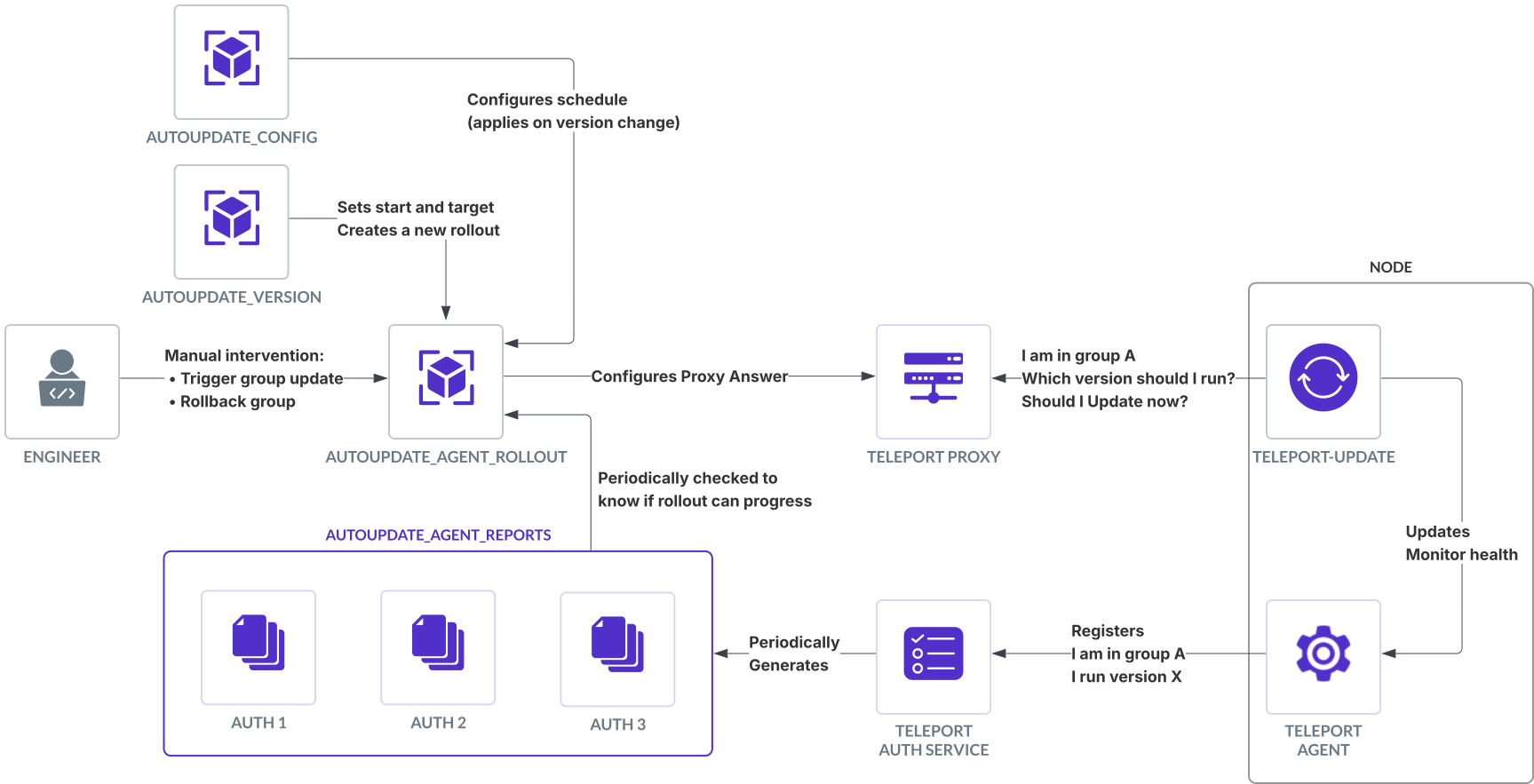
모든 리소스 간의 관계를 설명하는 스키마

업데이트 전략#

autoupdate_config 리소스는 에이전트 그룹에 걸쳐 업데이트를 전파하는 방법을 관리하기 위한 두 가지 전략을 지원합니다:

halt-on-error 전략#

halt-on-error 전략은 환경 전반에 걸쳐 예측 가능하고 순차적인 업데이트를 제공합니다. 프로덕션으로 진행하기 전에 개발 환경이 성공적으로 업데이트되도록 하려는 전통적인 개발 파이프라인에 이상적입니다.

주요 특성:

  • 정의된 순서대로 그룹을 통해 순차적으로 업데이트 진행
  • 이전 그룹이 업데이트에 실패하면 이후 그룹은 업데이트되지 않음
  • 제어된 예측 가능한 업데이트 경로 제공
  • wait_hours 매개변수가 있는 그룹은 이전 그룹의 성공적인 업데이트 후 지정된 시간 동안 대기

예제 설정:

kind: autoupdate_config
metadata:
  name: autoupdate-config
spec:
  agents:
    mode: enabled
    strategy: halt-on-error
    schedules:
      regular:
        - name: dev
          days: ["Mon", "Tue", "Wed", "Thu"]
          start_hour: 16
        - name: stage
          days: ["Mon", "Tue", "Wed", "Thu"]
          start_hour: 18
        - name: prod
          days: ["Mon", "Tue", "Wed", "Thu"]
          start_hour: 20
          wait_hours: 24

이 예제에서 dev 그룹이 먼저 업데이트되고, 그 다음 stage, 마지막으로 prod가 업데이트됩니다. prod 그룹은 devstage 모두 성공적으로 업데이트된 경우에만 업데이트되며, stage가 완료된 후 24시간을 기다립니다.

time-based 전략#

time-based 전략은 지리적 지역이나 다른 팀과 같이 업데이트 그룹이 서로 독립적인 환경을 위해 설계되었습니다. 다른 그룹의 상태에 관계없이 그룹에 대해 지정된 유지 관리 창이 활성화될 때마다 업데이트가 발생할 수 있습니다.

주요 특성:

  • 그룹은 설정된 유지 관리 창 동안 독립적으로 업데이트
  • 그룹 간 의존성 없음 - prod의 창이 dev보다 먼저 발생하면 prod가 먼저 업데이트됨
  • 유지 관리 창이 엄격하게 적용됨 - 업데이트는 지정된 창 기간 동안만 발생
  • wait_hours 매개변수를 지원하지 않음

예제 설정:

kind: autoupdate_config
metadata:
  name: autoupdate-config
spec:
  agents:
    mode: enabled
    strategy: time-based
    maintenance_window_duration: 2h
    schedules:
      regular:
        - name: us-east
          days: ["Mon", "Tue", "Wed", "Thu"]
          start_hour: 4
        - name: us-west
          days: ["Mon", "Tue", "Wed", "Thu"]
          start_hour: 6
        - name: europe
          days: ["Mon", "Tue", "Wed", "Thu"]
          start_hour: 12

이 예제에서 각 지역은 다른 지역의 상태에 관계없이 자체 2시간 유지 관리 창 동안 업데이트됩니다. US East의 창 이전에 Europe의 창이 활성화될 때 새 버전이 사용 가능해지면 Europe이 먼저 업데이트됩니다.

롤아웃 중 버전 동작#

선택한 전략에 따라 롤아웃의 다양한 지점에서 설치되는 버전에 대해 시스템이 다르게 작동합니다. start_version이 A이고 target_version이 B인 시나리오를 고려하십시오:

halt-on-error 전략 버전 동작#

이 표는 그룹의 유지 관리 창에 따라 에이전트가 설치할 버전을 요약합니다:

타이밍 새 에이전트 설치 기존 에이전트 업데이트
유지 관리 창 이전 버전 A 설치 업데이트 없음
유지 관리 창 중 버전 B 설치 버전 B로 업데이트
유지 관리 창 이후 버전 B 설치 버전 B로 업데이트

halt-on-error 전략에서 이전 그룹이 업데이트를 완료하지 않으면 다음 그룹이 시작되지 않습니다. 예를 들어 2개 그룹이 있는 경우:

  • dev는 매일 13:00에 업데이트
  • prod는 평일 15:00에 업데이트

그룹은 에이전트의 90% 이상이 대상 버전을 실행할 때 업데이트된 것으로 간주됩니다. 그룹 초기 에이전트 수는 그룹이 업데이트를 시작할 때 측정됩니다.

Warning

업데이트 창 동안 대규모 다운스케일이 발생하면 그룹 에이전트 수가 초기 값의 90%에 절대 도달하지 않아 롤아웃이 중단됩니다.

이 경우 Teleport는 합법적으로 다운스케일된 에이전트와 새 버전 때문에 연결할 수 없는 에이전트를 구분할 수 없습니다. 에이전트는 누락된 것으로 간주되며 롤아웃을 재개하려면 수동 개입이 필요합니다(tctl autoupdate agents mark-done $GROUP_NAME).

dev가 금요일 16:30에 업데이트를 완료하면, 업데이트 창이 1시간 길이이고 prod의 업데이트 창이 종료되었으므로 prod는 즉시 업데이트를 시작하지 않습니다. prod 업데이트는 월요일 15:00에 시작됩니다.

카나리#

halt-on-error 전략에서 canary_count 필드를 각 그룹에 설정하여 나머지 에이전트로 진행하기 전에 업데이트하고 검증할 무작위로 선택된 에이전트(5개 미만)의 수를 지정할 수 있습니다. 이는 환경 차이로 인해 이전 그룹에서 발견되지 않을 수 있는 업데이트 실패의 영향을 줄이는 데 사용할 수 있습니다.

주요 특성:

  • 최대 5개의 Linux 및 Kubernetes 에이전트가 무작위로 선택되어 먼저 업데이트됩니다.
  • 카나리가 업데이트에 실패하면 그룹은 실패로 표시되고 업데이트되지 않습니다.
  • 그룹이 성공적으로 업데이트될 때까지 후속 그룹은 업데이트되지 않습니다.
  • Linux와 Kubernetes 에이전트는 별도의 그룹에 배치하여 두 그룹 모두 카나리가 적용되도록 할 수 있습니다.
  • tbot 전용 설치는 카나리로 선택되지 않습니다. 그러나 에이전트는 tbot 업데이트 실패를 감지하고 에이전트와 tbot을 모두 롤백하며 카나리를 실패시키기 위해 tbot과 함께 배포될 수 있습니다.

예제 설정:

kind: autoupdate_config
metadata:
  name: autoupdate-config
spec:
  agents:
    mode: enabled
    strategy: halt-on-error
    schedules:
      regular:
        - name: stage
          days: ["Mon", "Tue", "Wed", "Thu"]
          start_hour: 18
          canary_count: 5
        - name: prod
          days: ["Mon", "Tue", "Wed", "Thu"]
          start_hour: 20
          wait_hours: 24
          canary_count: 5

time-based 전략 버전 동작#

이 표는 그룹의 유지 관리 창에 따라 에이전트가 설치할 버전을 요약합니다:

타이밍 새 에이전트 설치 기존 에이전트 업데이트
유지 관리 창 이전 버전 A 설치 업데이트 없음
유지 관리 창 중 버전 B 설치 버전 B로 업데이트
유지 관리 창 이후 버전 B 설치 다음 창까지 업데이트 없음

유지 관리 창이 닫힌 후 발생하는 일의 주요 차이점:

  • halt-on-error의 경우, 에이전트는 창을 놓쳤더라도 그룹의 다른 에이전트와 동일한 버전을 실행하기 위해 업데이트됩니다.
  • time-based의 경우, 업데이트는 유지 관리 창 기간으로 엄격히 제한됩니다.

time-based 전략에서 그룹은 이전 그룹이 아직 업데이트를 완료하지 않아도 유지 관리 창에 진입하는 즉시 업데이트를 시작합니다.

모드 우선순위#

mode 필드는 autoupdate_configautoupdate_version 리소스 모두에서 설정할 수 있습니다. 가장 제한적인 모드가 우선합니다:

  1. disabled (가장 제한적)
  2. suspended
  3. enabled (가장 덜 제한적)

이를 통해 서로 다른 팀이 안전 제어를 유지하면서 독립적으로 설정 및 버전 리소스를 관리할 수 있습니다.

클라우드별 제약 사항#

클라우드 호스팅 Teleport Enterprise의 경우:

  • autoupdate_version 리소스는 자동으로 관리되며 편집할 수 없습니다
  • 스케줄의 days 필드는 종종 설정할 수 없습니다
  • start_hour는 선택한 유지 관리 창으로 기본 설정됩니다
  • 기본적으로 최대 5개의 업데이트 그룹이 허용됩니다
  • 전체 업데이트 스케줄은 4일보다 길 수 없습니다

이러한 제약 사항은 모든 에이전트가 주간 업데이트되고 Teleport 클러스터 버전과 호환성을 유지하도록 보장합니다.

Managed Updates 리소스 레퍼런스

원문 보기
요약

이 문서는 Managed Updates v2 리소스에 대한 상세 레퍼런스 정보를 제공합니다. Managed Updates는 두 가지 사용자 대면 리소스를 통해 구성됩니다: 업데이트가 적용되는 방법과 시기를 설명합니다. 에이전트가 업데이트해야 하는 버전을 지정합니다.

이 문서는 Managed Updates v2 리소스에 대한 상세 레퍼런스 정보를 제공합니다. 참고:

Managed Updates v2 리소스#

사용자 대면#

Managed Updates는 두 가지 사용자 대면 리소스를 통해 구성됩니다:

autoupdate_config#

업데이트가 적용되는 방법과 시기를 설명합니다. 설정 변경은 다음 롤아웃 시 적용됩니다.

kind: autoupdate_config
metadata:
  # autoupdate_config is a singleton resource. There can be only one instance
  # of this resource in the Teleport cluster, and it must be named `autoupdate-config`.
  name: autoupdate-config
spec:
  agents:
    # mode allows users to enable, disable, or suspend agent updates at the
    # cluster level. Disable agent automatic updates only if self-managed
    # updates are in place. This value may also be set in autoupdate_version.
    # If set in both places, disabled overrides suspended, which overrides enabled.
    # Possible values: "enabled", "disabled", "suspended"
    # Default: "disabled" (unless specified in autoupdate_version)
    mode: enabled

    # strategy used to roll out updates to agents. Applies to every group.
    # The halt-on-error strategy ensures that groups earlier in the schedule are
    # given the opportunity to update to the target_version before groups that are
    # later in the schedule. (Currently, the schedule must be stopped manually by
    # setting the mode to "suspended" or "disabled". In the future, errors will be
    # detected automatically).
    # The time-based strategy ensure that each group updates within a defined
    # time window, with no dependence between groups.
    # Possible values: "halt-on-error" or "time-based"
    # Default: "halt-on-error"
    strategy: halt-on-error

    # maintenance_window_duration configures the duration after the start_hour
    # when updates may occur. Only valid for the time-based strategy.
    # maintenance_window_duration: 1h

    # schedules define groups of agents with different update times.
    # Currently, only the regular schedule is configurable.
    schedules:
      regular:

        # name of each group, configured locally via "teleport-update enable --group".
        # Agents presenting a missing or empty group are placed in the last group in the list.
        - name: staging

          # start_hour of the update, in UTC
          start_hour: 4

          # days that the update may occur on
          # Days are not configurable for most Enterprise cloud-hosted users.
          # Possible values: "Mon", "Tue", "Wed", "Thu", "Fri", "Sat", "Sun", and "*"
          # Default: [ "Mon", "Tue", "Wed", "Thu" ]
          days: [ "Mon", "Tue", "Wed", "Thu" ]

        - name: production
          start_hour: 5

          # wait_hours ensures that the group executes at least a specific number of hours
          # after the previous group. Only valid for the halt-on-error schedule.
          # Default: 0
          wait_hours: 24

          # canary_count specifies the number of agents to update and verify before the rest
          # of the group. Only valid for the halt-on-error schedule.
          # Possible values: 0-5
          # Default: 0
          canary_count: 5

  tools:
    # mode allows users to enable or disable client tool updates at the
    # cluster level. Disable client tool automatic updates only if self-managed
    # updates are in place.
    # Possible values: "enabled" or "disabled"
    # Default: "disabled"
    mode: enabled

autoupdate_version#

에이전트가 업데이트해야 하는 버전을 지정합니다. 시작 또는 대상 버전을 변경하면 새 롤아웃이 생성됩니다.

Note

이 리소스는 클라우드 관리 Teleport Enterprise에서는 편집할 수 없습니다. 이는 모든 클라이언트가 보안 패치를 받고 클러스터 버전과 호환성을 유지하도록 보장합니다.

kind: autoupdate_version
metadata:
  # autoupdate_version is a singleton resource. There can be only one instance
  # of this resource in the Teleport cluster, and it must be named `autoupdate-version`.
  name: autoupdate-version
spec:
  agents:
    # start_version is the version used to install new agents before their
    # group's scheduled update time. Agents never update to the start_version
    # automatically, but may be required to via "teleport-update update --now".
    start_version: v17.2.0

    # target_version is the version that agents update to during their group's
    # scheduled update time. New agents also use this version after their group's
    # scheduled update time.
    target_version: v17.2.1

    # schedule used to roll out updates.
    # The regular schedule is defined in the autoupdate_config resource.
    # The immediate schedule updates all agents to target_version immediately.
    # Possible values: "regular" or "immediate"
    # Default: "regular"
    schedule: regular

    # mode allows users to enable, disable, or suspend agent updates at the
    # cluster level. Disable agent automatic updates only if self-managed
    # updates are in place. This value may also be set in autoupdate_config.
    # If set in both places, disabled overrides suspended, which overrides enabled.
    # Possible values: "enabled", "disabled", "suspended"
    # Default: "disabled" (unless specified in autoupdate_config)
    mode: enabled

  tools:
    # target_version is the semver version of client tools the cluster will advertise.
    # Client tools such as tsh and tctl will update to this version at login if the
    # mode set in autoupdate_config is set to enabled.
    # Default: cluster version
    target_version: v17.2.1

시스템 리소스#

이러한 리소스는 Teleport에 의해 자동으로 생성됩니다. 사용자는 편집하지 않아야 하지만, 읽으면 자동 업데이트 상태를 추적하고 Teleport의 업데이트 결정을 이해하는 데 도움이 됩니다.

이러한 리소스는 Teleport 에이전트 설치만 추적합니다. 그러나 tbot이 Teleport 에이전트와 함께 배포된 경우, tbot 업데이트 실패는 에이전트 업데이트를 되돌리게 하고 에이전트 업데이트는 실패로 표시됩니다.

autoupdate_agent_rollout#

autoupdate_agent_rollout은 에이전트 그룹에 걸친 버전 롤아웃을 설명합니다. 한 번에 하나의 롤아웃이 활성화됩니다. 각 Auth Service는 매 분마다 롤아웃을 업데이트합니다.

kind: autoupdate_agent_rollout
metadata:
  # autoupdate_agent_rollout is a singleton resource. There can be only one instance
  # of this resource in the Teleport cluster, and it must be named `autoupdate-agent-rollout`.
  name: autoupdate-agent-rollout
spec:
  # start_version is the version used to install new agents before their
  # group's scheduled update time. Agents never update to the start_version
  # automatically, but may be required to via "teleport-update update --now".
  start_version: v17.2.0

  # target_version is the version that agents update to during their group's
  # scheduled update time. New agents also use this version after their group's
  # scheduled update time.
  target_version: v17.2.1

  # schedule used to roll out updates.
  # The regular schedule is defined in the autoupdate_config resource.
  # The immediate schedule updates all agents to target_version immediately.
  # Possible values: "regular" or "immediate"
  schedule: regular

  # autoupdate_mode allows users to enable, disable, or suspend agent updates at the
  # cluster level. Disable agent automatic updates only if self-managed
  # updates are in place. This value may also be set in autoupdate_config.
  # If set in both places, disabled overrides suspended, which overrides enabled.
  # Possible values: "enabled", "disabled", "suspended"
  autoupdate_mode: enabled

  # strategy used to roll out updates to agents.
  # The halt-on-error strategy ensures that groups earlier in the schedule are
  # given the opportunity to update to the target_version before groups that are
  # later in the schedule. (Currently, the schedule must be stopped manually by
  # setting the mode to "suspended" or "disabled". In the future, errors will be
  # detected automatically).
  # The time-based strategy ensure that each group updates within a defined
  # time window, with no dependence between groups.
  # Possible values: "halt-on-error" or "time-based"
  # Default: "halt-on-error"
  strategy: halt-on-error

  # maintenance_window_duration configures the duration after the start_hour
  # when updates may occur. Only valid for the time-based strategy.
  # maintenance_window_duration: 1h

status:

  # groups contains the status for each group in the currently executing schedule.
  groups:

    # name of each group, configured locally via "teleport-update enable --group"
    - name: staging

      # start_time of the group
      start_time: 0001-01-01T00:00:00Z

      # state of the group
      # Possible values: unstarted, active, done, rolledback
      state: active

      # last_update_time of this group's status
      last_update_time: 0001-01-01T00:00:00Z

      # last_update_reason of this group's status
      last_update_reason: "new version"

      # days that the update may occur on, from autoupdate_config
      # Possible values: "Mon", "Tue", "Wed", "Thu", "Fri", "Sat", "Sun", and "*"
      config_days: [ "Mon", "Tue", "Wed", "Thu" ]

      # start_hour of the update, in UTC, from autoupdate_config
      config_start_hour: 4

    - name: production

      # ...

      # config_wait_hours is specific number of hours after the previous group that this
      # group may execute after, from autoupdate_config.
      config_wait_hours: 24

      # canary_count is the number of agents selected to update and verify before the rest
      # of the group. Only present for the halt-on-error schedule.
      canary_count: 1

      # canaries describes the status of the selected canaries for this group.
      canaries:

        # updater_id is the unique ID of the updater that is managing the canary.
        - updater_id: 3c6bcc1b-1992-4abc-a6f1-43f8f1b9ff05

          # host_id is the unique host ID of the agent that is being updated.
          host_id: c757ad82-95f2-4416-ae9d-a20ffd9b5a54

          # hostname is the hostname of the agent that is being updated.
          hostname: prod43

          # success is true if the canary was updated successfully.
          success: true

  # start_time of the rollout
  start_time: 0001-01-01T00:00:00Z

  # state of the entire rollout
  # Possible values: unstarted, active, done, rolledback
  state: active

autoupdate_agent_report#

각 auth에 연결된 에이전트 수와 실행 중인 버전을 보고합니다. 업데이트 진행 상황을 추적하고 자동으로 롤아웃을 진행하는 데 사용됩니다. 각 Teleport Auth Service 인스턴스는 매 분마다 하나의 보고서를 생성합니다.

에이전트는 다음과 같은 경우에만 보고서에 계산됩니다:

  • 최소 1분 동안 연결되어 있음
  • teleport-update로 자동 업데이트 중 (teleport-kube-agent 업데이터 지원은 향후 버전에 포함될 예정)
  • 관리 업데이트가 활성화됨(업데이터가 비활성화되지 않거나 특정 버전에 고정되지 않음)

보고 기간으로 인해 에이전트가 보고서에 나타나는 데 최대 2분, 롤아웃에 나타나는 데 3분이 걸릴 수 있습니다:

  • 에이전트가 정상으로 계산되기까지 1분
  • 다음 보고서가 생성되기까지 1분
  • 다음 autoupdate_agent_rollout 업데이트까지 1분
kind: autoupdate_agent_report
version: v1
metadata:
  # Instance ID of the auth that generated the report.
  name: auth1
spec:
  # When the report was generated.
  timestamp: 2025-05-28T11:22:41.924956-04:00
  # Map of the agent groups seen by the auth.
  groups:
    dev:
      # Map of the agent versions seen for this group by the auth.
      versions:
        "1.2.3":
          # Number of registered agents with this version.
          count: 15
        "1.2.4":
          count: 2
        "1.2.5":
          count: 34
    stage:
      versions:
        "1.2.3":
          count: 15
        "1.2.4":
          count: 125
    prod:
      versions:
        "1.2.5":
          count: 1543
  # List of agents omitted from the report.
  omitted:
    - count: 120
      reason: "version is pinned"
    - count: 12
      reason: "managed update v1 updater does not support agent reports"
    - count: 42
      reason: "updater version predates agent report"

보고서는 tctl get autoupdate_agent_reports를 사용하여 개별적으로 확인할 수 있습니다. 모든 보고서를 하나로 집계하려면 tctl autoupdate agents report를 실행하십시오.

에이전트 업데이트 개요#

에이전트를 업데이트할 때 다양한 Managed Updates v2 구성 요소 간의 상호 작용을 설명하는 스키마:

모든 리소스 간의 관계를 설명하는 스키마

업데이트 전략#

autoupdate_config 리소스는 에이전트 그룹에 걸쳐 업데이트를 전파하는 방법을 관리하기 위한 두 가지 전략을 지원합니다:

halt-on-error 전략#

halt-on-error 전략은 환경 전반에 걸쳐 예측 가능하고 순차적인 업데이트를 제공합니다. 프로덕션으로 진행하기 전에 개발 환경이 성공적으로 업데이트되도록 하려는 전통적인 개발 파이프라인에 이상적입니다.

주요 특성:

  • 정의된 순서대로 그룹을 통해 순차적으로 업데이트 진행
  • 이전 그룹이 업데이트에 실패하면 이후 그룹은 업데이트되지 않음
  • 제어된 예측 가능한 업데이트 경로 제공
  • wait_hours 매개변수가 있는 그룹은 이전 그룹의 성공적인 업데이트 후 지정된 시간 동안 대기

예제 설정:

kind: autoupdate_config
metadata:
  name: autoupdate-config
spec:
  agents:
    mode: enabled
    strategy: halt-on-error
    schedules:
      regular:
        - name: dev
          days: ["Mon", "Tue", "Wed", "Thu"]
          start_hour: 16
        - name: stage
          days: ["Mon", "Tue", "Wed", "Thu"]
          start_hour: 18
        - name: prod
          days: ["Mon", "Tue", "Wed", "Thu"]
          start_hour: 20
          wait_hours: 24

이 예제에서 dev 그룹이 먼저 업데이트되고, 그 다음 stage, 마지막으로 prod가 업데이트됩니다. prod 그룹은 devstage 모두 성공적으로 업데이트된 경우에만 업데이트되며, stage가 완료된 후 24시간을 기다립니다.

time-based 전략#

time-based 전략은 지리적 지역이나 다른 팀과 같이 업데이트 그룹이 서로 독립적인 환경을 위해 설계되었습니다. 다른 그룹의 상태에 관계없이 그룹에 대해 지정된 유지 관리 창이 활성화될 때마다 업데이트가 발생할 수 있습니다.

주요 특성:

  • 그룹은 설정된 유지 관리 창 동안 독립적으로 업데이트
  • 그룹 간 의존성 없음 - prod의 창이 dev보다 먼저 발생하면 prod가 먼저 업데이트됨
  • 유지 관리 창이 엄격하게 적용됨 - 업데이트는 지정된 창 기간 동안만 발생
  • wait_hours 매개변수를 지원하지 않음

예제 설정:

kind: autoupdate_config
metadata:
  name: autoupdate-config
spec:
  agents:
    mode: enabled
    strategy: time-based
    maintenance_window_duration: 2h
    schedules:
      regular:
        - name: us-east
          days: ["Mon", "Tue", "Wed", "Thu"]
          start_hour: 4
        - name: us-west
          days: ["Mon", "Tue", "Wed", "Thu"]
          start_hour: 6
        - name: europe
          days: ["Mon", "Tue", "Wed", "Thu"]
          start_hour: 12

이 예제에서 각 지역은 다른 지역의 상태에 관계없이 자체 2시간 유지 관리 창 동안 업데이트됩니다. US East의 창 이전에 Europe의 창이 활성화될 때 새 버전이 사용 가능해지면 Europe이 먼저 업데이트됩니다.

롤아웃 중 버전 동작#

선택한 전략에 따라 롤아웃의 다양한 지점에서 설치되는 버전에 대해 시스템이 다르게 작동합니다. start_version이 A이고 target_version이 B인 시나리오를 고려하십시오:

halt-on-error 전략 버전 동작#

이 표는 그룹의 유지 관리 창에 따라 에이전트가 설치할 버전을 요약합니다:

타이밍 새 에이전트 설치 기존 에이전트 업데이트
유지 관리 창 이전 버전 A 설치 업데이트 없음
유지 관리 창 중 버전 B 설치 버전 B로 업데이트
유지 관리 창 이후 버전 B 설치 버전 B로 업데이트

halt-on-error 전략에서 이전 그룹이 업데이트를 완료하지 않으면 다음 그룹이 시작되지 않습니다. 예를 들어 2개 그룹이 있는 경우:

  • dev는 매일 13:00에 업데이트
  • prod는 평일 15:00에 업데이트

그룹은 에이전트의 90% 이상이 대상 버전을 실행할 때 업데이트된 것으로 간주됩니다. 그룹 초기 에이전트 수는 그룹이 업데이트를 시작할 때 측정됩니다.

Warning

업데이트 창 동안 대규모 다운스케일이 발생하면 그룹 에이전트 수가 초기 값의 90%에 절대 도달하지 않아 롤아웃이 중단됩니다.

이 경우 Teleport는 합법적으로 다운스케일된 에이전트와 새 버전 때문에 연결할 수 없는 에이전트를 구분할 수 없습니다. 에이전트는 누락된 것으로 간주되며 롤아웃을 재개하려면 수동 개입이 필요합니다(tctl autoupdate agents mark-done $GROUP_NAME).

dev가 금요일 16:30에 업데이트를 완료하면, 업데이트 창이 1시간 길이이고 prod의 업데이트 창이 종료되었으므로 prod는 즉시 업데이트를 시작하지 않습니다. prod 업데이트는 월요일 15:00에 시작됩니다.

카나리#

halt-on-error 전략에서 canary_count 필드를 각 그룹에 설정하여 나머지 에이전트로 진행하기 전에 업데이트하고 검증할 무작위로 선택된 에이전트(5개 미만)의 수를 지정할 수 있습니다. 이는 환경 차이로 인해 이전 그룹에서 발견되지 않을 수 있는 업데이트 실패의 영향을 줄이는 데 사용할 수 있습니다.

주요 특성:

  • 최대 5개의 Linux 및 Kubernetes 에이전트가 무작위로 선택되어 먼저 업데이트됩니다.
  • 카나리가 업데이트에 실패하면 그룹은 실패로 표시되고 업데이트되지 않습니다.
  • 그룹이 성공적으로 업데이트될 때까지 후속 그룹은 업데이트되지 않습니다.
  • Linux와 Kubernetes 에이전트는 별도의 그룹에 배치하여 두 그룹 모두 카나리가 적용되도록 할 수 있습니다.
  • tbot 전용 설치는 카나리로 선택되지 않습니다. 그러나 에이전트는 tbot 업데이트 실패를 감지하고 에이전트와 tbot을 모두 롤백하며 카나리를 실패시키기 위해 tbot과 함께 배포될 수 있습니다.

예제 설정:

kind: autoupdate_config
metadata:
  name: autoupdate-config
spec:
  agents:
    mode: enabled
    strategy: halt-on-error
    schedules:
      regular:
        - name: stage
          days: ["Mon", "Tue", "Wed", "Thu"]
          start_hour: 18
          canary_count: 5
        - name: prod
          days: ["Mon", "Tue", "Wed", "Thu"]
          start_hour: 20
          wait_hours: 24
          canary_count: 5

time-based 전략 버전 동작#

이 표는 그룹의 유지 관리 창에 따라 에이전트가 설치할 버전을 요약합니다:

타이밍 새 에이전트 설치 기존 에이전트 업데이트
유지 관리 창 이전 버전 A 설치 업데이트 없음
유지 관리 창 중 버전 B 설치 버전 B로 업데이트
유지 관리 창 이후 버전 B 설치 다음 창까지 업데이트 없음

유지 관리 창이 닫힌 후 발생하는 일의 주요 차이점:

  • halt-on-error의 경우, 에이전트는 창을 놓쳤더라도 그룹의 다른 에이전트와 동일한 버전을 실행하기 위해 업데이트됩니다.
  • time-based의 경우, 업데이트는 유지 관리 창 기간으로 엄격히 제한됩니다.

time-based 전략에서 그룹은 이전 그룹이 아직 업데이트를 완료하지 않아도 유지 관리 창에 진입하는 즉시 업데이트를 시작합니다.

모드 우선순위#

mode 필드는 autoupdate_configautoupdate_version 리소스 모두에서 설정할 수 있습니다. 가장 제한적인 모드가 우선합니다:

  1. disabled (가장 제한적)
  2. suspended
  3. enabled (가장 덜 제한적)

이를 통해 서로 다른 팀이 안전 제어를 유지하면서 독립적으로 설정 및 버전 리소스를 관리할 수 있습니다.

클라우드별 제약 사항#

클라우드 호스팅 Teleport Enterprise의 경우:

  • autoupdate_version 리소스는 자동으로 관리되며 편집할 수 없습니다
  • 스케줄의 days 필드는 종종 설정할 수 없습니다
  • start_hour는 선택한 유지 관리 창으로 기본 설정됩니다
  • 기본적으로 최대 5개의 업데이트 그룹이 허용됩니다
  • 전체 업데이트 스케줄은 4일보다 길 수 없습니다

이러한 제약 사항은 모든 에이전트가 주간 업데이트되고 Teleport 클러스터 버전과 호환성을 유지하도록 보장합니다.