





Panther로 Teleport 감사 이벤트 내보내기
Teleport v18.10요약
Teleport의 Event Handler 플러그인은 Teleport Auth Service에서 감사 이벤트를 수신하여 로그 관리 솔루션으로 전달하므로, 기록 분석, 비정상적인 동작 감지, Teleport 클러스터와 사용자가 상호 작용하는 방식에 대한 더 나은 이...
Teleport의 Event Handler 플러그인은 Teleport Auth Service에서 감사 이벤트를 수신하여 로그 관리 솔루션으로 전달하므로, 기록 분석, 비정상적인 동작 감지, Teleport 클러스터와 사용자가 상호 작용하는 방식에 대한 더 나은 이해를 얻을 수 있습니다.
Panther는 클라우드 네이티브 보안 분석 플랫폼입니다. 이 가이드에서는 Fluentd를 사용하여 Teleport 감사 이벤트를 Panther로 전달하는 방법을 설명합니다.
작동 방식#
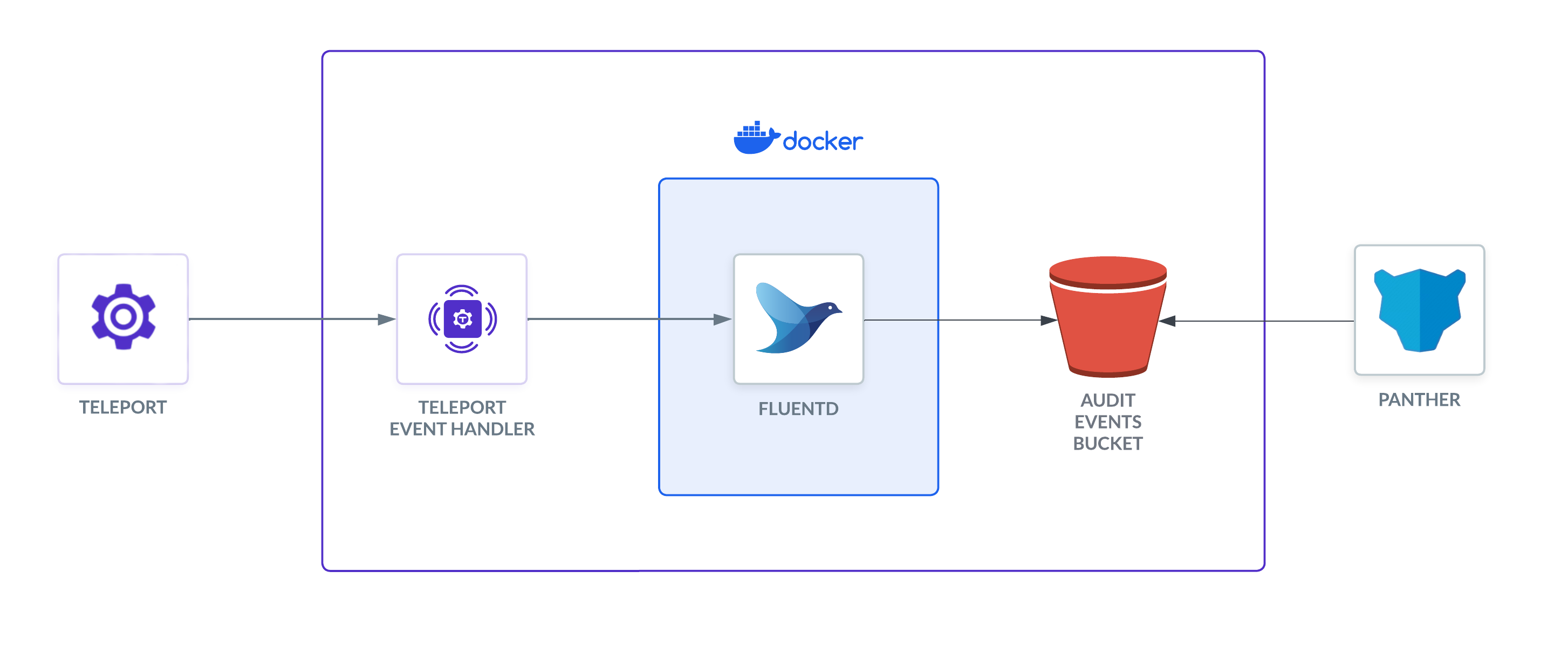
Teleport Event Handler는 mTLS를 사용하여 Fluentd와 통신하여 보안 채널을 설정하도록 설계되었습니다. 이 설정에서 Event Handler는 이벤트를 Fluentd로 전송하고, Fluentd는 이를 Panther가 수집할 S3로 전달합니다.
사전 요구사항#
- Panther 계정.
- Fluentd 버전 v
[fluentd.version]이상. Teleport Event Handler는 기존 Fluentd 시스템에 통합하거나 새로운 설정과 함께 사용할 수 있는 새fluent.conf파일을 생성합니다. - 로그를 저장할 S3 버킷. Panther는 이 버킷에서 로그를 수집합니다.
- Teleport Event Handler 플러그인을 실행할 서버, 가상 머신, Kubernetes 클러스터 또는 Docker 환경.
이 가이드는 Event Handler 설정 가이드 중 하나를 완료했다고 가정합니다:
아래 지침은 VM에서 Event Handler 플러그인을 로컬로 테스트하는 방법을 보여줍니다. 다른 환경에서는 경로, 포트 및 도메인을 조정해야 합니다.
1/3단계. S3 플러그인이 포함된 Fluentd Dockerfile 생성#
Panther로 로그를 전송하려면 S3용 Fluentd 출력 플러그인을 사용해야 합니다. 다음 내용으로 Dockerfile을 만듭니다:
FROM fluent/fluentd:edge
USER root
RUN fluent-gem install fluent-plugin-s3
USER fluent
Docker 이미지를 빌드합니다:
$ docker build -t fluentd-s3 .
테스트를 위해 로컬 Docker 컨테이너에서 Fluentd를 실행하는 경우, 진입점을 루트 사용자의 대화형 셸로 조정하여 설정을 테스트할 수 있습니다.
$ docker run -u $(id -u root):$(id -g root) -p 8888:8888 -v $(pwd):/keys -v \
$(pwd)/fluent.conf:/fluentd/etc/fluent.conf --entrypoint=/bin/sh -i --tty  fluentd-s3
Panther용 Fluentd 구성#
사전 요구사항 설정 가이드에서 생성된 fluent.conf 파일을 수정합니다. 이 파일은 Panther로 로그를 전송하도록 업데이트해야 합니다. 즉, <filter>와 <match> 섹션을 파일에 추가해야 합니다. 이 섹션들은 S3로 전송하기 전에 로그를 필터링하고 형식을 지정합니다. record_transformer는 Panther에 올바른 날짜 및 시간 형식을 전송하는 데 중요합니다.
<!--
# Below code is commented out as it's autogenerated in step 4 by teleport-event-handler
fluent.conf
This is a sample configuration file for Fluentd to send logs to S3.
Created by the Teleport Event Handler plugin.
Add the <filter> and <match> sections to the file.
 <source>
     @type http
     port 8888

     <transport tls>
         client_cert_auth true
         ca_path "/keys/ca.crt"
         cert_path "/keys/server.crt"
         private_key_path "/keys/server.key"
         private_key_passphrase "AUTOGENERATED"
     </transport>

     <parse>
       @type json
       json_parser oj

       # This time format is used by Teleport Event Handler.
       time_type string
       time_format %Y-%m-%dT%H:%M:%S
     </parse>

     # If the number of events is high, fluentd will start failing the ingestion
     # with the following error message: buffer space has too many data errors.
     # The following configuration prevents data loss in case of a restart and
     # overcomes the limitations of the default fluentd buffer configuration.
     # This configuration is optional.
     # See https://docs.fluentd.org/configuration/buffer-section for more details.
     <buffer>
       @type file
       flush_thread_count 8
       flush_interval 1s
       chunk_limit_size 10M
       queue_limit_length 16
       retry_max_interval 30
       retry_forever true
  </buffer>
</source>
-->
<filter test.log>
  @type record_transformer
  enable_ruby true
  <record>
    time ${time.utc.strftime("%Y-%m-%dT%H:%M:%SZ")}
  </record>
</filter>
<match test.log>
  @type s3
  aws_key_id  REPLACE_aws_access_key
  aws_sec_key  REPLACE_aws_secret_access_key
  s3_bucket  REPLACE_s3_bucket
  s3_region us-west-2
  path teleport/logs
  <buffer>
    @type file
    path /var/log/fluent/buffer/s3-events
    timekey 60
    timekey_wait 0
    timekey_use_utc true
    chunk_limit_size 256m
  </buffer>
  time_slice_format %Y%m%d%H%M%S
  <format>
    @type json
    </format>
</match>
<match session.*>
  @type stdout
</match>
Fluentd 컨테이너를 시작합니다:
$ docker run -p 8888:8888 -v $(pwd):/keys -v $(pwd)/fluent.conf:/fluentd/etc/fluent.conf fluentd-s3
이렇게 하면 Fluentd 컨테이너가 시작되고 Teleport Event Handler가 로그를 전송할 포트 8888이 노출됩니다.
2/3단계. Event Handler 플러그인 실행#
이 섹션에서는 생성한 Event Handler 구성을 수정하고 Event Handler를 실행하여 구성을 테스트합니다.
Event Handler 구성#
설치 방법에 따라 Event Handler 구성을 편집합니다.
Linux server
앞에서 Fluentd 이벤트 핸들러를 구성하기 위해 teleport-event-handler.toml이라는
파일을 생성했습니다. 이 파일에는 다음과 유사한 설정이 포함되어 있습니다:
storage = "./storage"
timeout = "10s"
batch = 20
# concurrency is the number of concurrent sessions to process. By default, this is set to 5.
concurrency = 5
# The window size configures the duration of the time window for the event handler
# to request events from Teleport. By default, this is set to 24 hours.
# Reduce the window size if the events backend cannot manage the event volume
# for the default window size.
# The window size should be specified as a duration string, parsed by Go's time.ParseDuration.
window-size = "24h"
# types is a comma-separated list of event types to search when forwarding audit
# events. For example, to limit forwarded events to user logins
# and new Access Requests, you can assign this field to
# "user.login,access_request.create".
types = ""
# skip-event-types is a comma-separated list of audit log event types to skip.
# For example, to forward all audit events except for new app deletion events,
# you can include the following assignment:
# skip-event-types = ["app.delete"]
skip-event-types = []
# skip-session-types is a comma-separated list of session recording event types to skip.
# For example, to forward all session events except for malformed SQL packet
# events, you can include the following assignment:
# skip-session-types = ["db.session.malformed_packet"]
skip-session-types = []

[forward.fluentd]
ca = "/home/bob/event-handler/ca.crt"
cert = "/home/bob/event-handler/client.crt"
key = "/home/bob/event-handler/client.key"
url = "https://fluentd.example.com:8888/test.log"
session-url = "https://fluentd.example.com:8888/session"

[teleport]
addr = "teleport.example.com:443"
identity = "identity"
구성에서 fluentd.example.com을 사용 중인 Fluentd 배포의 도메인 이름으로
변경합니다.
Helm Chart
다음 템플릿을 사용하여 teleport-plugin-event-handler-values.yaml을 생성합니다:
eventHandler:
  storagePath: "./storage"
  timeout: "10s"
  batch: 20
  # concurrency is the number of concurrent sessions to process. By default, this is set to 5.
  concurrency: 5
  # The window size configures the duration of the time window for the event handler
  # to request events from Teleport. By default, this is set to 24 hours.
  # Reduce the window size if the events backend cannot manage the event volume
  # for the default window size.
  # The window size should be specified as a duration string, parsed by Go's time.ParseDuration.
  windowSize: "24h"
  # types is a list of event types to search when forwarding audit
  # events. For example, to limit forwarded events to user logins
  # and new Access Requests, you can assign this field to:
  # ["user.login", "access_request.create"]
  types: []
  # skipEventTypes lists types of audit events to skip. For example, to forward all
  # audit events except for new app deletion events, you can assign this to:
  # ["app.delete"]
  skipEventTypes: []
  # skipSessionTypes lists types of session recording events to skip. For example,
  # to forward all session events except for malformed SQL packet events,
  # you can assign this to:
  # ["db.session.malformed_packet"]
  skipSessionTypes: []

teleport:
  address: "teleport.example.com:443"
  identitySecretName: teleport-event-handler-identity
  identitySecretPath: identity

fluentd:
  url: "https://fluentd.fluentd.svc.cluster.local/events.log"
  sessionUrl: "https://fluentd.fluentd.svc.cluster.local/session.log"
  certificate:
    secretName: "teleport-event-handler-client-tls"
    caPath: "ca.crt"
    certPath: "client.crt"
    keyPath: "client.key"

persistentVolumeClaim:
  enabled: true
다음 필드를 업데이트합니다.
이 섹션의 내용은 원문 문서를 참조하세요. (finish-event-handler-fields.mdx)
Event Handler 시작#
이 섹션의 내용은 원문 문서를 참조하세요. (start-event-handler.mdx)
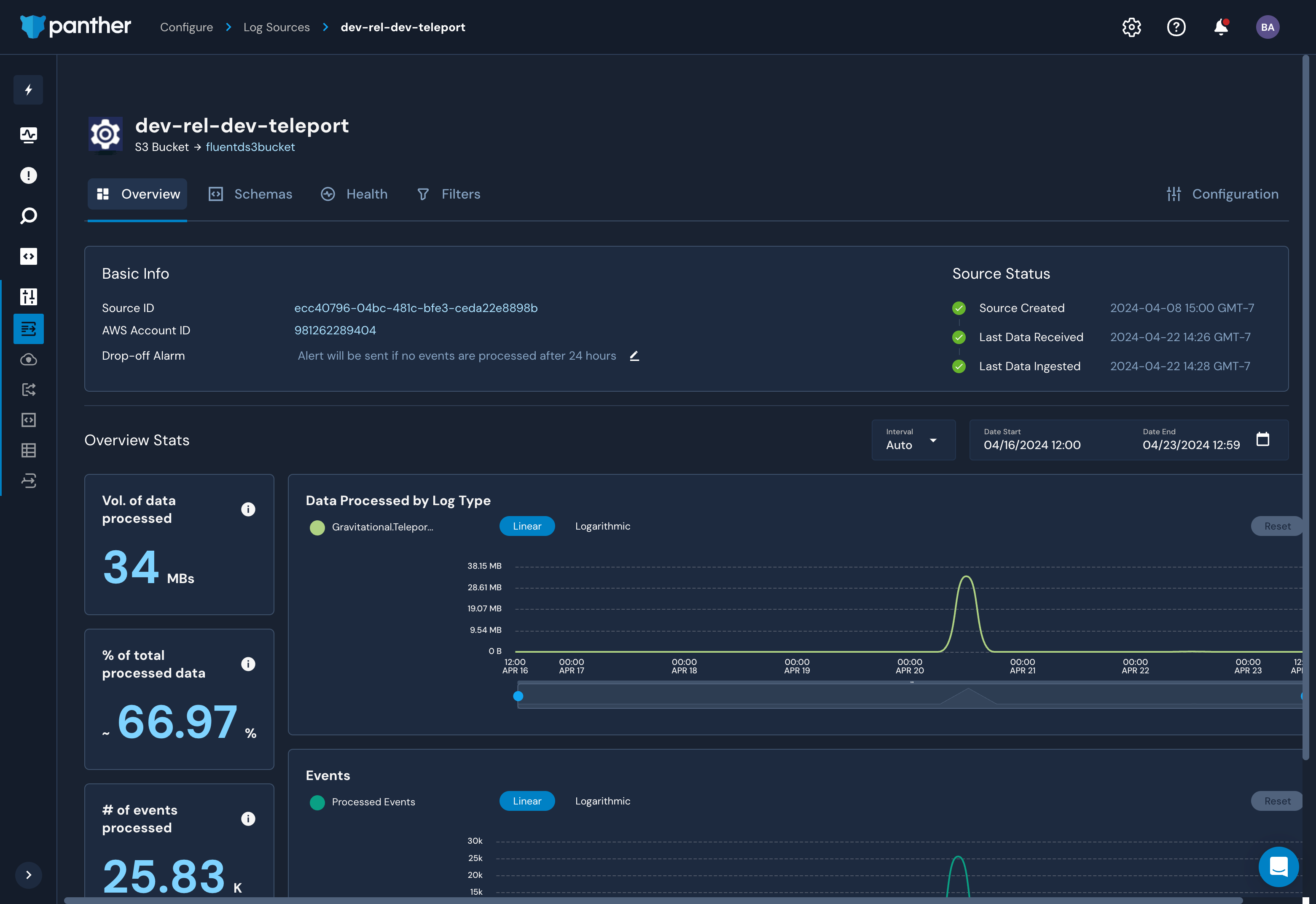
Panther의 Logs 뷰에 이제 Teleport 클러스터 이벤트가 표시됩니다.
3/3단계. S3에서 로그를 수집하도록 Panther 구성#
로그가 S3로 전송되면 Panther가 이를 수집하도록 구성할 수 있습니다. S3 버킷을 데이터 소스로 설정하려면 Panther 문서를 따르세요.
연결 문제 해결#
Teleport Event Handler가 Teleport 클러스터에 연결하는 동안 오류 로그를 표시하는 경우 다음을 확인하세요:
- Teleport Event Handler가 Teleport 클러스터에 연결하는 데 사용하는 인증서가 만료 날짜를 지나지 않았는지 확인합니다. 이는
tctl auth sign명령의--ttl플래그 값으로, 기본적으로 12시간입니다. - Teleport Event Handler 구성 파일에서 Teleport Proxy Service에 대한 올바른 호스트 및 포트를 제공했는지 확인합니다.
- Teleport Event Handler를 시작하기 전에 Fluentd 컨테이너를 먼저 시작합니다. Event Handler는 시작 시 즉시 Fluentd에 연결을 시도합니다.
다음 단계#
- Panther Detections, Alerts and Notifications에 대해 자세히 알아봅니다.
teleport-plugin-event-handlerHelm 차트의 values 파일에서 설정할 수 있는 모든 옵션을 보려면 참조 가이드를 참조하세요.