InfoGrab Docs

teleport-cluster Helm 차트의 Kubernetes Operator

요약

이 가이드에서는 teleport-cluster Helm 차트를 통해 배포된 Teleport 클러스터와 함께 Teleport Kubernetes Operator를 실행하는 방법을 설명합니다. 경고: Teleport 클러스터가 teleport-cluster Helm 차트를 사용하여 배포되지 않은 경우(Teleport Cloud, 수동 배포, Terraform을 통한 배포 등), 대신 독립형 운영자 가이드를 따라야 합니다.

이 가이드에서는 teleport-cluster Helm 차트를 통해 배포된 Teleport 클러스터와 함께 Teleport Kubernetes Operator를 실행하는 방법을 설명합니다.

경고: Teleport 클러스터가 teleport-cluster Helm 차트를 사용하여 배포되지 않은 경우(Teleport Cloud, 수동 배포, Terraform을 통한 배포 등), 대신 독립형 운영자 가이드를 따라야 합니다.

작동 방식#

teleport-cluster Helm 차트에는 teleport-operator 차트가 종속성으로 포함되어 있습니다. operator.enabled 값 필드를 true로 설정하여 teleport-cluster 차트를 설치하면, 차트가 Teleport Kubernetes Operator에 대한 하나 이상의 파드를 실행합니다. 또한 Teleport Kubernetes Operator가 Teleport 클러스터와 신뢰를 설정할 수 있는 조인 토큰(join token)과 Operator를 위한 Teleport 역할 및 Kubernetes 서비스 계정을 생성합니다. 마지막으로 teleport-operator 차트는 Operator가 Teleport 리소스를 관리할 수 있도록 하는 사용자 정의 리소스 정의(CRD)를 설치합니다.

사전 요구사항#

  • Kubernetes 클러스터 (teleport-cluster Helm 차트 배포 여부에 관계없음);
  • Helm
  • kubectl

다음 명령을 실행하여 Kubernetes 연결을 확인합니다:

$ kubectl cluster-info
# Kubernetes control plane is running at https://127.0.0.1:6443
# CoreDNS is running at https://127.0.0.1:6443/api/v1/namespaces/kube-system/services/kube-dns:dns/proxy
# Metrics-server is running at https://127.0.0.1:6443/api/v1/namespaces/kube-system/services/https:metrics-server:https/proxy

운영자를 로컬에서 실험하려는 사용자는 minikube를 사용하여 로컬 Kubernetes 클러스터를 시작할 수 있습니다:

$ minikube start

1단계/2단계: 운영자와 함께 teleport-cluster Helm 차트 설치#

Configure Helm to fetch Teleport charts from the Teleport Helm repository:

$ helm repo add teleport (=teleport.helm_repo_url=)

Refresh the local Helm cache by fetching the latest charts:

$ helm repo update

네임스페이스에 operator.enabled=true로 Teleport 클러스터용 Helm 차트를 설치합니다:

Teleport Community Edition:

$ helm install teleport-cluster teleport/teleport-cluster \
        --create-namespace --namespace  \
        --set clusterName=teleport-cluster.teleport-cluster.svc.cluster.local \
        --set operator.enabled=true \
        --version (=teleport.version=)

Teleport Enterprise:

Teleport 클러스터 리소스를 위한 네임스페이스를 생성합니다:

$ kubectl create namespace 

The Teleport Auth Service reads a license file to authenticate your Teleport Enterprise account.

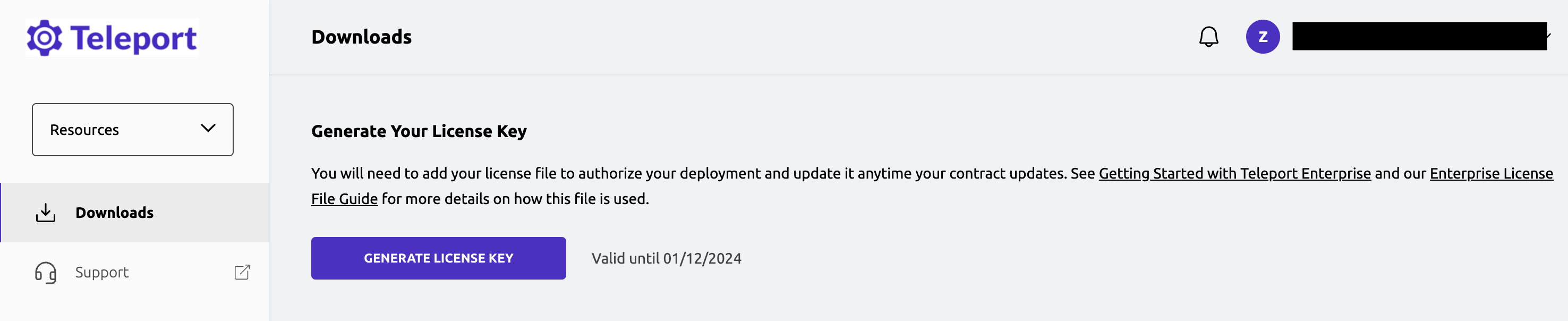
To obtain your license file, navigate to your Teleport account dashboard and log in. You can start at teleport.sh and enter your Teleport account name (e.g. my-company). After logging in you will see a "GENERATE LICENSE KEY" button, which will generate a new license file and allow you to download it.

License File Download

생성한 네임스페이스에서 "license"라는 시크릿을 생성합니다:

$ kubectl -n  create secret generic license --from-file=license.pem

Teleport 클러스터와 Teleport Kubernetes Operator를 배포합니다:

$ helm install teleport-cluster teleport/teleport-cluster \
        --namespace  \
        --set enterprise=true \
        --set clusterName=teleport-cluster.teleport-cluster.svc.cluster.local \
        --set operator.enabled=true \
        --version (=teleport.version=)

이 명령은 필요한 Kubernetes CRD를 설치하고 Teleport 클러스터 옆에 Teleport Kubernetes Operator를 배포합니다. teleport-cluster 네임스페이스에 모든 리소스(클러스터 범위인 CRD 제외)가 생성됩니다.

2단계/2단계: 클러스터와 운영자가 실행 중이고 정상인지 확인#

$ kubectl get deployments -n 
#

$ kubectl get pods -n 
#

다음 단계#

새로 배포된 Teleport Kubernetes Operator를 사용하여 Teleport 사용자를 생성하고 역할을 부여하려면 사용자 및 역할 IaC 가이드를 따르세요.

Helm 차트 매개변수는 teleport-cluster Helm 차트 참조에 문서화되어 있습니다.

AWS 또는 GCP에서 Teleport 실행과 같은 특정 설정을 자세히 설명하는 Helm 배포 가이드를 참조하세요.

문제 해결#

The CustomResources (CRs) are not reconciled#

The Teleport Operator watches for new resources or changes in Kubernetes. When a change happens, it triggers the reconciliation loop. This loop is in charge of validating the resource, checking if it already exists in Teleport and making calls to the Teleport API to create/update/delete the resource. The reconciliation loop also adds a status field on the Kubernetes resource.

If an error happens and the reconciliation loop is not successful, an item in status.conditions will describe what went wrong. This allows users to diagnose errors by inspecting Kubernetes resources with kubectl:

$ kubectl describe teleportusers myuser

For example, if a user has been granted a nonexistent role the status will look like:

apiVersion: resources.teleport.dev/v2
kind: TeleportUser
# [...]
status:
  conditions:
  - lastTransitionTime: "2022-07-25T16:15:52Z"
    message: Teleport resource has the Kubernetes origin label.
    reason: OriginLabelMatching
    status: "True"
    type: TeleportResourceOwned
  - lastTransitionTime: "2022-07-25T17:08:58Z"
    message: 'Teleport returned the error: role my-non-existing-role is not found'
    reason: TeleportError
    status: "False"
    type: SuccessfullyReconciled

Here SuccessfullyReconciled is False and the error is role my-non-existing-role is not found.

If the status is not present or does not give sufficient information to solve the issue, check the operator logs:

The CR doesn't have a status#

  1. Check if the CR is in the same namespace as the operator. The operator only watches for resource in its own namespace.

  2. Check if the operator pods are running and healthy:

    kubectl get pods -n "$OPERATOR_NAMESPACE"`
    
  3. Check the operator logs:

    $ kubectl logs deploy/

I cannot delete the Kubernetes CR#

The operator protects Kubernetes CRs from deletion with a finalizer. It will not allow the CR to be deleted until the Teleport resource is deleted as well, this is a safety to avoid leaving dangling resources and potentially grant unintentional access.

There might be some reasons causing Teleport to refuse a resource deletion, the most frequent one is if another resource depends on it. For example: you cannot delete a role if it is still assigned to a user.

If this happens, the operator will report the error sent by Teleport in its log.

To resolve this lock, you can either:

  • resolve the dependency issue so the resource gets successfully deleted in Teleport. In the role example, this would imply removing any mention of the role from the various users who had it.

  • patch the Kubernetes CR to remove the finalizers. This will tell Kubernetes to stop waiting for the operator deletion and remove the CR. If you do this, the CR will be removed but the Teleport resource will remain. The operator will never attempt to remove it again.

    For example, if the role is named my-role:

    kubectl patch TeleportRole my-role -p '{"metadata":{"finalizers":null}}' --type=merge
    

teleport-cluster Helm 차트의 Kubernetes Operator

원문 보기
요약

이 가이드에서는 teleport-cluster Helm 차트를 통해 배포된 Teleport 클러스터와 함께 Teleport Kubernetes Operator를 실행하는 방법을 설명합니다. 경고: Teleport 클러스터가 teleport-cluster Helm 차트를 사용하여 배포되지 않은 경우(Teleport Cloud, 수동 배포, Terraform을 통한 배포 등), 대신 독립형 운영자 가이드를 따라야 합니다.

이 가이드에서는 teleport-cluster Helm 차트를 통해 배포된 Teleport 클러스터와 함께 Teleport Kubernetes Operator를 실행하는 방법을 설명합니다.

경고: Teleport 클러스터가 teleport-cluster Helm 차트를 사용하여 배포되지 않은 경우(Teleport Cloud, 수동 배포, Terraform을 통한 배포 등), 대신 독립형 운영자 가이드를 따라야 합니다.

작동 방식#

teleport-cluster Helm 차트에는 teleport-operator 차트가 종속성으로 포함되어 있습니다. operator.enabled 값 필드를 true로 설정하여 teleport-cluster 차트를 설치하면, 차트가 Teleport Kubernetes Operator에 대한 하나 이상의 파드를 실행합니다. 또한 Teleport Kubernetes Operator가 Teleport 클러스터와 신뢰를 설정할 수 있는 조인 토큰(join token)과 Operator를 위한 Teleport 역할 및 Kubernetes 서비스 계정을 생성합니다. 마지막으로 teleport-operator 차트는 Operator가 Teleport 리소스를 관리할 수 있도록 하는 사용자 정의 리소스 정의(CRD)를 설치합니다.

사전 요구사항#

  • Kubernetes 클러스터 (teleport-cluster Helm 차트 배포 여부에 관계없음);
  • Helm
  • kubectl

다음 명령을 실행하여 Kubernetes 연결을 확인합니다:

$ kubectl cluster-info
# Kubernetes control plane is running at https://127.0.0.1:6443
# CoreDNS is running at https://127.0.0.1:6443/api/v1/namespaces/kube-system/services/kube-dns:dns/proxy
# Metrics-server is running at https://127.0.0.1:6443/api/v1/namespaces/kube-system/services/https:metrics-server:https/proxy

운영자를 로컬에서 실험하려는 사용자는 minikube를 사용하여 로컬 Kubernetes 클러스터를 시작할 수 있습니다:

$ minikube start

1단계/2단계: 운영자와 함께 teleport-cluster Helm 차트 설치#

Configure Helm to fetch Teleport charts from the Teleport Helm repository:

$ helm repo add teleport (=teleport.helm_repo_url=)

Refresh the local Helm cache by fetching the latest charts:

$ helm repo update

네임스페이스에 operator.enabled=true로 Teleport 클러스터용 Helm 차트를 설치합니다:

Teleport Community Edition:

$ helm install teleport-cluster teleport/teleport-cluster \
        --create-namespace --namespace  \
        --set clusterName=teleport-cluster.teleport-cluster.svc.cluster.local \
        --set operator.enabled=true \
        --version (=teleport.version=)

Teleport Enterprise:

Teleport 클러스터 리소스를 위한 네임스페이스를 생성합니다:

$ kubectl create namespace 

The Teleport Auth Service reads a license file to authenticate your Teleport Enterprise account.

To obtain your license file, navigate to your Teleport account dashboard and log in. You can start at teleport.sh and enter your Teleport account name (e.g. my-company). After logging in you will see a "GENERATE LICENSE KEY" button, which will generate a new license file and allow you to download it.

License File Download

생성한 네임스페이스에서 "license"라는 시크릿을 생성합니다:

$ kubectl -n  create secret generic license --from-file=license.pem

Teleport 클러스터와 Teleport Kubernetes Operator를 배포합니다:

$ helm install teleport-cluster teleport/teleport-cluster \
        --namespace  \
        --set enterprise=true \
        --set clusterName=teleport-cluster.teleport-cluster.svc.cluster.local \
        --set operator.enabled=true \
        --version (=teleport.version=)

이 명령은 필요한 Kubernetes CRD를 설치하고 Teleport 클러스터 옆에 Teleport Kubernetes Operator를 배포합니다. teleport-cluster 네임스페이스에 모든 리소스(클러스터 범위인 CRD 제외)가 생성됩니다.

2단계/2단계: 클러스터와 운영자가 실행 중이고 정상인지 확인#

$ kubectl get deployments -n 
#

$ kubectl get pods -n 
#

다음 단계#

새로 배포된 Teleport Kubernetes Operator를 사용하여 Teleport 사용자를 생성하고 역할을 부여하려면 사용자 및 역할 IaC 가이드를 따르세요.

Helm 차트 매개변수는 teleport-cluster Helm 차트 참조에 문서화되어 있습니다.

AWS 또는 GCP에서 Teleport 실행과 같은 특정 설정을 자세히 설명하는 Helm 배포 가이드를 참조하세요.

문제 해결#

The CustomResources (CRs) are not reconciled#

The Teleport Operator watches for new resources or changes in Kubernetes. When a change happens, it triggers the reconciliation loop. This loop is in charge of validating the resource, checking if it already exists in Teleport and making calls to the Teleport API to create/update/delete the resource. The reconciliation loop also adds a status field on the Kubernetes resource.

If an error happens and the reconciliation loop is not successful, an item in status.conditions will describe what went wrong. This allows users to diagnose errors by inspecting Kubernetes resources with kubectl:

$ kubectl describe teleportusers myuser

For example, if a user has been granted a nonexistent role the status will look like:

apiVersion: resources.teleport.dev/v2
kind: TeleportUser
# [...]
status:
  conditions:
  - lastTransitionTime: "2022-07-25T16:15:52Z"
    message: Teleport resource has the Kubernetes origin label.
    reason: OriginLabelMatching
    status: "True"
    type: TeleportResourceOwned
  - lastTransitionTime: "2022-07-25T17:08:58Z"
    message: 'Teleport returned the error: role my-non-existing-role is not found'
    reason: TeleportError
    status: "False"
    type: SuccessfullyReconciled

Here SuccessfullyReconciled is False and the error is role my-non-existing-role is not found.

If the status is not present or does not give sufficient information to solve the issue, check the operator logs:

The CR doesn't have a status#

  1. Check if the CR is in the same namespace as the operator. The operator only watches for resource in its own namespace.

  2. Check if the operator pods are running and healthy:

    kubectl get pods -n "$OPERATOR_NAMESPACE"`
    
  3. Check the operator logs:

    $ kubectl logs deploy/

I cannot delete the Kubernetes CR#

The operator protects Kubernetes CRs from deletion with a finalizer. It will not allow the CR to be deleted until the Teleport resource is deleted as well, this is a safety to avoid leaving dangling resources and potentially grant unintentional access.

There might be some reasons causing Teleport to refuse a resource deletion, the most frequent one is if another resource depends on it. For example: you cannot delete a role if it is still assigned to a user.

If this happens, the operator will report the error sent by Teleport in its log.

To resolve this lock, you can either:

  • resolve the dependency issue so the resource gets successfully deleted in Teleport. In the role example, this would imply removing any mention of the role from the various users who had it.

  • patch the Kubernetes CR to remove the finalizers. This will tell Kubernetes to stop waiting for the operator deletion and remove the CR. If you do this, the CR will be removed but the Teleport resource will remain. The operator will never attempt to remove it again.

    For example, if the role is named my-role:

    kubectl patch TeleportRole my-role -p '{"metadata":{"finalizers":null}}' --type=merge