





InfoGrab DocsInfoGrab Docs

Pipeline Wizard

요약

Pipeline Wizard는 사용자가 입력 필드를 사용하여 파이프라인을 만들 수 있도록 돕는 Vue 프론트엔드 컴포넌트입니다. Pipeline Wizard는 사용자 플로를 구성하는 단일 템플릿 파일을 필요로 합니다.

Pipeline Wizard는 사용자가 입력 필드를 사용하여 파이프라인을 만들 수 있도록 돕는 Vue 프론트엔드 컴포넌트입니다. 입력 필드의 유형과 최종 파이프라인의 형태는 YAML 템플릿으로 구성됩니다.

Pipeline Wizard는 사용자 플로를 구성하는 단일 템플릿 파일을 필요로 합니다. Wizard는 파일의 내용과 독립적으로 동작하므로, 다양한 플로를 표시하는 데 사용할 수 있습니다. 예를 들어 정적 사이트용 템플릿 파일, Docker 이미지용 템플릿 파일, 모바일 앱용 템플릿 파일 등을 각각 만들 수 있습니다. 첫 번째 이터레이션으로서 이러한 템플릿들은 GitLab 소스 코드의 일부입니다.

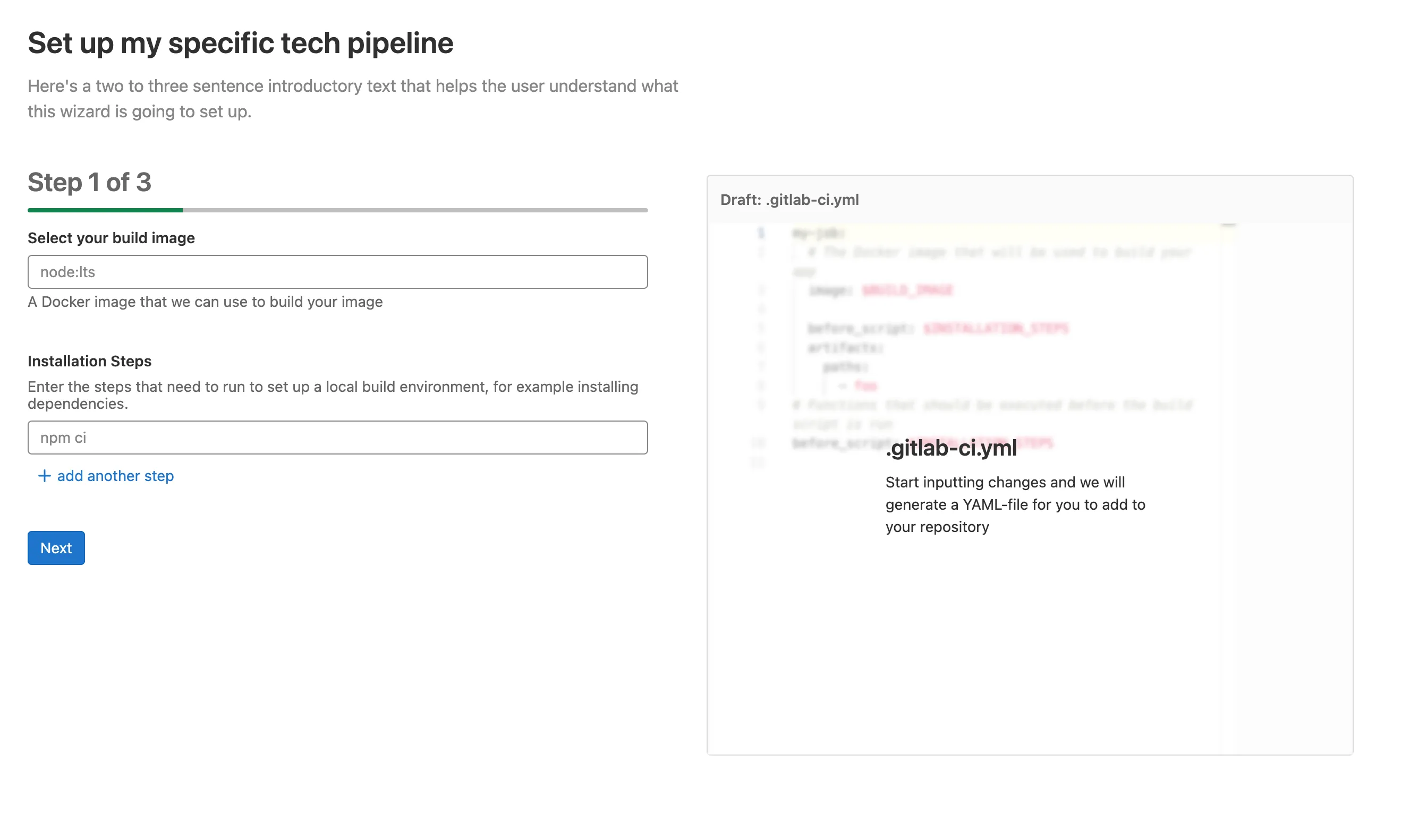
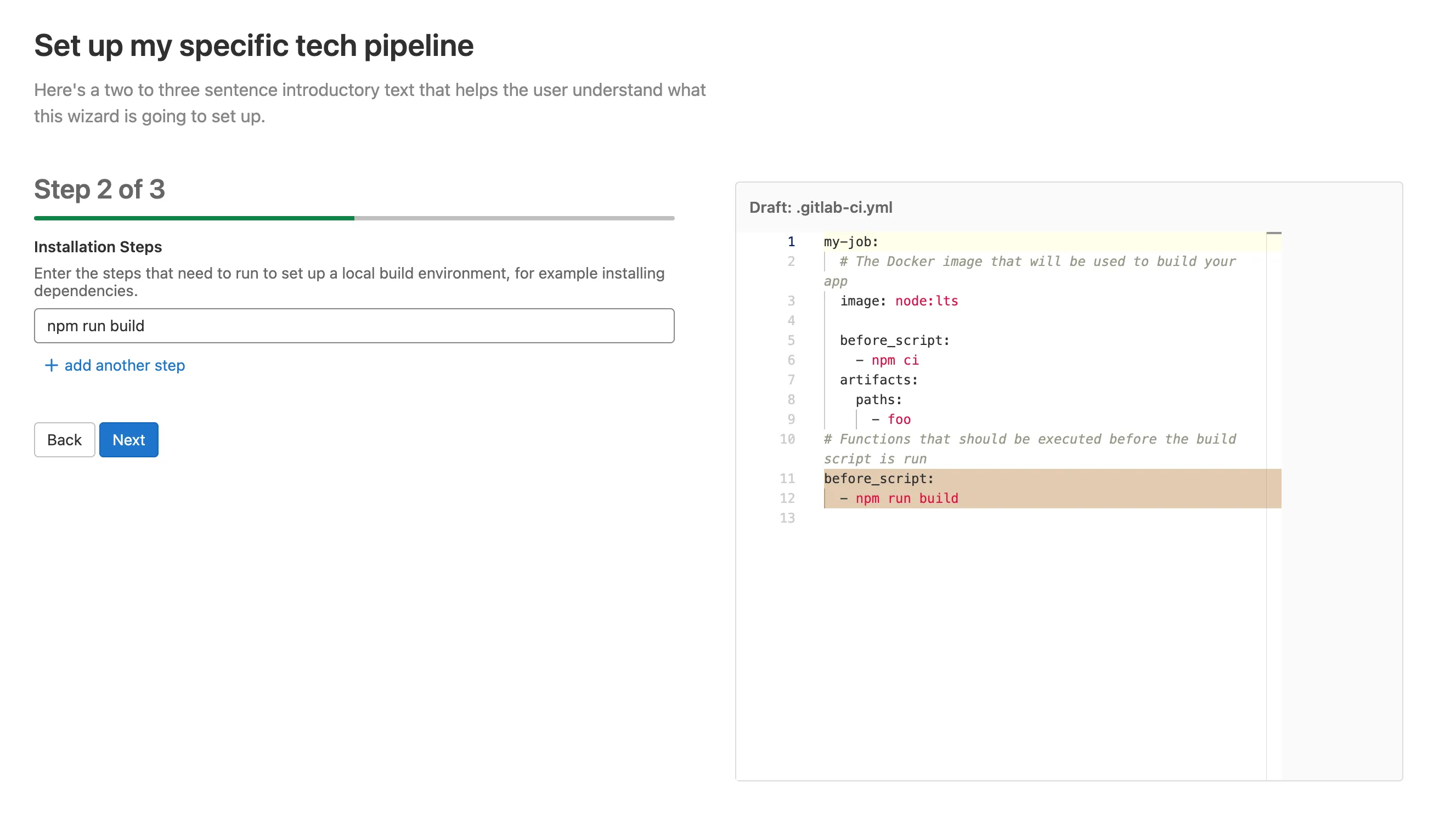
템플릿 파일은 여러 단계(step)를 정의합니다. 사용자에게 표시되는 마지막 단계는 항상 커밋 단계이며, 이는 템플릿 정의에 포함되지 않습니다. 이상적인 사용자 경험은 23단계로 구성되어 사용자에게 총 34단계가 표시됩니다.

사용 예시#

Vue 컴포넌트#

<!-- ~/my_feature/my_component.vue -->

<script>
  import PipelineWizard from '~/pipeline_wizard/pipeline_wizard.vue'
  import template from '~/pipeline_wizard/templates/my_template.yml';

  export default {
    name: "MyComponent",
    components: { PipelineWizard },
    data() {
      return { template }
    },
    methods: {
      onDone() {
        // redirect
      }
     }
  }
</script>

<template>
  <pipeline-wizard :template="template"
                   project-path="foo/bar"
                   default-branch="main"
                   @done="onDone" />
</template>

템플릿#

# ~/pipeline_wizard/templates/my_template.yml
id: gitlab/my-template
title: Set up my specific tech pipeline
description: Here's two or three introductory sentences that help the user understand what this wizard is going to set up.
steps:
  # Step 1
  - inputs:
      # First input widget
      - label: Select your build image
        description: A Docker image that we can use to build your app
        placeholder: node:lts
        widget: text
        target: $BUILD_IMAGE
        required: true
        pattern: '^(?:(?=[^:\/]{1,253})(?!-)[a-zA-Z0-9-]{1,63}(?<!-)(?:\.(?!-)[a-zA-Z0-9-]{1,63}(?<!-))*(?::[0-9]{1,5})?\/)?((?![._-])(?:[a-z0-9._-]*)(?<![._-])(?:\/(?![._-])[a-z0-9._-]*(?<![._-]))*)(?::(?![.-])[a-zA-Z0-9_.-]{1,128})?
        invalid-feedback: Please enter a valid docker image

      # Second input widget
      - label: Installation Steps
        description: "Enter the steps that need to run to set up a local build
          environment, for example installing dependencies."
        placeholder: npm ci
        widget: list
        target: $INSTALLATION_STEPS

    # This is the template to copy to the final pipeline file and updated with
    # the values input by the user. Comments are copied as-is.
    template:
      my-job:
        # The Docker image that will be used to build your app
        image: $BUILD_IMAGE

        before_script: $INSTALLATION_STEPS

        artifacts:
          paths:
            - foo

  # Step 2
  - inputs:
      # This is the only input widget for this step
      - label: Installation Steps
        description: "Enter the steps that need to run to set up a local build
          environment, for example installing dependencies."
        placeholder: npm ci
        widget: list
        target: $INSTALLATION_STEPS

    template:
      # Functions that should be executed before the build script runs
      before_script: $INSTALLATION_STEPS

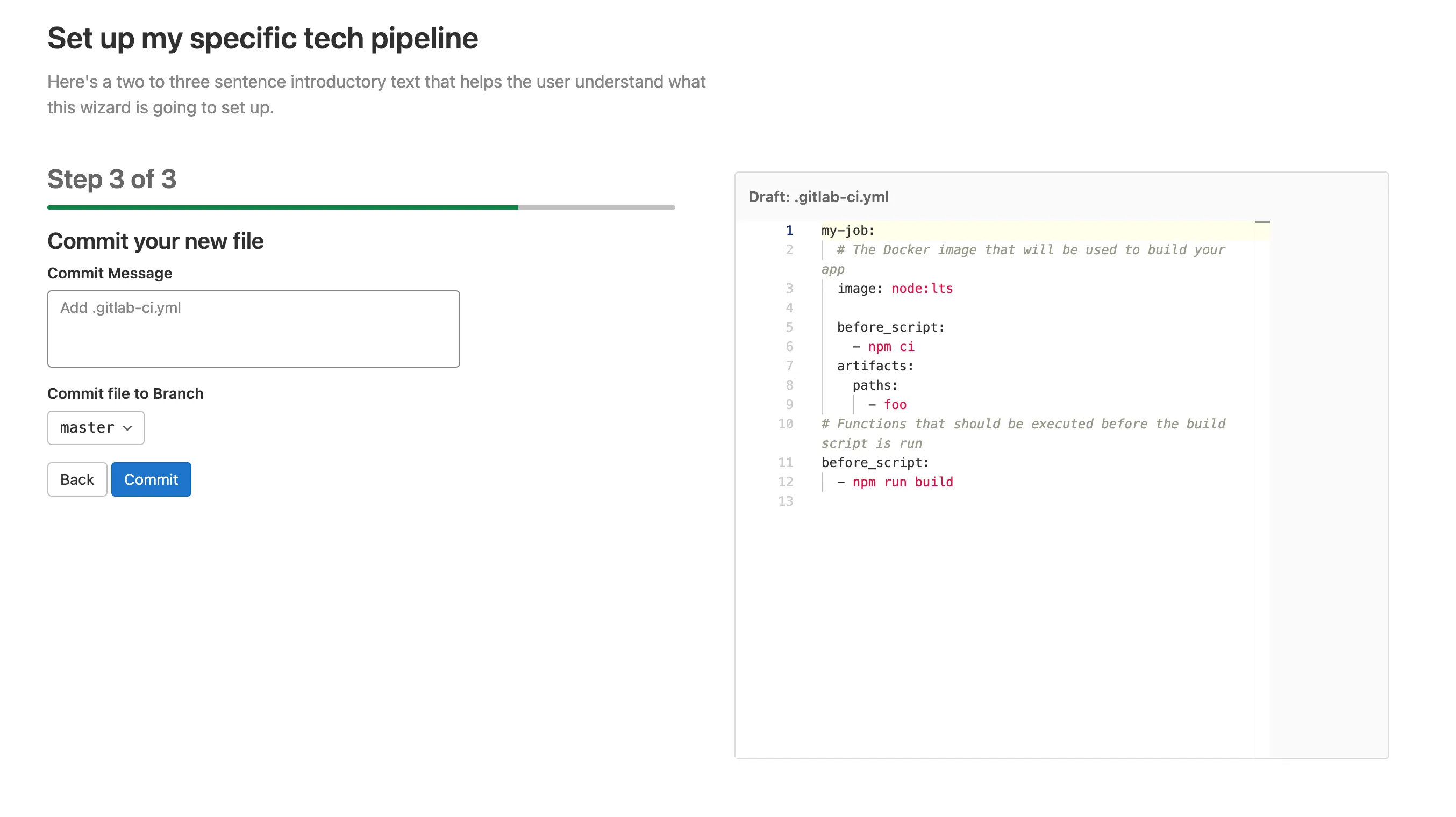
결과#

[

](/19.1/development/cicd/img/pipeline_wizard_sample_step1_v15_1.png)

[

](/19.1/development/cicd/img/pipeline_wizard_sample_step2_v15_1.png)

[

](/19.1/development/cicd/img/pipeline_wizard_sample_step3_v15_1.png)

커밋 단계#

Wizard의 마지막 단계는 항상 커밋 단계입니다. 사용자는 wizard의 props로 정의된 리포지터리에 새로 생성된 파일을 커밋할 수 있습니다. 사용자는 커밋할 브랜치를 변경할 수 있습니다. 향후 이터레이션에서 여기서 MR을 생성하는 기능이 추가될 예정입니다.

컴포넌트 API 레퍼런스#

Props#

  • template (필수): 파싱되지 않은 문자열로서의 템플릿 내용. 자세한 내용은 템플릿 파일 위치를 참조하세요.

  • project-path (필수): 최종 파일이 커밋될 프로젝트의 전체 경로

  • default-branch (필수): 커밋 단계에서 미리 선택될 브랜치. 사용자가 변경할 수 있습니다.

  • default-filename (선택, 기본값: .gitlab-ci.yml): 파일에 사용될 파일명. 템플릿 파일에서 재정의할 수 있습니다.

이벤트#

  • done - 파일이 커밋된 후 발생합니다. 예를 들어 사용자를 파이프라인으로 리다이렉트하는 데 사용하세요.

템플릿 파일 위치#

템플릿 파일은 일반적으로 ~/pipeline_wizard/templates/에 YAML 파일로 저장됩니다.

PipelineWizard 컴포넌트는 template 속성을 파싱되지 않은 String으로 받으며, Webpack은 위 폴더에서 .yml 파일을 문자열로 로드하도록 구성되어 있습니다. 다른 위치에서 파일을 로드해야 하는 경우, Webpack이 이를 Object로 파싱하지 않도록 확인하세요.

템플릿 레퍼런스#

템플릿#

템플릿 파일의 루트 요소에서 다음 속성들을 정의할 수 있습니다:

Name Required Type Description
id check-circle Yes string 고유한 템플릿 ID. 이 ID는 슬래시 /를 구분자로 하는 네임스페이싱 패턴을 따라야 합니다. GitLab 소스 코드에 커밋된 템플릿은 항상 gitlab로 시작해야 합니다. 예: gitlab/my-template
title check-circle Yes string 사용자에게 표시되는 페이지 제목. Wizard 위에 h1 제목으로 표시됩니다.
description check-circle Yes string 사용자에게 표시되는 페이지 설명.
filename dotted-circle No string 생성되는 파일의 이름. 기본값은 .gitlab-ci.yml입니다.
steps check-circle Yes list step 정의 목록.

step 레퍼런스#

step은 다단계(또는 다중 페이지) 프로세스에서 하나의 페이지를 구성합니다. 최종 .gitlab-ci.yml의 일부를 구성하는 하나 이상의 관련 입력 필드로 이루어집니다.

step에는 두 가지 속성이 포함됩니다:

Name Required Type Description
template check-circle Yes map 최종 .gitlab-ci.yml에 딥 머지될 원시 YAML. 이 template 섹션은 입력 필드의 값으로 대체되는 $ 기호로 표시된 변수를 포함할 수 있습니다.
inputs check-circle Yes list input 정의 목록.

input 레퍼런스#

각 step에는 하나 이상의 inputs가 포함될 수 있습니다. 이상적인 사용자 경험을 위해 세 개를 초과하지 않도록 합니다.

입력의 외관과 동작, 그리고 생성되는 YAML 타입(string, list 등)은 사용되는 widget에 따라 결정됩니다. widget: text는 텍스트 입력을 표시하고 사용자의 입력을 문자열로 템플릿에 삽입합니다. widget: list는 하나 이상의 입력 필드를 표시하고 목록을 삽입합니다.

모든 inputslabel, widget, 그리고 선택적으로 target을 가져야 하지만, 대부분의 속성은 사용되는 widget에 따라 달라집니다:

Name Required Type Description
label check-circle Yes string 입력 필드의 라벨.
widget check-circle Yes string 이 입력에 사용할 widget 유형.
target dotted-circle No string 입력 필드의 값으로 대체되어야 하는 step의 template 내 변수명. 예: $FOO.

Widgets#

Text#

widget: text로 사용합니다. YAML 파일에 string을 삽입합니다.

Name Required Type Description
label check-circle Yes string 입력 필드의 라벨.
description dotted-circle No string 입력 필드와 관련된 도움말 텍스트.
required dotted-circle No boolean 다음 단계로 진행하기 전에 사용자가 값을 제공해야 하는지 여부. 정의되지 않은 경우 false.
placeholder dotted-circle No string 입력 필드의 플레이스홀더.
pattern dotted-circle No string 다음 단계로 진행하기 전에 사용자의 입력이 일치해야 하는 정규 표현식.
invalidFeedback dotted-circle No string 패턴 유효성 검사가 실패했을 때 표시되는 도움말 텍스트.
default dotted-circle No string 필드의 기본값.
id dotted-circle No string 입력 필드 ID는 보통 자동으로 생성되지만 이 속성을 제공하여 재정의할 수 있습니다.
monospace dotted-circle No boolean 입력의 폰트를 모노스페이스로 설정합니다. 사용자가 코드 스니펫이나 셸 명령어를 입력할 때 유용합니다.

List#

widget: list로 사용합니다. YAML 파일에 list를 삽입합니다.

Name Required Type Description
label check-circle Yes string 입력 필드의 라벨.
description dotted-circle No string 입력 필드와 관련된 도움말 텍스트.
required dotted-circle No boolean 다음 단계로 진행하기 전에 사용자가 값을 제공해야 하는지 여부. 정의되지 않은 경우 false.
placeholder dotted-circle No string 입력 필드의 플레이스홀더.
pattern dotted-circle No string 다음 단계로 진행하기 전에 사용자의 입력이 일치해야 하는 정규 표현식.
invalidFeedback dotted-circle No string 패턴 유효성 검사가 실패했을 때 표시되는 도움말 텍스트.
default dotted-circle No list 목록의 기본값.
id dotted-circle No string 입력 필드 ID는 보통 자동으로 생성되지만 이 속성을 제공하여 재정의할 수 있습니다.

Checklist#

widget: checklist로 사용합니다. 다음 단계로 진행하기 전에 체크해야 하는 체크박스 목록을 삽입합니다.

Name Required Type Description
title dotted-circle No string 체크리스트 항목 위에 표시되는 제목.
items dotted-circle No list 체크해야 하는 항목 목록. 각 항목은 하나의 체크박스에 해당하며, 문자열 또는 checklist item이 될 수 있습니다.
Checklist Item#
Name Required Type Description
text check-circle Yes string 체크리스트 항목 위에 표시되는 제목.
help dotted-circle No string 항목을 설명하는 도움말 텍스트.
id dotted-circle No string 입력 필드 ID는 보통 자동으로 생성되지만 이 속성을 제공하여 재정의할 수 있습니다.

Pipeline Wizard

GitLab v19.1
원문 보기
요약

Pipeline Wizard는 사용자가 입력 필드를 사용하여 파이프라인을 만들 수 있도록 돕는 Vue 프론트엔드 컴포넌트입니다. Pipeline Wizard는 사용자 플로를 구성하는 단일 템플릿 파일을 필요로 합니다.

Pipeline Wizard는 사용자가 입력 필드를 사용하여 파이프라인을 만들 수 있도록 돕는 Vue 프론트엔드 컴포넌트입니다. 입력 필드의 유형과 최종 파이프라인의 형태는 YAML 템플릿으로 구성됩니다.

Pipeline Wizard는 사용자 플로를 구성하는 단일 템플릿 파일을 필요로 합니다. Wizard는 파일의 내용과 독립적으로 동작하므로, 다양한 플로를 표시하는 데 사용할 수 있습니다. 예를 들어 정적 사이트용 템플릿 파일, Docker 이미지용 템플릿 파일, 모바일 앱용 템플릿 파일 등을 각각 만들 수 있습니다. 첫 번째 이터레이션으로서 이러한 템플릿들은 GitLab 소스 코드의 일부입니다.

템플릿 파일은 여러 단계(step)를 정의합니다. 사용자에게 표시되는 마지막 단계는 항상 커밋 단계이며, 이는 템플릿 정의에 포함되지 않습니다. 이상적인 사용자 경험은 23단계로 구성되어 사용자에게 총 34단계가 표시됩니다.

사용 예시#

Vue 컴포넌트#

<!-- ~/my_feature/my_component.vue -->

<script>
  import PipelineWizard from '~/pipeline_wizard/pipeline_wizard.vue'
  import template from '~/pipeline_wizard/templates/my_template.yml';

  export default {
    name: "MyComponent",
    components: { PipelineWizard },
    data() {
      return { template }
    },
    methods: {
      onDone() {
        // redirect
      }
     }
  }
</script>

<template>
  <pipeline-wizard :template="template"
                   project-path="foo/bar"
                   default-branch="main"
                   @done="onDone" />
</template>

템플릿#

# ~/pipeline_wizard/templates/my_template.yml
id: gitlab/my-template
title: Set up my specific tech pipeline
description: Here's two or three introductory sentences that help the user understand what this wizard is going to set up.
steps:
  # Step 1
  - inputs:
      # First input widget
      - label: Select your build image
        description: A Docker image that we can use to build your app
        placeholder: node:lts
        widget: text
        target: $BUILD_IMAGE
        required: true
        pattern: '^(?:(?=[^:\/]{1,253})(?!-)[a-zA-Z0-9-]{1,63}(?<!-)(?:\.(?!-)[a-zA-Z0-9-]{1,63}(?<!-))*(?::[0-9]{1,5})?\/)?((?![._-])(?:[a-z0-9._-]*)(?<![._-])(?:\/(?![._-])[a-z0-9._-]*(?<![._-]))*)(?::(?![.-])[a-zA-Z0-9_.-]{1,128})?
        invalid-feedback: Please enter a valid docker image

      # Second input widget
      - label: Installation Steps
        description: "Enter the steps that need to run to set up a local build
          environment, for example installing dependencies."
        placeholder: npm ci
        widget: list
        target: $INSTALLATION_STEPS

    # This is the template to copy to the final pipeline file and updated with
    # the values input by the user. Comments are copied as-is.
    template:
      my-job:
        # The Docker image that will be used to build your app
        image: $BUILD_IMAGE

        before_script: $INSTALLATION_STEPS

        artifacts:
          paths:
            - foo

  # Step 2
  - inputs:
      # This is the only input widget for this step
      - label: Installation Steps
        description: "Enter the steps that need to run to set up a local build
          environment, for example installing dependencies."
        placeholder: npm ci
        widget: list
        target: $INSTALLATION_STEPS

    template:
      # Functions that should be executed before the build script runs
      before_script: $INSTALLATION_STEPS

결과#

[

](/19.1/development/cicd/img/pipeline_wizard_sample_step1_v15_1.png)

[

](/19.1/development/cicd/img/pipeline_wizard_sample_step2_v15_1.png)

[

](/19.1/development/cicd/img/pipeline_wizard_sample_step3_v15_1.png)

커밋 단계#

Wizard의 마지막 단계는 항상 커밋 단계입니다. 사용자는 wizard의 props로 정의된 리포지터리에 새로 생성된 파일을 커밋할 수 있습니다. 사용자는 커밋할 브랜치를 변경할 수 있습니다. 향후 이터레이션에서 여기서 MR을 생성하는 기능이 추가될 예정입니다.

컴포넌트 API 레퍼런스#

Props#

  • template (필수): 파싱되지 않은 문자열로서의 템플릿 내용. 자세한 내용은 템플릿 파일 위치를 참조하세요.

  • project-path (필수): 최종 파일이 커밋될 프로젝트의 전체 경로

  • default-branch (필수): 커밋 단계에서 미리 선택될 브랜치. 사용자가 변경할 수 있습니다.

  • default-filename (선택, 기본값: .gitlab-ci.yml): 파일에 사용될 파일명. 템플릿 파일에서 재정의할 수 있습니다.

이벤트#

  • done - 파일이 커밋된 후 발생합니다. 예를 들어 사용자를 파이프라인으로 리다이렉트하는 데 사용하세요.

템플릿 파일 위치#

템플릿 파일은 일반적으로 ~/pipeline_wizard/templates/에 YAML 파일로 저장됩니다.

PipelineWizard 컴포넌트는 template 속성을 파싱되지 않은 String으로 받으며, Webpack은 위 폴더에서 .yml 파일을 문자열로 로드하도록 구성되어 있습니다. 다른 위치에서 파일을 로드해야 하는 경우, Webpack이 이를 Object로 파싱하지 않도록 확인하세요.

템플릿 레퍼런스#

템플릿#

템플릿 파일의 루트 요소에서 다음 속성들을 정의할 수 있습니다:

Name Required Type Description
id check-circle Yes string 고유한 템플릿 ID. 이 ID는 슬래시 /를 구분자로 하는 네임스페이싱 패턴을 따라야 합니다. GitLab 소스 코드에 커밋된 템플릿은 항상 gitlab로 시작해야 합니다. 예: gitlab/my-template
title check-circle Yes string 사용자에게 표시되는 페이지 제목. Wizard 위에 h1 제목으로 표시됩니다.
description check-circle Yes string 사용자에게 표시되는 페이지 설명.
filename dotted-circle No string 생성되는 파일의 이름. 기본값은 .gitlab-ci.yml입니다.
steps check-circle Yes list step 정의 목록.

step 레퍼런스#

step은 다단계(또는 다중 페이지) 프로세스에서 하나의 페이지를 구성합니다. 최종 .gitlab-ci.yml의 일부를 구성하는 하나 이상의 관련 입력 필드로 이루어집니다.

step에는 두 가지 속성이 포함됩니다:

Name Required Type Description
template check-circle Yes map 최종 .gitlab-ci.yml에 딥 머지될 원시 YAML. 이 template 섹션은 입력 필드의 값으로 대체되는 $ 기호로 표시된 변수를 포함할 수 있습니다.
inputs check-circle Yes list input 정의 목록.

input 레퍼런스#

각 step에는 하나 이상의 inputs가 포함될 수 있습니다. 이상적인 사용자 경험을 위해 세 개를 초과하지 않도록 합니다.

입력의 외관과 동작, 그리고 생성되는 YAML 타입(string, list 등)은 사용되는 widget에 따라 결정됩니다. widget: text는 텍스트 입력을 표시하고 사용자의 입력을 문자열로 템플릿에 삽입합니다. widget: list는 하나 이상의 입력 필드를 표시하고 목록을 삽입합니다.

모든 inputslabel, widget, 그리고 선택적으로 target을 가져야 하지만, 대부분의 속성은 사용되는 widget에 따라 달라집니다:

Name Required Type Description
label check-circle Yes string 입력 필드의 라벨.
widget check-circle Yes string 이 입력에 사용할 widget 유형.
target dotted-circle No string 입력 필드의 값으로 대체되어야 하는 step의 template 내 변수명. 예: $FOO.

Widgets#

Text#

widget: text로 사용합니다. YAML 파일에 string을 삽입합니다.

Name Required Type Description
label check-circle Yes string 입력 필드의 라벨.
description dotted-circle No string 입력 필드와 관련된 도움말 텍스트.
required dotted-circle No boolean 다음 단계로 진행하기 전에 사용자가 값을 제공해야 하는지 여부. 정의되지 않은 경우 false.
placeholder dotted-circle No string 입력 필드의 플레이스홀더.
pattern dotted-circle No string 다음 단계로 진행하기 전에 사용자의 입력이 일치해야 하는 정규 표현식.
invalidFeedback dotted-circle No string 패턴 유효성 검사가 실패했을 때 표시되는 도움말 텍스트.
default dotted-circle No string 필드의 기본값.
id dotted-circle No string 입력 필드 ID는 보통 자동으로 생성되지만 이 속성을 제공하여 재정의할 수 있습니다.
monospace dotted-circle No boolean 입력의 폰트를 모노스페이스로 설정합니다. 사용자가 코드 스니펫이나 셸 명령어를 입력할 때 유용합니다.

List#

widget: list로 사용합니다. YAML 파일에 list를 삽입합니다.

Name Required Type Description
label check-circle Yes string 입력 필드의 라벨.
description dotted-circle No string 입력 필드와 관련된 도움말 텍스트.
required dotted-circle No boolean 다음 단계로 진행하기 전에 사용자가 값을 제공해야 하는지 여부. 정의되지 않은 경우 false.
placeholder dotted-circle No string 입력 필드의 플레이스홀더.
pattern dotted-circle No string 다음 단계로 진행하기 전에 사용자의 입력이 일치해야 하는 정규 표현식.
invalidFeedback dotted-circle No string 패턴 유효성 검사가 실패했을 때 표시되는 도움말 텍스트.
default dotted-circle No list 목록의 기본값.
id dotted-circle No string 입력 필드 ID는 보통 자동으로 생성되지만 이 속성을 제공하여 재정의할 수 있습니다.

Checklist#

widget: checklist로 사용합니다. 다음 단계로 진행하기 전에 체크해야 하는 체크박스 목록을 삽입합니다.

Name Required Type Description
title dotted-circle No string 체크리스트 항목 위에 표시되는 제목.
items dotted-circle No list 체크해야 하는 항목 목록. 각 항목은 하나의 체크박스에 해당하며, 문자열 또는 checklist item이 될 수 있습니다.
Checklist Item#
Name Required Type Description
text check-circle Yes string 체크리스트 항목 위에 표시되는 제목.
help dotted-circle No string 항목을 설명하는 도움말 텍스트.
id dotted-circle No string 입력 필드 ID는 보통 자동으로 생성되지만 이 속성을 제공하여 재정의할 수 있습니다.