





InfoGrab Docs

환경 구성 설정

요약

Product 메뉴를 선택하고 System Console을 선택한 후 Environment를 선택하여 System Console에서 다음 환경 구성 옵션을 검토하고 관리하세요: 셀프 호스팅 Mattermost 배포를 관리하는 시스템 관리자는 다음 테이블에서 설명한 대로 config.json 파일을 편집할 수 있습니다.

Product 메뉴를 선택하고 System Console을 선택한 후 Environment를 선택하여 System Console에서 다음 환경 구성 옵션을 검토하고 관리하세요:

Tip

셀프 호스팅 Mattermost 배포를 관리하는 시스템 관리자는 다음 테이블에서 설명한 대로 config.json 파일을 편집할 수 있습니다. 아래 각 구성 값에는 JSON 인식 도구를 사용하여 config.json 파일에서 프로그래밍 방식으로 값에 접근하기 위한 JSON 경로가 포함되어 있습니다. 예를 들어, SiteURL 값은 ServiceSettings 아래에 있습니다.

    • jq 같은 도구를 사용하는 경우: cat config/config.json | jq '.ServiceSettings.SiteURL'
    • config.json 파일을 수동으로 작업하는 경우, ServiceSettings 같은 객체를 찾은 다음 해당 객체 내에서 SiteURL 키를 찾으세요.

웹 서버#

셀프 호스팅 배포에서는 System Console > Environment > Web Server로 이동하거나 다음 테이블에서 설명한 대로 config.json 파일을 업데이트하여 Mattermost가 배포된 네트워크 환경을 구성할 수 있습니다. 이 섹션의 구성 설정 변경 사항은 적용되기 전에 서버를 다시 시작해야 합니다.

사이트 URL#

The URL that users use to access Mattermost. The port number is required if it’s not a standard port, such as 80 or 443. This field is required. Select the Test Live URL button in the System Console to validate the Site URL.- System Config path: Environment > Web Server - config.json setting: ServiceSettings > SiteURL - Environment variable: MM_SERVICESETTINGS_SITEURL
Note
    • URL에는 https://example.com/company/mattermost 와 같이 서브 경로가 포함될 수 있습니다.
    • 사이트 URL 값을 변경하면 데스크톱 앱에서 로그아웃한 후 새 도메인으로 다시 로그인하세요.
    • 사이트 URL이 설정되지 않은 경우:
    • 이메일 알림에 깨진 링크가 포함되고, 이메일 일괄 처리가 작동하지 않습니다.
    • GitLab, Google, Entra ID를 포함한 OAuth 2.0을 통한 인증이 실패합니다.
    • 플러그인이 예상대로 작동하지 않을 수 있습니다.

최대 URL 길이#

The longest URL, in characters, including query parameters, accepted by the Mattermost server. Longer URLs are rejected, and API calls fail with an error. Numeric value. Default is 2048 characters.- System Config path: N/A - config.json setting: ServiceSettings > MaximumURLLength > 2048 - Environment variable: MM_SERVICESETTINGS_MAXIMUMURLLENGTH
The address and port to which to bind and listen. Specifying :8065 will bind to all network interfaces. Specifying 127.0.0.1:8065 will only bind to the network interface having that IP address.

웹 서버 수신 주소#

The address and port to which to bind and listen. Specifying :8065 will bind to all network interfaces. Specifying 127.0.0.1:8065 will only bind to the network interface having that IP address. If you choose a port of a lower level (called “system ports” or “well-known ports”, in the range of 0-1023), you must have permissions to bind to that port.- System Config path: Environment > Web Server - config.json setting: ServiceSettings > ListenAddress - Environment variable: MM_SERVICESETTINGS_LISTENADDRESS
Note

웹 서버는 address:port (예: ":8065")를 사용하는 반면, Metrics 는 포트 번호만 사용합니다 (예: 8067).

    • true: Forwards all insecure traffic from port 80 to secure port 443.
    • false: (Default) When using a proxy such as NGINX in front of Mattermost this setting is unnecessary and should be set to false.

포트 80을 443으로 전달#

Forward insecure traffic from port 80 to port 443. - true: Forwards all insecure traffic from port 80 to secure port 443. - false: (Default) When using a proxy such as NGINX in front of Mattermost this setting is unnecessary and should be set to false.- System Config path: Environment > Web Server - config.json setting: ServiceSettings > Forward80To443 > false - Environment variable: MM_SERVICESETTINGS_FORWARD80TO443
  • Not specified: Mattermost will connect over an unsecure connection.
  • TLS: Encrypts the communication between Mattermost clients and your server.

웹 서버 연결 보안#

Connection security between Mattermost clients and the server. - Not specified: Mattermost will connect over an unsecure connection. - TLS: Encrypts the communication between Mattermost clients and your server.- System Config path: Environment > Web Server - config.json setting: ServiceSettings > ConnectionSecurity - Environment variable: MM_SERVICESETTINGS_CONNECTIONSECURITY

See the setting up TLS for Mattermost for details.

TLS 인증서 파일#

The path to the certificate file to use for TLS connection security. String input.- System Config path: Environment > Web Server - config.json setting: ServiceSettings > TLSCertFile - Environment variable: MM_SERVICESETTINGS_TLSCERTFILE

TLS 키 파일#

The path to the TLS key file to use for TLS connection security. String input.- System Config path: Environment > Web Server - config.json setting: ServiceSettings > TLSKeyFile - Environment variable: MM_SERVICESETTINGS_TLSKEYFILE
  • true: The certificate will be retrieved when a client attempts to connect from a new domain. This will work with multiple domains.
  • false: (Default) Manual certificate specification based on the TLS Certificate File and TLS Key File specified above.

Let's Encrypt 사용#

Enable the automatic retrieval of certificates from Let’s Encrypt. - true: The certificate will be retrieved when a client attempts to connect from a new domain. This will work with multiple domains. - false: (Default) Manual certificate specification based on the TLS Certificate File and TLS Key File specified above.- System Config path: Environment > Web Server - config.json setting: ServiceSettings > UseLetsEncrypt > false - Environment variable: MM_SERVICESETTINGS_USELETSENCRYPT

See the setting up TLS for Mattermost for details on setting up Let's Encrypt.

Let's Encrypt 인증서 캐시 파일#

The path to the file where certificates and other data about the Let’s Encrypt service will be stored. File path input.- System Config path: Environment > Web Server - config.json setting: ServiceSettings > LetsEncryptCertificateCacheFile - Environment variable: MM_SERVICESETTINGS_LETSENCRYPTCERTIFICATECACHEFILE

읽기 타임아웃#

Maximum time allowed from when the connection is accepted to when the request body is fully read. Numerical input in seconds. Default is 300 seconds.- System Config path: Environment > Web Server - config.json setting: ServiceSettings > ReadTimeout > 300 - Environment variable: MM_SERVICESETTINGS_READTIMEOUT
If using HTTP (insecure), this is the maximum time, in seconds, allowed from the end of reading the request headers until the response is written. If using HTTPS, it's the total time, in seconds, from when the connection is accepted until the response is written. Default is 300 seconds.

쓰기 타임아웃#

- If using HTTP (insecure), this is the maximum time allowed from the end of reading the request headers until the response is written. - If using HTTPS, it's the total time from when the connection is accepted until the response is written. Numerical input in seconds. Default is 300 seconds.- System Config path: Environment > Web Server - config.json setting: ServiceSettings > WriteTimeout > 300 - Environment variable: MM_SERVICESETTINGS_WRITETIMEOUT

유휴 타임아웃#

Set an explicit idle timeout in the HTTP server. This is the maximum time allowed before an idle connection is disconnected. Numerical input in seconds. Default is 300 seconds.- System Config path: Environment > Web Server - config.json setting: ServiceSettings > IdleTimeout > 300 - Environment variable: MM_SERVICESETTINGS_IDLETIMEOUT
  • gzip: (Default) The Mattermost server will serve static files compressed with gzip to improve performance.
  • Uncompressed: The Mattermost server will serve static files uncompressed.
  • Disabled: The Mattermost server will not serve static files.

웹 서버 모드#

We recommend gzip to improve performance unless your environment has specific restrictions, such as a web proxy that distributes gzip files poorly. - gzip: (Default) The Mattermost server will serve static files compressed with gzip to improve performance. gzip compression applies to the HTML, CSS, Javascript, and other static content files that make up the Mattermost web client. - Uncompressed: The Mattermost server will serve static files uncompressed. - Disabled: The Mattermost server will not serve static files.- System Config path: Environment > Web Server - config.json setting: ServiceSettings > WebserverMode > "gzip" - Environment variable: MM_SERVICESETTINGS_WEBSERVERMODE
  • true: Outgoing HTTPS requests, including S3 clients, can accept unverified, self-signed certificates.
  • false: (Default) Only secure HTTPS requests are allowed.

안전하지 않은 발신 연결 활성화#

Configure Mattermost to allow insecure outgoing connections. - true: Outgoing HTTPS requests, including S3 clients, can accept unverified, self-signed certificates. For example, outgoing webhooks to a server with a self-signed TLS certificate, using any domain, will be allowed, and will skip TLS verification. - false: (Default) Only secure HTTPS requests are allowed.- System Config path: Environment > Web Server - config.json setting: ServiceSettings > EnableInsecureOutgoingConnections > false - Environment variable: MM_SERVICESETTINGS_ENABLEINSECUREOUTGOINGCONNECTIONS
Warning

이 기능을 활성화하면 해당 연결이 중간자 공격(man-in-the-middle attacks)에 취약해집니다.

관리되는 리소스 경로#

A comma-separated list of paths within the Mattermost domain that are managed by a third party service instead of Mattermost itself. Links to these paths will be opened in a new tab/window by Mattermost apps. For example, if Mattermost is running on https://mymattermost.com, setting this to conference will cause links such as https://mymattermost.com/conference to open in a new window.- System Config path: Environment > Web Server - config.json setting: ServiceSettings > ManagedResourcePaths - Environment variable: MM_SERVICESETTINGS_MANAGEDRESOURCEPATHS
Note

Mattermost 데스크톱 앱을 사용하는 경우 브라우저 대신 데스크톱 앱 내에서 링크를 열기 위한 추가 구성이 필요합니다. 자세한 내용은 desktop managed resources 문서를 참조하세요.

디스크에서 구성 다시 로드#

You must change the database line in the config.json file, and then reload configuration to fail over without taking the server down. Select the Reload configuration from disk button in the System Console after changing your database configuration. Then, go to Environment > Database and select Recycle Database Connections to complete the reload.- System Config path: Environment > Web Server - config.json setting: N/A - Environment variable: N/A

모든 캐시 제거#

Purge all in-memory caches for sessions, accounts, and channels. Select the Purge All Caches button in the System Console to purge all caches.- System Config path: Environment > Web Server - config.json setting: N/A - Environment variable: N/A
Note

캐시를 제거하면 성능에 악영향을 미칠 수 있습니다. 고가용성 클러스터 기반 배포 에서는 클러스터 내 모든 서버의 캐시를 제거하려고 시도합니다.

웹소켓 URL#

You can configure the server to instruct clients on where they should try to connect websockets to. String input.- System Config path: N/A - config.json setting: ServiceSettings > WebsocketURL > "" - Environment variable: MM_SERVICESETTINGS_WEBSOCKETURL
Note

사이트 URL 구성 설정과 일치하는 단일 웹소켓 URL을 구성하는 것을 강력히 권장합니다.

라이선스 파일 위치#

The path and filename of the license file on disk. On startup, if Mattermost can't find a valid license in the database from a previous upload, it looks in this path for the license file. String input. Can be an absolute path or a path relative to the mattermost directory.- System Config path: N/A - config.json setting: ServiceSettings > LicenseFileLocation > "" - Environment variable: MM_SERVICESETTINGS_LICENSEFILELOCATION

TLS 최소 버전#

The minimum TLS version used by the Mattermost server. String input. Default is 1.2.- System Config path: N/A - config.json setting: ServiceSettings > TLSMinVer > 1.2 - Environment variable: MM_SERVICESETTINGS_TLSMINVER
Note

이 설정은 NGINX와 같은 역방향 프록시 레이어를 사용하지 않고 내장 서버 바이너리를 직접 사용하는 경우에만 적용됩니다.

신뢰할 수 있는 프록시 IP 헤더#

Specified headers that will be checked, one by one, for IP addresses (order is important). All other headers are ignored. String array input consisting of header names, such as ["X-Forwarded-For", "X-Real-Ip"].- System Config path: N/A - config.json setting: ServiceSettings > TrustedProxyIPHeader > [] - Environment variable: MM_SERVICESETTINGS_TRUSTEDPROXYIPHEADER
Note
    • 기본값 [] 은 어떤 헤더도 신뢰하지 않음을 의미합니다.
    • 클라이언트가 헤더를 전송하여 속도 제한 및/또는 감사 로그를 우회하는 것을 방지하기 위해, 프록시 없이 Mattermost가 실행되는 경우 기본 설정을 유지하는 것을 권장합니다.
    • 역방향 프록시를 사용하는 환경의 경우, 역방향 프록시가 헤더를 설정하는 한 이 문제가 발생하지 않습니다. 해당 환경에서는 역방향 프록시가 설정한 헤더만 명시적으로 허용하고 추가 값은 허용하지 마세요.
    • true: Adds the Strict Transport Security (HSTS) header to all responses, forcing the browser to request all resources via HTTPS.
    • false: (Default) No restrictions on TLS transport. Strict Transport Security (HSTS) header isn't added to responses.

엄격한 전송 보안 (HSTS) 활성화#

- true: Adds the Strict Transport Security (HSTS) header to all responses, forcing the browser to request all resources via HTTPS. - false: (Default) No restrictions on TLS transport. Strict Transport Security (HSTS) header isn't added to responses.- System Config path: N/A - config.json setting: ServiceSettings > TLSStrictTransport > false - Environment variable: MM_SERVICESETTINGS_TLSSTRICTTRANSPORT

See the Strict-Transport-Security documentation for details.

보안 TLS 전송 만료#

The time, in seconds, that the browser remembers a site is only to be accessed using HTTPS. After this period, a site can't be accessed using HTTP unless TLSStrictTransport is set to true. Numerical input. Default is 63072000 (2 years).- System Config path: N/A - config.json setting: ServiceSettings > TLSStrictTransportMaxAge > 63072000 - Environment variable: MM_SERVICESETTINGS_TLSSTRICTTRANSPORTMAXAGE

See the Strict-Transport-Security documentation for details.

TLS 암호 덮어쓰기#

Set TLS ciphers overwrites to meet requirements from legacy clients which don't support modern ciphers, or to limit the types of accepted ciphers. If none specified, the Mattermost server assumes a set of currently considered secure ciphers, and allows overwrites in the edge case. String array input.- System Config path: N/A - config.json setting: ServiceSettings > TLSOverwriteCiphers > [] - Environment variable: MM_SERVICESETTINGS_TLSOVERWRITECIPHERS
Note
    • 이 설정은 NGINX와 같은 역방향 프록시 레이어를 사용하지 않고 내장 서버 바이너리를 직접 사용하는 경우에만 적용됩니다.
    • 안전한 것으로 간주되는 암호 목록은 /model/config.goServerTLSSupportedCiphers 변수를 참조하세요.

고루틴 상태 임계값#

Set a threshold on the number of goroutines when the Mattermost system is considered to be in a healthy state. When goroutines exceed this limit, a warning is returned in the server logs. Numeric input. Default is -1 which turns off checking for the threshold.- System Config path: N/A - config.json setting: ServiceSettings > GoroutineHealthThreshold > -1 - Environment variable: MM_SERVICESETTINGS_GOROUTINEHEALTHTHRESHOLD
  • true: (Default) Allows cookies for subdomains by setting the domain parameter on Mattermost cookies.
  • false: Cookies not allowed for subdomains.

서브도메인 쿠키 허용#

- true: (Default) Allows cookies for subdomains by setting the domain parameter on Mattermost cookies. - false: Cookies aren't allowed for subdomains.- System Config path: N/A - config.json setting: ServiceSettings > AllowCookiesForSubdomains > true - Environment variable: MM_SERVICESETTINGS_ALLOWCOOKIESFORSUBDOMAINS

클러스터 로그 타임아웃#

Define the frequency, in milliseconds, of cluster request time logging for performance monitoring. Numerical input. Default is 2000 milliseconds (2 seconds).- System Config path: N/A - config.json setting: ServiceSettings > ClusterLogTimeoutMilliseconds > 2000 - Environment variable: MM_SERVICESETTINGS_CLUSTERLOGTIMEOUTMILLISECONDS

See the performance monitoring documentation for details.

최대 페이로드 크기#

The maximum payload size in bytes for all APIs except APIs that receive a file as an input. For example, the upload attachment API or the API to upload a custom emoji. Numerical value. Default is 300000 (300 kB).- System Config path: N/A - config.json setting: ServiceSettings > MaximumPayloadSizeBytes > 300000 - Environment variable: MM_SERVICESETTINGS_MAXIMUMPAYLOADSIZEBYTES

데이터베이스#

셀프 호스팅 배포에서는 System Console > Environment > Database로 이동하거나 다음 테이블에서 설명한 대로 config.json 파일을 편집하여 Mattermost가 배포된 데이터베이스 환경을 구성할 수 있습니다. 이 섹션의 구성 설정 변경 사항은 적용되기 전에 서버를 다시 시작해야 합니다.

드라이버 이름#

The type of database. Can be either: - mysql: (Default) Enables driver to MySQL database. - postgres: Enables driver to PostgreSQL database.- System Config path: N/A - config.json setting: SqlSettings > DriverName - Environment variable: MM_SQLSETTINGS_DRIVERNAME

데이터 소스#

The connection string to the master database. String input.- System Config path: N/A - config.json setting: SqlSettings > DataSource - Environment variable: MM_SQLSETTINGS_DATASOURCE

PostgreSQL 데이터베이스#

Driver Name을 postgres로 설정한 경우, 다음 형식의 연결 문자열을 사용하세요:

postgres://mmuser:password@hostname_or_IP:5432/mattermost_test?sslmode=disable&connect_timeout=10

PostgreSQL 데이터베이스에서 TLS 사용

PostgreSQL 서버에 대한 연결을 암호화하는 매개변수는 sslmode입니다. PostgreSQL 서버와 상호 작용하는 데 사용되는 라이브러리는 pq입니다. 현재 표준 PostgreSQL 클라이언트 psql "sslmode=value"에 전달할 수 있는 모든 값을 사용하는 것은 불가능합니다. 자세한 내용은 SSL 모드 설명 문서를 참조하세요.

데이터베이스 관리자는 아래에 설명된 지원되는 값에 따라 기능을 구성해야 합니다.

Short description of the sslmode parameterValueExample of a data source name
Don't use TLS / SSL encryption against the PostgreSQL server. Default value in file config.jsondisablepostgres://mmuser:password@hostname_or_IP:5432/mattermost_test ?sslmode=disable&connect_timeout=10
The data is encrypted and the network is trusted. Default value is sslmode when omitted.requirepostgres://mmuser:password@hostname_or_IP:5432/mattermost_test ?sslmode=require&connect_timeout=10
The data is encrypted when connecting to a trusted server.verify-capostgres://mmuser:password@hostname_or_IP:5432/mattermost_test ?sslmode=verify-ca&connect_timeout=10
The data is encrypted when connecting to a trusted server.verify-fullpostgres://mmuser:password@hostname_or_IP:5432/mattermost_test ?sslmode=verify-full&connect_timeout=10

MySQL 데이터베이스#

드라이버 이름을 mysql로 설정한 경우, charset 대신 collation을 사용하는 것을 권장합니다.

collation을 지정하려면:

"SqlSettings": {
    "DataSource": "<mmuser:password>@tcp(hostname or IP:3306)/mattermost?charset=utf8mb4,utf8&collation=utf8mb4_general_ci",
    [...]
}

collation을 생략하면 기본 collation인 utf8mb4_general_ci가 사용됩니다:

"SqlSettings": {
  "DataSource": "<mmuser:password>@tcp(hostname or IP:3306)/mattermost?charset=utf8mb4,utf8",
  [...]
}
Note

MySQL 8.0 이상을 사용하는 경우 기본 collation이 utf8mb4_0900_ai_ci로 변경되었습니다. MySQL 8.0 지원에 대한 자세한 내용은 Database Software Requirements 문서를 참조하세요.

MySQL 데이터베이스에서 TLS 사용

MySQL 서버에 대한 연결을 암호화하는 매개변수는 tls입니다.

MySQL과 상호 작용하는 데 사용되는 라이브러리는 Go-MySQL-Driver입니다.

현재 표준 MySQL 클라이언트 mysql --ssl-mode=value에 전달할 수 있는 모든 값을 사용하는 것은 불가능합니다.

8.0 버전 예시는 연결 암호화 옵션 요약 문서를 참조하세요.

데이터베이스 관리자는 아래에 설명된 지원되는 값에 따라 기능을 구성해야 합니다.

Short description of the tls parameterValueExample of a data source name
Don't use TLS / SSL encryption against MySQL server.false"<mmuser:password>@tcp(hostname or IP:3306)/mattermost_test ?charset=utf8mb4,utf8&writeTimeout=30s&tls=false"
Use TLS / SSL encryption against MySQL server.true"<mmuser:password>@tcp(hostname or IP:3306)/mattermost_test ?charset=utf8mb4,utf8&writeTimeout=30s&tls=true"
Use TLS / SSL encryption with a self- signed certificate against MySQL server.skip-verify"<mmuser:password>@tcp(hostname or IP:3306)/mattermost_test ?charset=utf8mb4,utf8&writeTimeout=30s&tls=skip-verify"
Use TLS / SSL encryption if server advertises a possible fallback; unencrypted if it's not advertised.preferred"<mmuser:password>@tcp(hostname or IP:3306)/mattermost_test ?charset=utf8mb4,utf8&writeTimeout=30s&tls=preferred"

AWS 고가용성 RDS 클러스터 배포#

AWS 고가용성 RDS 클러스터 배포의 경우, AWS 장애 조치 처리의 이점을 얻으려면 이 구성 설정을 클러스터 수준의 쓰기/읽기 엔드포인트로 지정하세요. AWS는 다른 데이터베이스 노드를 작성자 노드로 승격시키는 것을 처리합니다.

Mattermost는 이를 관리할 필요가 없습니다. 자세한 내용은 고가용성 데이터베이스 구성 문서를 참조하세요.

최대 열린 연결 수#

The maximum number of open connections to the database. Numerical input. Default is 100.- System Config path: Environment > Database - config.json setting: SqlSettings > MaxOpenConns > 100 - Environment variable: MM_SQLSETTINGS_MAXOPENCONNS

최대 유휴 연결 수#

The maximum number of idle connections held open to the database. Numerical input. Default is 50. A 2:1 ratio with MaxOpenConns is recommended.- System Config path: Environment > Database - config.json setting: SqlSettings > MaxIdleConns > 50 - Environment variable: MM_SQLSETTINGS_MAXIDLECONNS

쿼리 타임아웃#

The amount of time to wait, in seconds, for a response from the database after opening a connection and sending the query. Numerical input in seconds. Default is 30 seconds.- System Config path: Environment > Database - config.json setting: SqlSettings > QueryTimeout > 30 - Environment variable: MM_SQLSETTINGS_QUERYTIMEOUT

애널리틱스 쿼리 타임아웃#

The number of seconds to wait for a response from the database after opening a connection and sending certain analytics queries. This setting only applies to long queries which are run in the background to populate some information in the Team and Site Statistics pages. Numerical input in seconds. Default is 300 seconds.- config.json setting: SqlSettings > AnalyticsQueryTimeout > 300 - System Config path: Environment > Database - Environment variable: MM_SQLSETTINGS_ANALYTICSQUERYTIMEOUT

최대 연결 수명#

Maximum lifetime for a connection to the database, in milliseconds. Use this setting to configure the maximum amount of time a connection to the database may be reused Numerical input in milliseconds. Default is 3600000 milliseconds (1 hour).- System Config path: Environment > Database - config.json setting: SqlSettings > ConnMaxLifetimeMilliseconds > 3600000 - Environment variable: MM_SQLSETTINGS_CONNMAXLIFETIMEMILLISECONDS

최대 연결 유휴 타임아웃#

Maximum time a database connection can remain idle, in milliseconds. Numerical input in milliseconds. Default is 300000 (5 minutes).- System Config path: Environment > Database - config.json setting: SqlSettings > ConnMaxIdleTimeMilliseconds > 300000 - Environment variable: MM_SQLSETTINGS_CONNMAXIDLETIMEMILLISECONDS

최소 해시태그 길이#

Minimum number of characters in a hashtag. This value must be greater than or equal to 2.- System Config path: Environment > Database - config.json setting: SqlSettings > MinimumHashtagLength > 3 - Environment variable: MM_SQLSETTINGS_MINIMUMHASHTAGLENGTH
Note

MySQL 데이터베이스는 세 글자보다 짧은 문자열 검색을 지원하도록 구성되어야 합니다. 자세한 내용은 MySQL 문서 를 참조하세요.

    • true: Executing SQL statements are written to the log.
    • false: (Default) SQL statements aren't written to the log.

SQL 문 로깅#

Executed SQL statements can be written to the log for development. - true: Executing SQL statements are written to the log. - false: (Default) SQL statements aren't written to the log.- System Config path: Environment > Database - config.json setting: SqlSettings > Trace > false - Environment variable: MM_SQLSETTINGS_TRACE

데이터베이스 연결 재활용#

Select the Recycle Database Connections button to manually recycle the connection pool by closing the current set of open connections to the database within 20 seconds, and then creating a new set of connections. To fail over without stopping the server, change the database line in the config.json file, select Reload Configuration from Disk via Environment > Web Server, then select Recycle Database Connections.- System Config path: Environment > Database - config.json setting: N/A - Environment variable: N/A
  • true: Disables the use of the database to perform searches. If another search engine isn't configured, setting this value to true will result in empty search results.
  • false: (Default) Database search isn't disabled.

데이터베이스 검색 비활성화#

When enterprise-scale search, database search can be disabled from performing searches. - true: Disables the use of the database to perform searches. If another search engine isn't configured, setting this value to true will result in empty search results. - false: (Default) Database search isn't disabled.- System Config path: Environment > Database - config.json setting: SqlSettings > DisableDatabaseSearch > false - Environment variable: MM_SQLSETTINGS_DISABLEDATABASESEARCH

Mattermost의 검색 동작은 활성화된 검색 엔진에 따라 달라집니다:

  • Elasticsearch 또는 AWS OpenSearch가 활성화된 경우, Mattermost는 먼저 이를 사용하려고 시도합니다.
  • Elasticsearch가 실패하거나 비활성화된 경우, Mattermost는 Bleve 검색이 활성화된 경우 이를 사용하려고 시도합니다. Bleve 검색은 Mattermost v11.0에서 더 이상 지원되지 않습니다. 엔터프라이즈 검색 기능을 위해 Elasticsearch 또는 OpenSearch를 사용하는 것을 권장합니다.
  • 이러한 방법이 실패하거나 비활성화된 경우, Mattermost는 데이터베이스를 직접 검색하려고 시도합니다 (이 방법이 활성화된 경우).
  • 위의 모든 방법이 실패하거나 비활성화된 경우, 검색 결과가 비어 있게 됩니다.
Note

대규모 배포에서 이 구성 설정을 비활성화하면 다음 영역에서 서버 성능이 향상될 수 있습니다:

    • 데이터베이스 부하 감소: 데이터베이스 검색이 활성화되면 사용자가 실행하는 모든 검색 쿼리가 데이터베이스와 상호 작용해야 하므로 데이터베이스 서버에 추가 부하가 발생합니다. 데이터베이스 검색을 비활성화하면 이러한 쿼리를 피할 수 있어 데이터베이스 부하가 줄어듭니다.
    • 응답 시간 개선: 특히 대용량 데이터셋의 경우 데이터베이스 검색은 시간이 많이 걸릴 수 있습니다. 데이터베이스 검색을 비활성화하면 시스템이 데이터베이스에서 검색 결과를 가져와 처리하는 데 시간을 소비하지 않으므로 더 빠른 응답 시간을 얻을 수 있습니다.
    • 인덱싱 서비스로 검색 오프로드: 데이터베이스 검색을 비활성화하면 검색이 Elasticsearch와 같은 검색 작업에 최적화된 전문 인덱싱 서비스로 오프로드되는 경우가 많습니다. 이러한 서비스는 기존 데이터베이스 검색에 비해 더 빠르고 효율적인 검색 기능을 제공할 수 있습니다.
    • 리소스 소비 감소: 데이터베이스에 대해 직접 검색 쿼리를 실행하면 리소스(CPU 및 메모리 사용)가 많이 소모될 수 있습니다. 데이터베이스 검색을 비활성화하면 이러한 리소스를 다른 중요한 기능에 할당하여 전반적인 시스템 성능을 개선할 수 있습니다.
    • 확장성 향상: 사용자 수와 데이터 볼륨이 증가함에 따라 데이터베이스 검색의 효율성이 떨어질 수 있습니다. 전문 검색 서비스는 더 효과적으로 확장할 수 있도록 설계되어 전반적인 시스템 확장성과 성능을 향상시킵니다.

단, Mattermost에서 데이터베이스 검색을 수행하는 기능은 특히 다른 검색 엔진이 활성화되지 않은 경우 많은 사용자에게 중요한 기능입니다. 이 기능을 비활성화하면 사용자가 Mattermost 검색 상자를 사용하려고 할 때 오류가 표시됩니다. 성능 향상과 조직 및 사용자의 요구 사항 간의 균형을 맞추는 것이 중요합니다.

적용된 스키마 마이그레이션#

db_migrations 테이블에 있는 버전 정보를 기반으로 데이터 스토어에 적용된 모든 마이그레이션 목록입니다. Product 메뉴에서 About Mattermost를 선택하여 배포에 적용된 현재 데이터베이스 스키마 버전을 검토하세요.

활성 검색 백엔드#

현재 검색에 사용되는 활성 백엔드의 읽기 전용 표시입니다. 값으로 none, database, elasticsearch, 또는 bleve가 포함될 수 있습니다.

읽기 복제본#

Specifies the connection strings for the read replica databases.- System Config path: N/A - config.json setting: SqlSettings > DataSourceReplicas > [] - Environment variable: MM_SQLSETTINGS_DATASOURCEREPLICAS
Note
    • 배열의 각 데이터베이스 연결 문자열은 데이터 소스 설정에 사용된 것과 동일한 형식이어야 합니다.
    • 여러 읽기 복제본을 공백으로 구분하여 배열에 넣으면 Mattermost가 여러 데이터베이스 인스턴스에 걸쳐 읽기 쿼리를 부하 분산할 수 있습니다. 예: MM_SQLSETTINGS_DATASOURCEREPLICAS=dc-1 dc-2

AWS 고가용성 RDS 클러스터 배포#

AWS 고가용성 RDS 클러스터 배포의 경우, 이 구성 설정을 RDS 클러스터 내의 기본 읽기 전용 노드 엔드포인트로 직접 지정하여 AWS/RDS가 처리하는 장애 조치/부하 분산을 우회하세요 (쓰기 트래픽 제외). Mattermost는 읽기 전용 연결을 균형 잡는 자체 방법이 있으며, 해당 노드가 실패할 경우 데이터 소스/쓰기+읽기 연결에 대한 쿼리도 균형 잡을 수 있습니다. 자세한 내용은 고가용성 데이터베이스 구성 문서를 참조하세요.

Specifies the connection strings for the search replica databases. A search replica is similar to a read replica, but is used only for handling search queries.

검색 복제본#

Specifies the connection strings for the search replica databases. A search replica is similar to a read replica, but is used only for handling search queries.- System Config path: N/A - config.json setting: SqlSettings > DataSourceSearchReplicas > [] - Environment variable: MM_SQLSETTINGS_DATASOURCESEARCHREPLICAS
Note

배열의 각 데이터베이스 연결 문자열은 데이터 소스 설정에 사용된 것과 동일한 형식이어야 합니다.

AWS 고가용성 RDS 클러스터 배포#

AWS 고가용성 RDS 클러스터 배포의 경우, 이 구성 설정을 RDS 클러스터 내의 기본 읽기 전용 노드 엔드포인트로 직접 지정하여 AWS/RDS가 처리하는 장애 조치/부하 분산을 우회하세요 (쓰기 트래픽 제외). Mattermost는 읽기 전용 연결을 균형 잡는 자체 방법이 있으며, 해당 노드가 실패할 경우 데이터 소스/쓰기+읽기 연결에 대한 쿼리도 균형 잡을 수 있습니다. 자세한 내용은 고가용성 데이터베이스 구성 문서를 참조하세요.

복제본 지연 설정#

String array input specifies a connection string and user-defined SQL queries on the database to measure replica lag for a single replica instance. These settings monitor absolute lag based on binlog distance/transaction queue length, and the time taken for the replica to catch up. String array input consists of: - DataSource: The database credentials to connect to the database instance. - QueryAbsoluteLag: A plain SQL query that must return a single row. The first column must be the node value of the Prometheus metric, and the second column must be the value of the lag used to measure absolute lag. - QueryTimeLag: A plain SQL query that must return a single row. The first column must be the node value of the Prometheus metric, and the second column must be the value of the lag used to measure the time lag.- System Config path: N/A - config.json setting: SqlSettings > ReplicaLagSettings > [] - Environment variable: MM_SQLSETTINGS_REPLICALAGSETTINGS
Note
    • QueryAbsoluteLagQueryTimeLag 쿼리는 단일 행을 반환해야 합니다.
    • 이를 올바르게 모니터링하려면 Mattermost에 대한 성능 모니터링 을 설정해야 합니다.
  1. 데이터베이스 유형에 따라 복제본 지연 지표를 구성합니다. 각 데이터베이스 유형 구성에 대한 자세한 내용은 다음 탭을 참조하세요.

아래 강조 표시된 구성을 SqlSettings.ReplicaLagSettings 배열에 추가합니다. AWS Aurora 노드의 복제 통계는 클러스터 구성원인 모든 서버 인스턴스에서 볼 수 있으므로 이 작업은 한 번만 수행하면 됩니다. 그룹의 단일 노드를 가리키도록 DataSource를 변경하세요.

Aurora 복제 통계에 대한 자세한 내용은 AWS Aurora 문서를 참조하세요. 예시
{
  "SqlSettings": {
      "ReplicaLagSettings": [
        {
            "DataSource": "replica-1",
            "QueryAbsoluteLag": "select server_id, highest_lsn_rcvd-durable_lsn as bindiff from aurora_global_db_instance_status() where server_id=<>",
            "QueryTimeLag": "select server_id, visibility_lag_in_msec from aurora_global_db_instance_status() where server_id=<>"
        }
      ]
  }
}

<h4>MySQL Group Replication</h4>
아래 강조 표시된 구성을 <code>SqlSettings.ReplicaLagSettings</code> 배열에 추가합니다. 모든 노드의 복제 통계는 MySQL 복제 그룹 구성원인 모든 서버 인스턴스에서 공유되므로 이 작업은 한 번만 수행하면 됩니다. 그룹의 단일 노드를 가리키도록 <code>DataSource</code>를 변경하세요.
그룹 복제 통계에 대한 자세한 내용은 <a href="https://dev.mysql.com/doc/refman/8.0/en/group-replication-replication-group-member-stats.html">MySQL 문서</a>를 참조하세요.
예시
{
"SqlSettings": {
"ReplicaLagSettings": [
{
"DataSource": "replica-1",
"QueryAbsoluteLag": "select member_id, count_transactions_remote_in_applier_queue FROM performance_schema.replication_group_member_stats where member_id=<>",
"QueryTimeLag": ""
}
]
}
}
<h4>PostgreSQL replication slots</h4>
1. 아래 강조 표시된 구성을 <code>SqlSettings.ReplicaLagSettings</code> 배열에 추가합니다. 이 쿼리는 클러스터의<strong>기본</strong> 노드에 대해 실행해야 합니다. 이를 위해 <code>DataSource</code>를 구성한 <a href="#data-source">SqlSettings.DataSource</a> 설정과 일치하도록 변경하세요.
pg_stat_replication에 대한 자세한 내용은 <a href="https://www.postgresql.org/docs/current/monitoring-stats.html#MONITORING-PG-STAT-REPLICATION-VIEW">PostgreSQL 문서</a>를 참조하세요.
   <strong>예시:</strong>
   {
"SqlSettings": {
"ReplicaLagSettings": [
{
"DataSource": "postgres://mmuser:password@localhost:5432/mattermost_test?sslmode=disable&connect_timeout=10.",
"QueryAbsoluteLag": "select usename, pg_wal_lsn_diff(pg_current_wal_lsn(),replay_lsn) as metric from pg_stat_replication;",
"QueryTimeLag": ""
}
]
}
}
2. <code>pg_monitor</code>에 대한 데이터베이스 사용자 권한을 부여합니다. 이 사용자는 위의 <code>DataSource</code> 문자열에 구성된 것과 동일한 사용자여야 합니다.
역할에 대한 자세한 내용은 <a href="https://www.postgresql.org/docs/10/default-roles.html">PostgreSQL 문서</a>를 참조하세요.
sudo -u postgres psql
postgres=# GRANT pg_monitor TO mmuser;
  1. 구성을 저장하고 모든 Mattermost 노드를 재시작합니다.
  2. Mattermost를 모니터링하는 Grafana 인스턴스로 이동하여 Mattermost Performance Monitoring v2 대시보드를 엽니다.
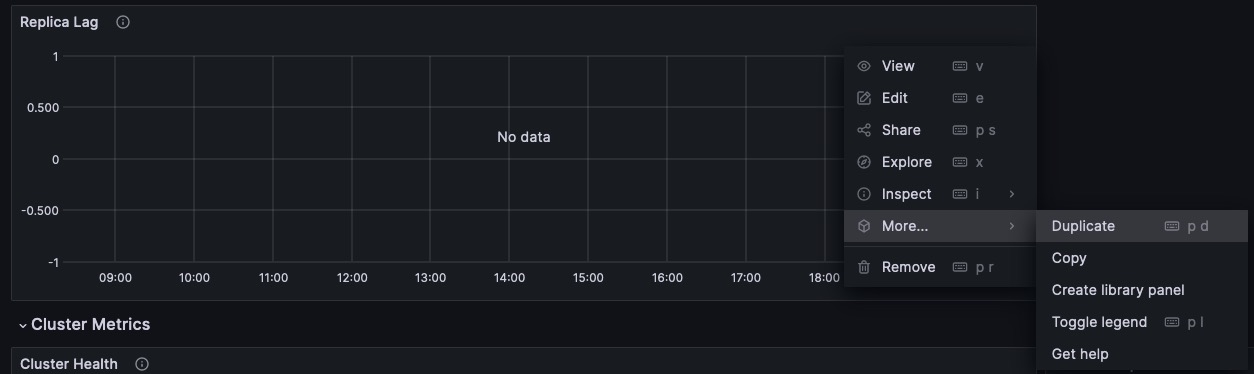
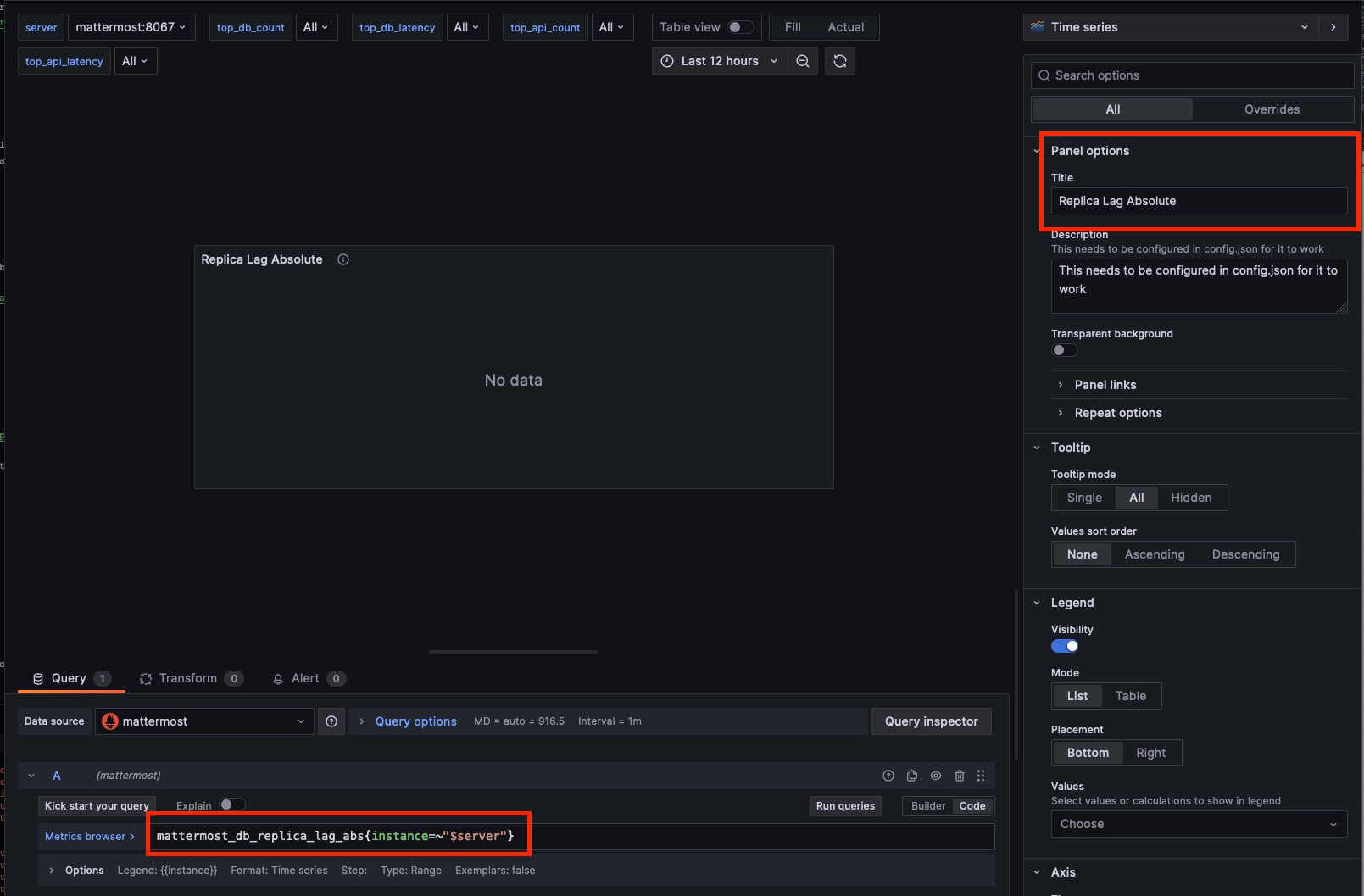
  3. QueryTimeLag 차트는 기존 Replica Lag 차트를 활용하여 이미 설정되어 있습니다. QueryAbsoluteLag 지표를 사용하는 경우 Replica Lag 차트를 복사하고 쿼리를 편집하여 아래 절대 지연 지표를 사용하고 제목을 Replica Lag Absolute로 수정하세요.
mattermost_db_replica_lag_abs{instance=~"$server"}


  :alt: A screenshot showing how to clone a chart within Grafana


  :alt: A screenshot showing the specific edits to make to the cloned grafana chart.


Specifies how frequently unhealthy replicas will be monitored for liveness check. Mattermost will dynamically choose a replica if it's alive.

복제본 모니터 간격 (초)#

Specifies how frequently unhealthy replicas will be monitored for liveness check. Mattermost will dynamically choose a replica if it's alive. Numerical input. Default is 5 seconds.- System Config path: N/A - config.json setting: SqlSettings > ReplicaMonitorIntervalSeconds > 5 - Environment variable: MM_SQLSETTINGS_REPLICAMONITORINTERVALSECONDS

Note

이 구성 설정은 셀프 호스팅 배포에만 적용됩니다.

#

엔터프라이즈 검색#

핵심 데이터베이스 검색은 관계형 데이터베이스에서 이루어지며 약 2~3백만 개 이하의 게시물 및 파일 항목이 있는 배포를 위한 것입니다. 그 이상의 규모에서는 3백만 게시물에 도달하기 전에 최적의 검색 성능을 위해 Elasticsearch 또는 AWS OpenSearch를 사용한 엔터프라이즈 검색을 활성화하는 것이 강력히 권장됩니다.

3백만 개 이상의 게시물이 있는 셀프 호스팅 배포에서는 메시지 검색@멘션에서 타임아웃과 같은 심각한 성능 문제를 방지하기 위해 Elasticsearch 또는 AWS OpenSearch가 필요합니다.

System Console > Environment > Elasticsearch로 이동하여 Mattermost 엔터프라이즈 검색을 구성할 수 있습니다. 다음 구성 설정은 Elasticsearch와 AWS OpenSearch 모두에 적용됩니다. 다음 테이블에서 설명한 대로 config.json 파일을 편집할 수도 있습니다. 이 섹션의 구성 설정 변경 사항은 적용되기 전에 서버를 다시 시작해야 합니다.

  • true: Indexing of new posts occurs automatically.
  • false: (Default) Elasticsearch indexing is disabled and new messages aren't indexed.

Elasticsearch 인덱싱 활성화#

Configure Mattermost to index new posts automatically. - true: Indexing of new messages occurs automatically. - false: (Default) Indexing of new messages is disabled, and new messages aren't indexed.- System Config path: Environment > Elasticsearch - config.json setting: ElasticsearchSettings > EnableIndexing > false - Environment variable: MM_ELASTICSEARCHSETTINGS_ENABLEINDEXING
Note

인덱싱이 비활성화되었다가 인덱스가 생성된 후 다시 활성화된 경우, 완전한 검색 결과를 보장하기 위해 인덱스를 제거하고 재구성하세요.

백엔드 유형#

ElasticsearchAWS OpenSearch 모두 최적화된 검색 성능으로 엔터프라이즈 규모의 배포를 제공하고 성능 저하 및 타임아웃을 방지합니다. 제품 문서에서 엔터프라이즈 검색에 대해 자세히 알아보세요.

The type of search backend. - elasticsearch - (Default) - opensearch - Required for AWS OpenSearch.- System Config path: Environment > Elasticsearch - config.json setting: ElasticsearchSettings > Backend > "elasticsearch" - Environment variable: MM_ELASTICSEARCHSETTINGS_BACKEND

Learn more about enterprise search version support.

서버 연결 주소#

The address of the Elasticsearch or AWS OpenSearch server.- System Config path: Environment > Elasticsearch - config.json setting: ElasticsearchSettings > ConnectionUrl - Environment variable: MM_ELASTICSEARCHSETTINGS_CONNECTIONURL

CA 경로#

Optional path to the Custom Certificate Authority certificates for the Elasticsearch or AWS OpenSearch server.- System Config path: Environment > Elasticsearch - config.json setting: ElasticsearchSettings > CA - Environment variable: MM_ELASTICSEARCHSETTINGS_CA
Note
    • Mattermost v7.8부터 사용 가능합니다. 인증서 경로는 /opt/mattermost/data/elasticsearch/ 또는 /opt/mattermost/data/opensearch 여야 하며 System Console에서 ./elasticsearch/cert.pem 또는 ./opensearch/cert.pem 으로 구성되어야 합니다.
    • 기본 인증 자격 증명과 함께 또는 대체하여 사용할 수 있습니다. 운영 체제의 기본 인증 기관 인증서를 사용하려면 이 설정을 비워두세요.

클라이언트 인증서 경로#

Mattermost v7.8부터 사용 가능합니다. 기본 인증 자격 증명과 함께 또는 대체하여 사용할 수 있습니다.

Optional client certificate for the connection to the Elasticsearch or AWS OpenSearch server in the PEM format.- System Config path: Environment > Elasticsearch - config.json setting: ElasticsearchSettings > ClientCert - Environment variable: MM_ELASTICSEARCHSETTINGS_CLIENTCERT

클라이언트 인증서 키 경로#

Mattermost v7.8부터 사용 가능합니다. 기본 인증 자격 증명과 함께 또는 대체하여 사용할 수 있습니다.

Optional key for the client certificate in the PEM format.- System Config path: Environment > Elasticsearch - config.json setting: ElasticsearchSettings > ClientKey - Environment variable: MM_ELASTICSEARCHSETTINGS_CLIENTKEY
  • true: Skips the certificate verification step for TLS connections.
  • false: (Default) Mattermost does not skip certificate verification.

TLS 검증 건너뛰기#

The certificate step for TLS connections can be skipped. - true: Skips the certificate verification step for TLS connections. - false: (Default) Mattermost requires certificate verification.- System Config path: Environment > Elasticsearch - config.json setting: ElasticsearchSettings > SkipTLSVerification > false - Environment variable: MM_ELASTICSEARCHSETTINGS_SKIPTLSVERIFICATION

서버 사용자명#

(Optional) The username to authenticate to the Elasticsearch or AWS OpenSearch server. String input.- System Config path: Environment > Elasticsearch - config.json setting: ElasticsearchSettings > UserName - Environment variable: MM_ELASTICSEARCHSETTINGS_USERNAME

서버 비밀번호#

(Optional) The password to authenticate to the Elasticsearch or AWS OpenSearch server. String input.- System Config path: Environment > Elasticsearch - config.json setting: ElasticsearchSettings > Password - Environment variable: MM_ELASTICSEARCHSETTINGS_PASSWORD
  • true: Sniffing finds and connects to all data nodes in your cluster automatically.
  • false: (Default) Cluster sniffing is disabled.
Warning

Do not enable cluster sniffing when using cloud-hosted search providers such as Amazon OpenSearch Service. Cloud providers typically hide search cluster nodes behind a proxy, so sniffed node addresses may be unreachable from your network. The provider handles connection pooling for you, making sniffing unnecessary and potentially disruptive.

클러스터 스니핑 활성화#

Configure Mattermost to automatically find and connect to all data nodes in a cluster. - true: Sniffing finds and connects to all data nodes in your cluster automatically. - false: (Default) Cluster sniffing is disabled. Do not enable cluster sniffing when using cloud-hosted search providers such as Amazon OpenSearch Service.- System Config path: Environment > Elasticsearch - config.json setting: ElasticsearchSettings > Sniff > false - Environment variable: MM_ELASTICSEARCHSETTINGS_SNIFF

System Console의 연결 테스트 버튼을 선택하여 Mattermost와 Elasticsearch 또는 AWS OpenSearch 서버 간의 연결을 확인하세요.

대량 인덱싱#

Configure Mattermost to start a bulk index of all existing posts in the database, from oldest to newest.- System Config path: Environment > Elasticsearch - config.json setting: N/A - Environment variable: N/A
Note
    • 대량 인덱싱 전에 항상 인덱스를 제거 하세요.
    • System Console에서 지금 인덱싱 버튼을 선택하여 모든 게시물의 대량 인덱싱을 시작하고 진행 중인 모든 인덱스 작업을 검토하세요.
    • 인덱싱 중에 Elasticsearch 또는 AWS OpenSearch를 사용할 수 있지만, 인덱싱 작업이 완료될 때까지 검색 결과가 불완전할 수 있습니다.
    • 진행 중인 인덱싱 작업이 취소되면 인덱스 및 검색 결과가 불완전하게 됩니다.

채널 인덱스 재구성#

Purge the channels index adn re-index all channels in the database, from oldest to newest.- System Config path: Environment > Elasticsearch - config.json setting: N/A - Environment variable: N/A

System Console의 채널 인덱스 재구성 버튼을 선택하여 채널 인덱스를 제거하세요. 이 프로세스를 시작하기 전에 대량 인덱싱 테이블을 통해 진행 중인 다른 인덱싱 작업이 없는지 확인하세요. 인덱싱 중에는 채널 자동 완성을 사용할 수 있지만 인덱싱 작업이 완료될 때까지 검색 결과가 불완전할 수 있습니다.

인덱스 제거#

Purge the entire Elasticsearch index.- System Config path: Environment > Elasticsearch - config.json setting: N/A - Environment variable: N/A

System Console의 인덱스 제거 버튼을 선택하여 인덱스를 제거하세요. 인덱스를 제거한 후 지금 인덱싱 버튼을 선택하여 새 인덱스를 생성하세요.

제거 시 건너뛸 인덱스#

Specify index names to ignore while purging indexes. Separate multiple index names with commas. Use an asterisk (*) to match a sequence of index name characters.- System Config path: Environment > Elasticsearch - config.json setting: ElasticsearchSettings > IgnoredPurgeIndexes - Environment variable: MM_ELASTICSEARCHSETTINGS_IGNOREDPURGEINDEXES
  • true: Elasticsearch or AWS OpenSearch is used for all search queries using the latest index. Search results may be incomplete until a bulk index of the existing message database is completed.
  • false: (Default) Relational database search is used for search queries.

검색 쿼리에 Elasticsearch 활성화#

Configure Mattermost to use Elasticsearch or AWS OpenSearch for all search queries using the latest index. - true: Elasticsearch or AWS OpenSearch is used for all search queries using the latest index. Search results may be incomplete until a bulk index of the existing message database is completed. - false: (Default) Database search is used for search queries.- System Config path: Environment > Elasticsearch - config.json setting: ElasticsearchSettings > EnableSearching > false - Environment variable: MM_ELASTICSEARCHSETTINGS_ENABLESEARCHING

인덱싱이 비활성화되었다가 인덱스가 생성된 후 다시 활성화된 경우, 완전한 검색 결과를 보장하기 위해 인덱스를 제거하고 재구성하세요.

  • true: Elasticsearch will be used for all autocompletion queries on users and channels using the latest index.
  • false: (Default) Database autocomplete is used.

자동 완성 쿼리에 Elasticsearch 활성화#

Configure Mattermost to use Elasticsearch or AWS OpenSearch for all autocompletion queries on users and channels using the latest index. - true: Elasticsearch or AWS OpenSearch will be used for all autocompletion queries on users and channels using the latest index. - false: (Default) Database autocomplete is used.- System Config path: Environment > Elasticsearch - config.json setting: ElasticsearchSettings > EnableAutocomplete > false - Environment variable: MM_ELASTICSEARCHSETTINGS_ENABLEAUTOCOMPLETE

기존 사용자 및 채널 데이터베이스의 대량 인덱싱이 완료될 때까지 자동 완성 결과가 불완전할 수 있습니다.

  • true: Users can find messages in public channels they haven't joined, scoped to teams they belong to.
  • false: (Default) Users can only search messages in channels they are a member of.

멤버십 없이 공개 채널 검색 허용#

Allow users to search for messages in public channels they have not joined. When enabled for the first time, existing posts are updated in the background with channel type information. This backfill process is throttled to ~10,000 posts per second to avoid impacting search performance. - true: Users can find messages in public channels they haven't joined, scoped to teams they belong to. - false: (Default) Users can only search messages in channels they are a member of.- System Config path: Environment > Elasticsearch - config.json setting: ElasticsearchSettings > EnableSearchPublicChannelsWithoutMembership > false - Environment variable: MM_ELASTICSEARCHSETTINGS_ENABLESEARCHPUBLICCHANNELSWITHOUTMEMBERSHIP
Note

이 설정은 준수 모드 가 활성화된 경우 효과가 없습니다. 준수 모드가 활성화되면 검색 결과는 항상 사용자가 멤버인 채널로 제한됩니다.

게시물 인덱스 복제본#

The number of replicas to use for each post index. Numerical input. Default is 1.- System Config path: N/A - config.json setting: ElasticsearchSettings > PostIndexReplicas > 1 - Environment variable: MM_ELASTICSEARCHSETTINGS_POSTINDEXREPLICAS
Note
    • 이 설정이 변경되면 변경된 구성은 새로 생성된 인덱스에만 적용됩니다. 기존 인덱스에 변경 사항을 적용하려면 이 설정을 변경한 후 인덱스를 제거하고 재구성하세요.
    • n개의 데이터 노드가 있는 경우, 각 인덱스의 샤드당 복제본 수는 n-1이어야 합니다.
    • Elasticsearch 또는 AWS OpenSearch 클러스터의 노드 수가 변경되면, 이 구성 설정과 함께 채널 인덱스 복제본사용자 인덱스 복제본 도 적절히 업데이트해야 합니다.

게시물 인덱스 샤드#

The number of shards to use for each post index. Numerical input. Default is 1.- System Config path: N/A - config.json setting: ElasticsearchSettings > PostIndexShards > 1 - Environment variable: MM_ELASTICSEARCHSETTINGS_POSTINDEXSHARDS
Note

이 구성 설정이 변경되면 변경된 구성은 새로 생성된 인덱스에만 적용됩니다. 기존 인덱스에 변경 사항을 적용하려면 이 설정을 변경한 후 인덱스를 제거하고 재구성하세요.

채널 인덱스 복제본#

The number of replicas to use for each channel index. Numerical input. Default is 1.- System Config path: N/A - config.json setting: ElasticsearchSettings > ChannelIndexReplicas > 1 - Environment variable: MM_ELASTICSEARCHSETTINGS_CHANNELINDEXREPLICAS
Note

n개의 데이터 노드가 있는 경우, 각 인덱스의 샤드당 복제본 수는 n-1이어야 합니다. Elasticsearch 또는 AWS OpenSearch 클러스터의 노드 수가 변경되면, 이 구성 설정과 함께 게시물 인덱스 복제본사용자 인덱스 복제본 도 적절히 업데이트해야 합니다.

채널 인덱스 샤드#

The number of shards to use for each channel index. Numerical input. Default is 1.- System Config path: N/A - config.json setting: ElasticsearchSettings > ChannelIndexShards > 1 - Environment variable: MM_ELASTICSEARCHSETTINGS_CHANNELINDEXSHARDS

사용자 인덱스 복제본#

The number of replicas to use for each user index. Numerical input. Default is 1.- System Config path: N/A - config.json setting: ElasticsearchSettings > UserIndexReplicas > 1 - Environment variable: MM_ELASTICSEARCHSETTINGS_USERINDEXREPLICAS
Note

n개의 데이터 노드가 있는 경우, 각 인덱스의 샤드당 복제본 수는 n-1이어야 합니다. Elasticsearch 또는 AWS OpenSearch 클러스터의 노드 수가 변경되면, 이 구성 설정과 함께 게시물 인덱스 복제본사용자 인덱스 복제본 도 적절히 업데이트해야 합니다.

사용자 인덱스 샤드#

The number of shards to use for each user index. Numerical input. Default is 1.- System Config path: N/A - config.json setting: ElasticsearchSettings > UserIndexShards > 1 - Environment variable: MM_ELASTICSEARCHSETTINGS_USERINDEXSHARDS

검색 인덱스 집계#

Elasticsearch or AWS OpenSearch indexes older than the age specified by this setting, in days, will be aggregated during the daily scheduled job. Numerical input. Default is 365 days.- System Config path: N/A - config.json setting: ElasticsearchSettings > AggregatePostsAfterDays > 365 - Environment variable: MM_ELASTICSEARCHSETTINGS_AGGREGATEPOSTSAFTERDAYS
Note

데이터 보존엔터프라이즈 검색 을 함께 사용하는 경우, 데이터 보존 정책보다 큰 값으로 설정하세요.

게시물 집계기 시작 시간#

The start time of the daily scheduled aggregator job. Must be a 24-hour time stamp in the form HH:MM based on the local time of the server. Default is 03:00 (3 AM)- System Config path: N/A - config.json setting: ElasticsearchSettings > PostsAggregatorJobStartTime > "03:00" - Environment variable: MM_ELASTICSEARCHSETTINGS_POSTSAGGREGATORJOBSTARTTIME

인덱스 접두사#

The prefix added to the Elasticsearch or AWS OpenSearch index name.- System Config path: N/A - config.json setting: ElasticsearchSettings > IndexPrefix - Environment variable: MM_ELASTICSEARCHSETTINGS_INDEXPREFIX
Note

이 설정이 사용되면 Mattermost에서 생성한 모든 Elasticsearch 또는 AWS OpenSearch 인덱스에 이 접두사가 붙습니다. 여러 Mattermost 배포가 인덱스 이름이 충돌하지 않도록 Elasticsearch 또는 AWS OpenSearch 클러스터를 공유할 수 있도록 다른 접두사를 설정할 수 있습니다.

글로벌 검색 접두사#

Enable global search across multiple Elasticsearch indices with the same index prefix. This is helpful for setups with multiple data centers where Elasticsearch instances share data using cross-cluster replication. It allows for easier and unified searching across distributed indices. Value must be a prefix of IndexPrefix.- System Config path: N/A - config.json setting: ElasticsearchSettings > GlobalSearchPrefix - Environment variable: MM_ELASTICSEARCHSETTINGS_GLOBALSEARCHPREFIX

실시간 인덱싱 배치 크기#

The number of new posts needed before those posts are added to the Elasticsearch or AWS OpenSearch index. Once added to the index, the post becomes searchable. On servers with more than 1 post per second, we suggest setting this value to the average number of posts over a 20 second period of time. Numerical input. Default is 1. Every post is indexed synchronously as they are created.- System Config path: N/A - config.json setting: ElasticsearchSettings > LiveIndexingBatchSize > 1 - Environment variable: MM_ELASTICSEARCHSETTINGS_LIVEINDEXINGBATCHSIZE
Note

초당 1개 이상의 게시물을 처리하는 설치의 경우, Elasticsearch 또는 AWS OpenSearch 클러스터의 속도 제한 또는 리소스 제한에 도달하지 않으려면 이 값을 늘려야 할 수 있습니다.

이 값을 증가시키면 정확히 어떤 일이 발생하나요?

주요 영향은 게시물의 임계값이 충족된 후 게시물이 Elasticsearch 또는 AWS OpenSearch에 인덱싱되어 Mattermost 내에서 게시물을 검색할 수 있게 된다는 것입니다. 따라서 더 큰 서버에 대한 권장 사항을 기반으로 이 값을 설정하고 게시물을 작성하면 평균적으로 약 10~20초 동안 검색을 통해 찾을 수 없습니다. 현실적으로 이렇게 빠르게 게시물을 활발하게 검색하는 사용자의 수가 제한되어 있으므로 어떤 사용자도 이 영향을 느끼지 않아야 합니다. Elasticsearch 또는 AWS OpenSearch 서버 사양에 따라 이 값을 더 낮거나 높게 설정할 수 있습니다.

사용량이 많은 기간에는 더 많은 트래픽이 발생하여 더 많은 게시물이 생성되고 인덱스 번호에 도달하는 시간이 빨라지므로 이 지연이 더 빨라집니다. 사용량이 적은 기간에는 그 반대를 예상하세요.

서버에 적합한 숫자를 찾는 방법

  1. 서버에서 매분 얼마나 많은 게시물이 작성되는지 이해해야 합니다. 아래 쿼리를 실행하여 서버의 분당 평균 게시물 수를 계산하세요.
  2. 이 쿼리는 부하가 클 수 있으므로 비피크 시간에 실행하는 것을 권장합니다.

    또한 WHERE 절을 조정하여 다른 기간의 분당 게시물 수를 확인할 수 있습니다. 현재 31536000000은 1년의 밀리초 수를 나타냅니다.
    SELECT
      AVG(postsPerMinute) as averagePostsPerMinute
    FROM (
      SELECT
        count(*) as postsPerMinute,
        date_trunc('minute', to_timestamp(createat/1000))
      FROM posts
      WHERE createAt > ( (extract(epoch from now()) * 1000 )  - 31536000000)
      GROUP BY date_trunc('minute', to_timestamp(createat/1000))
    ) as ppm;
  3. 환경에 허용 가능한 인덱스 창을 결정하고, 분당 평균 게시물 수를 그것으로 나눕니다. 10-20초를 권장합니다. 평균적으로 분당 600개의 게시물이 있고 20초마다 인덱싱하려면 (60초 / 20초 = 3`) 600 / 3을 계산하여 200이라는 숫자가 나옵니다. 200개의 게시물 후에 Mattermost는 게시물을 Elasticsearch 또는 AWS OpenSearch에 인덱싱합니다. 따라서 평균적으로 검색 가능성에 20초의 지연이 있습니다.
  4. config.json을 편집하거나 mmctl을 실행하여 LiveIndexingBatchSize 설정을 수정합니다
  5. In the config.json

    {
        "ElasticsearchSettings": {
          "LiveIndexingBatchSize": 200
        }
      }
    
    **Via mmctl**
    
    
    mmctl config set ElasticsearchSettings.LiveIndexingBatchSize 200
    
    **Via an environment variable**
    
    MM_ELASTICSEARCHSETTINGS_LIVEINDEXINGBATCHSIZE = 200</code></pre>
    <li class="numbered">Mattermost 서버를 재시작합니다.

배치 크기#

The number of posts for a single batch during a bulk indexing job. Numerical input. Default is 10000.- System Config path: N/A - config.json setting: ElasticsearchSettings > BatchSize > 10000 - Environment variable: MM_ELASTICSEARCHSETTINGS_BATCHSIZE

요청 타임아웃#

The timeout, in seconds, for Elasticsearch or AWS OpenSearch calls. Numerical input in seconds. Default is 30 seconds.- System Config path: N/A - config.json setting: ElasticsearchSettings > RequestTimeoutSeconds > 30 - Environment variable: MM_ELASTICSEARCHSETTINGS_REQUESTTIMEOUTSECONDS
  • error: Creates the error trace when initializing the Elasticsearch or AWS OpenSearch client and prints any template creation or search query that returns an error as part of the error message.
  • all: Creates the three traces (error, trace and info) for the driver and doesn’t print the queries because they will be part of the trace log level of the driver.
  • not specified: (Default) No error trace is created.

추적#

Options for printing Elasticsearch or AWS OpenSearch trace errors. - error: Creates the error trace when initializing the Elasticsearch or AWS OpenSearch client and prints any template creation or search query that returns an error as part of the error message. - all: Creates the three traces (error, trace and info) for the driver and doesn’t print the queries because they will be part of the trace log level of the driver. - not specified: (Default) No error trace is created.- System Config path: N/A - config.json setting: ElasticsearchSettings > Trace - Environment variable: MM_ELASTICSEARCHSETTINGS_TRACE
  • true: Enables CJK language-specific analyzer plugins on the Elasticsearch or AWS OpenSearch server.
  • false: (Default) Standard analyzers are used for all languages.

CJK 분석기 활성화#

When enabled, Mattermost uses language-specific analyzer plugins to improve search results for Korean, Japanese, and Chinese content. The required analyzer plugins must be installed on the Elasticsearch or AWS OpenSearch server before enabling this setting. Supported plugins: - analysis-nori (Korean) - analysis-kuromoji (Japanese) - analysis-smartcn (Chinese) - true: CJK language-specific analyzers are enabled. - false: (Default) Standard analyzers are used.- System Config path: N/A - config.json setting: ElasticsearchSettings > EnableCJKAnalyzers > false - Environment variable: MM_ELASTICSEARCHSETTINGS_ENABLECJKANALYZERS
Note

Mattermost v11.6부터 사용 가능합니다. 전체 분석 지원을 위해 이 설정을 활성화하기 전에 Elasticsearch 또는 AWS OpenSearch 서버에 필요한 분석기 플러그인이 설치되어 있어야 합니다. 플러그인이 감지되지 않으면 경고가 기록됩니다. 플러그인 설치 지침은 Elasticsearch setupAWS OpenSearch setup 문서를 참조하세요.

이전에 Elasticsearch 또는 AWS OpenSearch를 실행하던 서버에서 이 설정을 활성화하는 경우, 기존 콘텐츠가 새 분석기로 올바르게 검색 가능하도록 검색 인덱스를 제거하고 재구성해야 합니다. 인덱스 제거 및 재구성 지침은 Elasticsearch setup 문서를 참조하세요.

#

파일 스토리지#

셀프 호스팅 배포에서는 System Console > Environment > File Storage로 이동하거나 다음 테이블에서 설명한 대로 config.json 파일을 편집하여 파일 스토리지 설정을 구성할 수 있습니다.

Note

현재 Mattermost는 로컬 파일 시스템 및 Amazon S3 또는 S3 호환 컨테이너에 파일을 저장하는 것을 지원합니다. Digital Ocean Spaces 로 Mattermost를 테스트했지만 시장의 모든 S3 호환 컨테이너는 테스트하지 않았습니다. 다른 S3 호환 컨테이너를 사용하려는 경우 자체적으로 테스트를 완료하는 것을 권장합니다. NFS를 사용하여 로컬 스토리지 또는 네트워크 드라이브를 사용할 수도 있습니다.

    • local: (Default) Files and images are stored in the specified local file directory.
    • amazons3: Files and images are stored on Amazon S3 based on the access key, bucket, and region fields provided.

파일 스토리지 시스템#

The type of file storage system used. Can be either Local File System or Amazon S3. - local: (Default) Files and images are stored in the specified local file directory. - amazons3: Files and images are stored on Amazon S3 based on the access key, bucket, and region fields provided. The driver is compatible with other S3-compatible services, such as Digital Ocean Spaces.- System Config path: Environment > File Storage - config.json setting: FileSettings > DriverName > "local" - Environment variable: MM_FILESETTINGS_DRIVERNAME

로컬 스토리지 디렉터리#

The local directory to which files are written when the File storage system is set to local. Can be any directory writable by the user Mattermost is running as, and is relative to the directory where Mattermost is installed. Defaults to ./data/.- System Config path: Environment > File Storage - config.json setting: FileSettings > Directory - Environment variable: MM_FILESETTINGS_DIRECTORY

파일 스토리지 시스템amazons3로 설정된 경우 이 설정은 적용되지 않습니다.

최대 파일 크기#

The maximum file size for message attachments and plugin uploads. This value must be specified in mebibytes in the System Console, and in bytes in the config.json file. The default is 104857600 bytes (100 mebibytes).- System Config path: Environment > File Storage - config.json setting: FileSettings > MaxFileSize > 104857600 - Environment variable: MM_FILESETTINGS_MAXFILESIZE
Note
    • 서버 메모리가 설정을 지원할 수 있는지 확인하세요. 파일 크기가 크면 네트워크 중단으로 인한 서버 충돌 및 업로드 실패 위험이 높아집니다.
    • 플러그인 파일 업로드Received invalid response from the server 오류는 일반적으로 MaxFileSize 가 플러그인 파일 업로드를 지원하기에 충분히 크지 않거나 프록시 설정이 충분하지 않을 수 있음을 나타냅니다.
    • Mattermost 앞에 프록시 또는 로드 밸런서를 사용하는 경우 다음 프록시 설정을 적절히 조정해야 합니다:
    • NGINX의 경우 client_max_body_size 를 사용합니다.
    • Apache의 경우 LimitRequestBody 를 사용합니다.
    • true: (Default) Documents are searchable by their content.
    • false: Documents aren’t searchable by their content.

내용으로 문서 검색 활성화#

Enable users to search the contents of documents attached to messages. - true: (Default) Documents are searchable by their content. - false: Documents aren’t searchable by their content. When document content search is disabled, users can search for files by file name only.- System Config path: Environment > File Storage - config.json setting: FileSettings > ExtractContent > true - Environment variable: MM_FILESETTINGS_EXTRACTCONTENT
Note

파일에서 콘텐츠를 추출할 때 내용으로 문서 검색 활성화가 필요합니다. Mattermost 파일 검색Mattermost Agents 모두 필요한 의존성이 활성화된 경우 파일과 해당 콘텐츠에 접근할 수 있습니다. Mattermost Server v5.35로 업그레이드하기 전에 공유된 파일의 문서 콘텐츠 검색 결과는 mmctl 을 사용하여 추출 명령을 실행할 때까지 불완전할 수 있습니다. 이 명령이 실행되지 않으면 사용자는 파일 이름으로만 이전 파일을 검색할 수 있습니다.

선택적으로 다음 의존성 을 설치하여 Mattermost의 콘텐츠 검색 지원을 DOC, RTF, XML, HTML과 같이 PDF, DOCX, ODT 이외의 파일 형식으로 확장할 수 있습니다:

    • tidy: HTML 문서의 콘텐츠 검색에 사용됩니다.
    • wv: DOC 문서의 콘텐츠 검색에 사용됩니다.
    • poppler-utils: PDF 문서 콘텐츠 추출 시 서버 성능을 크게 향상시키는 데 사용됩니다.
    • unrtf: RTF 문서의 콘텐츠 검색에 사용됩니다.
    • JusText: HTML 문서 검색에 사용됩니다. 배포 정보는 JusText Python 패키지 를 참조하세요.

이러한 의존성을 설치하지 않으면 추출할 수 없는 문서에 대한 로그 항목이 표시됩니다. 추출할 수 없는 문서는 건너뛰고 기록되어 콘텐츠 추출이 계속 진행될 수 있습니다.

    • true: Contents of documents within ZIP files are returned in search results.
    • false: (Default) The contents of documents within ZIP files aren’t returned in search results.

ZIP 파일 내 문서 내용 검색 활성화#

Enables users to search the contents of compressed ZIP files attached to messages. - true: Contents of documents within ZIP files are returned in search results. This may have an impact on server performance for large files. the specified local file directory. - false: (Default) The contents of documents within ZIP files aren’t returned in search results.- System Config path: Environment > File Storage - config.json setting: FileSettings > ArchiveRecursion > false - Environment variable: MM_FILESETTINGS_ARCHIVERECURSION
Note
    • 웹 브라우저 또는 데스크톱 앱에서 Mattermost를 사용할 때 ZIP 파일 내 문서 콘텐츠를 검색할 수 있습니다.
    • 문서 콘텐츠 검색은 서버에 부하를 추가합니다.
    • 이 설정은 표준 ZIP 파일에만 적용됩니다. 7zip (.7z) 파일은 보안상의 이유로 차단되며 검색할 수 없습니다.
    • 대규모 배포 또는 대용량의 텍스트 위주 문서를 많이 공유하는 팀의 경우, 하드웨어 요구사항 을 검토하고 프로덕션 환경에서 활성화하기 전에 스테이징 환경에서 이 기능을 테스트하는 것을 권장합니다.

Amazon S3 버킷#

The name of the bucket for your S3-compatible object storage instance. A string with the S3-compatible bucket name.- System Config path: Environment > File Storage - config.json setting: FileSettings > AmazonS3Bucket - Environment variable: MM_FILESETTINGS_AMAZONS3BUCKET

Amazon S3 경로 접두사#

The prefix you selected for your Amazon S3 bucket in AWS. A string containing the path prefix.- System Config path: N/A - config.json setting: FileSettings > AmazonS3PathPrefix - Environment variable: MM_FILESETTINGS_AMAZONS3PATHPREFIX

Amazon S3 리전#

The AWS region you selected when creating your Amazon S3 bucket in AWS. A string with the AWS region containing the bucket. If no region is set, Mattermost attempts to get the appropriate region from AWS, and sets it to us-east-1 if none found.- System Config path: Environment > File Storage - config.json setting: `".FileSettings.AmazonS3Region", - Environment variable: MM_FILESETTINGS_AMAZONS3REGION

Digital Ocean Spaces 또는 기타 S3 호환 서비스의 경우 이 설정을 비워두세요.

Amazon S3 액세스 키 ID#

A string with the access key for the S3-compatible storage instance. Your EC2 administrator can supply you with the Access Key ID.- System Config path: Environment > File Storage - config.json setting: FileSettings > AmazonS3AccessKeyId - Environment variable: MM_FILESETTINGS_AMAZONS3ACCESSKEYID
Note

Amazon S3에 Amazon S3 IAM Role 을 사용하는 경우가 아니라면 접근에 필요합니다.

Amazon S3 엔드포인트#

The hostname of your S3-compatible instance. A string with the hostname of the S3-compatible storage instance. Defaults to s3.amazonaws.com.- System Config path: Environment > File Storage - config.json setting: FileSettings > AmazonS3Endpoint > "s3.amazonaws.com" - Environment variable: MM_FILESETTINGS_AMAZONS3ENDPOINT
Note

Digital Ocean Spaces의 경우 호스트명은 .digitaloceanspaces.com 으로 설정해야 합니다. 여기서 은 Space 설정 시 선택한 리전의 약어입니다. nyc3, ams3, 또는 sgp1 이 될 수 있습니다.

Amazon S3 시크릿 액세스 키#

The secret access key associated with your Amazon S3 Access Key ID. A string with the secret access key for the S3-compatible storage instance.- System Config path: Environment > File Storage - config.json setting: FileSettings > AmazonS3SecretAccessKey - Environment variable: MM_FILESETTINGS_AMAZONS3SECRETACCESSKEY

보안 Amazon S3 연결 활성화#

Enable or disable secure Amazon S3 connections. - true: (Default) Enables only secure Amazon S3 connections. - false: Allows insecure connections to Amazon S3.- System Config path: Environment > File Storage - config.json setting: FileSettings > AmazonS3SSL > true - Environment variable: MM_FILESETTINGS_AMAZONS3SSL
  • true: Use Signature v2 signing process.
  • false: (Default) Use Signature v4 signing process.

Amazon S3 서명 v2#

By default, Mattermost uses Signature v4 to sign API calls to AWS, but under some circumstances, v2 is required. - true: Use Signature v2 signing process. - false: (Default) Use Signature v4 signing process.- System Config path: N/A - config.json setting: FileSettings > AmazonS3SignV2 > false - Environment variable: MM_FILESETTINGS_AMAZONS3SIGNV2

See the AWS documentation for information about when to use the Signature v2 signing process.

  • true: Encrypts files in Amazon S3 using server-side encryption with Amazon S3-managed keys.
  • false: (Default) Doesn’t encrypt files in Amazon S3.

Amazon S3 서버 측 암호화 활성화#

Enable server-side encryption for Amazon S3. - true: Encrypts files in Amazon S3 using server-side encryption with Amazon S3-managed keys. - false: (Default) Doesn’t encrypt files in Amazon S3.- System Config path: Environment > File Storage - config.json setting: FileSettings > AmazonS3SSE > false - Environment variable: MM_FILESETTINGS_AMAZONS3SSE
Note

이 구성 설정은 셀프 호스팅 배포에서만 사용 가능합니다.

    • true: Log additional debugging information is logged to the system logs.
    • false: (Default) No Amazon S3 debugging information is included in the system logs.

Amazon S3 디버깅 활성화#

Enable or disable Amazon S3 debugging to capture additional debugging information in system logs. - true: Log additional debugging information is logged to the system logs. - false: (Default) No Amazon S3 debugging information is included in the system logs. Typically set to false in production.- System Config path: Environment > File Storage - config.json setting: FileSettings > AmazonS3Trace > false - Environment variable: MM_FILESETTINGS_AMAZONS3TRACE

System Console에서 연결 테스트 버튼을 선택하여 설정을 확인하고 사용자가 서버에 접근할 수 있는지 확인합니다.

Amazon S3 스토리지 클래스#

일부 Amazon S3 호환 스토리지 솔루션은 업로드 요청에 스토리지 클래스 파라미터가 포함되어야 하며, 그렇지 않으면 요청이 거부됩니다. S3 호환 솔루션에서 요구하는 스토리지 클래스를 설정합니다.

The storage class to use for uploads to S3-compatible storage solutions. String input. Default is an empty string "". Select Test Connection to test the configured connection.- System Config path: Environment > File Storage - config.json setting: FileSettings > AmazonS3StorageClass > "", - Environment variable: MM_FILESETTINGS_AMAZONS3STORAGECLASS
Note

대부분의 Amazon S3 호환 스토리지 솔루션은 스토리지 클래스가 제공되지 않으면 기본 스토리지 클래스 STANDARD 를 할당합니다. 지원되는 스토리지 클래스에 대한 자세한 내용은 Amazon S3 스토리지 클래스 문서를 참조하세요.

Amazon S3 내보내기 스토리지 클래스#

The storage class to use for exports to S3-compatible storage solutions. String input. Default is an empty string "".- System Config path: N/A - config.json setting: FileSettings > ExportAmazonS3StorageClass > "" - Environment variable: MM_FILESETTINGS_EXPORTAMAZONS3STORAGECLASS
Note

대부분의 Amazon S3 호환 스토리지 솔루션은 스토리지 클래스가 제공되지 않으면 기본 스토리지 클래스 STANDARD 를 할당합니다. 지원되는 스토리지 클래스에 대한 자세한 내용은 Amazon S3 스토리지 클래스 문서를 참조하세요.

Amazon S3 요청 타임아웃#

The amount of time, in milliseconds, before requests to Amazon S3 storage time out. Default is 30000 (30 seconds).- System Config path: N/A - config.json setting: FileSettings > AmazonS3RequestTimeoutMilliseconds > 30000 - Environment variable: MM_FILESETTINGS_AMAZONS3REQUESTTIMEOUTMILLISECONDS

Amazon S3 업로드 파트 크기#

The size, in bytes, of each part in a multi-part upload to Amazon S3. Numeric value. Default is 5242880 (5MB).- System Config path: N/A - config.json setting: FileSettings > AmazonS3UploadPartSizeBytes > 5242880 - Environment variable: MM_FILESETTINGS_AMAZONS3UPLOADPARTSIZEBYTES
Note

파트 크기가 작을수록 더 많은 요청과 지연 시간 증가를 초래할 수 있으며, 파트 크기가 클수록 더 많은 메모리가 할당될 수 있습니다.

Amazon S3 내보내기 업로드 파트 크기#

The size, in bytes, of each part in a multi-part exported to Amazon S3. Numeric value. Default is 104857600 (100MB).- System Config path: N/A - config.json setting: FileSettings > ExportAmazonS3UploadPartSizeBytes > 104857600 - Environment variable: MM_FILESETTINGS_EXPORTAMAZONS3UPLOADPARTSIZEBYTES
Note

파트 크기가 작을수록 더 많은 요청과 지연 시간 증가를 초래할 수 있으며, 파트 크기가 클수록 더 많은 메모리가 할당될 수 있습니다.

Amazon S3 요청 타임아웃#

The amount of time, in milliseconds, before requests to Amazon S3 storage time out. Default is 30000 (30 seconds).- System Config path: N/A - config.json setting: FileSettings > AmazonS3RequestTimeoutMilliseconds > 30000 - Environment variable: MM_FILESETTINGS_AMAZONS3REQUESTTIMEOUTMILLISECONDS

초기 글꼴#

The font used in auto-generated profile pictures with colored backgrounds and username initials. A string with the font file name. Default is nunito-bold.ttf.- System Config path: N/A - config.json setting: FileSettings > InitialFont > "nunito-bold.ttf" - Environment variable: MM_FILESETTINGS_INITIALFONT

이미지 프록시#

자체 호스팅 배포에서는 이미지 프록시를 사용하여 Mattermost 앱이 원격 자체 호스팅 서버에 직접 연결되지 않도록 할 수 있습니다. System Console > Environment > Image Proxy로 이동하거나 다음 표에서 설명한 대로 config.json 파일을 편집하여 이미지 프록시를 설정합니다.

  • true: Enables an image proxy for loading external images.
  • false: (Default) Disables the image proxy.

이미지 프록시 활성화#

An image proxy anonymizes Mattermost app connections and prevents them from accessing insecure content. - true: Enables an image proxy for loading external images. - false: (Default) Disables the image proxy.- System Config path: Environment > Image Proxy - config.json setting: ImageProxySettings > Enable > true - Environment variable: MM_IMAGEPROXYSETTINGS_ENABLE

자세한 내용은 이미지 프록시 문서를 참조하세요.

  • local: (Default) The Mattermost server itself acts as the image proxy.
  • atmos/camo: An external atmos/camo image proxy is used.

이미지 프록시 유형#

The type of image proxy used by Mattermost. - local: (Default) The Mattermost server itself acts as the image proxy. - atmos/camo: An external atmos/camo image proxy is used.- System Config path: Environment > Image Proxy - config.json setting: ImageProxySettings > ImageProxyType > "local" - Environment variable: MM_IMAGEPROXYSETTINGS_IMAGEPROXYTYPE

자세한 내용은 이미지 프록시 문서를 참조하세요.

원격 이미지 프록시 URL#

The URL of the atmos/camo proxy. This setting isn't needed when using the local image proxy.- System Config path: Environment > Image Proxy - config.json setting: ImageProxySettings > RemoteImageProxyURL - Environment variable: MM_IMAGEPROXYSETTINGS_REMOTEIMAGEPROXYURL

원격 이미지 프록시 옵션#

The URL signing key passed to an atmos/camo image proxy. This setting isn't needed when using the local image proxy type.- System Config path: Environment > Image Proxy - config.json setting: ImageProxySettings > RemoteImageProxyOptions - Environment variable: MM_IMAGEPROXYSETTINGS_REMOTEIMAGEPROXYOPTIONS

자세한 내용은 이미지 프록시 문서를 참조하세요.


SMTP#

자체 호스팅 배포에서는 System Console > Environment > SMTP로 이동하거나 다음 표에서 설명한 대로 config.json 파일을 편집하여 SMTP 이메일 서버 설정을 구성할 수 있습니다.

SMTP 서버#

The location of the SMTP email server used for email notifications.- System Config path: Environment > SMTP - config.json setting: EmailSettings > SMTPServer - Environment variable: MM_EMAILSETTINGS_SMTPSERVER

SMTP 서버 포트#

The port of SMTP email server. String input.- System Config path: Environment > SMTP - config.json setting: EmailSettings > "SMTPPort" - Environment variable: MM_EMAILSETTINGS_SMTPPORT
  • true: SMTP username and password are used for authenticating to the SMTP server.
  • false: (Default) Mattermost doesn’t attempt to authenticate to the SMTP server.

SMTP 인증 활성화#

Enable or disable SMTP authentication. - true: SMTP username and password are used for authenticating to the SMTP server. - false: (Default) Mattermost doesn’t attempt to authenticate to the SMTP server.- System Config path: Environment > SMTP - config.json setting: EmailSettings > EnableSMTPAuth > false - Environment variable: MM_EMAILSETTINGS_ENABLESMTPAUTH

SMTP 서버 사용자명#

The username for authenticating to the SMTP server. String input.- System Config path: Environment > SMTP - config.json setting: EmailSettings > SMTPUsername - Environment variable: MM_EMAILSETTINGS_SMTPUSERNAME

SMTP 서버 비밀번호#

The password associated with the SMTP username. String input.- System Config path: Environment > SMTP - config.json setting: EmailSettings > SMTPPassword - Environment variable: MM_EMAILSETTINGS_SMTPPASSWORD
  • Not specified: (Default) Send email over an unsecure connection.
  • TLS: Communication between Mattermost and your email server is encrypted.
  • STARTTLS: Attempts to upgrade an existing insecure connection to a secure connection using TLS.

SMTP 연결 보안#

Specify connection security for emails sent using SMTP. - Not specified: (Default) Send email over an unsecure connection. - TLS: Communication between Mattermost and your email server is encrypted. - STARTTLS: Attempts to upgrade an existing insecure connection to a secure connection using TLS.- System Config path: Environment > SMTP - config.json setting: EmailSettings > ConnectionSecurity - Environment variable: MM_EMAILSETTINGS_CONNECTIONSECURITY
  • true: Mattermost won't verify the email server certificate.
  • false: (Default) Mattermost verifies the email server certificate.

서버 인증서 검증 건너뛰기#

Configure Mattermost to skip the verification of the email server certificate. - true: Mattermost won't verify the email server certificate. - false: (Default) Mattermost verifies the email server certificate.- System Config path: Environment > SMTP - config.json setting: EmailSettings > SkipServerCertificateVerification > false - Environment variable: MM_EMAILSETTINGS_SKIPSERVERCERTIFICATEVERIFICATION
  • true: (Default) System admins are notified by email if a relevant security fix alert is announced. Requires email to be enabled.
  • false: Security alerts are disabled.

보안 알림 활성화#

Enable or disable security alerts. - true: (Default) System admins are notified by email if a relevant security fix alert is announced. Requires email to be enabled. - false: Security alerts are disabled.- System Config path: Environment > SMTP - config.json setting: ServiceSettings > EnableSecurityFixAlert > true - Environment variable: MM_SERVICESETTINGS_ENABLESECURITYFIXALERT

자세한 내용은 원격 측정 문서를 참조하세요.

SMTP 서버 타임아웃#

The maximum amount of time, in seconds, allowed for establishing a TCP connection between Mattermost and the SMTP server. Numerical value in seconds.- System Config path: Environment > SMTP - config.json setting: EmailSettings > SMTPServerTimeout - Environment variable: MM_EMAILSETTINGS_SMTPSERVERTIMEOUT

푸시 알림 서버#

자체 호스팅 배포에서는 System Console > Environment > Push Notification Server 로 이동하거나 아래 표에 설명된 대로 config.json 파일을 편집하여 Mattermost 모바일 푸시 알림을 구성할 수 있습니다. 이 섹션의 구성 설정을 변경하려면 적용되기 전에 서버를 재시작해야 합니다.

  • Do not send push notifications: 모바일 푸시 알림이 비활성화됩니다.
  • Use HPNS connection with uptime SLA to send notifications to iOS and Android apps: (기본값) Mattermost 호스팅 푸시 알림 서비스를 사용합니다.
  • Use TPNS connection to send notifications to iOS and Android apps: Mattermost 테스트 푸시 알림 서비스를 사용합니다.
  • Manually enter Push Notification Service location: 커스텀 모바일 앱을 빌드할 때는 자체 모바일 푸시 프록시 서비스를 호스팅하고 해당 URL을 Push Notification Server 필드에 지정해야 합니다.

푸시 알림 활성화#

Mattermost 푸시 알림을 활성화하거나 비활성화합니다. - Do not send push notifications: 모바일 푸시 알림이 비활성화됩니다. - Use HPNS connection with uptime SLA to send notifications to iOS and Android apps: (기본값) Mattermost의 호스팅 푸시 알림 서비스를 사용합니다. - Use TPNS connection to send notifications to iOS and Android apps: Mattermost의 테스트 푸시 알림 서비스를 사용합니다. - Manually enter Push Notification Service location: 커스텀 모바일 앱을 빌드할 때는 자체 모바일 푸시 프록시 서비스를 호스팅하고 해당 URL을 Push Notification Server 필드에 지정해야 합니다.- System Config path: Environment > Push Notification Server - config.json setting: EmailSettings > SendPushNotifications - Environment variable: MM_EMAILSETTINGS_SENDPUSHNOTIFICATIONS

호스팅 푸시 알림 서비스 (HPNS)#

Mattermost Enterprise, Professional, Cloud 고객은 Mattermost의 호스팅 푸시 알림 서비스(HPNS)를 사용할 수 있습니다. HPNS는 다음을 제공합니다:

  • GitHub에서 사용 가능한 공개 호스팅된 Mattermost 푸시 알림 서비스(MPNS) 접근.
  • 암호화되지 않은 메시지 내용에 대한 명시적인 개인정보 보호 정책.
  • 암호화된 TLS 연결:
  • HPNS와 Apple 푸시 알림 서비스 사이
  • HPNS와 Google의 Firebase Cloud Messaging 서비스 사이
  • HPNS와 Mattermost 서버 사이
  • 프로덕션 수준의 가동 시간 기대치.
  • 새 서버에 대한 기본 제공 구성으로 새 배포에 HPNS를 활성화하는 데 별도 작업이 필요하지 않습니다. 기존 배포의 경우 HPNS를 활성화 할 수 있습니다.
  • HPNS는 Mattermost가 Apple App StoreGoogle Play Store 를 통해 배포하는 사전 빌드된 앱에서만 작동합니다. 자체 모바일 앱을 빌드하는 경우 자체 Mattermost 푸시 프록시 서버 호스팅 도 필요합니다.
  • 올바른 포트에서 푸시 프록시에 연결 가능해야 합니다. HPNS의 경우 Mattermost 서버에서 포트 443을 사용합니다.
  • Mattermost는 알림 데이터를 저장하지 않습니다. HPNS가 알림을 보낼 기기를 알아야 하므로 device_id 와 같은 데이터만 서버 수준에서 저장됩니다.

테스트 푸시 알림 서비스 (TPNS)#

비상업적 자체 호스팅 고객은 Mattermost의 무료 기본 테스트 푸시 알림 서비스(TPNS)를 사용할 수 있습니다.

  • TPNS는 프로덕션 환경에서 사용하는 것을 권장하지 않으며, 프로덕션 수준의 업데이트 서비스 수준 계약(SLA)을 제공하지 않습니다.
  • TPNS는 Mattermost Cloud 배포에서 사용할 수 없습니다.
  • TPNS는 Mattermost가 Apple App StoreGoogle Play Store 를 통해 배포하는 사전 빌드된 모바일 앱에서만 작동합니다. 자체 모바일 앱을 빌드한 경우 자체 Mattermost 푸시 프록시 서비스 호스팅 도 필요합니다.
  • 올바른 포트에서 푸시 프록시에 연결 가능해야 합니다. TPNS의 경우 Mattermost 서버에서 포트 80을 사용합니다.
  • 모바일 푸시 알림이 필요하지 않거나 원하지 않는 경우 대규모 배포에서 이 구성 설정을 비활성화하면 다음 영역에서 서버 성능이 향상될 수 있습니다:
  • 처리 부하 감소: 푸시 알림 생성 및 전송에는 처리 능력과 리소스가 필요합니다. 비활성화하면 서버가 해당 리소스를 다른 작업에 할당할 수 있습니다.
  • 네트워크 트래픽 감소: 푸시 알림은 네트워크 통신을 포함합니다. 비활성화하면 전송되는 데이터 양이 줄어들어 전반적인 네트워크 성능이 향상될 수 있습니다.
  • 데이터베이스 부하 감소: 각 푸시 알림은 데이터베이스에서 읽고 쓰는 작업을 수반할 수 있습니다. 이러한 작업을 줄이면 데이터베이스 부하가 감소하여 다른 쿼리의 응답 시간이 향상됩니다.
  • 응답 시간 단축: 알림 관련 처리 작업이 줄어들면 시스템이 사용자의 다른 요청에 더 빠르게 응답하여 사용자 경험이 향상됩니다.
  • 간소화된 오류 처리: 푸시 알림 서비스는 때로 실패하거나 지연 문제가 발생할 수 있어 추가 오류 처리가 필요합니다. 알림을 비활성화하면 시스템 운영이 간소화됩니다.
  • 그러나 푸시 알림을 비활성화하면 사용자 경험, 커뮤니케이션 효율성 및 전반적인 생산성에 부정적인 영향을 줄 수 있습니다. 성능 향상과 조직 및 사용자의 요구 사이의 균형을 맞추는 것이 중요합니다.

ID 전용 푸시 알림#

:start-after: :nosearch:

관리자는 Mattermost 구성 설정을 통해 Apple 및 Google에 전송되는 데이터를 제한하여 iOS 및 Android 알림 인프라 침해에 대해 Mattermost 고객을 보호하기 위해 모바일 알림을 완전히 비공개로 설정할 수 있습니다.

iOS 및 Android 애플리케이션에 알림을 보내는 표준 방식은 Apple 또는 Google에 일반 텍스트 메시지를 전송하여 사용자의 전화기로 전달하고 iOS 또는 Android에 표시하는 것입니다. Apple이나 Google은 데이터를 수집하거나 저장하지 않는다고 보장하지만, 해당 조직이 침해되거나 강요를 받는 경우 플랫폼의 모든 표준 모바일 알림이 손상될 수 있습니다.

이러한 위험을 피하기 위해 Mattermost는 모바일 알림 텍스트를 Apple이나 Google에 어떤 정보도 전달하지 않는 메시지 ID 번호로 대체하도록 구성할 수 있습니다. 사용자 전화기의 Mattermost 모바일 애플리케이션이 메시지 ID를 수신하면, 해당 ID를 사용하여 Mattermost 서버와 비공개로 통신하고 암호화된 채널을 통해 모바일 알림 메시지를 가져옵니다. 즉, 메시지 텍스트는 Apple이나 Google의 메시지 릴레이 시스템에 표시되지 않습니다. 메시지 내용은 Mattermost에도 도달하지 않습니다.

Mattermost의 ID 전용 푸시 알림을 통한 비공개 모바일 기능으로 알림 메시지를 검색하는 추가 단계로 인해 최종 사용자는 Apple 및 Google 플랫폼을 통해 일반 텍스트를 전송하는 경우와 비교하여 모바일 알림이 완전히 표시되기 전에 약간의 지연을 경험할 수 있습니다.

ID 전용 푸시 알림 구성 설정에 대한 자세한 내용은 구성 설정 문서를 참조하세요. 데이터 프라이버시를 위한 ID 전용 푸시 알림 사용에 대한 자세한 내용은 모바일 앱 FAQ 문서 를 참조하세요.

푸시 알림 서버 위치#

Mattermost 호스팅 푸시 알림 서비스(HPNS) 서버의 물리적 위치입니다. US (기본값) 또는 Germany 를 선택하면 Push Notification Server 필드의 서버 URL이 자동으로 채워집니다.- System Config path: Environment > Push Notification Server - config.json setting: EmailSettings > PushNotificationServer - Environment variable: MM_EMAILSETTINGS_PUSHNOTIFICATIONSERVER

채널당 최대 알림 수#

@all, @here, @channel이 성능 극대화를 위해 데스크톱, 이메일, 모바일 푸시 알림을 더 이상 전송하지 않게 되는 채널당 최대 총 사용자 수입니다. 숫자 입력. 기본값은 1000 입니다.- System Config path: Environment > Push Notification Server - config.json setting: TeamSettings > MaxNotificationsPerChannel > 1000 - Environment variable: MM_EMAILSETTINGS_MAXNOTIFICATIONSPERCHANNEL
  • 이 값을 조금씩 늘리고, 성능 모니터링 메트릭 을 추적하여 시스템 상태를 모니터링하며, 읽기 전용 채널 과 같이 채널에 게시할 수 있는 사람을 제한하는 제한된 권한이 있는 대형 채널이 있는 경우에만 이 값을 늘리는 것을 권장합니다.
  • 대규모 배포에서 이 구성 설정 값을 10 으로 줄이면 다음 영역에서 서버 성능이 향상될 수 있습니다:
  • 알림 시스템 부하 감소: 각 알림은 일정량의 계산 및 네트워크 부하를 생성합니다. 채널당 알림 수를 제한하면 시스템이 더 적은 알림을 처리하여 서버 부하가 줄어듭니다.
  • 데이터베이스 효율성: 알림은 일반적으로 데이터베이스에 저장됩니다. 알림이 적으면 데이터베이스 쓰기 및 읽기 빈도가 줄어들어 데이터베이스 작업이 빨라지고 지연이 감소합니다.
  • 클라이언트 처리 최소화: 사용자의 클라이언트(예: 데스크톱 및 모바일 앱)는 알림을 가져와 처리해야 합니다. 알림이 적으면 클라이언트가 더 효율적으로 작동하여 사용자 기기의 메모리 및 CPU 사용량이 줄어듭니다.
  • 사용자 경험 향상: 알림이 너무 많으면 사용자에게 성능 지연 및 혼란스러운 경험을 유발할 수 있습니다. 수를 제한하면 사용자가 가장 중요한 알림만 받게 되어 사용성과 응답 시간이 향상될 수 있습니다.
  • 네트워크 대역폭: 많은 수의 알림, 특히 많은 사용자에게 전송되는 경우 많은 대역폭을 소비할 수 있습니다. 알림이 적으면 전반적인 네트워크 사용량이 줄어들고 중요한 메시지의 전달이 빨라질 수 있습니다.
  • 서버 부하 분산: 알림 수를 줄이면 워크로드를 서버 전체에 더 균등하게 분산할 수 있어 더 나은 부하 분산이 이루어지고 단일 서버가 병목 현상이 되는 것을 방지합니다.

고가용성#

자체 호스팅 배포에서는 System Console > Environment > High Availability로 이동하거나 다음 표에서 설명한 대로 config.json 파일을 편집하여 Mattermost를 고가용성 클러스터 기반 배포로 구성할 수 있습니다. 이 섹션의 구성 설정 변경 사항은 서버를 재시작해야 적용됩니다.

Mattermost 고가용성 클러스터 기반 배포에서는 System Console이 읽기 전용으로 설정되며, 설정은 config.json 파일을 직접 편집해야만 변경할 수 있습니다. 단, 고가용성 클러스터 기반 환경을 테스트하려면 config.json 파일에서 ClusterSettings.ReadOnlyConfigfalse로 설정하여 비활성화할 수 있습니다. 이렇게 하면 System Console을 통해 적용된 변경 사항이 구성 파일에 저장됩니다.

  • true: The Mattermost server will attempt inter-node communication with the other servers in the cluster that have the same cluster name.
  • false: (Default) Mattermost high availability mode is disabled.

고가용성 모드 활성화#

You can enable high availability mode. - true: The Mattermost server will attempt inter-node communication with the other servers in the cluster that have the same cluster name. This sets the System Console to read-only mode to keep the servers' config.json files in sync. - false: (Default) Mattermost high availability mode is disabled.- System Config path: Environment > High Availability - config.json setting: ClusterSettings > Enable > false - Environment variable: MM_CLUSTERSETTINGS_ENABLE

클러스터 이름#

The cluster to join by name in a high availability cluster-based deployment. Only nodes with the same cluster name will join together. This is to support blue-green deployments or staging pointing to the same database.- System Config path: Environment > High Availability - config.json setting: ClusterSettings > ClusterName - Environment variable: MM_CLUSTERSETTINGS_CLUSTERNAME

호스트명 재정의#

You can override the hostname of this server. - This property can be set to a specific IP address if needed; however, we don’t recommend overriding the hostname unless it's necessary. - If left blank, Mattermost attempts to get the hostname from the operating system or uses the IP address.- System Config path: Environment > High Availability - config.json setting: ClusterSettings > OverrideHostname - Environment variable: MM_CLUSTERSETTINGS_OVERRIDEHOSTNAME

자세한 내용은 고가용성 클러스터 기반 배포 문서를 참조하세요.

  • true: (Default) The cluster attempts to communicate using the IP address specified.
  • false: The cluster attempts to communicate using the hostname.

IP 주소 사용#

You can configure your high availability cluster-based deployment to communicate using the hostname instead of the IP address. - true: (Default) The cluster attempts to communicate using the IP address specified. - false: The cluster attempts to communicate using the hostname.- System Config path: Environment > High Availability - config.json setting: ClusterSettings > UseIPAddress > true - Environment variable: MM_CLUSTERSETTINGS_USEIPADDRESS
  • true: (Default) The server attempts to communicate via the gossip protocol over the gossip port specified.
  • false: The server attempts to communicate over the streaming port.

가십 암호화 활성화#

Gossip encryption uses AES-256 by default, and this value isn't configurable by design. - true: (Default) The server attempts to communicate via the gossip protocol over the gossip port specified. - false: The server attempts to communicate over the streaming port.- System Config path: Environment > High Availability - config.json setting: ClusterSettings > EnableGossipEncryption > true - Environment variable: MM_CLUSTERSETTINGS_ENABLEGOSSIPENCRYPTION
Note
    • Gossip 프로토콜은 코넬 대학교 연구진이 개발한 SWIM 프로토콜에 설명된 원칙을 기반으로 합니다. Gossip 프로토콜은 분산 시스템에서 노드가 무작위로 정보를 교환하여 네트워크 전체의 데이터 일관성을 보장하는 통신 메커니즘입니다. 탈중앙화, 확장성, 내결함성을 갖추고 있어 노드 수가 많은 시스템에 이상적입니다. 정보는 소셜 가십과 유사한 방식으로 확산되며, 네트워크가 일관된 상태로 수렴될 때까지 노드가 주기적으로 랜덤 피어에게 업데이트를 "가십"합니다. 분산 데이터베이스, 블록체인 네트워크, P2P 시스템에서 널리 사용되며, 구현이 간단하고 노드 장애에 강하지만 대규모 네트워크에서는 중복성과 전파 지연이 발생할 수 있습니다.
    • 또는 Systems 테이블에서 ClusterEncryptionKey 행 값을 수동으로 설정할 수 있습니다. 키는 base64로 변환된 바이트 배열입니다. AES-128, AES-192, AES-256을 선택하려면 이 값을 각각 16, 24, 32바이트로 설정합니다.
    • Mattermost v10.11부터 모든 새 배포에서 기본적으로 가십 암호화가 활성화됩니다. 기존 배포에서는 수동으로 암호화를 활성화하지 않으면 Gossip 프로토콜을 사용하는 모든 통신이 암호화되지 않은 상태로 유지됩니다. v10.11 이전에는 Cloud 배포에서 기본적으로 가십 암호화가 활성화되고 자체 호스팅 배포에서는 기본적으로 비활성화됩니다.
    • true: (Default) All communication through the cluster uses gossip compression.
    • false: All communication using the gossip protocol remains uncompressed.

가십 압축 활성화#

We recommend that you disable this configuration setting for better performance. - true: (Default for self-hosted deployments) All communication through the cluster uses gossip compression. This setting is enabled by default to maintain compatibility with older servers. - false: (Default for Cloud deployments) All communication using the gossip protocol remains uncompressed.- System Config path: Environment > High Availability - config.json setting: ClusterSettings > EnableGossipCompression > true - Environment variable: MM_CLUSTERSETTINGS_ENABLEGOSSIPCOMPRESSION

가십 포트#

The port used for the gossip protocol. Both UDP and TCP should be allowed on this port. Numerical input. Default is 8074.- System Config path: Environment > High Availability - config.json setting: ClusterSettings > GossipPort > 8074 - Environment variable: MM_CLUSTERSETTINGS_GOSSIPPORT

읽기 전용 구성#

- true: (Default) Changes made to settings in the System Console are ignored. - false: Changes made to settings in the System Console are written to config.json.- System Config path: N/A - config.json setting: ClusterSettings > ReadOnlyConfig > true - Environment variable: MM_CLUSTERSETTINGS_READONLYCONFIG

네트워크 인터페이스#

An IP address used to identify the device that does automatic IP detection in high availability cluster-based deployments. String input.- System Config path: N/A - config.json setting: ClusterSettings > NetworkInterface > "" - Environment variable: MM_CLUSTERSETTINGS_NETWORKINTERFACE

바인드 주소#

An IP address used to bind cluster traffic to a specific network device. This setting is used primarily for servers with multiple network devices or different Bind Address and Advertise Address like in deployments that involve NAT (Network Address Translation). String input.- System Config path: N/A - config.json setting: ClusterSettings > BindAddress > "" - Environment variable: MM_CLUSTERSETTINGS_BINDADDRESS

광고 주소#

The IP address used to access the server from other nodes. This settings is used primary when cluster nodes are not in the same network and involve NAT (Network Address Translation). String input.- System Config path: N/A - config.json setting: ClusterSettings > AdvertiseAddress > "" - Environment variable: MM_CLUSTERSETTINGS_ADVERTISEADDRESS

속도 제한#

자체 호스팅 배포에서 속도 제한은 Mattermost 서버가 너무 많은 요청으로 과부하되는 것을 방지하고 서버에 대한 서드파티 애플리케이션이나 악의적인 공격의 위험과 영향을 줄입니다.

System Console > Environment > Rate Limiting 으로 이동하거나 아래 표에 설명된 대로 config.json 파일을 편집하여 속도 제한 설정을 구성합니다. 이 섹션의 구성 설정을 변경하려면 적용되기 전에 서버를 재시작해야 합니다.

Mattermost 속도 제한 구성 설정은 수백 명의 사용자까지의 소규모 Mattermost 배포를 위한 것이며, 대규모 엔터프라이즈 배포에는 적합하지 않습니다.
  • true: 초당 최대 쿼리 수 구성 설정에 지정된 속도로 API가 제한됩니다.
  • false: (기본값) API 접근이 제한되지 않습니다.

속도 제한 활성화#

API를 초당 지정된 수의 요청으로 제한하는 속도 제한을 활성화하거나 비활성화합니다. - true: 초당 최대 쿼리 수 구성 설정에 지정된 속도로 API가 제한됩니다. - false: (기본값) API 접근이 제한되지 않습니다.- System Config path: Environment > Rate Limiting - config.json setting: RateLimitSettings > Enable > false - Environment variable: MM_RATELIMITSETTINGS_ENABLE

초당 최대 쿼리 수#

속도 제한 이 활성화된 경우 초당 이 수의 요청으로 API를 제한합니다. 숫자 입력. 기본값은 10 입니다. 초당 더 많은 요청을 허용하려면 이 값을 높이고, 더 적은 요청을 허용하려면 이 값을 낮춥니다.- System Config path: Environment > Rate Limiting - config.json setting: RateLimitSettings > PerSec > 10 - Environment variable: MM_RATELIMITSETTINGS_PERSEC

최대 버스트 크기#

속도 제한 이 활성화된 경우 초당 쿼리 제한을 초과하여 허용되는 최대 요청 수입니다. 숫자 입력. 기본값은 100 입니다. 더 많은 동시 요청을 처리하려면 이 값을 높이고, 이 용량을 제한하려면 이 값을 낮춥니다.- System Config path: Environment > Rate Limiting - config.json setting: RateLimitSettings > MaxBurst > 100 - Environment variable: MM_RATELIMITSETTINGS_MAXBURST

메모리 스토어 크기#

속도 제한 이 활성화된 경우 다양한 속도 제한 설정에 따라 시스템에 연결된 최대 사용자 세션 수입니다. 숫자 입력. 기본값은 10000 입니다. 일반적으로 시스템의 사용자 수로 설정합니다. 예상 사용자 수로 이 값을 설정하는 것을 권장합니다. 값이 높으면 리소스가 충분히 활용되지 않을 수 있으며, 값이 낮으면 사용자 세션/토큰이 너무 자주 만료될 수 있습니다.- System Config path: Environment > Rate Limiting - config.json setting: RateLimitSettings > MemoryStoreSize > 10000 - Environment variable: MM_RATELIMITSETTINGS_MEMORYSTORESIZE
  • true: (기본값) IP 주소별로 API 접근을 속도 제한합니다. 프록시 사용 시 권장됩니다.
  • false: IP 주소별로 속도 제한이 다르게 적용되지 않습니다.

원격 주소별 속도 제한 변형#

속도 제한 이 활성화된 경우 IP 주소별로 API 접근을 속도 제한하도록 Mattermost를 구성합니다. - true: (기본값) IP 주소별로 API 접근을 속도 제한합니다. 프록시 사용 시 권장됩니다. - false: IP 주소별로 속도 제한이 다르게 적용되지 않습니다.- System Config path: Environment > Rate Limiting - config.json setting: RateLimitSettings > VaryByRemoteAddr > true - Environment variable: MM_RATELIMITSETTINGS_VARYBYREMOTEADDR
  • true: 사용자 인증 토큰별로 API 접근을 속도 제한합니다. 프록시 사용 시 권장됩니다.
  • false: (기본값) 사용자 인증 토큰별로 속도 제한이 다르게 적용되지 않습니다.

사용자별 속도 제한 변형#

속도 제한 이 활성화된 경우 인증 토큰별로 API 접근을 속도 제한할지 여부를 설정합니다. - true: 사용자 인증 토큰별로 API 접근을 속도 제한합니다. 프록시 사용 시 권장됩니다. - false: (기본값) 사용자 인증 토큰별로 속도 제한이 다르게 적용되지 않습니다.- System Config path: Environment > Rate Limiting - config.json setting: RateLimitSettings > VaryByUser > false - Environment variable: MM_RATELIMITSETTINGS_VARYBYUSER

HTTP 헤더별 속도 제한 변형#

지정된 HTTP 헤더 필드에 따라 API 접근 속도 제한을 다르게 적용하도록 Mattermost를 구성합니다. 프록시 사용 시 권장됩니다. - NGINX 구성 시 X-Real-IP 로 설정합니다. - AmazonELB 구성 시 X-Forwarded-For 로 설정합니다.- System Config path: Environment > Rate Limiting - config.json setting: RateLimitSettings > VaryByHeader > "" - Environment variable: MM_RATELIMITSETTINGS_VARYBYHEADER

로깅#

Mattermost는 자체 호스팅 배포를 위해 운영 및 규정 준수 요구 사항을 충족하도록 별도의 로그 파일 및 순환 정책으로 개별 구성할 수 있는 3가지 독립적인 로깅 시스템을 제공합니다:

기본적으로 모든 Mattermost 에디션은 콘솔과 머신이 읽을 수 있는 JSON 형식의 mattermost.log 파일 모두에 로그를 기록합니다. Mattermost Enterprise 및 Professional 고객은 syslog 및 TCP 소켓 대상에 직접 로그를 기록할 수도 있습니다.

로그 설정#

System Console > Environment > Logging으로 이동하거나 다음 표에서 설명한 대로 config.json 파일을 편집하여 일반 로깅을 구성합니다. 이 섹션의 구성 설정 변경 사항은 서버를 재시작해야 적용됩니다.

  • true: (Default) General logs are written to the console based on the console log level configuration.
  • false: Output log messages aren’t written to the console.

콘솔에 로그 출력#

Configure Mattermost to output general logs to the console. - true: (Default) Output log messages are written to the console based on the console log level configuration. The server writes messages to the standard output stream (stdout). - false: Output log messages aren’t written to the console.- System Config path: Environment > Logging - config.json setting: LogSettings > EnableConsole > true - Environment variable: MM_LOGSETTINGS_ENABLECONSOLE
Note

Mattermost v11.0부터 알림 로그는 메인 콘솔 로그에 자동으로 포함됩니다.

    • DEBUG: (Default) Outputs verbose detail for developers debugging issues.
    • ERROR: Outputs only error messages.
    • INFO: Outputs general error messages and information around startup and initialization.

콘솔 로그 수준#

The level of detail in general log events written when Mattermost outputs log messages to the console. - DEBUG: (Default) Outputs verbose detail for developers debugging issues. - ERROR: Outputs only error messages. - INFO: Outputs error messages and information around startup and initialization.- System Config path: Environment > Logging - config.json setting: LogSettings > ConsoleLevel > "DEBUG" - Environment variable: MM_LOGSETTINGS_CONSOLELEVEL
  • true: (Default) General events are written in a machine-readable JSON format.
  • false: Logged events are written in plain text.

콘솔 로그를 JSON으로 출력#

Configure Mattermost to output general console logs as JSON. - true: (Default) Logged events are written in a machine-readable JSON format. - false: Logged events are written in plain text.- System Config path: Environment > Logging - config.json setting: LogSettings > ConsoleJson > true - Environment variable: MM_LOGSETTINGS_CONSOLEJSON

일반적으로 프로덕션 환경에서는 true로 설정합니다.

  • true: When logged general events are output to the console as plain text, colorize log levels details.
  • false: (Default) Plain text log details aren't colorized in the console.

일반 텍스트 콘솔 로그 색상 표시#

Enables system admins to display plain text general log level details in color. - true: When logged events are output to the console as plain text, colorize log levels details. - false: (Default) Plain text log details aren't colorized in the console.- System Config path: N/A - config.json setting: LogSettings > EnableColor > false - Environment variable: MM_LOGSETTINGS_ENABLECOLOR
  • true: (Default) General events are written based on the file log level configuration to a mattermost.log file located in the directory configured via file location.
  • false: Logged events aren’t written to a file.

파일에 로그 출력#

Configure Mattermost to output general console logs to a file. - true: (Default) Logged events are written based on the file log level configuration to a mattermost.log file located in the directory configured via file location. - false: Logged events aren’t written to a file.- System Config path: Environment > Logging - config.json setting: LogSettings > EnableFile > true - Environment variable: MM_LOGSETTINGS_ENABLEFILE
Note
    • Mattermost v11.0부터 알림 로그는 메인 파일 로그에 자동으로 포함됩니다.
    • 이 설정은 일반적으로 프로덕션 환경에서 true로 설정합니다. 활성화하면 System Console > Reporting > Server Logs로 이동하여 Download Logs를 선택해 mattermost.log 파일을 로컬에 다운로드할 수 있습니다.

파일 로그 디렉터리#

The location of the general log files. String input. If left blank, log files are stored in the ./logs directory.- System Config path: Environment > Logging - config.json setting: LogSettings > FileLocation > "" - Environment variable: MM_LOGSETTINGS_FILELOCATION
Note
    • 설정한 경로가 존재해야 하며, Mattermost는 해당 디렉터리에 쓰기 권한을 가져야 합니다.
    • Mattermost v11.4부터 MM_LOG_PATH 환경 변수를 사용하여 로그 파일 위치를 지정된 루트 디렉터리로 제한할 수 있습니다. 이 보안 기능은 LogSettings.FileLocation 또는 LogSettings.AdvancedLoggingJSON을 통해 구성된 모든 로그 파일이 승인된 로깅 디렉터리 내에 유지되도록 합니다.
    • MM_LOG_PATH가 설정되지 않은 경우 기본 logs 디렉터리가 사용됩니다. 루트 디렉터리 외부의 경로는 오류 로그를 생성하며 지원 패킷 다운로드에서 제외됩니다. 자세한 내용은 로그 경로 제한 문서를 참조하세요.
    • DEBUG: Outputs verbose detail for developers debugging issues.
    • ERROR: Outputs only error messages.
    • INFO: (Default) Outputs error messages and information around startup and initialization.

파일 로그 수준#

The level of detail in general log events when when Mattermost outputs log messages to a file. - DEBUG: Outputs verbose detail for developers debugging issues. - ERROR: Outputs only error messages. - INFO: (Default) Outputs error messages and information around startup and initialization.- System Config path: Environment > Logging - config.json setting: LogSettings > FileLevel > "INFO" - Environment variable: MM_LOGSETTINGS_FILELEVEL
  • true: (Default) General events are written in a machine-readable JSON format.
  • false: Logged events are written in plain text.

파일 로그를 JSON으로 출력#

Configure Mattermost to output general file logs as JSON. - true: (Default) Logged events are written in a machine-readable JSON format. - false: Logged events are written in plain text.- System Config path: Environment > Logging - config.json setting: LogSettings > FileJson > true - Environment variable: MM_LOGSETTINGS_FILEJSON

일반적으로 프로덕션 환경에서는 true로 설정합니다.

  • true: (Default) The contents of general incoming webhooks are printed to console and/or file logs for debugging.
  • false: The contents of incoming webhooks aren’t printed to log files.

웹훅 디버깅 활성화#

Configure Mattermost to capture the contents of general incoming webhooks to console and/or file logs for debugging. - true: (Default) The contents of incoming webhooks are printed to log files for debugging. - false: The contents of incoming webhooks aren’t printed to log files.- System Config path: Environment > Logging - config.json setting: LogSettings > EnableWebhookDebugging > true - Environment variable: MM_LOGSETTINGS_ENABLEWEBHOOKDEBUGGING
Note

들어오는 웹훅의 요청 본문을 로그에 포함하려면 파일 로그 수준DEBUG로 변경하여 디버그 로그를 활성화하세요.

여러 대상에 로그 출력#

Configure Mattermost to allow any combination of console, local file, syslog, and TCP socket targets, and send general log records to multiple targets. String input can contain a filespec to another configuration file, a database DSN, or JSON.- System Config path: Environment > Logging - config.json setting: LogSettings > AdvancedLoggingJSON > ": "" - Environment variable: MM_LOGSETTINGS_ADVANCEDLOGGINGJSON
Note
    • 자세한 내용은 Mattermost 로깅 문서를 참조하세요. 이 대상들은 추가 소프트웨어 설치 없이 대부분의 로그 애그리게이터 및 로그 분석 도구를 지원하도록 선택되었습니다.
    • 로그는 호출자의 지연 시간을 줄이기 위해 비동기적으로 기록됩니다.
    • 고급 로깅은 로거 구성의 핫 리로딩을 지원합니다.
    • Mattermost v11.4부터 AdvancedLoggingJSON 구성에 지정된 파일 경로는 MM_LOG_PATH 환경 변수로 지정된 디렉터리 내에 있어야 합니다. 자세한 내용은 로그 경로 제한을 참조하세요.

최대 필드 크기#

Enables system admins to limit the size of general log fields during logging. Numerical value. Default is 2048.- System Config path: N/A - config.json setting: LogSettings > MaxFieldSize > 2048 - Environment variable: MM_LOGSETTINGS_MAXFIELDSIZE

진단 및 오류 보고 활성화#

Whether or not general diagnostics and error reports are sent to Mattermost, Inc. - true: (Default) Send diagnostics and error reports. - false: Diagnostics and error reports aren't sent.- System Config path: Environment > Logging - config.json setting: LogSettings > EnableDiagnostics > "" - Environment variable: MM_LOGSETTINGS_ENABLEDIAGNOSTICS
Note

Mattermost가 수집하는 정보에 대한 자세한 내용은 원격 측정 문서를 참조하세요.

    • true: Send verbose diagnostics information.
    • false: (Default) Verbose diagnostics information isn't sent.

상세 진단 활성화#

Whether or not verbose general diagnostics information is sent. - true: Send verbose diagnostics information. - false: (Default) Verbose diagnostics information isn't sent.- System Config path: N/A - config.json setting: LogSettings > VerboseDiagnostics > false - Environment variable: MM_LOGSETTINGS_VERBOSEDIAGNOSTICS
  • true: (Default) Send error reports to Sentry. Default matches the EnableDiagnostics setting.
  • false: Error reports are not sent to Sentry.

Sentry 보고 활성화#

Whether or not general error reports are sent to Sentry. - true: (Default) Send error reports to Sentry. Default matches the EnableDiagnostics setting. - false: Error reports are not sent to Sentry.- System Config path: N/A - config.json setting: LogSettings > EnableSentry > true - Environment variable: MM_LOGSETTINGS_ENABLESENTRY

알림 로깅#

Important

Mattermost v11부터 알림 로그 설정이 표준 콘솔 로그 및 mattermost.log 파일에 통합되었습니다. 이제 메인 로그 수준 설정이 서버 로그와 알림 로그를 모두 제어하므로, 고급 로깅 설정 없이는 알림 로깅을 비활성화할 수 없습니다.

AdvancedLoggingJSON 구성에서 NotificationError, NotificationWarn, NotificationInfo, NotificationDebug, NotificationTrace와 같은 개별 알림 로그 수준을 사용하여 알림 로그를 별도 파일로 분리하고 문제 해결 시 노이즈를 줄일 수 있습니다. 자세한 내용은 고급 로깅을 참조하세요.

다음 구성 설정은 Mattermost 서버 v11.0 이전 버전에만 적용됩니다.

다음 표에서 설명한 대로 config.json 파일을 편집하여 Mattermost 알림에 특화된 로깅을 구성할 수 있습니다. 이 설정은 메인 LogSettings와 독립적으로 작동하며 알림 하위 시스템에 특화된 로깅 동작을 맞춤 설정할 수 있습니다. 이 설정 변경 사항은 서버를 재시작해야 적용됩니다.

  • true: (Default) Notification logs are written to the console based on the console log level configuration.
  • false: Output log messages aren’t written to the console.

콘솔에 로그 출력#

Configure Mattermost to output notification logs to the console. - true: (Default) Output log messages are written to the console based on the console log level configuration. The server writes messages to the standard output stream (stdout). - false: Output log messages aren't written to the console.- System Config path: N/A - config.json setting: NotificationLogSettings > EnableConsole > true - Environment variable: MM_NOTIFICATIONLOGSETTINGS_ENABLECONSOLE
  • DEBUG: (Default) Outputs verbose detail for developers debugging issues.
  • ERROR: Outputs only error messages.
  • INFO: Outputs general error messages and information around startup and initialization.

콘솔 로그 수준#

The level of detail in notification log events written when Mattermost outputs log messages to the console. - DEBUG: (Default) Outputs verbose detail for developers debugging issues. - ERROR: Outputs only error messages. - INFO: Outputs error messages and information around startup and initialization.- System Config path: N/A - config.json setting: NotificationLogSettings > ConsoleLevel > "DEBUG" - Environment variable: MM_NOTIFICATIONLOGSETTINGS_CONSOLELEVEL
  • true: (Default) Notification events are written in a machine-readable JSON format.
  • false: Logged events are written in plain text.

콘솔 로그를 JSON으로 출력#

Configure Mattermost to output notification console logs as JSON. - true: (Default) Logged events are written in a machine-readable JSON format. - false: Logged events are written in plain text.- System Config path: N/A - config.json setting: NotificationLogSettings > ConsoleJson > true - Environment variable: MM_NOTIFICATIONLOGSETTINGS_CONSOLEJSON

일반적으로 프로덕션 환경에서는 true로 설정합니다.

  • true: When logged notification events are output to the console as plain text, colorize log levels details.
  • false: (Default) Plain text log details aren't colorized in the console.

일반 텍스트 콘솔 로그 색상 표시#

Enables system admins to display plain text notification log level details in color. - true: When logged events are output to the console as plain text, colorize log levels details. - false: (Default) Plain text log details aren't colorized in the console.- System Config path: N/A - config.json setting: NotificationLogSettings > EnableColor > false - Environment variable: MM_NOTIFICATIONLOGSETTINGS_ENABLECOLOR
  • true: (Default) Notification events are written based on the file log level configuration to a notifications.log file located in the directory configured via file location.
  • false: Logged events aren’t written to a file.

파일에 로그 출력#

Configure Mattermost to output notification console logs to a file. - true: (Default) Logged events are written based on the file log level configuration to a notifications.log file located in the directory configured via file location. - false: Logged events aren't written to a file.- System Config path: N/A - config.json setting: NotificationLogSettings > EnableFile > true - Environment variable: MM_NOTIFICATIONLOGSETTINGS_ENABLEFILE

파일 로그 디렉터리#

The location of the notification log files. String input. If left blank, log files are stored in the ./logs directory.- System Config path: N/A - config.json setting: NotificationLogSettings > FileLocation > "" - Environment variable: MM_NOTIFICATIONLOGSETTINGS_FILELOCATION
Note

설정한 경로가 존재해야 하며, Mattermost는 해당 디렉터리에 쓰기 권한을 가져야 합니다.

    • DEBUG: Outputs verbose detail for developers debugging issues.
    • ERROR: Outputs only error messages.
    • INFO: (Default) Outputs error messages and information around startup and initialization.

파일 로그 수준#

The level of detail in notification log events when Mattermost outputs log messages to a file. - DEBUG: Outputs verbose detail for developers debugging issues. - ERROR: Outputs only error messages. - INFO: (Default) Outputs error messages and information around startup and initialization.- System Config path: N/A - config.json setting: NotificationLogSettings > FileLevel > "INFO" - Environment variable: MM_NOTIFICATIONLOGSETTINGS_FILELEVEL
  • true: (Default) Notification events are written in a machine-readable JSON format.
  • false: Logged events are written in plain text.

파일 로그를 JSON으로 출력#

Configure Mattermost to output notification file logs as JSON. - true: (Default) Logged events are written in a machine-readable JSON format. - false: Logged events are written in plain text.- System Config path: N/A - config.json setting: NotificationLogSettings > FileJson > true - Environment variable: MM_NOTIFICATIONLOGSETTINGS_FILEJSON

여러 대상에 로그 출력#

Configure Mattermost to allow any combination of console, local file, syslog, and TCP socket targets, and send notification log records to multiple targets. String input can contain a filespec to another configuration file, a database DSN, or JSON.- System Config path: N/A - config.json setting: NotificationLogSettings > AdvancedLoggingJSON > ": "" - Environment variable: MM_NOTIFICATIONLOGSETTINGS_ADVANCEDLOGGINGJSON

감사 로깅#

System Console > Compliance > Audit Logging으로 이동하거나 다음 표에서 설명한 대로 config.json 파일을 편집하여 감사 로깅을 구성합니다. 이 설정은 메인 LogSettings와 독립적으로 작동하며 감사 하위 시스템에 특화된 로깅 동작을 맞춤 설정할 수 있습니다. 이 설정 변경 사항은 서버를 재시작해야 적용됩니다.

  • true: Logged events are written to the file specified by the audit file name configuration setting.
  • false: (Default) Audit log files aren't written.

파일에 감사 로그 출력#

Whether to write audit log files to disk. - true: Logged events are written to the file specified by the audit file name configuration setting. - false: (Default) Audit log files aren't written.- System Config path: Compliance > Audit Logging - config.json setting: ExperimentalAuditSettings > FileEnabled > false - Environment variable: MM_EXPERIMENTALAUDITSETTINGS_FILEENABLED
Note

FileEnabledtrue로 설정된 경우 감사 파일 이름을 설정해야 합니다.

감사 파일 이름#

The name of the audit log files. The path that you set to the audit file must exist and Mattermost must have write permissions in it. Example: /var/log/mattermost_audit.log- System Config path: Compliance > Audit Logging - config.json setting: ExperimentalAuditSettings > FileName > "" - Environment variable: MM_EXPERIMENTALAUDITSETTINGS_FILENAME
Note

감사 로깅을 활성화하려면 파일 이름을 설정해야 합니다.

최대 파일 크기#

The maximum size in megabytes for audit log files before they are rotated. Numerical input. Default is 100 MB.- System Config path: Compliance > Audit Logging - config.json setting: ExperimentalAuditSettings > FileMaxSizeMB > 100 - Environment variable: MM_EXPERIMENTALAUDITSETTINGS_FILEMAXSIZEMB

최대 파일 보존 기간#

The maximum age in days for audit log files before they are deleted. Numerical input. Default is 0 (no limit).- System Config path: Compliance > Audit Logging - config.json setting: ExperimentalAuditSettings > FileMaxAgeDays > 0 - Environment variable: MM_EXPERIMENTALAUDITSETTINGS_FILEMAXAGEDAYS

최대 파일 백업 수#

The maximum number of audit log file backups to retain. Numerical input. Default is 0 (no limit).- System Config path: Compliance > Audit Logging - config.json setting: ExperimentalAuditSettings > FileMaxBackups > 0 - Environment variable: MM_EXPERIMENTALAUDITSETTINGS_FILEMAXBACKUPS
  • true: Rotated audit log files are compressed.
  • false: (Default) Rotated audit log files aren't compressed.

감사 로그 파일 압축#

Whether to compress rotated audit log files. - true: Rotated audit log files are compressed. - false: (Default) Rotated audit log files aren't compressed.- System Config path: Compliance > Audit Logging - config.json setting: ExperimentalAuditSettings > FileCompress > false - Environment variable: MM_EXPERIMENTALAUDITSETTINGS_FILECOMPRESS

감사 로그 큐 크기#

The maximum number of audit log entries that can be queued. Numerical input. Default is 1000.- System Config path: Compliance > Audit Logging - config.json setting: ExperimentalAuditSettings > FileMaxQueueSize > 1000 - Environment variable: MM_EXPERIMENTALAUDITSETTINGS_FILEMAXQUEUESIZE

감사 로그 인증서#

Certificate configuration for audit logging. String input. Default is blank.- System Config path: N/A - config.json setting: ExperimentalAuditSettings > Certificate > "" - Environment variable: MM_EXPERIMENTALAUDITSETTINGS_CERTIFICATE

여러 대상에 감사 로그 출력#

Configures Mattermost to output audit log records to multiple targets.- System Config path: Compliance > Audit Logging - config.json setting: ExperimentalAuditSettings > AdvancedLoggingJSON > {} - Environment variable: MM_EXPERIMENTALAUDITSETTINGS_ADVANCEDLOGGINGJSON

Note
    • 고급 로깅 구성에 대한 자세한 내용은 Mattermost 로깅 문서를 참조하세요. 이 대상들은 추가 소프트웨어 설치 없이 대부분의 로그 애그리게이터 및 로그 분석 도구를 지원하도록 선택되었습니다.
    • 감사 로그는 호출자의 지연 시간을 줄이기 위해 비동기적으로 기록됩니다.
    • 고급 감사 로깅은 로거 구성의 핫 리로딩을 지원합니다.
#

세션 길이#

자체 호스팅 배포에서 사용자 세션은 사용자가 로그인을 시도할 때 지워지며, 세션 데이터베이스 테이블에서 24시간마다 세션이 지워집니다. System Console > Environment > Session Lengths로 이동하거나 다음 표에서 설명한 대로 config.json 파일을 편집하여 세션 길이를 구성합니다. 이 섹션의 구성 설정 변경 사항은 서버를 재시작해야 적용됩니다.

  • true: (Default) Sessions are automatically extended when users are active in their Mattermost client.
  • false: Sessions won't extend with activity in Mattermost.

활동에 따른 세션 길이 연장#

Improves the user experience by extending sessions and keeping users logged in if they are active in their Mattermost apps. - true: (Default) Sessions are automatically extended when users are active in their Mattermost client. User sessions only expire when users aren’t active in their Mattermost client for the entire duration of the session lengths defined. - false: Sessions won't extend with activity in Mattermost. User sessions immediately expire at the end of the session length or based on the session idle timeout configured.- System Config path: Environment > Session Lengths - config.json setting: ServiceSettings > ExtendSessionLengthWithActivity > true - Environment variable: MM_SERVICESETTINGS_EXTENDSESSIONLENGTHWITHACTIVITY
  • true: (Default for new deployments) Session revocation is enabled. All sessions of a user expire if their password is changed (by themselves or a system admin). If the password change is initiated by the user, their current session isn't terminated.
  • false: (Default for existing deployments) Session revocation is disabled. When users change their password, only the user's current session is revoked. When a system admin changes the user's password, none of the user's sessions are revoked.

비밀번호 변경 시 세션 종료#

Enable or disable session revocation when a user's password changes. - true: (Default for new deployments) Session revocation is enabled. All sessions of a user expire if their password is changed (by themselves or by a system admin). If the password change is initiated by the user, their current session isn't terminated. - false: (Default for existing deployments) Session revocation is disabled. When users change their password, only the user's current session is revoked. When a system admin changes the user's password, none of the user's sessions are revoked.- System Config path: Environment > Session Lengths - config.json setting: ServiceSettings > TerminateSessionsOnPasswordChange > true - Environment variable: MM_SERVICESETTINGS_TERMINATESESSIONSONPASSWORDCHANGE
Set the number of hours counted from the last time a user entered their credentials into the web app or the desktop app to the expiry of the user’s session on email and AD/LDAP authentication. Default is 720 hours.

AD/LDAP 및 이메일 세션 길이#

Set the number of hours counted from the last time a user entered their credentials into the web app or the desktop app to the expiry of the user’s session on email and AD/LDAP authentication. Numerical input in hours. Default is 720 hours.- System Config path: Environment > Session Lengths - config.json setting: ServiceSettings > SessionLengthWebInHours > 720 - Environment variable: MM_SERVICESETTINGS_SESSIONLENGTHWEBINHOURS
Note

이 설정을 변경한 후 새로운 세션 길이는 사용자가 다음 번에 자격 증명을 입력할 때부터 적용됩니다.

모바일 세션 길이#

Set the number of hours counted from the last time a user entered their credential into the mobile app to the expiry of the user’s session. Numerical input in hours. Default is 720 hours.- System Config path: Environment > Session Lengths - config.json setting: ServiceSettings > SessionLengthMobileInHours > 720 - Environment variable: MM_SERVICESETTINGS_SESSIONLENGTHMOBILEINHOURS
Note

이 설정을 변경한 후 새로운 세션 길이는 사용자가 다음 번에 자격 증명을 입력할 때부터 적용됩니다.

SSO 세션 길이#

Set the number of hours from the last time a user entered their SSO credentials to the expiry of the user’s session. This setting defines the session length for SSO authentication, such as SAML, GitLab, and OAuth 2.0. Numerical input in hours. Default is 720 hours. Numbers as decimals are also valid values for this configuration setting.- System Config path: Environment > Session Lengths - config.json setting: ServiceSettings > SessionLengthSSOInHours > 720 - Environment variable: MM_SERVICESETTINGS_SESSIONLENGTHSSOINHOURS
Note
    • 이 설정을 변경한 후 새로운 세션 길이는 사용자가 다음 번에 자격 증명을 입력할 때부터 적용됩니다.
    • 인증 방법이 SAML, GitLab, 또는 OAuth 2.0인 경우, 사용자가 이미 SAML, GitLab, 또는 OAuth 2.0으로 로그인된 상태라면 Mattermost에 자동으로 다시 로그인될 수 있습니다.

세션 캐시#

Set the number of minutes to cache a session in memory. Numerical input in minutes. Default is 10 minutes.- System Config path: Environment > Session Lengths - config.json setting: ServiceSettings > SessionCacheInMinutes > 10 - Environment variable: MM_SERVICESETTINGS_SESSIONCACHEINMINUTES
The number of minutes from the last time a user was active on the system to the expiry of the user’s session. Once expired, the user will need to log in to continue. Default is 43200 minutes (30 days). Minimum value is 5 minutes, and a value of 0 sets the time as unlimited.

세션 유휴 타임아웃#

The number of minutes from the last time a user was active on the system to the expiry of the user’s session. Once expired, the user will need to log in to continue. Numerical input in minutes. Default is 43200 (30 days). Minimum value is 5 minutes, and a value of 0 sets the time as unlimited.- System Config path: N/A - config.json setting: ServiceSettings > SessionIdleTimeoutInMinutes > 43200 - Environment variable: MM_SERVICESETTINGS_SESSIONIDLETIMEOUTINMINUTES

Note
    • 이 설정은 활동에 따른 세션 길이 연장true로 설정된 경우 효과가 없습니다.
    • 이 설정은 웹앱과 데스크탑 앱에 적용됩니다. 모바일 앱의 경우 사용하지 않을 때 앱을 잠그려면 EMM 공급자를 사용하세요.
    • 고가용성 모드에서는 신뢰할 수 있는 타임아웃 측정을 위해 IP 해시 로드 밸런싱을 활성화하세요.
#

성능 모니터링#

자체 호스팅 배포에서는 System Console > Environment > Performance Monitoring으로 이동하거나 다음 표에서 설명한 대로 config.json 파일을 편집하여 성능 모니터링을 구성할 수 있습니다.

{
  "MetricsSettings": {
    "Enable": false,
    "BlockProfileRate": 0,
    "ListenAddress": :8067,
    "EnableClientMetrics": false,
    "EnableNotificationMetrics": true,
    "ClientSideUserIds": ""
  }
}

이 섹션의 구성 설정 변경 사항은 서버를 재시작해야 적용됩니다.

Prometheus와 Grafana로 성능 모니터링을 설정하는 방법에 대해 자세히 알아보려면 성능 모니터링 문서를 참조하세요. Mattermost Metrics 플러그인 사용에 대해 자세히 알아보려면 성능 지표 수집 문서를 참조하세요.

  • true: Performance monitoring data collection and profiling is enabled.
  • false: (Default) Mattermost performance monitoring is disabled.

성능 모니터링 활성화#

Enable or disable performance monitoring. - true: Performance monitoring data collection and profiling is enabled. - false: (Default) Mattermost performance monitoring is disabled.- System Config path: Environment > Performance Monitoring - config.json setting: MetricsSettings > Enable > false - Environment variable: MM_METRICSSETTINGS_ENABLE

자세한 내용은 성능 모니터링 문서를 참조하세요.

  • true: Client performance monitoring data collection and profiling is enabled.
  • false: (Default) Mattermost client performance monitoring is disabled.

클라이언트 성능 모니터링 활성화#

Enable or disable client performance monitoring. - true: Client performance monitoring data collection and profiling is enabled. - false: (Default) Mattermost client performance monitoring is disabled.- System Config path: Environment > Performance Monitoring - config.json setting: MetricsSettings > EnableClientMetrics > false - Environment variable: MM_METRICSSETTINGS_ENABLECLIENTMETRICS

클라이언트 측 사용자 ID#

A list of comma-separated user IDs you want to track for client-side webapp metrics. Limited to 5 user IDs. Blank by default.- System Config path: Environment > Performance Monitoring - config.json setting: MetricsSettings > ClientSideUserIds - Environment variable: MM_METRICSSETTINGS_CLIENTSIDEUSERIDS
Note
    • 이 설정은 EnableClientMetricstrue로 설정된 경우에만 적용됩니다.
    • 각 사용자 ID는 Mattermost 시스템의 유효한 사용자에 해당해야 합니다. 예: MM_METRICSSETTINGS_CLIENTSIDEUSERIDS="user1,user2,user3".
    • 성능을 보장하기 위해 사용자 ID의 총 개수는 5개로 제한됩니다. ID를 더 추가하면 높은 레이블 카디널리티로 인해 Prometheus에 과부하가 걸릴 수 있습니다. 성능 문제를 방지하려면 이 목록에 대한 변경을 최소화하는 것을 권장합니다.

수신 주소#

The port the Mattermost server will listen on to expose performance metrics, when enabled. Numerical input. Default is 8067.- System Config path: Environment > Performance Monitoring - config.json setting: MetricsSettings > ListenAddress > 8067 - Environment variable: MM_METRICSSETTINGS_LISTENADDRESS
Note
    • ListenAddress는 포트만 허용합니다. IP/호스트는 허용하지 않습니다. 인터페이스를 제한해야 하는 경우 OS 방화벽이나 역방향 프록시를 통해 설정하세요.
    • 주소는 host:port 형식을 사용합니다. 포트 8067의 모든 인터페이스에서 수신하려면 :8067을 사용하고, localhost로만 제한하려면 localhost:8067을 사용하세요.

블록 프로파일 비율#

Control how often Mattermost collects data about delays caused by blocking operations within Mattermost (such as when one part of the program has to wait for another). Default is 0 (profiling is disabled). The profiler aims to sample an average of one blocking event per rate nanoseconds spent blocked. Default is 0.- System Config path: N/A - config.json setting: MetricsSettings > BlockProfileRate > 0 - Environment variable: MM_METRICSSETTINGS_BLOCKPROFILERATE
Note
    • 이 설정은 System Console에서 사용할 수 없으며 config.json에서만 설정할 수 있습니다.
    • 성능 문제를 진단하고 프로파일링 데이터를 분석하는 방법을 알고 있는 경우에만 이 값을 조정하세요. 이 값은 Mattermost가 성능 프로파일에서 블로킹 이벤트를 기록하는 빈도를 나타냅니다:
    • 0으로 설정하면 블로킹 이벤트를 기록하지 않습니다 (프로파일링 비활성화).
    • 1로 설정하면 모든 블로킹 이벤트를 기록합니다 (프로파일링 완전 활성화).
    • 더 높은 숫자로 설정하면 이벤트의 일부만 기록합니다 (전체 프로파일링 대신 샘플링에 유용).

알림 모니터링 활성화#

Enable or disable notification metrics data collection. - true: (Default) Mattermost notification data collection is enabled for client-side web and desktop app users. - false: Mattermost notification data collection is disabled.- System Config path: Site Configuration > Notifications - config.json setting: MetricsSettings > EnableNotificationMetrics > true - Environment variable: MM_METRICSSETTINGS_ENABLENOTIFICATIONMETRICS
Note
    • MetricsSettings.Enabletrue로 설정되어 있어야 합니다.
    • NotificationMonitoring 기능 플래그가 true로 설정되어 있어야 합니다.

See the performance monitoring documentation

to learn more about Mattermost Notification Health metrics.


개발자#

자체 호스팅 배포에서는 System Console > Environment > Developer로 이동하거나 다음 표에서 설명한 대로 config.json 파일을 편집하여 개발자 모드를 구성할 수 있습니다. 이 섹션의 구성 설정 변경 사항은 서버를 재시작해야 적용됩니다.

  • true: (Default) The /test slash command is enabled to load test accounts and test data. Use this setting only in isolated non-production environments and never in production.
  • false: The /test slash command is disabled.

테스팅 명령 활성화#

Enable or disable the /test slash command. - true: (Default) The /test slash command is enabled to load test accounts and test data. Use this setting only in isolated non-production environments and never in production. - false: The /test slash command is disabled.- System Config path: Environment > Developer - config.json setting: ServiceSettings > EnableTesting > true - Environment variable: MM_SERVICESETTINGS_ENABLETESTING
  • true: (Default) Javascript errors are shown in a banner at the top of Mattermost the user interface. Not recommended for use in production.
  • false: Users are not alerted to Javascript errors.

개발자 모드 활성화#

Enable or disable developer mode. - true: (Default) Javascript errors are shown in a banner at the top of Mattermost the user interface. Not recommended for use in production. - false: Users are not alerted to Javascript errors.- System Config path: Environment > Developer - config.json setting: ServiceSettings > EnableDeveloper > true - Environment variable: MM_SERVICESETTINGS_ENABLEDEVELOPER
  • true: Those settings are visible and can be enabled by users.
  • false: (Default) Those settings are hidden and disabled.

클라이언트 디버깅 활성화#

Enable or disable client-side debugging settings found in Settings > Advanced > Debugging for individual users. - true: Those settings are visible and can be enabled by users. - false: (Default) Those settings are hidden and disabled.- System Config path: Environment > Developer - config.json setting: ServiceSettings > EnableClientPerformanceDebugging > false - Environment variable: MM_SERVICESETTINGS_ENABLECLIENTPERFORMANCEDEBUGGING

See the client debugging documentation to learn more.

신뢰할 수 없는 내부 연결 허용#

Warning

이 설정은 로컬 네트워크 외부에 있는 사용자가 Mattermost 서버를 통해 네트워크 내부의 기밀 데이터를 요청하지 못하도록 하기 위한 것입니다. 로컬 네트워크에 대한 의도치 않은 접근을 방지하기 위해 이 설정을 구성할 때 주의해야 합니다.

Limit the ability for the Mattermost server to make untrusted requests within its local network. A request is considered “untrusted” when it’s made on behalf of a client.- System Config path: Environment > Developer - config.json setting: ServiceSettings > AllowedUntrustedInternalConnections > ”” - Environment variable: MM_SERVICESETTINGS_ALLOWEDUNTRUSTEDINTERNALCONNECTIONS

이 설정은 Mattermost 서버가 요청할 수 있는 로컬 네트워크 주소의 허용 목록입니다. 공백으로 구분된 호스트명, IP 주소, CIDR 범위 목록으로 구성됩니다.

시스템 관리자만 구성할 수 있는 요청은 신뢰할 수 있는 것으로 간주되어 이 설정에 영향을 받지 않습니다. 신뢰할 수 있는 URL에는 OAuth 로그인이나 푸시 알림 전송에 사용되는 URL이 포함됩니다.

다음 기능은 신뢰할 수 없는 요청을 하며 이 설정의 영향을 받습니다:

  • 웹훅, 슬래시 명령 또는 메시지 액션을 사용하는 통합. 이를 통해 로컬 네트워크 내의 엔드포인트를 요청할 수 없게 합니다.
  • 링크 미리보기. 로컬 네트워크 주소 링크가 채팅 메시지에 게시될 때 링크 미리보기가 표시되지 않도록 합니다.
  • 로컬 이미지 프록시. 로컬 이미지 프록시가 활성화된 경우 로컬 네트워크에 있는 이미지를 통합에서 사용하거나 채팅 메시지에 게시할 수 없습니다.
이 설정을 수정할 수 있는 몇 가지 예시:
  • Matterpoll과 같이 자체 이미지를 포함하는 플러그인을 설치하는 경우 Mattermost 서버의 도메인 이름을 이 목록에 추가해야 합니다.
  • 로컬 네트워크에서 봇 또는 웹훅 기반 통합을 실행하는 경우 봇/통합의 호스트명을 이 목록에 추가해야 합니다.
  • 공개적으로 접근 가능한 웹 페이지나 이미지가 내부 IP 주소를 통해 Mattermost 서버에서 접근되는 방식으로 네트워크가 구성된 경우 해당 서버의 호스트명을 이 목록에 추가해야 합니다.
Note
    • Mattermost 애플리케이션 서버 자체의 공인 IP도 예약된 IP로 간주됩니다.
    • 호스트명, IP 주소 또는 CIDR 범위를 나열할 때 쉼표 대신 공백을 사용하세요. 예: webhooks.internal.example.com, 127.0.0.1, 또는 10.0.16.0/28.
    • IP 주소 및 도메인 이름 규칙은 호스트 해석 전에 적용됩니다.
    • CIDR 규칙은 호스트 해석 후에 적용되며, DNS 해석이 필요한 것은 CIDR 규칙뿐입니다.
    • Mattermost는 먼저 해석 없이 IP 주소와 호스트명을 일치시키려 합니다. 실패하면 로컬 리졸버(먼저 /etc/hosts 파일을 읽어)를 사용하여 해석한 다음 일치하는 CIDR 규칙을 확인합니다. 예를 들어, 도메인 “webhooks.internal.example.com”이 IP 주소 10.0.16.20으로 해석되는 경우, URL https://webhooks.internal.example.com/webhook을 가진 웹훅은 webhooks.internal.example.com 또는 10.0.16.16/28을 사용하여 허용 목록에 추가할 수 있지만 10.0.16.20은 사용할 수 없습니다.

모바일 보안#

Mattermost v10.7 및 모바일 앱 v2.27부터 EMM 공급자에 의존하지 않고 생체 인증을 구성하고, 탈옥 또는 루팅된 기기에서 Mattermost 사용을 방지하며, 화면 캡처를 차단할 수 있습니다. System Console > Environment > Mobile Security로 이동하거나 다음 표에서 설명한 대로 config.json 파일을 편집하여 이 옵션을 구성합니다. 이 섹션의 구성 설정 변경 사항은 서버를 재시작하고 사용자가 모바일 앱을 재시작하거나 로그아웃 후 다시 로그인해야 적용됩니다.

  • true: Biometric authentication is enabled.
  • false: (Default) Biometric authentication is disabled.

생체 인증 활성화#

Enforce biometric authentication, with PIN/passcode fallback, before accessing the app. Users will be prompted based on session activity and server switching rules. - true: Biometric authentication is enabled. - false: (Default) Biometric authentication is disabled.- System Config path: Environment > Mobile Security - config.json setting: NativeAppSettings > MobileEnableBiometrics > false - Environment variable: MM_NATIVEAPPSETTINGS_MOBILEENABLEBIOMETRICS
Note
    • 이 구성 설정을 변경하면 모바일 사용자가 Mattermost 모바일 앱을 재시작하거나 로그아웃 후 다시 로그인할 때 적용됩니다.
    • 다음 상황에서 사용자는 인증해야 합니다:
    • 새 서버 추가 시: 모바일 앱에 새 서버가 추가되고 생체 인증이 활성화된 경우.
    • 모바일 앱 열기 시: 활성 서버가 인증을 요구할 때 앱 실행 시.
    • 백그라운드 사용 후 복귀 시: 앱이 5분 이상 백그라운드에 있었고 활성 서버가 인증을 요구하는 경우.
    • 여러 서버 사용 시: 처음으로 서버에 접근할 때, 서버에서 5분 이상 비활성 상태 후, 그리고 마지막 인증 시도가 실패했을 때.
    • true: Jailbreak/Root protection is enabled.
    • false: (Default) Jailbreak/Root protection is disabled.

탈옥/루팅 보호 활성화#

Prevent access to the app on devices detected as jailbroken or rooted. If a device fails the security check, users will be denied access or prompted to switch to a compliant server. - true: Jailbreak/Root protection is enabled. - false: (Default) Jailbreak/Root protection is disabled.- System Config path: Environment > Mobile Security - config.json setting: NativeAppSettings > MobileJailbreakProtection > false - Environment variable: MM_NATIVEAPPSETTINGS_MOBILEJAILBREAKPROTECTION
Note
    • 이 구성 설정을 변경하면 모바일 사용자가 Mattermost 모바일 앱을 재시작하거나 로그아웃 후 다시 로그인할 때 적용됩니다.
    • 이 기능의 검사 수행 방법에 대해 자세히 알아보려면 Expo SDK 문서를 참조하세요.
    • true: Screen capture blocking is enabled.
    • false: (Default) Screen capture blocking is disabled.

화면 캡처 방지#

Block screenshots and screen recordings when using the mobile app. Screenshots will appear blank, and screen recordings will blur (iOS) or show a black screen (Android). Also applies when switching apps. - true: Screen capture blocking is enabled. - false: (Default) Screen capture blocking is disabled.- System Config path: Environment > Mobile Security - config.json setting: NativeAppSettings > MobilePreventScreenCapture > false - Environment variable: MM_NATIVEAPPSETTINGS_MOBILEPREVENTSCREENCAPTURE
Note

Changing this configuration setting takes effect when mobile users restart their Mattermost mobile app or log out and log back in.

    • true: Prevents file downloads, previews, and sharing for most file types. Allows in-app previews for PDFs, videos, and images only. Files are stored temporarily in the app's cache and cannot be exported or shared.
    • false: (Default) Secure file preview mode is disabled.

모바일에서 보안 파일 미리보기 활성화#

이 설정은 필수 파일 보기 기능은 유지하면서 파일 접근을 제한하여 조직의 모바일 보안 태세를 강화합니다.

- true: Prevents file downloads, previews, and sharing for most file types, even when the Allow file downloads on mobile configuration setting is enabled. Allows in-app previews for PDFs, videos, and images only. Files are stored temporarily in the app's cache and cannot be exported or shared. - false: (Default) Secure file preview mode is disabled.- System Config path: Site Configuration > File sharing and downloads - config.json setting: FileSettings > MobileEnableSecureFilePreview > false - Environment variable: MM_FILESETTINGS_MOBILEENABLESECUREFILEPREVIEW
Note

이 구성 설정을 변경하면 모바일 사용자가 Mattermost 모바일 앱을 재시작하거나 로그아웃 후 다시 로그인할 때 적용됩니다.

    • true: (Default) Enables tapping links inside PDFs on mobile when Secure File Preview Mode is active. Links will open in the device browser or supported app.
    • false: Disables link navigation in PDFs when Secure File Preview Mode is active.

모바일에서 PDF 링크 탐색 허용#

- true: (Default) Enables tapping links inside PDFs on mobile when Secure File Preview Mode is active. Links will open in the device browser or supported app. - false: Disables link navigation in PDFs when Secure File Preview Mode is active.- System Config path: Site Configuration > File sharing and downloads - config.json setting: FileSettings > MobileAllowPdfLinkNavigation > true - Environment variable: MM_FILESETTINGS_MOBILEALLOWPDFLINKNAVIGATION

Note
    • 이 구성 설정을 변경하면 모바일 사용자가 Mattermost 모바일 앱을 재시작하거나 로그아웃 후 다시 로그인할 때 적용됩니다.
    • 모바일에서 보안 파일 미리보기 구성 설정이 비활성화된 경우 이 설정은 효과가 없습니다.
#

config.json 전용 설정#

다음 자체 호스팅 배포 설정은 config.json 파일에서만 구성할 수 있으며 System Console에서는 사용할 수 없습니다.

  • true: (Default) Server-side requests made to the customer portal are disabled.
  • false: Server-side requests made to the customer portal are enabled, but will always fail in air-gapped and restricted environments.

고객 포털 요청 비활성화#

Enable or disable customer portal requests. - true: (Default) Server-side requests made to the customer portal are disabled. - false: Server-side requests made to the Mattermost Customer Portal are enabled, but will always fail in air-gapped and restricted deployment environments.- System Config path: N/A - config.json setting: CloudSettings > Disable > true, - Environment variable: MM_CLOUDSETTINGS_DISABLE
Note

Cloud 관리자는 이 구성 설정을 수정할 수 없습니다.

    • true: The api/v4/teams/{teamid}?permanent=true API endpoint can be called by team admins and system admins (or users with appropriate permissions), or by running the mmctl team delete command, to permanently delete a team.
    • false: (Default) The API endpoint cannot be called, but api/v4/teams/{teamid} can still be used to soft delete a team.

API 팀 삭제 활성화#

Allow permanent team deletion via API. - true: Team and system admins (or users with appropriate permissions) can call api/v4/teams/{teamid}?permanent=true or use mmctl team delete to permanently delete a team. - false: (Default) Endpoint not available; api/v4/teams/{teamid} still soft deletes a team.- System Config path: N/A - config.json setting: ServiceSettings > EnableAPITeamDeletion > false - Environment variable: N/A
Note

이 설정은 System Console에서 사용할 수 없으며 config.json에서만 설정할 수 있습니다.

    • true: The api/v4/users/{userid}?permanent=true API endpoint can be called by system admins (or users with appropriate permissions), or by running the mmctl user delete command, to permanently delete a user.
    • false: (Default) The API endpoint cannot be called, but api/v4/users/{userid} can still be used to soft delete a user.

API 사용자 삭제 활성화#

Allow permanent user deletion via API. - true: System admins (or users with appropriate permissions) can call api/v4/users/{userid}?permanent=true or use mmctl user delete to permanently delete a user. - false: (Default) Endpoint not available; api/v4/users/{userid} still soft deletes a user.- System Config path: N/A - config.json setting: ServiceSettings > EnableAPIUserDeletion > false - Environment variable: N/A
Note

이 설정은 System Console에서 사용할 수 없으며 config.json에서만 설정할 수 있습니다.

    • true: The api/v4/channels/{channelid}?permanent=true API endpoint can be called by system admins (or users with appropriate permissions), or by running the mmctl channel delete command, to permanently delete a channel.
    • false: (Default) The API endpoint cannot be called, but api/v4/channels/{channelid} can still be used to soft delete a channel.

API 채널 삭제 활성화#

Allow permanent channel deletion via API. - true: System admins (or users with appropriate permissions) can call api/v4/channels/{channelid}?permanent=true or use mmctl channel delete to permanently delete a channel. - false: (Default) Endpoint not available; api/v4/channels/{channelid} still soft deletes a channel.- System Config path: N/A - config.json setting: ServiceSettings > EnableAPIChannelDeletion > false - Environment variable: N/A
Note

이 설정은 System Console에서 사용할 수 없으며 config.json에서만 설정할 수 있습니다.

    • true: Developer debugging options are available in the Mattermost desktop app by going to the View > Developer Tools menu
    • false: (Default) Developer debugging options are unavailable in the Mattermost desktop app.

데스크탑 앱 개발자 모드 활성화#

Desktop App v5.10부터 이 설정은 Mattermost 데스크탑 앱의 View > Developer Tools 메뉴에서 사용할 수 있는 개발자 디버깅 옵션을 활성화합니다.

이 설정은 System Console에서 사용할 수 없으며 config.json에서 환경 변수 MM_DESKTOP_DEVELOPER_MODEtrue로 설정해야만 활성화할 수 있습니다. 기본적으로 비활성화되어 있습니다.

  • True: 문제 해결 및 디버깅을 위해 데스크탑 앱에서 다음 옵션을 잠금 해제합니다. Mattermost 개발자의 지시가 있을 때만 이 설정을 활성화해야 합니다:
  • Browser Mode Only: 프리로드 스크립트를 완전히 비활성화하고 웹 앱 구성 요소가 데스크탑 앱에 있다는 것을 인식하지 못하도록 합니다. 이 옵션은 웹 앱 구성 요소가 성능 및/또는 메모리 보유 문제를 일으키는지 여부의 가장 좋은 지표여야 합니다. 이 옵션은 알림, 크로스 탭 탐색, 읽지 않음/멘션 배지, 통화 위젯을 비활성화하고 macOS에서 크기 조정을 중단합니다.
  • Disable Notification Storage: 선택하고 읽을 때까지 읽지 않은 알림에 대한 참조를 유지하는 맵을 끕니다. 이 옵션은 Mattermost가 사용되지 않는 알림에 대한 참조를 너무 많이 유지하는 경우 디버깅에 유용합니다.
  • Disable User Activity Monitor: 사용자가 자리를 비웠는지 여부를 확인하는 인터벌을 끕니다. 이 옵션은 사용자의 상태가 예상치 못한 데스크탑 앱 동작을 일으키는지 여부를 디버깅하는 데 유용합니다.
  • Disable Context Menu: BrowserView에 연결된 컨텍스트 메뉴를 끕니다. 이 옵션은 라이브러리 정상성 확인에 유용합니다.
  • Force Legacy Messaging API: 앱이 최신 contextBridge API 대신 이전 메시징 API로 되돌아가도록 강제합니다. 이 옵션은 새 API가 메모리 보유 원인인지 확인하는 정상성 확인에 유용합니다.
  • Force New Messaging API: 앱이 contextBridge API를 사용하도록 강제하고 이전 API를 완전히 비활성화합니다. 이 옵션은 이전 API에 대한 리스너를 강제로 끕니다.
  • False: (Default) 개발자 디버깅 옵션이 잠기고 데스크탑 앱에서 사용할 수 없습니다.

Redis 캐시 백엔드#

Mattermost v10.4부터 자체 호스팅 배포를 사용하는 Mattermost Enterprise 고객은 대안적인 캐시 백엔드로 Redis (Remote Dictionary Server)를 구성할 수 있습니다. Redis는 데이터베이스, 캐시, 메시지 브로커로 사용할 수 있는 오픈 소스 인메모리 데이터 구조 저장소입니다. 다양한 데이터 구조를 지원하며 메모리에 데이터를 저장하고 매우 빠른 데이터 접근을 제공하는 성능으로 최우선 선택지가 됩니다.

Redis를 캐싱 솔루션으로 사용하면 고동시성 및 대규모 사용자 기반을 가진 엔터프라이즈급 배포에서 Mattermost가 고사용량에서도 고성능과 효율성을 유지할 수 있습니다.

다음 표에서 설명한 대로 config.json 파일을 편집하여 Redis 캐시를 구성합니다. 이 섹션의 구성 설정 변경 사항은 서버를 재시작해야 적용됩니다.

  • lru: (Default) Mattermost uses the in-memory cache store.
  • redis: Mattermost uses the configured Redis cache store.

캐시 유형#

Define the cache type. - lru: (Default) Mattermost uses the in-memory cache store. - redis: Mattermost uses the configured Redis cache store.- System Config path: N/A - config.json setting: CacheSettings > CacheType, > lru - Environment variable: MM_CACHESETTINGS_CACHETYPE

Redis 주소#

The hostname of the Redis host. String input.- System Config path: N/A - config.json setting: CacheSettings > RedisAddress, - Environment variable: MM_CACHESETTINGS_REDISADDRESS

Redis 비밀번호#

The password of the Redis host. String input. Leave blank if there is no password.- System Config path: N/A - config.json setting: CacheSettings > RedisPassword, - Environment variable: MM_CACHESETTINGS_REDISPASSWORD

Redis 데이터베이스#

The database of the Redis host. Zero-indexed number up to 15. Typically set to 0. Redis allows a maximum of 16 databases.- System Config path: N/A - config.json setting: CacheSettings > RedisDB, - Environment variable: MM_CACHESETTINGS_REDISDB
  • true: Client-side cache of Redis is disabled. Typically used as a test option, and not in production environments.
  • false: (Default) Client-side cache of Redis is enabled.

클라이언트 캐시 비활성화#

Disables the client-side cache of Redis. - true: Client-side cache of Redis is disabled. Typically used as a test option, and not in production environments. - false: (Default) Client-side cache of Redis is enabled.- System Config path: N/A - config.json setting: CacheSettings > DisableClientCache, > false - Environment variable: MM_CACHESETTINGS_REDISDB

Redis 캐시 접두사#

Adds a prefix to all Redis cache keys.- System Config path: N/A - config.json setting: CacheSettings > RedisCachePrefix - Environment variable: MM_CACHESETTINGS_REDISCACHEPREFIX
Tip

모든 Redis 캐시 키에 접두사를 추가하면 키 충돌을 줄이고, 디버깅을 단순화하며, 데이터를 격리하고, Redis 기반 시스템을 관리하고 확장하기 위한 명확한 구조를 제공합니다. 여러 시스템 또는 테넌트가 동일한 Redis 인스턴스를 사용하는 환경에서는 접두사가 데이터 무결성과 운영 효율성을 유지하는 데 중요합니다.

    • true: Improves websocket broadcasting performance; however, performance may decrease when users join or leave a channel. Not recommended unless you have at least 200,000 concurrent users actively using Mattermost.
    • false: (Default) Websocket broadcasting performance in channels is disabled.

웹허브 채널 반복 활성화#

Control the performance of websocket broadcasting in channels. When enabled, improves websocket broadcasting performance; however, performance may decrease when users join or leave a channel. Not recommended unless you have at least 200,000 concurrent users actively using Mattermost. Disabled by default.- System Config path: N/A - config.json setting: ServiceSettings > EnableWebHubChannelIteration, > false - Environment variable: MM_SERVICESETTINGS_ENABLEWEBHUBCHANNELITERATION
  • true: A new ExportFileBackend() is generated under FileSettings using new configuration values for select configuration settings.
  • false: (Default) Standard file storage is used. Standard file storage will also be used when the configuration setting or value is omitted.

전용 내보내기 파일 스토리지 대상 활성화#

Enables the ability to specify an alternate filestore target for Mattermost bulk exports and compliance exports. - True: A new ExportFileBackend() is generated under FileSettings using new configuration values for the following configuration settings: - ExportDriverName - ExportDirectory - ExportAmazonS3AccessKeyId - ExportAmazonS3SecretAccessKey - ExportAmazonS3Bucket - ExportAmazonS3PathPrefix - ExportAmazonS3Region - ExportAmazonS3Endpoint - ExportAmazonS3SSL - ExportAmazonS3SignV2 - ExportAmazonS3SSE - ExportAmazonS3Trace - ExportAmazonS3RequestTimeoutMilliseconds - ExportAmazonS3PresignExpiresSeconds - False: (Default) Standard file storage is used. Standard file storage will also be used when the configuration setting or value is omitted.- System Config path: N/A - config.json setting: FileSettings > DedicatedExportStore - Environment variable: MM_FILESETTINGS_DEDICATEDEXPORTSTORE
Note
    • 대체 파일스토리지 대상이 구성된 경우 Mattermost Cloud 관리자는 /exportlink [job-id|zip file|latest] 슬래시 명령을 사용하여 내보내기를 위한 S3 사전 서명 URL을 생성할 수 있습니다. 자세한 내용은 Mattermost 데이터 마이그레이션 문서를 참조하세요. 또는 Cloud 및 자체 호스팅 관리자가 mmctl export generate-presigned-url 명령을 사용하여 mmctl에서 직접 사전 서명 URL을 생성할 수 있습니다.
    • S3 사전 서명 URL을 생성하려면 기능 플래그 EnableExportDirectDownloadtrue로 설정되어 있어야 하고, 스토리지가 S3 링크 생성과 호환되어야 하며, 이 실험적 구성 설정이 true로 설정되어 있어야 합니다. 공유 스토리지를 사용하는 시스템에서는 내보내기를 위한 사전 서명 URL이 지원되지 않습니다.

환경 구성 설정

원문 보기
요약

Product 메뉴를 선택하고 System Console을 선택한 후 Environment를 선택하여 System Console에서 다음 환경 구성 옵션을 검토하고 관리하세요: 셀프 호스팅 Mattermost 배포를 관리하는 시스템 관리자는 다음 테이블에서 설명한 대로 config.json 파일을 편집할 수 있습니다.

Product 메뉴를 선택하고 System Console을 선택한 후 Environment를 선택하여 System Console에서 다음 환경 구성 옵션을 검토하고 관리하세요:

Tip

셀프 호스팅 Mattermost 배포를 관리하는 시스템 관리자는 다음 테이블에서 설명한 대로 config.json 파일을 편집할 수 있습니다. 아래 각 구성 값에는 JSON 인식 도구를 사용하여 config.json 파일에서 프로그래밍 방식으로 값에 접근하기 위한 JSON 경로가 포함되어 있습니다. 예를 들어, SiteURL 값은 ServiceSettings 아래에 있습니다.

    • jq 같은 도구를 사용하는 경우: cat config/config.json | jq '.ServiceSettings.SiteURL'
    • config.json 파일을 수동으로 작업하는 경우, ServiceSettings 같은 객체를 찾은 다음 해당 객체 내에서 SiteURL 키를 찾으세요.

웹 서버#

셀프 호스팅 배포에서는 System Console > Environment > Web Server로 이동하거나 다음 테이블에서 설명한 대로 config.json 파일을 업데이트하여 Mattermost가 배포된 네트워크 환경을 구성할 수 있습니다. 이 섹션의 구성 설정 변경 사항은 적용되기 전에 서버를 다시 시작해야 합니다.

사이트 URL#

The URL that users use to access Mattermost. The port number is required if it’s not a standard port, such as 80 or 443. This field is required. Select the Test Live URL button in the System Console to validate the Site URL.- System Config path: Environment > Web Server - config.json setting: ServiceSettings > SiteURL - Environment variable: MM_SERVICESETTINGS_SITEURL
Note
    • URL에는 https://example.com/company/mattermost 와 같이 서브 경로가 포함될 수 있습니다.
    • 사이트 URL 값을 변경하면 데스크톱 앱에서 로그아웃한 후 새 도메인으로 다시 로그인하세요.
    • 사이트 URL이 설정되지 않은 경우:
    • 이메일 알림에 깨진 링크가 포함되고, 이메일 일괄 처리가 작동하지 않습니다.
    • GitLab, Google, Entra ID를 포함한 OAuth 2.0을 통한 인증이 실패합니다.
    • 플러그인이 예상대로 작동하지 않을 수 있습니다.

최대 URL 길이#

The longest URL, in characters, including query parameters, accepted by the Mattermost server. Longer URLs are rejected, and API calls fail with an error. Numeric value. Default is 2048 characters.- System Config path: N/A - config.json setting: ServiceSettings > MaximumURLLength > 2048 - Environment variable: MM_SERVICESETTINGS_MAXIMUMURLLENGTH
The address and port to which to bind and listen. Specifying :8065 will bind to all network interfaces. Specifying 127.0.0.1:8065 will only bind to the network interface having that IP address.

웹 서버 수신 주소#

The address and port to which to bind and listen. Specifying :8065 will bind to all network interfaces. Specifying 127.0.0.1:8065 will only bind to the network interface having that IP address. If you choose a port of a lower level (called “system ports” or “well-known ports”, in the range of 0-1023), you must have permissions to bind to that port.- System Config path: Environment > Web Server - config.json setting: ServiceSettings > ListenAddress - Environment variable: MM_SERVICESETTINGS_LISTENADDRESS
Note

웹 서버는 address:port (예: ":8065")를 사용하는 반면, Metrics 는 포트 번호만 사용합니다 (예: 8067).

    • true: Forwards all insecure traffic from port 80 to secure port 443.
    • false: (Default) When using a proxy such as NGINX in front of Mattermost this setting is unnecessary and should be set to false.

포트 80을 443으로 전달#

Forward insecure traffic from port 80 to port 443. - true: Forwards all insecure traffic from port 80 to secure port 443. - false: (Default) When using a proxy such as NGINX in front of Mattermost this setting is unnecessary and should be set to false.- System Config path: Environment > Web Server - config.json setting: ServiceSettings > Forward80To443 > false - Environment variable: MM_SERVICESETTINGS_FORWARD80TO443
  • Not specified: Mattermost will connect over an unsecure connection.
  • TLS: Encrypts the communication between Mattermost clients and your server.

웹 서버 연결 보안#

Connection security between Mattermost clients and the server. - Not specified: Mattermost will connect over an unsecure connection. - TLS: Encrypts the communication between Mattermost clients and your server.- System Config path: Environment > Web Server - config.json setting: ServiceSettings > ConnectionSecurity - Environment variable: MM_SERVICESETTINGS_CONNECTIONSECURITY

See the setting up TLS for Mattermost for details.

TLS 인증서 파일#

The path to the certificate file to use for TLS connection security. String input.- System Config path: Environment > Web Server - config.json setting: ServiceSettings > TLSCertFile - Environment variable: MM_SERVICESETTINGS_TLSCERTFILE

TLS 키 파일#

The path to the TLS key file to use for TLS connection security. String input.- System Config path: Environment > Web Server - config.json setting: ServiceSettings > TLSKeyFile - Environment variable: MM_SERVICESETTINGS_TLSKEYFILE
  • true: The certificate will be retrieved when a client attempts to connect from a new domain. This will work with multiple domains.
  • false: (Default) Manual certificate specification based on the TLS Certificate File and TLS Key File specified above.

Let's Encrypt 사용#

Enable the automatic retrieval of certificates from Let’s Encrypt. - true: The certificate will be retrieved when a client attempts to connect from a new domain. This will work with multiple domains. - false: (Default) Manual certificate specification based on the TLS Certificate File and TLS Key File specified above.- System Config path: Environment > Web Server - config.json setting: ServiceSettings > UseLetsEncrypt > false - Environment variable: MM_SERVICESETTINGS_USELETSENCRYPT

See the setting up TLS for Mattermost for details on setting up Let's Encrypt.

Let's Encrypt 인증서 캐시 파일#

The path to the file where certificates and other data about the Let’s Encrypt service will be stored. File path input.- System Config path: Environment > Web Server - config.json setting: ServiceSettings > LetsEncryptCertificateCacheFile - Environment variable: MM_SERVICESETTINGS_LETSENCRYPTCERTIFICATECACHEFILE

읽기 타임아웃#

Maximum time allowed from when the connection is accepted to when the request body is fully read. Numerical input in seconds. Default is 300 seconds.- System Config path: Environment > Web Server - config.json setting: ServiceSettings > ReadTimeout > 300 - Environment variable: MM_SERVICESETTINGS_READTIMEOUT
If using HTTP (insecure), this is the maximum time, in seconds, allowed from the end of reading the request headers until the response is written. If using HTTPS, it's the total time, in seconds, from when the connection is accepted until the response is written. Default is 300 seconds.

쓰기 타임아웃#

- If using HTTP (insecure), this is the maximum time allowed from the end of reading the request headers until the response is written. - If using HTTPS, it's the total time from when the connection is accepted until the response is written. Numerical input in seconds. Default is 300 seconds.- System Config path: Environment > Web Server - config.json setting: ServiceSettings > WriteTimeout > 300 - Environment variable: MM_SERVICESETTINGS_WRITETIMEOUT

유휴 타임아웃#

Set an explicit idle timeout in the HTTP server. This is the maximum time allowed before an idle connection is disconnected. Numerical input in seconds. Default is 300 seconds.- System Config path: Environment > Web Server - config.json setting: ServiceSettings > IdleTimeout > 300 - Environment variable: MM_SERVICESETTINGS_IDLETIMEOUT
  • gzip: (Default) The Mattermost server will serve static files compressed with gzip to improve performance.
  • Uncompressed: The Mattermost server will serve static files uncompressed.
  • Disabled: The Mattermost server will not serve static files.

웹 서버 모드#

We recommend gzip to improve performance unless your environment has specific restrictions, such as a web proxy that distributes gzip files poorly. - gzip: (Default) The Mattermost server will serve static files compressed with gzip to improve performance. gzip compression applies to the HTML, CSS, Javascript, and other static content files that make up the Mattermost web client. - Uncompressed: The Mattermost server will serve static files uncompressed. - Disabled: The Mattermost server will not serve static files.- System Config path: Environment > Web Server - config.json setting: ServiceSettings > WebserverMode > "gzip" - Environment variable: MM_SERVICESETTINGS_WEBSERVERMODE
  • true: Outgoing HTTPS requests, including S3 clients, can accept unverified, self-signed certificates.
  • false: (Default) Only secure HTTPS requests are allowed.

안전하지 않은 발신 연결 활성화#

Configure Mattermost to allow insecure outgoing connections. - true: Outgoing HTTPS requests, including S3 clients, can accept unverified, self-signed certificates. For example, outgoing webhooks to a server with a self-signed TLS certificate, using any domain, will be allowed, and will skip TLS verification. - false: (Default) Only secure HTTPS requests are allowed.- System Config path: Environment > Web Server - config.json setting: ServiceSettings > EnableInsecureOutgoingConnections > false - Environment variable: MM_SERVICESETTINGS_ENABLEINSECUREOUTGOINGCONNECTIONS
Warning

이 기능을 활성화하면 해당 연결이 중간자 공격(man-in-the-middle attacks)에 취약해집니다.

관리되는 리소스 경로#

A comma-separated list of paths within the Mattermost domain that are managed by a third party service instead of Mattermost itself. Links to these paths will be opened in a new tab/window by Mattermost apps. For example, if Mattermost is running on https://mymattermost.com, setting this to conference will cause links such as https://mymattermost.com/conference to open in a new window.- System Config path: Environment > Web Server - config.json setting: ServiceSettings > ManagedResourcePaths - Environment variable: MM_SERVICESETTINGS_MANAGEDRESOURCEPATHS
Note

Mattermost 데스크톱 앱을 사용하는 경우 브라우저 대신 데스크톱 앱 내에서 링크를 열기 위한 추가 구성이 필요합니다. 자세한 내용은 desktop managed resources 문서를 참조하세요.

디스크에서 구성 다시 로드#

You must change the database line in the config.json file, and then reload configuration to fail over without taking the server down. Select the Reload configuration from disk button in the System Console after changing your database configuration. Then, go to Environment > Database and select Recycle Database Connections to complete the reload.- System Config path: Environment > Web Server - config.json setting: N/A - Environment variable: N/A

모든 캐시 제거#

Purge all in-memory caches for sessions, accounts, and channels. Select the Purge All Caches button in the System Console to purge all caches.- System Config path: Environment > Web Server - config.json setting: N/A - Environment variable: N/A
Note

캐시를 제거하면 성능에 악영향을 미칠 수 있습니다. 고가용성 클러스터 기반 배포 에서는 클러스터 내 모든 서버의 캐시를 제거하려고 시도합니다.

웹소켓 URL#

You can configure the server to instruct clients on where they should try to connect websockets to. String input.- System Config path: N/A - config.json setting: ServiceSettings > WebsocketURL > "" - Environment variable: MM_SERVICESETTINGS_WEBSOCKETURL
Note

사이트 URL 구성 설정과 일치하는 단일 웹소켓 URL을 구성하는 것을 강력히 권장합니다.

라이선스 파일 위치#

The path and filename of the license file on disk. On startup, if Mattermost can't find a valid license in the database from a previous upload, it looks in this path for the license file. String input. Can be an absolute path or a path relative to the mattermost directory.- System Config path: N/A - config.json setting: ServiceSettings > LicenseFileLocation > "" - Environment variable: MM_SERVICESETTINGS_LICENSEFILELOCATION

TLS 최소 버전#

The minimum TLS version used by the Mattermost server. String input. Default is 1.2.- System Config path: N/A - config.json setting: ServiceSettings > TLSMinVer > 1.2 - Environment variable: MM_SERVICESETTINGS_TLSMINVER
Note

이 설정은 NGINX와 같은 역방향 프록시 레이어를 사용하지 않고 내장 서버 바이너리를 직접 사용하는 경우에만 적용됩니다.

신뢰할 수 있는 프록시 IP 헤더#

Specified headers that will be checked, one by one, for IP addresses (order is important). All other headers are ignored. String array input consisting of header names, such as ["X-Forwarded-For", "X-Real-Ip"].- System Config path: N/A - config.json setting: ServiceSettings > TrustedProxyIPHeader > [] - Environment variable: MM_SERVICESETTINGS_TRUSTEDPROXYIPHEADER
Note
    • 기본값 [] 은 어떤 헤더도 신뢰하지 않음을 의미합니다.
    • 클라이언트가 헤더를 전송하여 속도 제한 및/또는 감사 로그를 우회하는 것을 방지하기 위해, 프록시 없이 Mattermost가 실행되는 경우 기본 설정을 유지하는 것을 권장합니다.
    • 역방향 프록시를 사용하는 환경의 경우, 역방향 프록시가 헤더를 설정하는 한 이 문제가 발생하지 않습니다. 해당 환경에서는 역방향 프록시가 설정한 헤더만 명시적으로 허용하고 추가 값은 허용하지 마세요.
    • true: Adds the Strict Transport Security (HSTS) header to all responses, forcing the browser to request all resources via HTTPS.
    • false: (Default) No restrictions on TLS transport. Strict Transport Security (HSTS) header isn't added to responses.

엄격한 전송 보안 (HSTS) 활성화#

- true: Adds the Strict Transport Security (HSTS) header to all responses, forcing the browser to request all resources via HTTPS. - false: (Default) No restrictions on TLS transport. Strict Transport Security (HSTS) header isn't added to responses.- System Config path: N/A - config.json setting: ServiceSettings > TLSStrictTransport > false - Environment variable: MM_SERVICESETTINGS_TLSSTRICTTRANSPORT

See the Strict-Transport-Security documentation for details.

보안 TLS 전송 만료#

The time, in seconds, that the browser remembers a site is only to be accessed using HTTPS. After this period, a site can't be accessed using HTTP unless TLSStrictTransport is set to true. Numerical input. Default is 63072000 (2 years).- System Config path: N/A - config.json setting: ServiceSettings > TLSStrictTransportMaxAge > 63072000 - Environment variable: MM_SERVICESETTINGS_TLSSTRICTTRANSPORTMAXAGE

See the Strict-Transport-Security documentation for details.

TLS 암호 덮어쓰기#

Set TLS ciphers overwrites to meet requirements from legacy clients which don't support modern ciphers, or to limit the types of accepted ciphers. If none specified, the Mattermost server assumes a set of currently considered secure ciphers, and allows overwrites in the edge case. String array input.- System Config path: N/A - config.json setting: ServiceSettings > TLSOverwriteCiphers > [] - Environment variable: MM_SERVICESETTINGS_TLSOVERWRITECIPHERS
Note
    • 이 설정은 NGINX와 같은 역방향 프록시 레이어를 사용하지 않고 내장 서버 바이너리를 직접 사용하는 경우에만 적용됩니다.
    • 안전한 것으로 간주되는 암호 목록은 /model/config.goServerTLSSupportedCiphers 변수를 참조하세요.

고루틴 상태 임계값#

Set a threshold on the number of goroutines when the Mattermost system is considered to be in a healthy state. When goroutines exceed this limit, a warning is returned in the server logs. Numeric input. Default is -1 which turns off checking for the threshold.- System Config path: N/A - config.json setting: ServiceSettings > GoroutineHealthThreshold > -1 - Environment variable: MM_SERVICESETTINGS_GOROUTINEHEALTHTHRESHOLD
  • true: (Default) Allows cookies for subdomains by setting the domain parameter on Mattermost cookies.
  • false: Cookies not allowed for subdomains.

서브도메인 쿠키 허용#

- true: (Default) Allows cookies for subdomains by setting the domain parameter on Mattermost cookies. - false: Cookies aren't allowed for subdomains.- System Config path: N/A - config.json setting: ServiceSettings > AllowCookiesForSubdomains > true - Environment variable: MM_SERVICESETTINGS_ALLOWCOOKIESFORSUBDOMAINS

클러스터 로그 타임아웃#

Define the frequency, in milliseconds, of cluster request time logging for performance monitoring. Numerical input. Default is 2000 milliseconds (2 seconds).- System Config path: N/A - config.json setting: ServiceSettings > ClusterLogTimeoutMilliseconds > 2000 - Environment variable: MM_SERVICESETTINGS_CLUSTERLOGTIMEOUTMILLISECONDS

See the performance monitoring documentation for details.

최대 페이로드 크기#

The maximum payload size in bytes for all APIs except APIs that receive a file as an input. For example, the upload attachment API or the API to upload a custom emoji. Numerical value. Default is 300000 (300 kB).- System Config path: N/A - config.json setting: ServiceSettings > MaximumPayloadSizeBytes > 300000 - Environment variable: MM_SERVICESETTINGS_MAXIMUMPAYLOADSIZEBYTES

데이터베이스#

셀프 호스팅 배포에서는 System Console > Environment > Database로 이동하거나 다음 테이블에서 설명한 대로 config.json 파일을 편집하여 Mattermost가 배포된 데이터베이스 환경을 구성할 수 있습니다. 이 섹션의 구성 설정 변경 사항은 적용되기 전에 서버를 다시 시작해야 합니다.

드라이버 이름#

The type of database. Can be either: - mysql: (Default) Enables driver to MySQL database. - postgres: Enables driver to PostgreSQL database.- System Config path: N/A - config.json setting: SqlSettings > DriverName - Environment variable: MM_SQLSETTINGS_DRIVERNAME

데이터 소스#

The connection string to the master database. String input.- System Config path: N/A - config.json setting: SqlSettings > DataSource - Environment variable: MM_SQLSETTINGS_DATASOURCE

PostgreSQL 데이터베이스#

Driver Name을 postgres로 설정한 경우, 다음 형식의 연결 문자열을 사용하세요:

postgres://mmuser:password@hostname_or_IP:5432/mattermost_test?sslmode=disable&connect_timeout=10

PostgreSQL 데이터베이스에서 TLS 사용

PostgreSQL 서버에 대한 연결을 암호화하는 매개변수는 sslmode입니다. PostgreSQL 서버와 상호 작용하는 데 사용되는 라이브러리는 pq입니다. 현재 표준 PostgreSQL 클라이언트 psql "sslmode=value"에 전달할 수 있는 모든 값을 사용하는 것은 불가능합니다. 자세한 내용은 SSL 모드 설명 문서를 참조하세요.

데이터베이스 관리자는 아래에 설명된 지원되는 값에 따라 기능을 구성해야 합니다.

Short description of the sslmode parameterValueExample of a data source name
Don't use TLS / SSL encryption against the PostgreSQL server. Default value in file config.jsondisablepostgres://mmuser:password@hostname_or_IP:5432/mattermost_test ?sslmode=disable&connect_timeout=10
The data is encrypted and the network is trusted. Default value is sslmode when omitted.requirepostgres://mmuser:password@hostname_or_IP:5432/mattermost_test ?sslmode=require&connect_timeout=10
The data is encrypted when connecting to a trusted server.verify-capostgres://mmuser:password@hostname_or_IP:5432/mattermost_test ?sslmode=verify-ca&connect_timeout=10
The data is encrypted when connecting to a trusted server.verify-fullpostgres://mmuser:password@hostname_or_IP:5432/mattermost_test ?sslmode=verify-full&connect_timeout=10

MySQL 데이터베이스#

드라이버 이름을 mysql로 설정한 경우, charset 대신 collation을 사용하는 것을 권장합니다.

collation을 지정하려면:

"SqlSettings": {
    "DataSource": "<mmuser:password>@tcp(hostname or IP:3306)/mattermost?charset=utf8mb4,utf8&collation=utf8mb4_general_ci",
    [...]
}

collation을 생략하면 기본 collation인 utf8mb4_general_ci가 사용됩니다:

"SqlSettings": {
  "DataSource": "<mmuser:password>@tcp(hostname or IP:3306)/mattermost?charset=utf8mb4,utf8",
  [...]
}
Note

MySQL 8.0 이상을 사용하는 경우 기본 collation이 utf8mb4_0900_ai_ci로 변경되었습니다. MySQL 8.0 지원에 대한 자세한 내용은 Database Software Requirements 문서를 참조하세요.

MySQL 데이터베이스에서 TLS 사용

MySQL 서버에 대한 연결을 암호화하는 매개변수는 tls입니다.

MySQL과 상호 작용하는 데 사용되는 라이브러리는 Go-MySQL-Driver입니다.

현재 표준 MySQL 클라이언트 mysql --ssl-mode=value에 전달할 수 있는 모든 값을 사용하는 것은 불가능합니다.

8.0 버전 예시는 연결 암호화 옵션 요약 문서를 참조하세요.

데이터베이스 관리자는 아래에 설명된 지원되는 값에 따라 기능을 구성해야 합니다.

Short description of the tls parameterValueExample of a data source name
Don't use TLS / SSL encryption against MySQL server.false"<mmuser:password>@tcp(hostname or IP:3306)/mattermost_test ?charset=utf8mb4,utf8&writeTimeout=30s&tls=false"
Use TLS / SSL encryption against MySQL server.true"<mmuser:password>@tcp(hostname or IP:3306)/mattermost_test ?charset=utf8mb4,utf8&writeTimeout=30s&tls=true"
Use TLS / SSL encryption with a self- signed certificate against MySQL server.skip-verify"<mmuser:password>@tcp(hostname or IP:3306)/mattermost_test ?charset=utf8mb4,utf8&writeTimeout=30s&tls=skip-verify"
Use TLS / SSL encryption if server advertises a possible fallback; unencrypted if it's not advertised.preferred"<mmuser:password>@tcp(hostname or IP:3306)/mattermost_test ?charset=utf8mb4,utf8&writeTimeout=30s&tls=preferred"

AWS 고가용성 RDS 클러스터 배포#

AWS 고가용성 RDS 클러스터 배포의 경우, AWS 장애 조치 처리의 이점을 얻으려면 이 구성 설정을 클러스터 수준의 쓰기/읽기 엔드포인트로 지정하세요. AWS는 다른 데이터베이스 노드를 작성자 노드로 승격시키는 것을 처리합니다.

Mattermost는 이를 관리할 필요가 없습니다. 자세한 내용은 고가용성 데이터베이스 구성 문서를 참조하세요.

최대 열린 연결 수#

The maximum number of open connections to the database. Numerical input. Default is 100.- System Config path: Environment > Database - config.json setting: SqlSettings > MaxOpenConns > 100 - Environment variable: MM_SQLSETTINGS_MAXOPENCONNS

최대 유휴 연결 수#

The maximum number of idle connections held open to the database. Numerical input. Default is 50. A 2:1 ratio with MaxOpenConns is recommended.- System Config path: Environment > Database - config.json setting: SqlSettings > MaxIdleConns > 50 - Environment variable: MM_SQLSETTINGS_MAXIDLECONNS

쿼리 타임아웃#

The amount of time to wait, in seconds, for a response from the database after opening a connection and sending the query. Numerical input in seconds. Default is 30 seconds.- System Config path: Environment > Database - config.json setting: SqlSettings > QueryTimeout > 30 - Environment variable: MM_SQLSETTINGS_QUERYTIMEOUT

애널리틱스 쿼리 타임아웃#

The number of seconds to wait for a response from the database after opening a connection and sending certain analytics queries. This setting only applies to long queries which are run in the background to populate some information in the Team and Site Statistics pages. Numerical input in seconds. Default is 300 seconds.- config.json setting: SqlSettings > AnalyticsQueryTimeout > 300 - System Config path: Environment > Database - Environment variable: MM_SQLSETTINGS_ANALYTICSQUERYTIMEOUT

최대 연결 수명#

Maximum lifetime for a connection to the database, in milliseconds. Use this setting to configure the maximum amount of time a connection to the database may be reused Numerical input in milliseconds. Default is 3600000 milliseconds (1 hour).- System Config path: Environment > Database - config.json setting: SqlSettings > ConnMaxLifetimeMilliseconds > 3600000 - Environment variable: MM_SQLSETTINGS_CONNMAXLIFETIMEMILLISECONDS

최대 연결 유휴 타임아웃#

Maximum time a database connection can remain idle, in milliseconds. Numerical input in milliseconds. Default is 300000 (5 minutes).- System Config path: Environment > Database - config.json setting: SqlSettings > ConnMaxIdleTimeMilliseconds > 300000 - Environment variable: MM_SQLSETTINGS_CONNMAXIDLETIMEMILLISECONDS

최소 해시태그 길이#

Minimum number of characters in a hashtag. This value must be greater than or equal to 2.- System Config path: Environment > Database - config.json setting: SqlSettings > MinimumHashtagLength > 3 - Environment variable: MM_SQLSETTINGS_MINIMUMHASHTAGLENGTH
Note

MySQL 데이터베이스는 세 글자보다 짧은 문자열 검색을 지원하도록 구성되어야 합니다. 자세한 내용은 MySQL 문서 를 참조하세요.

    • true: Executing SQL statements are written to the log.
    • false: (Default) SQL statements aren't written to the log.

SQL 문 로깅#

Executed SQL statements can be written to the log for development. - true: Executing SQL statements are written to the log. - false: (Default) SQL statements aren't written to the log.- System Config path: Environment > Database - config.json setting: SqlSettings > Trace > false - Environment variable: MM_SQLSETTINGS_TRACE

데이터베이스 연결 재활용#

Select the Recycle Database Connections button to manually recycle the connection pool by closing the current set of open connections to the database within 20 seconds, and then creating a new set of connections. To fail over without stopping the server, change the database line in the config.json file, select Reload Configuration from Disk via Environment > Web Server, then select Recycle Database Connections.- System Config path: Environment > Database - config.json setting: N/A - Environment variable: N/A
  • true: Disables the use of the database to perform searches. If another search engine isn't configured, setting this value to true will result in empty search results.
  • false: (Default) Database search isn't disabled.

데이터베이스 검색 비활성화#

When enterprise-scale search, database search can be disabled from performing searches. - true: Disables the use of the database to perform searches. If another search engine isn't configured, setting this value to true will result in empty search results. - false: (Default) Database search isn't disabled.- System Config path: Environment > Database - config.json setting: SqlSettings > DisableDatabaseSearch > false - Environment variable: MM_SQLSETTINGS_DISABLEDATABASESEARCH

Mattermost의 검색 동작은 활성화된 검색 엔진에 따라 달라집니다:

  • Elasticsearch 또는 AWS OpenSearch가 활성화된 경우, Mattermost는 먼저 이를 사용하려고 시도합니다.
  • Elasticsearch가 실패하거나 비활성화된 경우, Mattermost는 Bleve 검색이 활성화된 경우 이를 사용하려고 시도합니다. Bleve 검색은 Mattermost v11.0에서 더 이상 지원되지 않습니다. 엔터프라이즈 검색 기능을 위해 Elasticsearch 또는 OpenSearch를 사용하는 것을 권장합니다.
  • 이러한 방법이 실패하거나 비활성화된 경우, Mattermost는 데이터베이스를 직접 검색하려고 시도합니다 (이 방법이 활성화된 경우).
  • 위의 모든 방법이 실패하거나 비활성화된 경우, 검색 결과가 비어 있게 됩니다.
Note

대규모 배포에서 이 구성 설정을 비활성화하면 다음 영역에서 서버 성능이 향상될 수 있습니다:

    • 데이터베이스 부하 감소: 데이터베이스 검색이 활성화되면 사용자가 실행하는 모든 검색 쿼리가 데이터베이스와 상호 작용해야 하므로 데이터베이스 서버에 추가 부하가 발생합니다. 데이터베이스 검색을 비활성화하면 이러한 쿼리를 피할 수 있어 데이터베이스 부하가 줄어듭니다.
    • 응답 시간 개선: 특히 대용량 데이터셋의 경우 데이터베이스 검색은 시간이 많이 걸릴 수 있습니다. 데이터베이스 검색을 비활성화하면 시스템이 데이터베이스에서 검색 결과를 가져와 처리하는 데 시간을 소비하지 않으므로 더 빠른 응답 시간을 얻을 수 있습니다.
    • 인덱싱 서비스로 검색 오프로드: 데이터베이스 검색을 비활성화하면 검색이 Elasticsearch와 같은 검색 작업에 최적화된 전문 인덱싱 서비스로 오프로드되는 경우가 많습니다. 이러한 서비스는 기존 데이터베이스 검색에 비해 더 빠르고 효율적인 검색 기능을 제공할 수 있습니다.
    • 리소스 소비 감소: 데이터베이스에 대해 직접 검색 쿼리를 실행하면 리소스(CPU 및 메모리 사용)가 많이 소모될 수 있습니다. 데이터베이스 검색을 비활성화하면 이러한 리소스를 다른 중요한 기능에 할당하여 전반적인 시스템 성능을 개선할 수 있습니다.
    • 확장성 향상: 사용자 수와 데이터 볼륨이 증가함에 따라 데이터베이스 검색의 효율성이 떨어질 수 있습니다. 전문 검색 서비스는 더 효과적으로 확장할 수 있도록 설계되어 전반적인 시스템 확장성과 성능을 향상시킵니다.

단, Mattermost에서 데이터베이스 검색을 수행하는 기능은 특히 다른 검색 엔진이 활성화되지 않은 경우 많은 사용자에게 중요한 기능입니다. 이 기능을 비활성화하면 사용자가 Mattermost 검색 상자를 사용하려고 할 때 오류가 표시됩니다. 성능 향상과 조직 및 사용자의 요구 사항 간의 균형을 맞추는 것이 중요합니다.

적용된 스키마 마이그레이션#

db_migrations 테이블에 있는 버전 정보를 기반으로 데이터 스토어에 적용된 모든 마이그레이션 목록입니다. Product 메뉴에서 About Mattermost를 선택하여 배포에 적용된 현재 데이터베이스 스키마 버전을 검토하세요.

활성 검색 백엔드#

현재 검색에 사용되는 활성 백엔드의 읽기 전용 표시입니다. 값으로 none, database, elasticsearch, 또는 bleve가 포함될 수 있습니다.

읽기 복제본#

Specifies the connection strings for the read replica databases.- System Config path: N/A - config.json setting: SqlSettings > DataSourceReplicas > [] - Environment variable: MM_SQLSETTINGS_DATASOURCEREPLICAS
Note
    • 배열의 각 데이터베이스 연결 문자열은 데이터 소스 설정에 사용된 것과 동일한 형식이어야 합니다.
    • 여러 읽기 복제본을 공백으로 구분하여 배열에 넣으면 Mattermost가 여러 데이터베이스 인스턴스에 걸쳐 읽기 쿼리를 부하 분산할 수 있습니다. 예: MM_SQLSETTINGS_DATASOURCEREPLICAS=dc-1 dc-2

AWS 고가용성 RDS 클러스터 배포#

AWS 고가용성 RDS 클러스터 배포의 경우, 이 구성 설정을 RDS 클러스터 내의 기본 읽기 전용 노드 엔드포인트로 직접 지정하여 AWS/RDS가 처리하는 장애 조치/부하 분산을 우회하세요 (쓰기 트래픽 제외). Mattermost는 읽기 전용 연결을 균형 잡는 자체 방법이 있으며, 해당 노드가 실패할 경우 데이터 소스/쓰기+읽기 연결에 대한 쿼리도 균형 잡을 수 있습니다. 자세한 내용은 고가용성 데이터베이스 구성 문서를 참조하세요.

Specifies the connection strings for the search replica databases. A search replica is similar to a read replica, but is used only for handling search queries.

검색 복제본#

Specifies the connection strings for the search replica databases. A search replica is similar to a read replica, but is used only for handling search queries.- System Config path: N/A - config.json setting: SqlSettings > DataSourceSearchReplicas > [] - Environment variable: MM_SQLSETTINGS_DATASOURCESEARCHREPLICAS
Note

배열의 각 데이터베이스 연결 문자열은 데이터 소스 설정에 사용된 것과 동일한 형식이어야 합니다.

AWS 고가용성 RDS 클러스터 배포#

AWS 고가용성 RDS 클러스터 배포의 경우, 이 구성 설정을 RDS 클러스터 내의 기본 읽기 전용 노드 엔드포인트로 직접 지정하여 AWS/RDS가 처리하는 장애 조치/부하 분산을 우회하세요 (쓰기 트래픽 제외). Mattermost는 읽기 전용 연결을 균형 잡는 자체 방법이 있으며, 해당 노드가 실패할 경우 데이터 소스/쓰기+읽기 연결에 대한 쿼리도 균형 잡을 수 있습니다. 자세한 내용은 고가용성 데이터베이스 구성 문서를 참조하세요.

복제본 지연 설정#

String array input specifies a connection string and user-defined SQL queries on the database to measure replica lag for a single replica instance. These settings monitor absolute lag based on binlog distance/transaction queue length, and the time taken for the replica to catch up. String array input consists of: - DataSource: The database credentials to connect to the database instance. - QueryAbsoluteLag: A plain SQL query that must return a single row. The first column must be the node value of the Prometheus metric, and the second column must be the value of the lag used to measure absolute lag. - QueryTimeLag: A plain SQL query that must return a single row. The first column must be the node value of the Prometheus metric, and the second column must be the value of the lag used to measure the time lag.- System Config path: N/A - config.json setting: SqlSettings > ReplicaLagSettings > [] - Environment variable: MM_SQLSETTINGS_REPLICALAGSETTINGS
Note
    • QueryAbsoluteLagQueryTimeLag 쿼리는 단일 행을 반환해야 합니다.
    • 이를 올바르게 모니터링하려면 Mattermost에 대한 성능 모니터링 을 설정해야 합니다.
  1. 데이터베이스 유형에 따라 복제본 지연 지표를 구성합니다. 각 데이터베이스 유형 구성에 대한 자세한 내용은 다음 탭을 참조하세요.

아래 강조 표시된 구성을 SqlSettings.ReplicaLagSettings 배열에 추가합니다. AWS Aurora 노드의 복제 통계는 클러스터 구성원인 모든 서버 인스턴스에서 볼 수 있으므로 이 작업은 한 번만 수행하면 됩니다. 그룹의 단일 노드를 가리키도록 DataSource를 변경하세요.

Aurora 복제 통계에 대한 자세한 내용은 AWS Aurora 문서를 참조하세요. 예시
{
  "SqlSettings": {
      "ReplicaLagSettings": [
        {
            "DataSource": "replica-1",
            "QueryAbsoluteLag": "select server_id, highest_lsn_rcvd-durable_lsn as bindiff from aurora_global_db_instance_status() where server_id=<>",
            "QueryTimeLag": "select server_id, visibility_lag_in_msec from aurora_global_db_instance_status() where server_id=<>"
        }
      ]
  }
}

<h4>MySQL Group Replication</h4>
아래 강조 표시된 구성을 <code>SqlSettings.ReplicaLagSettings</code> 배열에 추가합니다. 모든 노드의 복제 통계는 MySQL 복제 그룹 구성원인 모든 서버 인스턴스에서 공유되므로 이 작업은 한 번만 수행하면 됩니다. 그룹의 단일 노드를 가리키도록 <code>DataSource</code>를 변경하세요.
그룹 복제 통계에 대한 자세한 내용은 <a href="https://dev.mysql.com/doc/refman/8.0/en/group-replication-replication-group-member-stats.html">MySQL 문서</a>를 참조하세요.
예시
{
"SqlSettings": {
"ReplicaLagSettings": [
{
"DataSource": "replica-1",
"QueryAbsoluteLag": "select member_id, count_transactions_remote_in_applier_queue FROM performance_schema.replication_group_member_stats where member_id=<>",
"QueryTimeLag": ""
}
]
}
}
<h4>PostgreSQL replication slots</h4>
1. 아래 강조 표시된 구성을 <code>SqlSettings.ReplicaLagSettings</code> 배열에 추가합니다. 이 쿼리는 클러스터의<strong>기본</strong> 노드에 대해 실행해야 합니다. 이를 위해 <code>DataSource</code>를 구성한 <a href="#data-source">SqlSettings.DataSource</a> 설정과 일치하도록 변경하세요.
pg_stat_replication에 대한 자세한 내용은 <a href="https://www.postgresql.org/docs/current/monitoring-stats.html#MONITORING-PG-STAT-REPLICATION-VIEW">PostgreSQL 문서</a>를 참조하세요.
   <strong>예시:</strong>
   {
"SqlSettings": {
"ReplicaLagSettings": [
{
"DataSource": "postgres://mmuser:password@localhost:5432/mattermost_test?sslmode=disable&connect_timeout=10.",
"QueryAbsoluteLag": "select usename, pg_wal_lsn_diff(pg_current_wal_lsn(),replay_lsn) as metric from pg_stat_replication;",
"QueryTimeLag": ""
}
]
}
}
2. <code>pg_monitor</code>에 대한 데이터베이스 사용자 권한을 부여합니다. 이 사용자는 위의 <code>DataSource</code> 문자열에 구성된 것과 동일한 사용자여야 합니다.
역할에 대한 자세한 내용은 <a href="https://www.postgresql.org/docs/10/default-roles.html">PostgreSQL 문서</a>를 참조하세요.
sudo -u postgres psql
postgres=# GRANT pg_monitor TO mmuser;
  1. 구성을 저장하고 모든 Mattermost 노드를 재시작합니다.
  2. Mattermost를 모니터링하는 Grafana 인스턴스로 이동하여 Mattermost Performance Monitoring v2 대시보드를 엽니다.
  3. QueryTimeLag 차트는 기존 Replica Lag 차트를 활용하여 이미 설정되어 있습니다. QueryAbsoluteLag 지표를 사용하는 경우 Replica Lag 차트를 복사하고 쿼리를 편집하여 아래 절대 지연 지표를 사용하고 제목을 Replica Lag Absolute로 수정하세요.
mattermost_db_replica_lag_abs{instance=~"$server"}


  :alt: A screenshot showing how to clone a chart within Grafana


  :alt: A screenshot showing the specific edits to make to the cloned grafana chart.


Specifies how frequently unhealthy replicas will be monitored for liveness check. Mattermost will dynamically choose a replica if it's alive.

복제본 모니터 간격 (초)#

Specifies how frequently unhealthy replicas will be monitored for liveness check. Mattermost will dynamically choose a replica if it's alive. Numerical input. Default is 5 seconds.- System Config path: N/A - config.json setting: SqlSettings > ReplicaMonitorIntervalSeconds > 5 - Environment variable: MM_SQLSETTINGS_REPLICAMONITORINTERVALSECONDS

Note

이 구성 설정은 셀프 호스팅 배포에만 적용됩니다.

#

엔터프라이즈 검색#

핵심 데이터베이스 검색은 관계형 데이터베이스에서 이루어지며 약 2~3백만 개 이하의 게시물 및 파일 항목이 있는 배포를 위한 것입니다. 그 이상의 규모에서는 3백만 게시물에 도달하기 전에 최적의 검색 성능을 위해 Elasticsearch 또는 AWS OpenSearch를 사용한 엔터프라이즈 검색을 활성화하는 것이 강력히 권장됩니다.

3백만 개 이상의 게시물이 있는 셀프 호스팅 배포에서는 메시지 검색@멘션에서 타임아웃과 같은 심각한 성능 문제를 방지하기 위해 Elasticsearch 또는 AWS OpenSearch가 필요합니다.

System Console > Environment > Elasticsearch로 이동하여 Mattermost 엔터프라이즈 검색을 구성할 수 있습니다. 다음 구성 설정은 Elasticsearch와 AWS OpenSearch 모두에 적용됩니다. 다음 테이블에서 설명한 대로 config.json 파일을 편집할 수도 있습니다. 이 섹션의 구성 설정 변경 사항은 적용되기 전에 서버를 다시 시작해야 합니다.

  • true: Indexing of new posts occurs automatically.
  • false: (Default) Elasticsearch indexing is disabled and new messages aren't indexed.

Elasticsearch 인덱싱 활성화#

Configure Mattermost to index new posts automatically. - true: Indexing of new messages occurs automatically. - false: (Default) Indexing of new messages is disabled, and new messages aren't indexed.- System Config path: Environment > Elasticsearch - config.json setting: ElasticsearchSettings > EnableIndexing > false - Environment variable: MM_ELASTICSEARCHSETTINGS_ENABLEINDEXING
Note

인덱싱이 비활성화되었다가 인덱스가 생성된 후 다시 활성화된 경우, 완전한 검색 결과를 보장하기 위해 인덱스를 제거하고 재구성하세요.

백엔드 유형#

ElasticsearchAWS OpenSearch 모두 최적화된 검색 성능으로 엔터프라이즈 규모의 배포를 제공하고 성능 저하 및 타임아웃을 방지합니다. 제품 문서에서 엔터프라이즈 검색에 대해 자세히 알아보세요.

The type of search backend. - elasticsearch - (Default) - opensearch - Required for AWS OpenSearch.- System Config path: Environment > Elasticsearch - config.json setting: ElasticsearchSettings > Backend > "elasticsearch" - Environment variable: MM_ELASTICSEARCHSETTINGS_BACKEND

Learn more about enterprise search version support.

서버 연결 주소#

The address of the Elasticsearch or AWS OpenSearch server.- System Config path: Environment > Elasticsearch - config.json setting: ElasticsearchSettings > ConnectionUrl - Environment variable: MM_ELASTICSEARCHSETTINGS_CONNECTIONURL

CA 경로#

Optional path to the Custom Certificate Authority certificates for the Elasticsearch or AWS OpenSearch server.- System Config path: Environment > Elasticsearch - config.json setting: ElasticsearchSettings > CA - Environment variable: MM_ELASTICSEARCHSETTINGS_CA
Note
    • Mattermost v7.8부터 사용 가능합니다. 인증서 경로는 /opt/mattermost/data/elasticsearch/ 또는 /opt/mattermost/data/opensearch 여야 하며 System Console에서 ./elasticsearch/cert.pem 또는 ./opensearch/cert.pem 으로 구성되어야 합니다.
    • 기본 인증 자격 증명과 함께 또는 대체하여 사용할 수 있습니다. 운영 체제의 기본 인증 기관 인증서를 사용하려면 이 설정을 비워두세요.

클라이언트 인증서 경로#

Mattermost v7.8부터 사용 가능합니다. 기본 인증 자격 증명과 함께 또는 대체하여 사용할 수 있습니다.

Optional client certificate for the connection to the Elasticsearch or AWS OpenSearch server in the PEM format.- System Config path: Environment > Elasticsearch - config.json setting: ElasticsearchSettings > ClientCert - Environment variable: MM_ELASTICSEARCHSETTINGS_CLIENTCERT

클라이언트 인증서 키 경로#

Mattermost v7.8부터 사용 가능합니다. 기본 인증 자격 증명과 함께 또는 대체하여 사용할 수 있습니다.

Optional key for the client certificate in the PEM format.- System Config path: Environment > Elasticsearch - config.json setting: ElasticsearchSettings > ClientKey - Environment variable: MM_ELASTICSEARCHSETTINGS_CLIENTKEY
  • true: Skips the certificate verification step for TLS connections.
  • false: (Default) Mattermost does not skip certificate verification.

TLS 검증 건너뛰기#

The certificate step for TLS connections can be skipped. - true: Skips the certificate verification step for TLS connections. - false: (Default) Mattermost requires certificate verification.- System Config path: Environment > Elasticsearch - config.json setting: ElasticsearchSettings > SkipTLSVerification > false - Environment variable: MM_ELASTICSEARCHSETTINGS_SKIPTLSVERIFICATION

서버 사용자명#

(Optional) The username to authenticate to the Elasticsearch or AWS OpenSearch server. String input.- System Config path: Environment > Elasticsearch - config.json setting: ElasticsearchSettings > UserName - Environment variable: MM_ELASTICSEARCHSETTINGS_USERNAME

서버 비밀번호#

(Optional) The password to authenticate to the Elasticsearch or AWS OpenSearch server. String input.- System Config path: Environment > Elasticsearch - config.json setting: ElasticsearchSettings > Password - Environment variable: MM_ELASTICSEARCHSETTINGS_PASSWORD
  • true: Sniffing finds and connects to all data nodes in your cluster automatically.
  • false: (Default) Cluster sniffing is disabled.
Warning

Do not enable cluster sniffing when using cloud-hosted search providers such as Amazon OpenSearch Service. Cloud providers typically hide search cluster nodes behind a proxy, so sniffed node addresses may be unreachable from your network. The provider handles connection pooling for you, making sniffing unnecessary and potentially disruptive.

클러스터 스니핑 활성화#

Configure Mattermost to automatically find and connect to all data nodes in a cluster. - true: Sniffing finds and connects to all data nodes in your cluster automatically. - false: (Default) Cluster sniffing is disabled. Do not enable cluster sniffing when using cloud-hosted search providers such as Amazon OpenSearch Service.- System Config path: Environment > Elasticsearch - config.json setting: ElasticsearchSettings > Sniff > false - Environment variable: MM_ELASTICSEARCHSETTINGS_SNIFF

System Console의 연결 테스트 버튼을 선택하여 Mattermost와 Elasticsearch 또는 AWS OpenSearch 서버 간의 연결을 확인하세요.

대량 인덱싱#

Configure Mattermost to start a bulk index of all existing posts in the database, from oldest to newest.- System Config path: Environment > Elasticsearch - config.json setting: N/A - Environment variable: N/A
Note
    • 대량 인덱싱 전에 항상 인덱스를 제거 하세요.
    • System Console에서 지금 인덱싱 버튼을 선택하여 모든 게시물의 대량 인덱싱을 시작하고 진행 중인 모든 인덱스 작업을 검토하세요.
    • 인덱싱 중에 Elasticsearch 또는 AWS OpenSearch를 사용할 수 있지만, 인덱싱 작업이 완료될 때까지 검색 결과가 불완전할 수 있습니다.
    • 진행 중인 인덱싱 작업이 취소되면 인덱스 및 검색 결과가 불완전하게 됩니다.

채널 인덱스 재구성#

Purge the channels index adn re-index all channels in the database, from oldest to newest.- System Config path: Environment > Elasticsearch - config.json setting: N/A - Environment variable: N/A

System Console의 채널 인덱스 재구성 버튼을 선택하여 채널 인덱스를 제거하세요. 이 프로세스를 시작하기 전에 대량 인덱싱 테이블을 통해 진행 중인 다른 인덱싱 작업이 없는지 확인하세요. 인덱싱 중에는 채널 자동 완성을 사용할 수 있지만 인덱싱 작업이 완료될 때까지 검색 결과가 불완전할 수 있습니다.

인덱스 제거#

Purge the entire Elasticsearch index.- System Config path: Environment > Elasticsearch - config.json setting: N/A - Environment variable: N/A

System Console의 인덱스 제거 버튼을 선택하여 인덱스를 제거하세요. 인덱스를 제거한 후 지금 인덱싱 버튼을 선택하여 새 인덱스를 생성하세요.

제거 시 건너뛸 인덱스#

Specify index names to ignore while purging indexes. Separate multiple index names with commas. Use an asterisk (*) to match a sequence of index name characters.- System Config path: Environment > Elasticsearch - config.json setting: ElasticsearchSettings > IgnoredPurgeIndexes - Environment variable: MM_ELASTICSEARCHSETTINGS_IGNOREDPURGEINDEXES
  • true: Elasticsearch or AWS OpenSearch is used for all search queries using the latest index. Search results may be incomplete until a bulk index of the existing message database is completed.
  • false: (Default) Relational database search is used for search queries.

검색 쿼리에 Elasticsearch 활성화#

Configure Mattermost to use Elasticsearch or AWS OpenSearch for all search queries using the latest index. - true: Elasticsearch or AWS OpenSearch is used for all search queries using the latest index. Search results may be incomplete until a bulk index of the existing message database is completed. - false: (Default) Database search is used for search queries.- System Config path: Environment > Elasticsearch - config.json setting: ElasticsearchSettings > EnableSearching > false - Environment variable: MM_ELASTICSEARCHSETTINGS_ENABLESEARCHING

인덱싱이 비활성화되었다가 인덱스가 생성된 후 다시 활성화된 경우, 완전한 검색 결과를 보장하기 위해 인덱스를 제거하고 재구성하세요.

  • true: Elasticsearch will be used for all autocompletion queries on users and channels using the latest index.
  • false: (Default) Database autocomplete is used.

자동 완성 쿼리에 Elasticsearch 활성화#

Configure Mattermost to use Elasticsearch or AWS OpenSearch for all autocompletion queries on users and channels using the latest index. - true: Elasticsearch or AWS OpenSearch will be used for all autocompletion queries on users and channels using the latest index. - false: (Default) Database autocomplete is used.- System Config path: Environment > Elasticsearch - config.json setting: ElasticsearchSettings > EnableAutocomplete > false - Environment variable: MM_ELASTICSEARCHSETTINGS_ENABLEAUTOCOMPLETE

기존 사용자 및 채널 데이터베이스의 대량 인덱싱이 완료될 때까지 자동 완성 결과가 불완전할 수 있습니다.

  • true: Users can find messages in public channels they haven't joined, scoped to teams they belong to.
  • false: (Default) Users can only search messages in channels they are a member of.

멤버십 없이 공개 채널 검색 허용#

Allow users to search for messages in public channels they have not joined. When enabled for the first time, existing posts are updated in the background with channel type information. This backfill process is throttled to ~10,000 posts per second to avoid impacting search performance. - true: Users can find messages in public channels they haven't joined, scoped to teams they belong to. - false: (Default) Users can only search messages in channels they are a member of.- System Config path: Environment > Elasticsearch - config.json setting: ElasticsearchSettings > EnableSearchPublicChannelsWithoutMembership > false - Environment variable: MM_ELASTICSEARCHSETTINGS_ENABLESEARCHPUBLICCHANNELSWITHOUTMEMBERSHIP
Note

이 설정은 준수 모드 가 활성화된 경우 효과가 없습니다. 준수 모드가 활성화되면 검색 결과는 항상 사용자가 멤버인 채널로 제한됩니다.

게시물 인덱스 복제본#

The number of replicas to use for each post index. Numerical input. Default is 1.- System Config path: N/A - config.json setting: ElasticsearchSettings > PostIndexReplicas > 1 - Environment variable: MM_ELASTICSEARCHSETTINGS_POSTINDEXREPLICAS
Note
    • 이 설정이 변경되면 변경된 구성은 새로 생성된 인덱스에만 적용됩니다. 기존 인덱스에 변경 사항을 적용하려면 이 설정을 변경한 후 인덱스를 제거하고 재구성하세요.
    • n개의 데이터 노드가 있는 경우, 각 인덱스의 샤드당 복제본 수는 n-1이어야 합니다.
    • Elasticsearch 또는 AWS OpenSearch 클러스터의 노드 수가 변경되면, 이 구성 설정과 함께 채널 인덱스 복제본사용자 인덱스 복제본 도 적절히 업데이트해야 합니다.

게시물 인덱스 샤드#

The number of shards to use for each post index. Numerical input. Default is 1.- System Config path: N/A - config.json setting: ElasticsearchSettings > PostIndexShards > 1 - Environment variable: MM_ELASTICSEARCHSETTINGS_POSTINDEXSHARDS
Note

이 구성 설정이 변경되면 변경된 구성은 새로 생성된 인덱스에만 적용됩니다. 기존 인덱스에 변경 사항을 적용하려면 이 설정을 변경한 후 인덱스를 제거하고 재구성하세요.

채널 인덱스 복제본#

The number of replicas to use for each channel index. Numerical input. Default is 1.- System Config path: N/A - config.json setting: ElasticsearchSettings > ChannelIndexReplicas > 1 - Environment variable: MM_ELASTICSEARCHSETTINGS_CHANNELINDEXREPLICAS
Note

n개의 데이터 노드가 있는 경우, 각 인덱스의 샤드당 복제본 수는 n-1이어야 합니다. Elasticsearch 또는 AWS OpenSearch 클러스터의 노드 수가 변경되면, 이 구성 설정과 함께 게시물 인덱스 복제본사용자 인덱스 복제본 도 적절히 업데이트해야 합니다.

채널 인덱스 샤드#

The number of shards to use for each channel index. Numerical input. Default is 1.- System Config path: N/A - config.json setting: ElasticsearchSettings > ChannelIndexShards > 1 - Environment variable: MM_ELASTICSEARCHSETTINGS_CHANNELINDEXSHARDS

사용자 인덱스 복제본#

The number of replicas to use for each user index. Numerical input. Default is 1.- System Config path: N/A - config.json setting: ElasticsearchSettings > UserIndexReplicas > 1 - Environment variable: MM_ELASTICSEARCHSETTINGS_USERINDEXREPLICAS
Note

n개의 데이터 노드가 있는 경우, 각 인덱스의 샤드당 복제본 수는 n-1이어야 합니다. Elasticsearch 또는 AWS OpenSearch 클러스터의 노드 수가 변경되면, 이 구성 설정과 함께 게시물 인덱스 복제본사용자 인덱스 복제본 도 적절히 업데이트해야 합니다.

사용자 인덱스 샤드#

The number of shards to use for each user index. Numerical input. Default is 1.- System Config path: N/A - config.json setting: ElasticsearchSettings > UserIndexShards > 1 - Environment variable: MM_ELASTICSEARCHSETTINGS_USERINDEXSHARDS

검색 인덱스 집계#

Elasticsearch or AWS OpenSearch indexes older than the age specified by this setting, in days, will be aggregated during the daily scheduled job. Numerical input. Default is 365 days.- System Config path: N/A - config.json setting: ElasticsearchSettings > AggregatePostsAfterDays > 365 - Environment variable: MM_ELASTICSEARCHSETTINGS_AGGREGATEPOSTSAFTERDAYS
Note

데이터 보존엔터프라이즈 검색 을 함께 사용하는 경우, 데이터 보존 정책보다 큰 값으로 설정하세요.

게시물 집계기 시작 시간#

The start time of the daily scheduled aggregator job. Must be a 24-hour time stamp in the form HH:MM based on the local time of the server. Default is 03:00 (3 AM)- System Config path: N/A - config.json setting: ElasticsearchSettings > PostsAggregatorJobStartTime > "03:00" - Environment variable: MM_ELASTICSEARCHSETTINGS_POSTSAGGREGATORJOBSTARTTIME

인덱스 접두사#

The prefix added to the Elasticsearch or AWS OpenSearch index name.- System Config path: N/A - config.json setting: ElasticsearchSettings > IndexPrefix - Environment variable: MM_ELASTICSEARCHSETTINGS_INDEXPREFIX
Note

이 설정이 사용되면 Mattermost에서 생성한 모든 Elasticsearch 또는 AWS OpenSearch 인덱스에 이 접두사가 붙습니다. 여러 Mattermost 배포가 인덱스 이름이 충돌하지 않도록 Elasticsearch 또는 AWS OpenSearch 클러스터를 공유할 수 있도록 다른 접두사를 설정할 수 있습니다.

글로벌 검색 접두사#

Enable global search across multiple Elasticsearch indices with the same index prefix. This is helpful for setups with multiple data centers where Elasticsearch instances share data using cross-cluster replication. It allows for easier and unified searching across distributed indices. Value must be a prefix of IndexPrefix.- System Config path: N/A - config.json setting: ElasticsearchSettings > GlobalSearchPrefix - Environment variable: MM_ELASTICSEARCHSETTINGS_GLOBALSEARCHPREFIX

실시간 인덱싱 배치 크기#

The number of new posts needed before those posts are added to the Elasticsearch or AWS OpenSearch index. Once added to the index, the post becomes searchable. On servers with more than 1 post per second, we suggest setting this value to the average number of posts over a 20 second period of time. Numerical input. Default is 1. Every post is indexed synchronously as they are created.- System Config path: N/A - config.json setting: ElasticsearchSettings > LiveIndexingBatchSize > 1 - Environment variable: MM_ELASTICSEARCHSETTINGS_LIVEINDEXINGBATCHSIZE
Note

초당 1개 이상의 게시물을 처리하는 설치의 경우, Elasticsearch 또는 AWS OpenSearch 클러스터의 속도 제한 또는 리소스 제한에 도달하지 않으려면 이 값을 늘려야 할 수 있습니다.

이 값을 증가시키면 정확히 어떤 일이 발생하나요?

주요 영향은 게시물의 임계값이 충족된 후 게시물이 Elasticsearch 또는 AWS OpenSearch에 인덱싱되어 Mattermost 내에서 게시물을 검색할 수 있게 된다는 것입니다. 따라서 더 큰 서버에 대한 권장 사항을 기반으로 이 값을 설정하고 게시물을 작성하면 평균적으로 약 10~20초 동안 검색을 통해 찾을 수 없습니다. 현실적으로 이렇게 빠르게 게시물을 활발하게 검색하는 사용자의 수가 제한되어 있으므로 어떤 사용자도 이 영향을 느끼지 않아야 합니다. Elasticsearch 또는 AWS OpenSearch 서버 사양에 따라 이 값을 더 낮거나 높게 설정할 수 있습니다.

사용량이 많은 기간에는 더 많은 트래픽이 발생하여 더 많은 게시물이 생성되고 인덱스 번호에 도달하는 시간이 빨라지므로 이 지연이 더 빨라집니다. 사용량이 적은 기간에는 그 반대를 예상하세요.

서버에 적합한 숫자를 찾는 방법

  1. 서버에서 매분 얼마나 많은 게시물이 작성되는지 이해해야 합니다. 아래 쿼리를 실행하여 서버의 분당 평균 게시물 수를 계산하세요.
  2. 이 쿼리는 부하가 클 수 있으므로 비피크 시간에 실행하는 것을 권장합니다.

    또한 WHERE 절을 조정하여 다른 기간의 분당 게시물 수를 확인할 수 있습니다. 현재 31536000000은 1년의 밀리초 수를 나타냅니다.
    SELECT
      AVG(postsPerMinute) as averagePostsPerMinute
    FROM (
      SELECT
        count(*) as postsPerMinute,
        date_trunc('minute', to_timestamp(createat/1000))
      FROM posts
      WHERE createAt > ( (extract(epoch from now()) * 1000 )  - 31536000000)
      GROUP BY date_trunc('minute', to_timestamp(createat/1000))
    ) as ppm;
  3. 환경에 허용 가능한 인덱스 창을 결정하고, 분당 평균 게시물 수를 그것으로 나눕니다. 10-20초를 권장합니다. 평균적으로 분당 600개의 게시물이 있고 20초마다 인덱싱하려면 (60초 / 20초 = 3`) 600 / 3을 계산하여 200이라는 숫자가 나옵니다. 200개의 게시물 후에 Mattermost는 게시물을 Elasticsearch 또는 AWS OpenSearch에 인덱싱합니다. 따라서 평균적으로 검색 가능성에 20초의 지연이 있습니다.
  4. config.json을 편집하거나 mmctl을 실행하여 LiveIndexingBatchSize 설정을 수정합니다
  5. In the config.json

    {
        "ElasticsearchSettings": {
          "LiveIndexingBatchSize": 200
        }
      }
    
    **Via mmctl**
    
    
    mmctl config set ElasticsearchSettings.LiveIndexingBatchSize 200
    
    **Via an environment variable**
    
    MM_ELASTICSEARCHSETTINGS_LIVEINDEXINGBATCHSIZE = 200</code></pre>
    <li class="numbered">Mattermost 서버를 재시작합니다.

배치 크기#

The number of posts for a single batch during a bulk indexing job. Numerical input. Default is 10000.- System Config path: N/A - config.json setting: ElasticsearchSettings > BatchSize > 10000 - Environment variable: MM_ELASTICSEARCHSETTINGS_BATCHSIZE

요청 타임아웃#

The timeout, in seconds, for Elasticsearch or AWS OpenSearch calls. Numerical input in seconds. Default is 30 seconds.- System Config path: N/A - config.json setting: ElasticsearchSettings > RequestTimeoutSeconds > 30 - Environment variable: MM_ELASTICSEARCHSETTINGS_REQUESTTIMEOUTSECONDS
  • error: Creates the error trace when initializing the Elasticsearch or AWS OpenSearch client and prints any template creation or search query that returns an error as part of the error message.
  • all: Creates the three traces (error, trace and info) for the driver and doesn’t print the queries because they will be part of the trace log level of the driver.
  • not specified: (Default) No error trace is created.

추적#

Options for printing Elasticsearch or AWS OpenSearch trace errors. - error: Creates the error trace when initializing the Elasticsearch or AWS OpenSearch client and prints any template creation or search query that returns an error as part of the error message. - all: Creates the three traces (error, trace and info) for the driver and doesn’t print the queries because they will be part of the trace log level of the driver. - not specified: (Default) No error trace is created.- System Config path: N/A - config.json setting: ElasticsearchSettings > Trace - Environment variable: MM_ELASTICSEARCHSETTINGS_TRACE
  • true: Enables CJK language-specific analyzer plugins on the Elasticsearch or AWS OpenSearch server.
  • false: (Default) Standard analyzers are used for all languages.

CJK 분석기 활성화#

When enabled, Mattermost uses language-specific analyzer plugins to improve search results for Korean, Japanese, and Chinese content. The required analyzer plugins must be installed on the Elasticsearch or AWS OpenSearch server before enabling this setting. Supported plugins: - analysis-nori (Korean) - analysis-kuromoji (Japanese) - analysis-smartcn (Chinese) - true: CJK language-specific analyzers are enabled. - false: (Default) Standard analyzers are used.- System Config path: N/A - config.json setting: ElasticsearchSettings > EnableCJKAnalyzers > false - Environment variable: MM_ELASTICSEARCHSETTINGS_ENABLECJKANALYZERS
Note

Mattermost v11.6부터 사용 가능합니다. 전체 분석 지원을 위해 이 설정을 활성화하기 전에 Elasticsearch 또는 AWS OpenSearch 서버에 필요한 분석기 플러그인이 설치되어 있어야 합니다. 플러그인이 감지되지 않으면 경고가 기록됩니다. 플러그인 설치 지침은 Elasticsearch setupAWS OpenSearch setup 문서를 참조하세요.

이전에 Elasticsearch 또는 AWS OpenSearch를 실행하던 서버에서 이 설정을 활성화하는 경우, 기존 콘텐츠가 새 분석기로 올바르게 검색 가능하도록 검색 인덱스를 제거하고 재구성해야 합니다. 인덱스 제거 및 재구성 지침은 Elasticsearch setup 문서를 참조하세요.

#

파일 스토리지#

셀프 호스팅 배포에서는 System Console > Environment > File Storage로 이동하거나 다음 테이블에서 설명한 대로 config.json 파일을 편집하여 파일 스토리지 설정을 구성할 수 있습니다.

Note

현재 Mattermost는 로컬 파일 시스템 및 Amazon S3 또는 S3 호환 컨테이너에 파일을 저장하는 것을 지원합니다. Digital Ocean Spaces 로 Mattermost를 테스트했지만 시장의 모든 S3 호환 컨테이너는 테스트하지 않았습니다. 다른 S3 호환 컨테이너를 사용하려는 경우 자체적으로 테스트를 완료하는 것을 권장합니다. NFS를 사용하여 로컬 스토리지 또는 네트워크 드라이브를 사용할 수도 있습니다.

    • local: (Default) Files and images are stored in the specified local file directory.
    • amazons3: Files and images are stored on Amazon S3 based on the access key, bucket, and region fields provided.

파일 스토리지 시스템#

The type of file storage system used. Can be either Local File System or Amazon S3. - local: (Default) Files and images are stored in the specified local file directory. - amazons3: Files and images are stored on Amazon S3 based on the access key, bucket, and region fields provided. The driver is compatible with other S3-compatible services, such as Digital Ocean Spaces.- System Config path: Environment > File Storage - config.json setting: FileSettings > DriverName > "local" - Environment variable: MM_FILESETTINGS_DRIVERNAME

로컬 스토리지 디렉터리#

The local directory to which files are written when the File storage system is set to local. Can be any directory writable by the user Mattermost is running as, and is relative to the directory where Mattermost is installed. Defaults to ./data/.- System Config path: Environment > File Storage - config.json setting: FileSettings > Directory - Environment variable: MM_FILESETTINGS_DIRECTORY

파일 스토리지 시스템amazons3로 설정된 경우 이 설정은 적용되지 않습니다.

최대 파일 크기#

The maximum file size for message attachments and plugin uploads. This value must be specified in mebibytes in the System Console, and in bytes in the config.json file. The default is 104857600 bytes (100 mebibytes).- System Config path: Environment > File Storage - config.json setting: FileSettings > MaxFileSize > 104857600 - Environment variable: MM_FILESETTINGS_MAXFILESIZE
Note
    • 서버 메모리가 설정을 지원할 수 있는지 확인하세요. 파일 크기가 크면 네트워크 중단으로 인한 서버 충돌 및 업로드 실패 위험이 높아집니다.
    • 플러그인 파일 업로드Received invalid response from the server 오류는 일반적으로 MaxFileSize 가 플러그인 파일 업로드를 지원하기에 충분히 크지 않거나 프록시 설정이 충분하지 않을 수 있음을 나타냅니다.
    • Mattermost 앞에 프록시 또는 로드 밸런서를 사용하는 경우 다음 프록시 설정을 적절히 조정해야 합니다:
    • NGINX의 경우 client_max_body_size 를 사용합니다.
    • Apache의 경우 LimitRequestBody 를 사용합니다.
    • true: (Default) Documents are searchable by their content.
    • false: Documents aren’t searchable by their content.

내용으로 문서 검색 활성화#

Enable users to search the contents of documents attached to messages. - true: (Default) Documents are searchable by their content. - false: Documents aren’t searchable by their content. When document content search is disabled, users can search for files by file name only.- System Config path: Environment > File Storage - config.json setting: FileSettings > ExtractContent > true - Environment variable: MM_FILESETTINGS_EXTRACTCONTENT
Note

파일에서 콘텐츠를 추출할 때 내용으로 문서 검색 활성화가 필요합니다. Mattermost 파일 검색Mattermost Agents 모두 필요한 의존성이 활성화된 경우 파일과 해당 콘텐츠에 접근할 수 있습니다. Mattermost Server v5.35로 업그레이드하기 전에 공유된 파일의 문서 콘텐츠 검색 결과는 mmctl 을 사용하여 추출 명령을 실행할 때까지 불완전할 수 있습니다. 이 명령이 실행되지 않으면 사용자는 파일 이름으로만 이전 파일을 검색할 수 있습니다.

선택적으로 다음 의존성 을 설치하여 Mattermost의 콘텐츠 검색 지원을 DOC, RTF, XML, HTML과 같이 PDF, DOCX, ODT 이외의 파일 형식으로 확장할 수 있습니다:

    • tidy: HTML 문서의 콘텐츠 검색에 사용됩니다.
    • wv: DOC 문서의 콘텐츠 검색에 사용됩니다.
    • poppler-utils: PDF 문서 콘텐츠 추출 시 서버 성능을 크게 향상시키는 데 사용됩니다.
    • unrtf: RTF 문서의 콘텐츠 검색에 사용됩니다.
    • JusText: HTML 문서 검색에 사용됩니다. 배포 정보는 JusText Python 패키지 를 참조하세요.

이러한 의존성을 설치하지 않으면 추출할 수 없는 문서에 대한 로그 항목이 표시됩니다. 추출할 수 없는 문서는 건너뛰고 기록되어 콘텐츠 추출이 계속 진행될 수 있습니다.

    • true: Contents of documents within ZIP files are returned in search results.
    • false: (Default) The contents of documents within ZIP files aren’t returned in search results.

ZIP 파일 내 문서 내용 검색 활성화#

Enables users to search the contents of compressed ZIP files attached to messages. - true: Contents of documents within ZIP files are returned in search results. This may have an impact on server performance for large files. the specified local file directory. - false: (Default) The contents of documents within ZIP files aren’t returned in search results.- System Config path: Environment > File Storage - config.json setting: FileSettings > ArchiveRecursion > false - Environment variable: MM_FILESETTINGS_ARCHIVERECURSION
Note
    • 웹 브라우저 또는 데스크톱 앱에서 Mattermost를 사용할 때 ZIP 파일 내 문서 콘텐츠를 검색할 수 있습니다.
    • 문서 콘텐츠 검색은 서버에 부하를 추가합니다.
    • 이 설정은 표준 ZIP 파일에만 적용됩니다. 7zip (.7z) 파일은 보안상의 이유로 차단되며 검색할 수 없습니다.
    • 대규모 배포 또는 대용량의 텍스트 위주 문서를 많이 공유하는 팀의 경우, 하드웨어 요구사항 을 검토하고 프로덕션 환경에서 활성화하기 전에 스테이징 환경에서 이 기능을 테스트하는 것을 권장합니다.

Amazon S3 버킷#

The name of the bucket for your S3-compatible object storage instance. A string with the S3-compatible bucket name.- System Config path: Environment > File Storage - config.json setting: FileSettings > AmazonS3Bucket - Environment variable: MM_FILESETTINGS_AMAZONS3BUCKET

Amazon S3 경로 접두사#

The prefix you selected for your Amazon S3 bucket in AWS. A string containing the path prefix.- System Config path: N/A - config.json setting: FileSettings > AmazonS3PathPrefix - Environment variable: MM_FILESETTINGS_AMAZONS3PATHPREFIX

Amazon S3 리전#

The AWS region you selected when creating your Amazon S3 bucket in AWS. A string with the AWS region containing the bucket. If no region is set, Mattermost attempts to get the appropriate region from AWS, and sets it to us-east-1 if none found.- System Config path: Environment > File Storage - config.json setting: `".FileSettings.AmazonS3Region", - Environment variable: MM_FILESETTINGS_AMAZONS3REGION

Digital Ocean Spaces 또는 기타 S3 호환 서비스의 경우 이 설정을 비워두세요.

Amazon S3 액세스 키 ID#

A string with the access key for the S3-compatible storage instance. Your EC2 administrator can supply you with the Access Key ID.- System Config path: Environment > File Storage - config.json setting: FileSettings > AmazonS3AccessKeyId - Environment variable: MM_FILESETTINGS_AMAZONS3ACCESSKEYID
Note

Amazon S3에 Amazon S3 IAM Role 을 사용하는 경우가 아니라면 접근에 필요합니다.

Amazon S3 엔드포인트#

The hostname of your S3-compatible instance. A string with the hostname of the S3-compatible storage instance. Defaults to s3.amazonaws.com.- System Config path: Environment > File Storage - config.json setting: FileSettings > AmazonS3Endpoint > "s3.amazonaws.com" - Environment variable: MM_FILESETTINGS_AMAZONS3ENDPOINT
Note

Digital Ocean Spaces의 경우 호스트명은 .digitaloceanspaces.com 으로 설정해야 합니다. 여기서 은 Space 설정 시 선택한 리전의 약어입니다. nyc3, ams3, 또는 sgp1 이 될 수 있습니다.

Amazon S3 시크릿 액세스 키#

The secret access key associated with your Amazon S3 Access Key ID. A string with the secret access key for the S3-compatible storage instance.- System Config path: Environment > File Storage - config.json setting: FileSettings > AmazonS3SecretAccessKey - Environment variable: MM_FILESETTINGS_AMAZONS3SECRETACCESSKEY

보안 Amazon S3 연결 활성화#

Enable or disable secure Amazon S3 connections. - true: (Default) Enables only secure Amazon S3 connections. - false: Allows insecure connections to Amazon S3.- System Config path: Environment > File Storage - config.json setting: FileSettings > AmazonS3SSL > true - Environment variable: MM_FILESETTINGS_AMAZONS3SSL
  • true: Use Signature v2 signing process.
  • false: (Default) Use Signature v4 signing process.

Amazon S3 서명 v2#

By default, Mattermost uses Signature v4 to sign API calls to AWS, but under some circumstances, v2 is required. - true: Use Signature v2 signing process. - false: (Default) Use Signature v4 signing process.- System Config path: N/A - config.json setting: FileSettings > AmazonS3SignV2 > false - Environment variable: MM_FILESETTINGS_AMAZONS3SIGNV2

See the AWS documentation for information about when to use the Signature v2 signing process.

  • true: Encrypts files in Amazon S3 using server-side encryption with Amazon S3-managed keys.
  • false: (Default) Doesn’t encrypt files in Amazon S3.

Amazon S3 서버 측 암호화 활성화#

Enable server-side encryption for Amazon S3. - true: Encrypts files in Amazon S3 using server-side encryption with Amazon S3-managed keys. - false: (Default) Doesn’t encrypt files in Amazon S3.- System Config path: Environment > File Storage - config.json setting: FileSettings > AmazonS3SSE > false - Environment variable: MM_FILESETTINGS_AMAZONS3SSE
Note

이 구성 설정은 셀프 호스팅 배포에서만 사용 가능합니다.

    • true: Log additional debugging information is logged to the system logs.
    • false: (Default) No Amazon S3 debugging information is included in the system logs.

Amazon S3 디버깅 활성화#

Enable or disable Amazon S3 debugging to capture additional debugging information in system logs. - true: Log additional debugging information is logged to the system logs. - false: (Default) No Amazon S3 debugging information is included in the system logs. Typically set to false in production.- System Config path: Environment > File Storage - config.json setting: FileSettings > AmazonS3Trace > false - Environment variable: MM_FILESETTINGS_AMAZONS3TRACE

System Console에서 연결 테스트 버튼을 선택하여 설정을 확인하고 사용자가 서버에 접근할 수 있는지 확인합니다.

Amazon S3 스토리지 클래스#

일부 Amazon S3 호환 스토리지 솔루션은 업로드 요청에 스토리지 클래스 파라미터가 포함되어야 하며, 그렇지 않으면 요청이 거부됩니다. S3 호환 솔루션에서 요구하는 스토리지 클래스를 설정합니다.

The storage class to use for uploads to S3-compatible storage solutions. String input. Default is an empty string "". Select Test Connection to test the configured connection.- System Config path: Environment > File Storage - config.json setting: FileSettings > AmazonS3StorageClass > "", - Environment variable: MM_FILESETTINGS_AMAZONS3STORAGECLASS
Note

대부분의 Amazon S3 호환 스토리지 솔루션은 스토리지 클래스가 제공되지 않으면 기본 스토리지 클래스 STANDARD 를 할당합니다. 지원되는 스토리지 클래스에 대한 자세한 내용은 Amazon S3 스토리지 클래스 문서를 참조하세요.

Amazon S3 내보내기 스토리지 클래스#

The storage class to use for exports to S3-compatible storage solutions. String input. Default is an empty string "".- System Config path: N/A - config.json setting: FileSettings > ExportAmazonS3StorageClass > "" - Environment variable: MM_FILESETTINGS_EXPORTAMAZONS3STORAGECLASS
Note

대부분의 Amazon S3 호환 스토리지 솔루션은 스토리지 클래스가 제공되지 않으면 기본 스토리지 클래스 STANDARD 를 할당합니다. 지원되는 스토리지 클래스에 대한 자세한 내용은 Amazon S3 스토리지 클래스 문서를 참조하세요.

Amazon S3 요청 타임아웃#

The amount of time, in milliseconds, before requests to Amazon S3 storage time out. Default is 30000 (30 seconds).- System Config path: N/A - config.json setting: FileSettings > AmazonS3RequestTimeoutMilliseconds > 30000 - Environment variable: MM_FILESETTINGS_AMAZONS3REQUESTTIMEOUTMILLISECONDS

Amazon S3 업로드 파트 크기#

The size, in bytes, of each part in a multi-part upload to Amazon S3. Numeric value. Default is 5242880 (5MB).- System Config path: N/A - config.json setting: FileSettings > AmazonS3UploadPartSizeBytes > 5242880 - Environment variable: MM_FILESETTINGS_AMAZONS3UPLOADPARTSIZEBYTES
Note

파트 크기가 작을수록 더 많은 요청과 지연 시간 증가를 초래할 수 있으며, 파트 크기가 클수록 더 많은 메모리가 할당될 수 있습니다.

Amazon S3 내보내기 업로드 파트 크기#

The size, in bytes, of each part in a multi-part exported to Amazon S3. Numeric value. Default is 104857600 (100MB).- System Config path: N/A - config.json setting: FileSettings > ExportAmazonS3UploadPartSizeBytes > 104857600 - Environment variable: MM_FILESETTINGS_EXPORTAMAZONS3UPLOADPARTSIZEBYTES
Note

파트 크기가 작을수록 더 많은 요청과 지연 시간 증가를 초래할 수 있으며, 파트 크기가 클수록 더 많은 메모리가 할당될 수 있습니다.

Amazon S3 요청 타임아웃#

The amount of time, in milliseconds, before requests to Amazon S3 storage time out. Default is 30000 (30 seconds).- System Config path: N/A - config.json setting: FileSettings > AmazonS3RequestTimeoutMilliseconds > 30000 - Environment variable: MM_FILESETTINGS_AMAZONS3REQUESTTIMEOUTMILLISECONDS

초기 글꼴#

The font used in auto-generated profile pictures with colored backgrounds and username initials. A string with the font file name. Default is nunito-bold.ttf.- System Config path: N/A - config.json setting: FileSettings > InitialFont > "nunito-bold.ttf" - Environment variable: MM_FILESETTINGS_INITIALFONT

이미지 프록시#

자체 호스팅 배포에서는 이미지 프록시를 사용하여 Mattermost 앱이 원격 자체 호스팅 서버에 직접 연결되지 않도록 할 수 있습니다. System Console > Environment > Image Proxy로 이동하거나 다음 표에서 설명한 대로 config.json 파일을 편집하여 이미지 프록시를 설정합니다.

  • true: Enables an image proxy for loading external images.
  • false: (Default) Disables the image proxy.

이미지 프록시 활성화#

An image proxy anonymizes Mattermost app connections and prevents them from accessing insecure content. - true: Enables an image proxy for loading external images. - false: (Default) Disables the image proxy.- System Config path: Environment > Image Proxy - config.json setting: ImageProxySettings > Enable > true - Environment variable: MM_IMAGEPROXYSETTINGS_ENABLE

자세한 내용은 이미지 프록시 문서를 참조하세요.

  • local: (Default) The Mattermost server itself acts as the image proxy.
  • atmos/camo: An external atmos/camo image proxy is used.

이미지 프록시 유형#

The type of image proxy used by Mattermost. - local: (Default) The Mattermost server itself acts as the image proxy. - atmos/camo: An external atmos/camo image proxy is used.- System Config path: Environment > Image Proxy - config.json setting: ImageProxySettings > ImageProxyType > "local" - Environment variable: MM_IMAGEPROXYSETTINGS_IMAGEPROXYTYPE

자세한 내용은 이미지 프록시 문서를 참조하세요.

원격 이미지 프록시 URL#

The URL of the atmos/camo proxy. This setting isn't needed when using the local image proxy.- System Config path: Environment > Image Proxy - config.json setting: ImageProxySettings > RemoteImageProxyURL - Environment variable: MM_IMAGEPROXYSETTINGS_REMOTEIMAGEPROXYURL

원격 이미지 프록시 옵션#

The URL signing key passed to an atmos/camo image proxy. This setting isn't needed when using the local image proxy type.- System Config path: Environment > Image Proxy - config.json setting: ImageProxySettings > RemoteImageProxyOptions - Environment variable: MM_IMAGEPROXYSETTINGS_REMOTEIMAGEPROXYOPTIONS

자세한 내용은 이미지 프록시 문서를 참조하세요.


SMTP#

자체 호스팅 배포에서는 System Console > Environment > SMTP로 이동하거나 다음 표에서 설명한 대로 config.json 파일을 편집하여 SMTP 이메일 서버 설정을 구성할 수 있습니다.

SMTP 서버#

The location of the SMTP email server used for email notifications.- System Config path: Environment > SMTP - config.json setting: EmailSettings > SMTPServer - Environment variable: MM_EMAILSETTINGS_SMTPSERVER

SMTP 서버 포트#

The port of SMTP email server. String input.- System Config path: Environment > SMTP - config.json setting: EmailSettings > "SMTPPort" - Environment variable: MM_EMAILSETTINGS_SMTPPORT
  • true: SMTP username and password are used for authenticating to the SMTP server.
  • false: (Default) Mattermost doesn’t attempt to authenticate to the SMTP server.

SMTP 인증 활성화#

Enable or disable SMTP authentication. - true: SMTP username and password are used for authenticating to the SMTP server. - false: (Default) Mattermost doesn’t attempt to authenticate to the SMTP server.- System Config path: Environment > SMTP - config.json setting: EmailSettings > EnableSMTPAuth > false - Environment variable: MM_EMAILSETTINGS_ENABLESMTPAUTH

SMTP 서버 사용자명#

The username for authenticating to the SMTP server. String input.- System Config path: Environment > SMTP - config.json setting: EmailSettings > SMTPUsername - Environment variable: MM_EMAILSETTINGS_SMTPUSERNAME

SMTP 서버 비밀번호#

The password associated with the SMTP username. String input.- System Config path: Environment > SMTP - config.json setting: EmailSettings > SMTPPassword - Environment variable: MM_EMAILSETTINGS_SMTPPASSWORD
  • Not specified: (Default) Send email over an unsecure connection.
  • TLS: Communication between Mattermost and your email server is encrypted.
  • STARTTLS: Attempts to upgrade an existing insecure connection to a secure connection using TLS.

SMTP 연결 보안#

Specify connection security for emails sent using SMTP. - Not specified: (Default) Send email over an unsecure connection. - TLS: Communication between Mattermost and your email server is encrypted. - STARTTLS: Attempts to upgrade an existing insecure connection to a secure connection using TLS.- System Config path: Environment > SMTP - config.json setting: EmailSettings > ConnectionSecurity - Environment variable: MM_EMAILSETTINGS_CONNECTIONSECURITY
  • true: Mattermost won't verify the email server certificate.
  • false: (Default) Mattermost verifies the email server certificate.

서버 인증서 검증 건너뛰기#

Configure Mattermost to skip the verification of the email server certificate. - true: Mattermost won't verify the email server certificate. - false: (Default) Mattermost verifies the email server certificate.- System Config path: Environment > SMTP - config.json setting: EmailSettings > SkipServerCertificateVerification > false - Environment variable: MM_EMAILSETTINGS_SKIPSERVERCERTIFICATEVERIFICATION
  • true: (Default) System admins are notified by email if a relevant security fix alert is announced. Requires email to be enabled.
  • false: Security alerts are disabled.

보안 알림 활성화#

Enable or disable security alerts. - true: (Default) System admins are notified by email if a relevant security fix alert is announced. Requires email to be enabled. - false: Security alerts are disabled.- System Config path: Environment > SMTP - config.json setting: ServiceSettings > EnableSecurityFixAlert > true - Environment variable: MM_SERVICESETTINGS_ENABLESECURITYFIXALERT

자세한 내용은 원격 측정 문서를 참조하세요.

SMTP 서버 타임아웃#

The maximum amount of time, in seconds, allowed for establishing a TCP connection between Mattermost and the SMTP server. Numerical value in seconds.- System Config path: Environment > SMTP - config.json setting: EmailSettings > SMTPServerTimeout - Environment variable: MM_EMAILSETTINGS_SMTPSERVERTIMEOUT

푸시 알림 서버#

자체 호스팅 배포에서는 System Console > Environment > Push Notification Server 로 이동하거나 아래 표에 설명된 대로 config.json 파일을 편집하여 Mattermost 모바일 푸시 알림을 구성할 수 있습니다. 이 섹션의 구성 설정을 변경하려면 적용되기 전에 서버를 재시작해야 합니다.

  • Do not send push notifications: 모바일 푸시 알림이 비활성화됩니다.
  • Use HPNS connection with uptime SLA to send notifications to iOS and Android apps: (기본값) Mattermost 호스팅 푸시 알림 서비스를 사용합니다.
  • Use TPNS connection to send notifications to iOS and Android apps: Mattermost 테스트 푸시 알림 서비스를 사용합니다.
  • Manually enter Push Notification Service location: 커스텀 모바일 앱을 빌드할 때는 자체 모바일 푸시 프록시 서비스를 호스팅하고 해당 URL을 Push Notification Server 필드에 지정해야 합니다.

푸시 알림 활성화#

Mattermost 푸시 알림을 활성화하거나 비활성화합니다. - Do not send push notifications: 모바일 푸시 알림이 비활성화됩니다. - Use HPNS connection with uptime SLA to send notifications to iOS and Android apps: (기본값) Mattermost의 호스팅 푸시 알림 서비스를 사용합니다. - Use TPNS connection to send notifications to iOS and Android apps: Mattermost의 테스트 푸시 알림 서비스를 사용합니다. - Manually enter Push Notification Service location: 커스텀 모바일 앱을 빌드할 때는 자체 모바일 푸시 프록시 서비스를 호스팅하고 해당 URL을 Push Notification Server 필드에 지정해야 합니다.- System Config path: Environment > Push Notification Server - config.json setting: EmailSettings > SendPushNotifications - Environment variable: MM_EMAILSETTINGS_SENDPUSHNOTIFICATIONS

호스팅 푸시 알림 서비스 (HPNS)#

Mattermost Enterprise, Professional, Cloud 고객은 Mattermost의 호스팅 푸시 알림 서비스(HPNS)를 사용할 수 있습니다. HPNS는 다음을 제공합니다:

  • GitHub에서 사용 가능한 공개 호스팅된 Mattermost 푸시 알림 서비스(MPNS) 접근.
  • 암호화되지 않은 메시지 내용에 대한 명시적인 개인정보 보호 정책.
  • 암호화된 TLS 연결:
  • HPNS와 Apple 푸시 알림 서비스 사이
  • HPNS와 Google의 Firebase Cloud Messaging 서비스 사이
  • HPNS와 Mattermost 서버 사이
  • 프로덕션 수준의 가동 시간 기대치.
  • 새 서버에 대한 기본 제공 구성으로 새 배포에 HPNS를 활성화하는 데 별도 작업이 필요하지 않습니다. 기존 배포의 경우 HPNS를 활성화 할 수 있습니다.
  • HPNS는 Mattermost가 Apple App StoreGoogle Play Store 를 통해 배포하는 사전 빌드된 앱에서만 작동합니다. 자체 모바일 앱을 빌드하는 경우 자체 Mattermost 푸시 프록시 서버 호스팅 도 필요합니다.
  • 올바른 포트에서 푸시 프록시에 연결 가능해야 합니다. HPNS의 경우 Mattermost 서버에서 포트 443을 사용합니다.
  • Mattermost는 알림 데이터를 저장하지 않습니다. HPNS가 알림을 보낼 기기를 알아야 하므로 device_id 와 같은 데이터만 서버 수준에서 저장됩니다.

테스트 푸시 알림 서비스 (TPNS)#

비상업적 자체 호스팅 고객은 Mattermost의 무료 기본 테스트 푸시 알림 서비스(TPNS)를 사용할 수 있습니다.

  • TPNS는 프로덕션 환경에서 사용하는 것을 권장하지 않으며, 프로덕션 수준의 업데이트 서비스 수준 계약(SLA)을 제공하지 않습니다.
  • TPNS는 Mattermost Cloud 배포에서 사용할 수 없습니다.
  • TPNS는 Mattermost가 Apple App StoreGoogle Play Store 를 통해 배포하는 사전 빌드된 모바일 앱에서만 작동합니다. 자체 모바일 앱을 빌드한 경우 자체 Mattermost 푸시 프록시 서비스 호스팅 도 필요합니다.
  • 올바른 포트에서 푸시 프록시에 연결 가능해야 합니다. TPNS의 경우 Mattermost 서버에서 포트 80을 사용합니다.
  • 모바일 푸시 알림이 필요하지 않거나 원하지 않는 경우 대규모 배포에서 이 구성 설정을 비활성화하면 다음 영역에서 서버 성능이 향상될 수 있습니다:
  • 처리 부하 감소: 푸시 알림 생성 및 전송에는 처리 능력과 리소스가 필요합니다. 비활성화하면 서버가 해당 리소스를 다른 작업에 할당할 수 있습니다.
  • 네트워크 트래픽 감소: 푸시 알림은 네트워크 통신을 포함합니다. 비활성화하면 전송되는 데이터 양이 줄어들어 전반적인 네트워크 성능이 향상될 수 있습니다.
  • 데이터베이스 부하 감소: 각 푸시 알림은 데이터베이스에서 읽고 쓰는 작업을 수반할 수 있습니다. 이러한 작업을 줄이면 데이터베이스 부하가 감소하여 다른 쿼리의 응답 시간이 향상됩니다.
  • 응답 시간 단축: 알림 관련 처리 작업이 줄어들면 시스템이 사용자의 다른 요청에 더 빠르게 응답하여 사용자 경험이 향상됩니다.
  • 간소화된 오류 처리: 푸시 알림 서비스는 때로 실패하거나 지연 문제가 발생할 수 있어 추가 오류 처리가 필요합니다. 알림을 비활성화하면 시스템 운영이 간소화됩니다.
  • 그러나 푸시 알림을 비활성화하면 사용자 경험, 커뮤니케이션 효율성 및 전반적인 생산성에 부정적인 영향을 줄 수 있습니다. 성능 향상과 조직 및 사용자의 요구 사이의 균형을 맞추는 것이 중요합니다.

ID 전용 푸시 알림#

:start-after: :nosearch:

관리자는 Mattermost 구성 설정을 통해 Apple 및 Google에 전송되는 데이터를 제한하여 iOS 및 Android 알림 인프라 침해에 대해 Mattermost 고객을 보호하기 위해 모바일 알림을 완전히 비공개로 설정할 수 있습니다.

iOS 및 Android 애플리케이션에 알림을 보내는 표준 방식은 Apple 또는 Google에 일반 텍스트 메시지를 전송하여 사용자의 전화기로 전달하고 iOS 또는 Android에 표시하는 것입니다. Apple이나 Google은 데이터를 수집하거나 저장하지 않는다고 보장하지만, 해당 조직이 침해되거나 강요를 받는 경우 플랫폼의 모든 표준 모바일 알림이 손상될 수 있습니다.

이러한 위험을 피하기 위해 Mattermost는 모바일 알림 텍스트를 Apple이나 Google에 어떤 정보도 전달하지 않는 메시지 ID 번호로 대체하도록 구성할 수 있습니다. 사용자 전화기의 Mattermost 모바일 애플리케이션이 메시지 ID를 수신하면, 해당 ID를 사용하여 Mattermost 서버와 비공개로 통신하고 암호화된 채널을 통해 모바일 알림 메시지를 가져옵니다. 즉, 메시지 텍스트는 Apple이나 Google의 메시지 릴레이 시스템에 표시되지 않습니다. 메시지 내용은 Mattermost에도 도달하지 않습니다.

Mattermost의 ID 전용 푸시 알림을 통한 비공개 모바일 기능으로 알림 메시지를 검색하는 추가 단계로 인해 최종 사용자는 Apple 및 Google 플랫폼을 통해 일반 텍스트를 전송하는 경우와 비교하여 모바일 알림이 완전히 표시되기 전에 약간의 지연을 경험할 수 있습니다.

ID 전용 푸시 알림 구성 설정에 대한 자세한 내용은 구성 설정 문서를 참조하세요. 데이터 프라이버시를 위한 ID 전용 푸시 알림 사용에 대한 자세한 내용은 모바일 앱 FAQ 문서 를 참조하세요.

푸시 알림 서버 위치#

Mattermost 호스팅 푸시 알림 서비스(HPNS) 서버의 물리적 위치입니다. US (기본값) 또는 Germany 를 선택하면 Push Notification Server 필드의 서버 URL이 자동으로 채워집니다.- System Config path: Environment > Push Notification Server - config.json setting: EmailSettings > PushNotificationServer - Environment variable: MM_EMAILSETTINGS_PUSHNOTIFICATIONSERVER

채널당 최대 알림 수#

@all, @here, @channel이 성능 극대화를 위해 데스크톱, 이메일, 모바일 푸시 알림을 더 이상 전송하지 않게 되는 채널당 최대 총 사용자 수입니다. 숫자 입력. 기본값은 1000 입니다.- System Config path: Environment > Push Notification Server - config.json setting: TeamSettings > MaxNotificationsPerChannel > 1000 - Environment variable: MM_EMAILSETTINGS_MAXNOTIFICATIONSPERCHANNEL
  • 이 값을 조금씩 늘리고, 성능 모니터링 메트릭 을 추적하여 시스템 상태를 모니터링하며, 읽기 전용 채널 과 같이 채널에 게시할 수 있는 사람을 제한하는 제한된 권한이 있는 대형 채널이 있는 경우에만 이 값을 늘리는 것을 권장합니다.
  • 대규모 배포에서 이 구성 설정 값을 10 으로 줄이면 다음 영역에서 서버 성능이 향상될 수 있습니다:
  • 알림 시스템 부하 감소: 각 알림은 일정량의 계산 및 네트워크 부하를 생성합니다. 채널당 알림 수를 제한하면 시스템이 더 적은 알림을 처리하여 서버 부하가 줄어듭니다.
  • 데이터베이스 효율성: 알림은 일반적으로 데이터베이스에 저장됩니다. 알림이 적으면 데이터베이스 쓰기 및 읽기 빈도가 줄어들어 데이터베이스 작업이 빨라지고 지연이 감소합니다.
  • 클라이언트 처리 최소화: 사용자의 클라이언트(예: 데스크톱 및 모바일 앱)는 알림을 가져와 처리해야 합니다. 알림이 적으면 클라이언트가 더 효율적으로 작동하여 사용자 기기의 메모리 및 CPU 사용량이 줄어듭니다.
  • 사용자 경험 향상: 알림이 너무 많으면 사용자에게 성능 지연 및 혼란스러운 경험을 유발할 수 있습니다. 수를 제한하면 사용자가 가장 중요한 알림만 받게 되어 사용성과 응답 시간이 향상될 수 있습니다.
  • 네트워크 대역폭: 많은 수의 알림, 특히 많은 사용자에게 전송되는 경우 많은 대역폭을 소비할 수 있습니다. 알림이 적으면 전반적인 네트워크 사용량이 줄어들고 중요한 메시지의 전달이 빨라질 수 있습니다.
  • 서버 부하 분산: 알림 수를 줄이면 워크로드를 서버 전체에 더 균등하게 분산할 수 있어 더 나은 부하 분산이 이루어지고 단일 서버가 병목 현상이 되는 것을 방지합니다.

고가용성#

자체 호스팅 배포에서는 System Console > Environment > High Availability로 이동하거나 다음 표에서 설명한 대로 config.json 파일을 편집하여 Mattermost를 고가용성 클러스터 기반 배포로 구성할 수 있습니다. 이 섹션의 구성 설정 변경 사항은 서버를 재시작해야 적용됩니다.

Mattermost 고가용성 클러스터 기반 배포에서는 System Console이 읽기 전용으로 설정되며, 설정은 config.json 파일을 직접 편집해야만 변경할 수 있습니다. 단, 고가용성 클러스터 기반 환경을 테스트하려면 config.json 파일에서 ClusterSettings.ReadOnlyConfigfalse로 설정하여 비활성화할 수 있습니다. 이렇게 하면 System Console을 통해 적용된 변경 사항이 구성 파일에 저장됩니다.

  • true: The Mattermost server will attempt inter-node communication with the other servers in the cluster that have the same cluster name.
  • false: (Default) Mattermost high availability mode is disabled.

고가용성 모드 활성화#

You can enable high availability mode. - true: The Mattermost server will attempt inter-node communication with the other servers in the cluster that have the same cluster name. This sets the System Console to read-only mode to keep the servers' config.json files in sync. - false: (Default) Mattermost high availability mode is disabled.- System Config path: Environment > High Availability - config.json setting: ClusterSettings > Enable > false - Environment variable: MM_CLUSTERSETTINGS_ENABLE

클러스터 이름#

The cluster to join by name in a high availability cluster-based deployment. Only nodes with the same cluster name will join together. This is to support blue-green deployments or staging pointing to the same database.- System Config path: Environment > High Availability - config.json setting: ClusterSettings > ClusterName - Environment variable: MM_CLUSTERSETTINGS_CLUSTERNAME

호스트명 재정의#

You can override the hostname of this server. - This property can be set to a specific IP address if needed; however, we don’t recommend overriding the hostname unless it's necessary. - If left blank, Mattermost attempts to get the hostname from the operating system or uses the IP address.- System Config path: Environment > High Availability - config.json setting: ClusterSettings > OverrideHostname - Environment variable: MM_CLUSTERSETTINGS_OVERRIDEHOSTNAME

자세한 내용은 고가용성 클러스터 기반 배포 문서를 참조하세요.

  • true: (Default) The cluster attempts to communicate using the IP address specified.
  • false: The cluster attempts to communicate using the hostname.

IP 주소 사용#

You can configure your high availability cluster-based deployment to communicate using the hostname instead of the IP address. - true: (Default) The cluster attempts to communicate using the IP address specified. - false: The cluster attempts to communicate using the hostname.- System Config path: Environment > High Availability - config.json setting: ClusterSettings > UseIPAddress > true - Environment variable: MM_CLUSTERSETTINGS_USEIPADDRESS
  • true: (Default) The server attempts to communicate via the gossip protocol over the gossip port specified.
  • false: The server attempts to communicate over the streaming port.

가십 암호화 활성화#

Gossip encryption uses AES-256 by default, and this value isn't configurable by design. - true: (Default) The server attempts to communicate via the gossip protocol over the gossip port specified. - false: The server attempts to communicate over the streaming port.- System Config path: Environment > High Availability - config.json setting: ClusterSettings > EnableGossipEncryption > true - Environment variable: MM_CLUSTERSETTINGS_ENABLEGOSSIPENCRYPTION
Note
    • Gossip 프로토콜은 코넬 대학교 연구진이 개발한 SWIM 프로토콜에 설명된 원칙을 기반으로 합니다. Gossip 프로토콜은 분산 시스템에서 노드가 무작위로 정보를 교환하여 네트워크 전체의 데이터 일관성을 보장하는 통신 메커니즘입니다. 탈중앙화, 확장성, 내결함성을 갖추고 있어 노드 수가 많은 시스템에 이상적입니다. 정보는 소셜 가십과 유사한 방식으로 확산되며, 네트워크가 일관된 상태로 수렴될 때까지 노드가 주기적으로 랜덤 피어에게 업데이트를 "가십"합니다. 분산 데이터베이스, 블록체인 네트워크, P2P 시스템에서 널리 사용되며, 구현이 간단하고 노드 장애에 강하지만 대규모 네트워크에서는 중복성과 전파 지연이 발생할 수 있습니다.
    • 또는 Systems 테이블에서 ClusterEncryptionKey 행 값을 수동으로 설정할 수 있습니다. 키는 base64로 변환된 바이트 배열입니다. AES-128, AES-192, AES-256을 선택하려면 이 값을 각각 16, 24, 32바이트로 설정합니다.
    • Mattermost v10.11부터 모든 새 배포에서 기본적으로 가십 암호화가 활성화됩니다. 기존 배포에서는 수동으로 암호화를 활성화하지 않으면 Gossip 프로토콜을 사용하는 모든 통신이 암호화되지 않은 상태로 유지됩니다. v10.11 이전에는 Cloud 배포에서 기본적으로 가십 암호화가 활성화되고 자체 호스팅 배포에서는 기본적으로 비활성화됩니다.
    • true: (Default) All communication through the cluster uses gossip compression.
    • false: All communication using the gossip protocol remains uncompressed.

가십 압축 활성화#

We recommend that you disable this configuration setting for better performance. - true: (Default for self-hosted deployments) All communication through the cluster uses gossip compression. This setting is enabled by default to maintain compatibility with older servers. - false: (Default for Cloud deployments) All communication using the gossip protocol remains uncompressed.- System Config path: Environment > High Availability - config.json setting: ClusterSettings > EnableGossipCompression > true - Environment variable: MM_CLUSTERSETTINGS_ENABLEGOSSIPCOMPRESSION

가십 포트#

The port used for the gossip protocol. Both UDP and TCP should be allowed on this port. Numerical input. Default is 8074.- System Config path: Environment > High Availability - config.json setting: ClusterSettings > GossipPort > 8074 - Environment variable: MM_CLUSTERSETTINGS_GOSSIPPORT

읽기 전용 구성#

- true: (Default) Changes made to settings in the System Console are ignored. - false: Changes made to settings in the System Console are written to config.json.- System Config path: N/A - config.json setting: ClusterSettings > ReadOnlyConfig > true - Environment variable: MM_CLUSTERSETTINGS_READONLYCONFIG

네트워크 인터페이스#

An IP address used to identify the device that does automatic IP detection in high availability cluster-based deployments. String input.- System Config path: N/A - config.json setting: ClusterSettings > NetworkInterface > "" - Environment variable: MM_CLUSTERSETTINGS_NETWORKINTERFACE

바인드 주소#

An IP address used to bind cluster traffic to a specific network device. This setting is used primarily for servers with multiple network devices or different Bind Address and Advertise Address like in deployments that involve NAT (Network Address Translation). String input.- System Config path: N/A - config.json setting: ClusterSettings > BindAddress > "" - Environment variable: MM_CLUSTERSETTINGS_BINDADDRESS

광고 주소#

The IP address used to access the server from other nodes. This settings is used primary when cluster nodes are not in the same network and involve NAT (Network Address Translation). String input.- System Config path: N/A - config.json setting: ClusterSettings > AdvertiseAddress > "" - Environment variable: MM_CLUSTERSETTINGS_ADVERTISEADDRESS

속도 제한#

자체 호스팅 배포에서 속도 제한은 Mattermost 서버가 너무 많은 요청으로 과부하되는 것을 방지하고 서버에 대한 서드파티 애플리케이션이나 악의적인 공격의 위험과 영향을 줄입니다.

System Console > Environment > Rate Limiting 으로 이동하거나 아래 표에 설명된 대로 config.json 파일을 편집하여 속도 제한 설정을 구성합니다. 이 섹션의 구성 설정을 변경하려면 적용되기 전에 서버를 재시작해야 합니다.

Mattermost 속도 제한 구성 설정은 수백 명의 사용자까지의 소규모 Mattermost 배포를 위한 것이며, 대규모 엔터프라이즈 배포에는 적합하지 않습니다.
  • true: 초당 최대 쿼리 수 구성 설정에 지정된 속도로 API가 제한됩니다.
  • false: (기본값) API 접근이 제한되지 않습니다.

속도 제한 활성화#

API를 초당 지정된 수의 요청으로 제한하는 속도 제한을 활성화하거나 비활성화합니다. - true: 초당 최대 쿼리 수 구성 설정에 지정된 속도로 API가 제한됩니다. - false: (기본값) API 접근이 제한되지 않습니다.- System Config path: Environment > Rate Limiting - config.json setting: RateLimitSettings > Enable > false - Environment variable: MM_RATELIMITSETTINGS_ENABLE

초당 최대 쿼리 수#

속도 제한 이 활성화된 경우 초당 이 수의 요청으로 API를 제한합니다. 숫자 입력. 기본값은 10 입니다. 초당 더 많은 요청을 허용하려면 이 값을 높이고, 더 적은 요청을 허용하려면 이 값을 낮춥니다.- System Config path: Environment > Rate Limiting - config.json setting: RateLimitSettings > PerSec > 10 - Environment variable: MM_RATELIMITSETTINGS_PERSEC

최대 버스트 크기#

속도 제한 이 활성화된 경우 초당 쿼리 제한을 초과하여 허용되는 최대 요청 수입니다. 숫자 입력. 기본값은 100 입니다. 더 많은 동시 요청을 처리하려면 이 값을 높이고, 이 용량을 제한하려면 이 값을 낮춥니다.- System Config path: Environment > Rate Limiting - config.json setting: RateLimitSettings > MaxBurst > 100 - Environment variable: MM_RATELIMITSETTINGS_MAXBURST

메모리 스토어 크기#

속도 제한 이 활성화된 경우 다양한 속도 제한 설정에 따라 시스템에 연결된 최대 사용자 세션 수입니다. 숫자 입력. 기본값은 10000 입니다. 일반적으로 시스템의 사용자 수로 설정합니다. 예상 사용자 수로 이 값을 설정하는 것을 권장합니다. 값이 높으면 리소스가 충분히 활용되지 않을 수 있으며, 값이 낮으면 사용자 세션/토큰이 너무 자주 만료될 수 있습니다.- System Config path: Environment > Rate Limiting - config.json setting: RateLimitSettings > MemoryStoreSize > 10000 - Environment variable: MM_RATELIMITSETTINGS_MEMORYSTORESIZE
  • true: (기본값) IP 주소별로 API 접근을 속도 제한합니다. 프록시 사용 시 권장됩니다.
  • false: IP 주소별로 속도 제한이 다르게 적용되지 않습니다.

원격 주소별 속도 제한 변형#

속도 제한 이 활성화된 경우 IP 주소별로 API 접근을 속도 제한하도록 Mattermost를 구성합니다. - true: (기본값) IP 주소별로 API 접근을 속도 제한합니다. 프록시 사용 시 권장됩니다. - false: IP 주소별로 속도 제한이 다르게 적용되지 않습니다.- System Config path: Environment > Rate Limiting - config.json setting: RateLimitSettings > VaryByRemoteAddr > true - Environment variable: MM_RATELIMITSETTINGS_VARYBYREMOTEADDR
  • true: 사용자 인증 토큰별로 API 접근을 속도 제한합니다. 프록시 사용 시 권장됩니다.
  • false: (기본값) 사용자 인증 토큰별로 속도 제한이 다르게 적용되지 않습니다.

사용자별 속도 제한 변형#

속도 제한 이 활성화된 경우 인증 토큰별로 API 접근을 속도 제한할지 여부를 설정합니다. - true: 사용자 인증 토큰별로 API 접근을 속도 제한합니다. 프록시 사용 시 권장됩니다. - false: (기본값) 사용자 인증 토큰별로 속도 제한이 다르게 적용되지 않습니다.- System Config path: Environment > Rate Limiting - config.json setting: RateLimitSettings > VaryByUser > false - Environment variable: MM_RATELIMITSETTINGS_VARYBYUSER

HTTP 헤더별 속도 제한 변형#

지정된 HTTP 헤더 필드에 따라 API 접근 속도 제한을 다르게 적용하도록 Mattermost를 구성합니다. 프록시 사용 시 권장됩니다. - NGINX 구성 시 X-Real-IP 로 설정합니다. - AmazonELB 구성 시 X-Forwarded-For 로 설정합니다.- System Config path: Environment > Rate Limiting - config.json setting: RateLimitSettings > VaryByHeader > "" - Environment variable: MM_RATELIMITSETTINGS_VARYBYHEADER

로깅#

Mattermost는 자체 호스팅 배포를 위해 운영 및 규정 준수 요구 사항을 충족하도록 별도의 로그 파일 및 순환 정책으로 개별 구성할 수 있는 3가지 독립적인 로깅 시스템을 제공합니다:

기본적으로 모든 Mattermost 에디션은 콘솔과 머신이 읽을 수 있는 JSON 형식의 mattermost.log 파일 모두에 로그를 기록합니다. Mattermost Enterprise 및 Professional 고객은 syslog 및 TCP 소켓 대상에 직접 로그를 기록할 수도 있습니다.

로그 설정#

System Console > Environment > Logging으로 이동하거나 다음 표에서 설명한 대로 config.json 파일을 편집하여 일반 로깅을 구성합니다. 이 섹션의 구성 설정 변경 사항은 서버를 재시작해야 적용됩니다.

  • true: (Default) General logs are written to the console based on the console log level configuration.
  • false: Output log messages aren’t written to the console.

콘솔에 로그 출력#

Configure Mattermost to output general logs to the console. - true: (Default) Output log messages are written to the console based on the console log level configuration. The server writes messages to the standard output stream (stdout). - false: Output log messages aren’t written to the console.- System Config path: Environment > Logging - config.json setting: LogSettings > EnableConsole > true - Environment variable: MM_LOGSETTINGS_ENABLECONSOLE
Note

Mattermost v11.0부터 알림 로그는 메인 콘솔 로그에 자동으로 포함됩니다.

    • DEBUG: (Default) Outputs verbose detail for developers debugging issues.
    • ERROR: Outputs only error messages.
    • INFO: Outputs general error messages and information around startup and initialization.

콘솔 로그 수준#

The level of detail in general log events written when Mattermost outputs log messages to the console. - DEBUG: (Default) Outputs verbose detail for developers debugging issues. - ERROR: Outputs only error messages. - INFO: Outputs error messages and information around startup and initialization.- System Config path: Environment > Logging - config.json setting: LogSettings > ConsoleLevel > "DEBUG" - Environment variable: MM_LOGSETTINGS_CONSOLELEVEL
  • true: (Default) General events are written in a machine-readable JSON format.
  • false: Logged events are written in plain text.

콘솔 로그를 JSON으로 출력#

Configure Mattermost to output general console logs as JSON. - true: (Default) Logged events are written in a machine-readable JSON format. - false: Logged events are written in plain text.- System Config path: Environment > Logging - config.json setting: LogSettings > ConsoleJson > true - Environment variable: MM_LOGSETTINGS_CONSOLEJSON

일반적으로 프로덕션 환경에서는 true로 설정합니다.

  • true: When logged general events are output to the console as plain text, colorize log levels details.
  • false: (Default) Plain text log details aren't colorized in the console.

일반 텍스트 콘솔 로그 색상 표시#

Enables system admins to display plain text general log level details in color. - true: When logged events are output to the console as plain text, colorize log levels details. - false: (Default) Plain text log details aren't colorized in the console.- System Config path: N/A - config.json setting: LogSettings > EnableColor > false - Environment variable: MM_LOGSETTINGS_ENABLECOLOR
  • true: (Default) General events are written based on the file log level configuration to a mattermost.log file located in the directory configured via file location.
  • false: Logged events aren’t written to a file.

파일에 로그 출력#

Configure Mattermost to output general console logs to a file. - true: (Default) Logged events are written based on the file log level configuration to a mattermost.log file located in the directory configured via file location. - false: Logged events aren’t written to a file.- System Config path: Environment > Logging - config.json setting: LogSettings > EnableFile > true - Environment variable: MM_LOGSETTINGS_ENABLEFILE
Note
    • Mattermost v11.0부터 알림 로그는 메인 파일 로그에 자동으로 포함됩니다.
    • 이 설정은 일반적으로 프로덕션 환경에서 true로 설정합니다. 활성화하면 System Console > Reporting > Server Logs로 이동하여 Download Logs를 선택해 mattermost.log 파일을 로컬에 다운로드할 수 있습니다.

파일 로그 디렉터리#

The location of the general log files. String input. If left blank, log files are stored in the ./logs directory.- System Config path: Environment > Logging - config.json setting: LogSettings > FileLocation > "" - Environment variable: MM_LOGSETTINGS_FILELOCATION
Note
    • 설정한 경로가 존재해야 하며, Mattermost는 해당 디렉터리에 쓰기 권한을 가져야 합니다.
    • Mattermost v11.4부터 MM_LOG_PATH 환경 변수를 사용하여 로그 파일 위치를 지정된 루트 디렉터리로 제한할 수 있습니다. 이 보안 기능은 LogSettings.FileLocation 또는 LogSettings.AdvancedLoggingJSON을 통해 구성된 모든 로그 파일이 승인된 로깅 디렉터리 내에 유지되도록 합니다.
    • MM_LOG_PATH가 설정되지 않은 경우 기본 logs 디렉터리가 사용됩니다. 루트 디렉터리 외부의 경로는 오류 로그를 생성하며 지원 패킷 다운로드에서 제외됩니다. 자세한 내용은 로그 경로 제한 문서를 참조하세요.
    • DEBUG: Outputs verbose detail for developers debugging issues.
    • ERROR: Outputs only error messages.
    • INFO: (Default) Outputs error messages and information around startup and initialization.

파일 로그 수준#

The level of detail in general log events when when Mattermost outputs log messages to a file. - DEBUG: Outputs verbose detail for developers debugging issues. - ERROR: Outputs only error messages. - INFO: (Default) Outputs error messages and information around startup and initialization.- System Config path: Environment > Logging - config.json setting: LogSettings > FileLevel > "INFO" - Environment variable: MM_LOGSETTINGS_FILELEVEL
  • true: (Default) General events are written in a machine-readable JSON format.
  • false: Logged events are written in plain text.

파일 로그를 JSON으로 출력#

Configure Mattermost to output general file logs as JSON. - true: (Default) Logged events are written in a machine-readable JSON format. - false: Logged events are written in plain text.- System Config path: Environment > Logging - config.json setting: LogSettings > FileJson > true - Environment variable: MM_LOGSETTINGS_FILEJSON

일반적으로 프로덕션 환경에서는 true로 설정합니다.

  • true: (Default) The contents of general incoming webhooks are printed to console and/or file logs for debugging.
  • false: The contents of incoming webhooks aren’t printed to log files.

웹훅 디버깅 활성화#

Configure Mattermost to capture the contents of general incoming webhooks to console and/or file logs for debugging. - true: (Default) The contents of incoming webhooks are printed to log files for debugging. - false: The contents of incoming webhooks aren’t printed to log files.- System Config path: Environment > Logging - config.json setting: LogSettings > EnableWebhookDebugging > true - Environment variable: MM_LOGSETTINGS_ENABLEWEBHOOKDEBUGGING
Note

들어오는 웹훅의 요청 본문을 로그에 포함하려면 파일 로그 수준DEBUG로 변경하여 디버그 로그를 활성화하세요.

여러 대상에 로그 출력#

Configure Mattermost to allow any combination of console, local file, syslog, and TCP socket targets, and send general log records to multiple targets. String input can contain a filespec to another configuration file, a database DSN, or JSON.- System Config path: Environment > Logging - config.json setting: LogSettings > AdvancedLoggingJSON > ": "" - Environment variable: MM_LOGSETTINGS_ADVANCEDLOGGINGJSON
Note
    • 자세한 내용은 Mattermost 로깅 문서를 참조하세요. 이 대상들은 추가 소프트웨어 설치 없이 대부분의 로그 애그리게이터 및 로그 분석 도구를 지원하도록 선택되었습니다.
    • 로그는 호출자의 지연 시간을 줄이기 위해 비동기적으로 기록됩니다.
    • 고급 로깅은 로거 구성의 핫 리로딩을 지원합니다.
    • Mattermost v11.4부터 AdvancedLoggingJSON 구성에 지정된 파일 경로는 MM_LOG_PATH 환경 변수로 지정된 디렉터리 내에 있어야 합니다. 자세한 내용은 로그 경로 제한을 참조하세요.

최대 필드 크기#

Enables system admins to limit the size of general log fields during logging. Numerical value. Default is 2048.- System Config path: N/A - config.json setting: LogSettings > MaxFieldSize > 2048 - Environment variable: MM_LOGSETTINGS_MAXFIELDSIZE

진단 및 오류 보고 활성화#

Whether or not general diagnostics and error reports are sent to Mattermost, Inc. - true: (Default) Send diagnostics and error reports. - false: Diagnostics and error reports aren't sent.- System Config path: Environment > Logging - config.json setting: LogSettings > EnableDiagnostics > "" - Environment variable: MM_LOGSETTINGS_ENABLEDIAGNOSTICS
Note

Mattermost가 수집하는 정보에 대한 자세한 내용은 원격 측정 문서를 참조하세요.

    • true: Send verbose diagnostics information.
    • false: (Default) Verbose diagnostics information isn't sent.

상세 진단 활성화#

Whether or not verbose general diagnostics information is sent. - true: Send verbose diagnostics information. - false: (Default) Verbose diagnostics information isn't sent.- System Config path: N/A - config.json setting: LogSettings > VerboseDiagnostics > false - Environment variable: MM_LOGSETTINGS_VERBOSEDIAGNOSTICS
  • true: (Default) Send error reports to Sentry. Default matches the EnableDiagnostics setting.
  • false: Error reports are not sent to Sentry.

Sentry 보고 활성화#

Whether or not general error reports are sent to Sentry. - true: (Default) Send error reports to Sentry. Default matches the EnableDiagnostics setting. - false: Error reports are not sent to Sentry.- System Config path: N/A - config.json setting: LogSettings > EnableSentry > true - Environment variable: MM_LOGSETTINGS_ENABLESENTRY

알림 로깅#

Important

Mattermost v11부터 알림 로그 설정이 표준 콘솔 로그 및 mattermost.log 파일에 통합되었습니다. 이제 메인 로그 수준 설정이 서버 로그와 알림 로그를 모두 제어하므로, 고급 로깅 설정 없이는 알림 로깅을 비활성화할 수 없습니다.

AdvancedLoggingJSON 구성에서 NotificationError, NotificationWarn, NotificationInfo, NotificationDebug, NotificationTrace와 같은 개별 알림 로그 수준을 사용하여 알림 로그를 별도 파일로 분리하고 문제 해결 시 노이즈를 줄일 수 있습니다. 자세한 내용은 고급 로깅을 참조하세요.

다음 구성 설정은 Mattermost 서버 v11.0 이전 버전에만 적용됩니다.

다음 표에서 설명한 대로 config.json 파일을 편집하여 Mattermost 알림에 특화된 로깅을 구성할 수 있습니다. 이 설정은 메인 LogSettings와 독립적으로 작동하며 알림 하위 시스템에 특화된 로깅 동작을 맞춤 설정할 수 있습니다. 이 설정 변경 사항은 서버를 재시작해야 적용됩니다.

  • true: (Default) Notification logs are written to the console based on the console log level configuration.
  • false: Output log messages aren’t written to the console.

콘솔에 로그 출력#

Configure Mattermost to output notification logs to the console. - true: (Default) Output log messages are written to the console based on the console log level configuration. The server writes messages to the standard output stream (stdout). - false: Output log messages aren't written to the console.- System Config path: N/A - config.json setting: NotificationLogSettings > EnableConsole > true - Environment variable: MM_NOTIFICATIONLOGSETTINGS_ENABLECONSOLE
  • DEBUG: (Default) Outputs verbose detail for developers debugging issues.
  • ERROR: Outputs only error messages.
  • INFO: Outputs general error messages and information around startup and initialization.

콘솔 로그 수준#

The level of detail in notification log events written when Mattermost outputs log messages to the console. - DEBUG: (Default) Outputs verbose detail for developers debugging issues. - ERROR: Outputs only error messages. - INFO: Outputs error messages and information around startup and initialization.- System Config path: N/A - config.json setting: NotificationLogSettings > ConsoleLevel > "DEBUG" - Environment variable: MM_NOTIFICATIONLOGSETTINGS_CONSOLELEVEL
  • true: (Default) Notification events are written in a machine-readable JSON format.
  • false: Logged events are written in plain text.

콘솔 로그를 JSON으로 출력#

Configure Mattermost to output notification console logs as JSON. - true: (Default) Logged events are written in a machine-readable JSON format. - false: Logged events are written in plain text.- System Config path: N/A - config.json setting: NotificationLogSettings > ConsoleJson > true - Environment variable: MM_NOTIFICATIONLOGSETTINGS_CONSOLEJSON

일반적으로 프로덕션 환경에서는 true로 설정합니다.

  • true: When logged notification events are output to the console as plain text, colorize log levels details.
  • false: (Default) Plain text log details aren't colorized in the console.

일반 텍스트 콘솔 로그 색상 표시#

Enables system admins to display plain text notification log level details in color. - true: When logged events are output to the console as plain text, colorize log levels details. - false: (Default) Plain text log details aren't colorized in the console.- System Config path: N/A - config.json setting: NotificationLogSettings > EnableColor > false - Environment variable: MM_NOTIFICATIONLOGSETTINGS_ENABLECOLOR
  • true: (Default) Notification events are written based on the file log level configuration to a notifications.log file located in the directory configured via file location.
  • false: Logged events aren’t written to a file.

파일에 로그 출력#

Configure Mattermost to output notification console logs to a file. - true: (Default) Logged events are written based on the file log level configuration to a notifications.log file located in the directory configured via file location. - false: Logged events aren't written to a file.- System Config path: N/A - config.json setting: NotificationLogSettings > EnableFile > true - Environment variable: MM_NOTIFICATIONLOGSETTINGS_ENABLEFILE

파일 로그 디렉터리#

The location of the notification log files. String input. If left blank, log files are stored in the ./logs directory.- System Config path: N/A - config.json setting: NotificationLogSettings > FileLocation > "" - Environment variable: MM_NOTIFICATIONLOGSETTINGS_FILELOCATION
Note

설정한 경로가 존재해야 하며, Mattermost는 해당 디렉터리에 쓰기 권한을 가져야 합니다.

    • DEBUG: Outputs verbose detail for developers debugging issues.
    • ERROR: Outputs only error messages.
    • INFO: (Default) Outputs error messages and information around startup and initialization.

파일 로그 수준#

The level of detail in notification log events when Mattermost outputs log messages to a file. - DEBUG: Outputs verbose detail for developers debugging issues. - ERROR: Outputs only error messages. - INFO: (Default) Outputs error messages and information around startup and initialization.- System Config path: N/A - config.json setting: NotificationLogSettings > FileLevel > "INFO" - Environment variable: MM_NOTIFICATIONLOGSETTINGS_FILELEVEL
  • true: (Default) Notification events are written in a machine-readable JSON format.
  • false: Logged events are written in plain text.

파일 로그를 JSON으로 출력#

Configure Mattermost to output notification file logs as JSON. - true: (Default) Logged events are written in a machine-readable JSON format. - false: Logged events are written in plain text.- System Config path: N/A - config.json setting: NotificationLogSettings > FileJson > true - Environment variable: MM_NOTIFICATIONLOGSETTINGS_FILEJSON

여러 대상에 로그 출력#

Configure Mattermost to allow any combination of console, local file, syslog, and TCP socket targets, and send notification log records to multiple targets. String input can contain a filespec to another configuration file, a database DSN, or JSON.- System Config path: N/A - config.json setting: NotificationLogSettings > AdvancedLoggingJSON > ": "" - Environment variable: MM_NOTIFICATIONLOGSETTINGS_ADVANCEDLOGGINGJSON

감사 로깅#

System Console > Compliance > Audit Logging으로 이동하거나 다음 표에서 설명한 대로 config.json 파일을 편집하여 감사 로깅을 구성합니다. 이 설정은 메인 LogSettings와 독립적으로 작동하며 감사 하위 시스템에 특화된 로깅 동작을 맞춤 설정할 수 있습니다. 이 설정 변경 사항은 서버를 재시작해야 적용됩니다.

  • true: Logged events are written to the file specified by the audit file name configuration setting.
  • false: (Default) Audit log files aren't written.

파일에 감사 로그 출력#

Whether to write audit log files to disk. - true: Logged events are written to the file specified by the audit file name configuration setting. - false: (Default) Audit log files aren't written.- System Config path: Compliance > Audit Logging - config.json setting: ExperimentalAuditSettings > FileEnabled > false - Environment variable: MM_EXPERIMENTALAUDITSETTINGS_FILEENABLED
Note

FileEnabledtrue로 설정된 경우 감사 파일 이름을 설정해야 합니다.

감사 파일 이름#

The name of the audit log files. The path that you set to the audit file must exist and Mattermost must have write permissions in it. Example: /var/log/mattermost_audit.log- System Config path: Compliance > Audit Logging - config.json setting: ExperimentalAuditSettings > FileName > "" - Environment variable: MM_EXPERIMENTALAUDITSETTINGS_FILENAME
Note

감사 로깅을 활성화하려면 파일 이름을 설정해야 합니다.

최대 파일 크기#

The maximum size in megabytes for audit log files before they are rotated. Numerical input. Default is 100 MB.- System Config path: Compliance > Audit Logging - config.json setting: ExperimentalAuditSettings > FileMaxSizeMB > 100 - Environment variable: MM_EXPERIMENTALAUDITSETTINGS_FILEMAXSIZEMB

최대 파일 보존 기간#

The maximum age in days for audit log files before they are deleted. Numerical input. Default is 0 (no limit).- System Config path: Compliance > Audit Logging - config.json setting: ExperimentalAuditSettings > FileMaxAgeDays > 0 - Environment variable: MM_EXPERIMENTALAUDITSETTINGS_FILEMAXAGEDAYS

최대 파일 백업 수#

The maximum number of audit log file backups to retain. Numerical input. Default is 0 (no limit).- System Config path: Compliance > Audit Logging - config.json setting: ExperimentalAuditSettings > FileMaxBackups > 0 - Environment variable: MM_EXPERIMENTALAUDITSETTINGS_FILEMAXBACKUPS
  • true: Rotated audit log files are compressed.
  • false: (Default) Rotated audit log files aren't compressed.

감사 로그 파일 압축#

Whether to compress rotated audit log files. - true: Rotated audit log files are compressed. - false: (Default) Rotated audit log files aren't compressed.- System Config path: Compliance > Audit Logging - config.json setting: ExperimentalAuditSettings > FileCompress > false - Environment variable: MM_EXPERIMENTALAUDITSETTINGS_FILECOMPRESS

감사 로그 큐 크기#

The maximum number of audit log entries that can be queued. Numerical input. Default is 1000.- System Config path: Compliance > Audit Logging - config.json setting: ExperimentalAuditSettings > FileMaxQueueSize > 1000 - Environment variable: MM_EXPERIMENTALAUDITSETTINGS_FILEMAXQUEUESIZE

감사 로그 인증서#

Certificate configuration for audit logging. String input. Default is blank.- System Config path: N/A - config.json setting: ExperimentalAuditSettings > Certificate > "" - Environment variable: MM_EXPERIMENTALAUDITSETTINGS_CERTIFICATE

여러 대상에 감사 로그 출력#

Configures Mattermost to output audit log records to multiple targets.- System Config path: Compliance > Audit Logging - config.json setting: ExperimentalAuditSettings > AdvancedLoggingJSON > {} - Environment variable: MM_EXPERIMENTALAUDITSETTINGS_ADVANCEDLOGGINGJSON

Note
    • 고급 로깅 구성에 대한 자세한 내용은 Mattermost 로깅 문서를 참조하세요. 이 대상들은 추가 소프트웨어 설치 없이 대부분의 로그 애그리게이터 및 로그 분석 도구를 지원하도록 선택되었습니다.
    • 감사 로그는 호출자의 지연 시간을 줄이기 위해 비동기적으로 기록됩니다.
    • 고급 감사 로깅은 로거 구성의 핫 리로딩을 지원합니다.
#

세션 길이#

자체 호스팅 배포에서 사용자 세션은 사용자가 로그인을 시도할 때 지워지며, 세션 데이터베이스 테이블에서 24시간마다 세션이 지워집니다. System Console > Environment > Session Lengths로 이동하거나 다음 표에서 설명한 대로 config.json 파일을 편집하여 세션 길이를 구성합니다. 이 섹션의 구성 설정 변경 사항은 서버를 재시작해야 적용됩니다.

  • true: (Default) Sessions are automatically extended when users are active in their Mattermost client.
  • false: Sessions won't extend with activity in Mattermost.

활동에 따른 세션 길이 연장#

Improves the user experience by extending sessions and keeping users logged in if they are active in their Mattermost apps. - true: (Default) Sessions are automatically extended when users are active in their Mattermost client. User sessions only expire when users aren’t active in their Mattermost client for the entire duration of the session lengths defined. - false: Sessions won't extend with activity in Mattermost. User sessions immediately expire at the end of the session length or based on the session idle timeout configured.- System Config path: Environment > Session Lengths - config.json setting: ServiceSettings > ExtendSessionLengthWithActivity > true - Environment variable: MM_SERVICESETTINGS_EXTENDSESSIONLENGTHWITHACTIVITY
  • true: (Default for new deployments) Session revocation is enabled. All sessions of a user expire if their password is changed (by themselves or a system admin). If the password change is initiated by the user, their current session isn't terminated.
  • false: (Default for existing deployments) Session revocation is disabled. When users change their password, only the user's current session is revoked. When a system admin changes the user's password, none of the user's sessions are revoked.

비밀번호 변경 시 세션 종료#

Enable or disable session revocation when a user's password changes. - true: (Default for new deployments) Session revocation is enabled. All sessions of a user expire if their password is changed (by themselves or by a system admin). If the password change is initiated by the user, their current session isn't terminated. - false: (Default for existing deployments) Session revocation is disabled. When users change their password, only the user's current session is revoked. When a system admin changes the user's password, none of the user's sessions are revoked.- System Config path: Environment > Session Lengths - config.json setting: ServiceSettings > TerminateSessionsOnPasswordChange > true - Environment variable: MM_SERVICESETTINGS_TERMINATESESSIONSONPASSWORDCHANGE
Set the number of hours counted from the last time a user entered their credentials into the web app or the desktop app to the expiry of the user’s session on email and AD/LDAP authentication. Default is 720 hours.

AD/LDAP 및 이메일 세션 길이#

Set the number of hours counted from the last time a user entered their credentials into the web app or the desktop app to the expiry of the user’s session on email and AD/LDAP authentication. Numerical input in hours. Default is 720 hours.- System Config path: Environment > Session Lengths - config.json setting: ServiceSettings > SessionLengthWebInHours > 720 - Environment variable: MM_SERVICESETTINGS_SESSIONLENGTHWEBINHOURS
Note

이 설정을 변경한 후 새로운 세션 길이는 사용자가 다음 번에 자격 증명을 입력할 때부터 적용됩니다.

모바일 세션 길이#

Set the number of hours counted from the last time a user entered their credential into the mobile app to the expiry of the user’s session. Numerical input in hours. Default is 720 hours.- System Config path: Environment > Session Lengths - config.json setting: ServiceSettings > SessionLengthMobileInHours > 720 - Environment variable: MM_SERVICESETTINGS_SESSIONLENGTHMOBILEINHOURS
Note

이 설정을 변경한 후 새로운 세션 길이는 사용자가 다음 번에 자격 증명을 입력할 때부터 적용됩니다.

SSO 세션 길이#

Set the number of hours from the last time a user entered their SSO credentials to the expiry of the user’s session. This setting defines the session length for SSO authentication, such as SAML, GitLab, and OAuth 2.0. Numerical input in hours. Default is 720 hours. Numbers as decimals are also valid values for this configuration setting.- System Config path: Environment > Session Lengths - config.json setting: ServiceSettings > SessionLengthSSOInHours > 720 - Environment variable: MM_SERVICESETTINGS_SESSIONLENGTHSSOINHOURS
Note
    • 이 설정을 변경한 후 새로운 세션 길이는 사용자가 다음 번에 자격 증명을 입력할 때부터 적용됩니다.
    • 인증 방법이 SAML, GitLab, 또는 OAuth 2.0인 경우, 사용자가 이미 SAML, GitLab, 또는 OAuth 2.0으로 로그인된 상태라면 Mattermost에 자동으로 다시 로그인될 수 있습니다.

세션 캐시#

Set the number of minutes to cache a session in memory. Numerical input in minutes. Default is 10 minutes.- System Config path: Environment > Session Lengths - config.json setting: ServiceSettings > SessionCacheInMinutes > 10 - Environment variable: MM_SERVICESETTINGS_SESSIONCACHEINMINUTES
The number of minutes from the last time a user was active on the system to the expiry of the user’s session. Once expired, the user will need to log in to continue. Default is 43200 minutes (30 days). Minimum value is 5 minutes, and a value of 0 sets the time as unlimited.

세션 유휴 타임아웃#

The number of minutes from the last time a user was active on the system to the expiry of the user’s session. Once expired, the user will need to log in to continue. Numerical input in minutes. Default is 43200 (30 days). Minimum value is 5 minutes, and a value of 0 sets the time as unlimited.- System Config path: N/A - config.json setting: ServiceSettings > SessionIdleTimeoutInMinutes > 43200 - Environment variable: MM_SERVICESETTINGS_SESSIONIDLETIMEOUTINMINUTES

Note
    • 이 설정은 활동에 따른 세션 길이 연장true로 설정된 경우 효과가 없습니다.
    • 이 설정은 웹앱과 데스크탑 앱에 적용됩니다. 모바일 앱의 경우 사용하지 않을 때 앱을 잠그려면 EMM 공급자를 사용하세요.
    • 고가용성 모드에서는 신뢰할 수 있는 타임아웃 측정을 위해 IP 해시 로드 밸런싱을 활성화하세요.
#

성능 모니터링#

자체 호스팅 배포에서는 System Console > Environment > Performance Monitoring으로 이동하거나 다음 표에서 설명한 대로 config.json 파일을 편집하여 성능 모니터링을 구성할 수 있습니다.

{
  "MetricsSettings": {
    "Enable": false,
    "BlockProfileRate": 0,
    "ListenAddress": :8067,
    "EnableClientMetrics": false,
    "EnableNotificationMetrics": true,
    "ClientSideUserIds": ""
  }
}

이 섹션의 구성 설정 변경 사항은 서버를 재시작해야 적용됩니다.

Prometheus와 Grafana로 성능 모니터링을 설정하는 방법에 대해 자세히 알아보려면 성능 모니터링 문서를 참조하세요. Mattermost Metrics 플러그인 사용에 대해 자세히 알아보려면 성능 지표 수집 문서를 참조하세요.

  • true: Performance monitoring data collection and profiling is enabled.
  • false: (Default) Mattermost performance monitoring is disabled.

성능 모니터링 활성화#

Enable or disable performance monitoring. - true: Performance monitoring data collection and profiling is enabled. - false: (Default) Mattermost performance monitoring is disabled.- System Config path: Environment > Performance Monitoring - config.json setting: MetricsSettings > Enable > false - Environment variable: MM_METRICSSETTINGS_ENABLE

자세한 내용은 성능 모니터링 문서를 참조하세요.

  • true: Client performance monitoring data collection and profiling is enabled.
  • false: (Default) Mattermost client performance monitoring is disabled.

클라이언트 성능 모니터링 활성화#

Enable or disable client performance monitoring. - true: Client performance monitoring data collection and profiling is enabled. - false: (Default) Mattermost client performance monitoring is disabled.- System Config path: Environment > Performance Monitoring - config.json setting: MetricsSettings > EnableClientMetrics > false - Environment variable: MM_METRICSSETTINGS_ENABLECLIENTMETRICS

클라이언트 측 사용자 ID#

A list of comma-separated user IDs you want to track for client-side webapp metrics. Limited to 5 user IDs. Blank by default.- System Config path: Environment > Performance Monitoring - config.json setting: MetricsSettings > ClientSideUserIds - Environment variable: MM_METRICSSETTINGS_CLIENTSIDEUSERIDS
Note
    • 이 설정은 EnableClientMetricstrue로 설정된 경우에만 적용됩니다.
    • 각 사용자 ID는 Mattermost 시스템의 유효한 사용자에 해당해야 합니다. 예: MM_METRICSSETTINGS_CLIENTSIDEUSERIDS="user1,user2,user3".
    • 성능을 보장하기 위해 사용자 ID의 총 개수는 5개로 제한됩니다. ID를 더 추가하면 높은 레이블 카디널리티로 인해 Prometheus에 과부하가 걸릴 수 있습니다. 성능 문제를 방지하려면 이 목록에 대한 변경을 최소화하는 것을 권장합니다.

수신 주소#

The port the Mattermost server will listen on to expose performance metrics, when enabled. Numerical input. Default is 8067.- System Config path: Environment > Performance Monitoring - config.json setting: MetricsSettings > ListenAddress > 8067 - Environment variable: MM_METRICSSETTINGS_LISTENADDRESS
Note
    • ListenAddress는 포트만 허용합니다. IP/호스트는 허용하지 않습니다. 인터페이스를 제한해야 하는 경우 OS 방화벽이나 역방향 프록시를 통해 설정하세요.
    • 주소는 host:port 형식을 사용합니다. 포트 8067의 모든 인터페이스에서 수신하려면 :8067을 사용하고, localhost로만 제한하려면 localhost:8067을 사용하세요.

블록 프로파일 비율#

Control how often Mattermost collects data about delays caused by blocking operations within Mattermost (such as when one part of the program has to wait for another). Default is 0 (profiling is disabled). The profiler aims to sample an average of one blocking event per rate nanoseconds spent blocked. Default is 0.- System Config path: N/A - config.json setting: MetricsSettings > BlockProfileRate > 0 - Environment variable: MM_METRICSSETTINGS_BLOCKPROFILERATE
Note
    • 이 설정은 System Console에서 사용할 수 없으며 config.json에서만 설정할 수 있습니다.
    • 성능 문제를 진단하고 프로파일링 데이터를 분석하는 방법을 알고 있는 경우에만 이 값을 조정하세요. 이 값은 Mattermost가 성능 프로파일에서 블로킹 이벤트를 기록하는 빈도를 나타냅니다:
    • 0으로 설정하면 블로킹 이벤트를 기록하지 않습니다 (프로파일링 비활성화).
    • 1로 설정하면 모든 블로킹 이벤트를 기록합니다 (프로파일링 완전 활성화).
    • 더 높은 숫자로 설정하면 이벤트의 일부만 기록합니다 (전체 프로파일링 대신 샘플링에 유용).

알림 모니터링 활성화#

Enable or disable notification metrics data collection. - true: (Default) Mattermost notification data collection is enabled for client-side web and desktop app users. - false: Mattermost notification data collection is disabled.- System Config path: Site Configuration > Notifications - config.json setting: MetricsSettings > EnableNotificationMetrics > true - Environment variable: MM_METRICSSETTINGS_ENABLENOTIFICATIONMETRICS
Note
    • MetricsSettings.Enabletrue로 설정되어 있어야 합니다.
    • NotificationMonitoring 기능 플래그가 true로 설정되어 있어야 합니다.

See the performance monitoring documentation

to learn more about Mattermost Notification Health metrics.


개발자#

자체 호스팅 배포에서는 System Console > Environment > Developer로 이동하거나 다음 표에서 설명한 대로 config.json 파일을 편집하여 개발자 모드를 구성할 수 있습니다. 이 섹션의 구성 설정 변경 사항은 서버를 재시작해야 적용됩니다.

  • true: (Default) The /test slash command is enabled to load test accounts and test data. Use this setting only in isolated non-production environments and never in production.
  • false: The /test slash command is disabled.

테스팅 명령 활성화#

Enable or disable the /test slash command. - true: (Default) The /test slash command is enabled to load test accounts and test data. Use this setting only in isolated non-production environments and never in production. - false: The /test slash command is disabled.- System Config path: Environment > Developer - config.json setting: ServiceSettings > EnableTesting > true - Environment variable: MM_SERVICESETTINGS_ENABLETESTING
  • true: (Default) Javascript errors are shown in a banner at the top of Mattermost the user interface. Not recommended for use in production.
  • false: Users are not alerted to Javascript errors.

개발자 모드 활성화#

Enable or disable developer mode. - true: (Default) Javascript errors are shown in a banner at the top of Mattermost the user interface. Not recommended for use in production. - false: Users are not alerted to Javascript errors.- System Config path: Environment > Developer - config.json setting: ServiceSettings > EnableDeveloper > true - Environment variable: MM_SERVICESETTINGS_ENABLEDEVELOPER
  • true: Those settings are visible and can be enabled by users.
  • false: (Default) Those settings are hidden and disabled.

클라이언트 디버깅 활성화#

Enable or disable client-side debugging settings found in Settings > Advanced > Debugging for individual users. - true: Those settings are visible and can be enabled by users. - false: (Default) Those settings are hidden and disabled.- System Config path: Environment > Developer - config.json setting: ServiceSettings > EnableClientPerformanceDebugging > false - Environment variable: MM_SERVICESETTINGS_ENABLECLIENTPERFORMANCEDEBUGGING

See the client debugging documentation to learn more.

신뢰할 수 없는 내부 연결 허용#

Warning

이 설정은 로컬 네트워크 외부에 있는 사용자가 Mattermost 서버를 통해 네트워크 내부의 기밀 데이터를 요청하지 못하도록 하기 위한 것입니다. 로컬 네트워크에 대한 의도치 않은 접근을 방지하기 위해 이 설정을 구성할 때 주의해야 합니다.

Limit the ability for the Mattermost server to make untrusted requests within its local network. A request is considered “untrusted” when it’s made on behalf of a client.- System Config path: Environment > Developer - config.json setting: ServiceSettings > AllowedUntrustedInternalConnections > ”” - Environment variable: MM_SERVICESETTINGS_ALLOWEDUNTRUSTEDINTERNALCONNECTIONS

이 설정은 Mattermost 서버가 요청할 수 있는 로컬 네트워크 주소의 허용 목록입니다. 공백으로 구분된 호스트명, IP 주소, CIDR 범위 목록으로 구성됩니다.

시스템 관리자만 구성할 수 있는 요청은 신뢰할 수 있는 것으로 간주되어 이 설정에 영향을 받지 않습니다. 신뢰할 수 있는 URL에는 OAuth 로그인이나 푸시 알림 전송에 사용되는 URL이 포함됩니다.

다음 기능은 신뢰할 수 없는 요청을 하며 이 설정의 영향을 받습니다:

  • 웹훅, 슬래시 명령 또는 메시지 액션을 사용하는 통합. 이를 통해 로컬 네트워크 내의 엔드포인트를 요청할 수 없게 합니다.
  • 링크 미리보기. 로컬 네트워크 주소 링크가 채팅 메시지에 게시될 때 링크 미리보기가 표시되지 않도록 합니다.
  • 로컬 이미지 프록시. 로컬 이미지 프록시가 활성화된 경우 로컬 네트워크에 있는 이미지를 통합에서 사용하거나 채팅 메시지에 게시할 수 없습니다.
이 설정을 수정할 수 있는 몇 가지 예시:
  • Matterpoll과 같이 자체 이미지를 포함하는 플러그인을 설치하는 경우 Mattermost 서버의 도메인 이름을 이 목록에 추가해야 합니다.
  • 로컬 네트워크에서 봇 또는 웹훅 기반 통합을 실행하는 경우 봇/통합의 호스트명을 이 목록에 추가해야 합니다.
  • 공개적으로 접근 가능한 웹 페이지나 이미지가 내부 IP 주소를 통해 Mattermost 서버에서 접근되는 방식으로 네트워크가 구성된 경우 해당 서버의 호스트명을 이 목록에 추가해야 합니다.
Note
    • Mattermost 애플리케이션 서버 자체의 공인 IP도 예약된 IP로 간주됩니다.
    • 호스트명, IP 주소 또는 CIDR 범위를 나열할 때 쉼표 대신 공백을 사용하세요. 예: webhooks.internal.example.com, 127.0.0.1, 또는 10.0.16.0/28.
    • IP 주소 및 도메인 이름 규칙은 호스트 해석 전에 적용됩니다.
    • CIDR 규칙은 호스트 해석 후에 적용되며, DNS 해석이 필요한 것은 CIDR 규칙뿐입니다.
    • Mattermost는 먼저 해석 없이 IP 주소와 호스트명을 일치시키려 합니다. 실패하면 로컬 리졸버(먼저 /etc/hosts 파일을 읽어)를 사용하여 해석한 다음 일치하는 CIDR 규칙을 확인합니다. 예를 들어, 도메인 “webhooks.internal.example.com”이 IP 주소 10.0.16.20으로 해석되는 경우, URL https://webhooks.internal.example.com/webhook을 가진 웹훅은 webhooks.internal.example.com 또는 10.0.16.16/28을 사용하여 허용 목록에 추가할 수 있지만 10.0.16.20은 사용할 수 없습니다.

모바일 보안#

Mattermost v10.7 및 모바일 앱 v2.27부터 EMM 공급자에 의존하지 않고 생체 인증을 구성하고, 탈옥 또는 루팅된 기기에서 Mattermost 사용을 방지하며, 화면 캡처를 차단할 수 있습니다. System Console > Environment > Mobile Security로 이동하거나 다음 표에서 설명한 대로 config.json 파일을 편집하여 이 옵션을 구성합니다. 이 섹션의 구성 설정 변경 사항은 서버를 재시작하고 사용자가 모바일 앱을 재시작하거나 로그아웃 후 다시 로그인해야 적용됩니다.

  • true: Biometric authentication is enabled.
  • false: (Default) Biometric authentication is disabled.

생체 인증 활성화#

Enforce biometric authentication, with PIN/passcode fallback, before accessing the app. Users will be prompted based on session activity and server switching rules. - true: Biometric authentication is enabled. - false: (Default) Biometric authentication is disabled.- System Config path: Environment > Mobile Security - config.json setting: NativeAppSettings > MobileEnableBiometrics > false - Environment variable: MM_NATIVEAPPSETTINGS_MOBILEENABLEBIOMETRICS
Note
    • 이 구성 설정을 변경하면 모바일 사용자가 Mattermost 모바일 앱을 재시작하거나 로그아웃 후 다시 로그인할 때 적용됩니다.
    • 다음 상황에서 사용자는 인증해야 합니다:
    • 새 서버 추가 시: 모바일 앱에 새 서버가 추가되고 생체 인증이 활성화된 경우.
    • 모바일 앱 열기 시: 활성 서버가 인증을 요구할 때 앱 실행 시.
    • 백그라운드 사용 후 복귀 시: 앱이 5분 이상 백그라운드에 있었고 활성 서버가 인증을 요구하는 경우.
    • 여러 서버 사용 시: 처음으로 서버에 접근할 때, 서버에서 5분 이상 비활성 상태 후, 그리고 마지막 인증 시도가 실패했을 때.
    • true: Jailbreak/Root protection is enabled.
    • false: (Default) Jailbreak/Root protection is disabled.

탈옥/루팅 보호 활성화#

Prevent access to the app on devices detected as jailbroken or rooted. If a device fails the security check, users will be denied access or prompted to switch to a compliant server. - true: Jailbreak/Root protection is enabled. - false: (Default) Jailbreak/Root protection is disabled.- System Config path: Environment > Mobile Security - config.json setting: NativeAppSettings > MobileJailbreakProtection > false - Environment variable: MM_NATIVEAPPSETTINGS_MOBILEJAILBREAKPROTECTION
Note
    • 이 구성 설정을 변경하면 모바일 사용자가 Mattermost 모바일 앱을 재시작하거나 로그아웃 후 다시 로그인할 때 적용됩니다.
    • 이 기능의 검사 수행 방법에 대해 자세히 알아보려면 Expo SDK 문서를 참조하세요.
    • true: Screen capture blocking is enabled.
    • false: (Default) Screen capture blocking is disabled.

화면 캡처 방지#

Block screenshots and screen recordings when using the mobile app. Screenshots will appear blank, and screen recordings will blur (iOS) or show a black screen (Android). Also applies when switching apps. - true: Screen capture blocking is enabled. - false: (Default) Screen capture blocking is disabled.- System Config path: Environment > Mobile Security - config.json setting: NativeAppSettings > MobilePreventScreenCapture > false - Environment variable: MM_NATIVEAPPSETTINGS_MOBILEPREVENTSCREENCAPTURE
Note

Changing this configuration setting takes effect when mobile users restart their Mattermost mobile app or log out and log back in.

    • true: Prevents file downloads, previews, and sharing for most file types. Allows in-app previews for PDFs, videos, and images only. Files are stored temporarily in the app's cache and cannot be exported or shared.
    • false: (Default) Secure file preview mode is disabled.

모바일에서 보안 파일 미리보기 활성화#

이 설정은 필수 파일 보기 기능은 유지하면서 파일 접근을 제한하여 조직의 모바일 보안 태세를 강화합니다.

- true: Prevents file downloads, previews, and sharing for most file types, even when the Allow file downloads on mobile configuration setting is enabled. Allows in-app previews for PDFs, videos, and images only. Files are stored temporarily in the app's cache and cannot be exported or shared. - false: (Default) Secure file preview mode is disabled.- System Config path: Site Configuration > File sharing and downloads - config.json setting: FileSettings > MobileEnableSecureFilePreview > false - Environment variable: MM_FILESETTINGS_MOBILEENABLESECUREFILEPREVIEW
Note

이 구성 설정을 변경하면 모바일 사용자가 Mattermost 모바일 앱을 재시작하거나 로그아웃 후 다시 로그인할 때 적용됩니다.

    • true: (Default) Enables tapping links inside PDFs on mobile when Secure File Preview Mode is active. Links will open in the device browser or supported app.
    • false: Disables link navigation in PDFs when Secure File Preview Mode is active.

모바일에서 PDF 링크 탐색 허용#

- true: (Default) Enables tapping links inside PDFs on mobile when Secure File Preview Mode is active. Links will open in the device browser or supported app. - false: Disables link navigation in PDFs when Secure File Preview Mode is active.- System Config path: Site Configuration > File sharing and downloads - config.json setting: FileSettings > MobileAllowPdfLinkNavigation > true - Environment variable: MM_FILESETTINGS_MOBILEALLOWPDFLINKNAVIGATION

Note
    • 이 구성 설정을 변경하면 모바일 사용자가 Mattermost 모바일 앱을 재시작하거나 로그아웃 후 다시 로그인할 때 적용됩니다.
    • 모바일에서 보안 파일 미리보기 구성 설정이 비활성화된 경우 이 설정은 효과가 없습니다.
#

config.json 전용 설정#

다음 자체 호스팅 배포 설정은 config.json 파일에서만 구성할 수 있으며 System Console에서는 사용할 수 없습니다.

  • true: (Default) Server-side requests made to the customer portal are disabled.
  • false: Server-side requests made to the customer portal are enabled, but will always fail in air-gapped and restricted environments.

고객 포털 요청 비활성화#

Enable or disable customer portal requests. - true: (Default) Server-side requests made to the customer portal are disabled. - false: Server-side requests made to the Mattermost Customer Portal are enabled, but will always fail in air-gapped and restricted deployment environments.- System Config path: N/A - config.json setting: CloudSettings > Disable > true, - Environment variable: MM_CLOUDSETTINGS_DISABLE
Note

Cloud 관리자는 이 구성 설정을 수정할 수 없습니다.

    • true: The api/v4/teams/{teamid}?permanent=true API endpoint can be called by team admins and system admins (or users with appropriate permissions), or by running the mmctl team delete command, to permanently delete a team.
    • false: (Default) The API endpoint cannot be called, but api/v4/teams/{teamid} can still be used to soft delete a team.

API 팀 삭제 활성화#

Allow permanent team deletion via API. - true: Team and system admins (or users with appropriate permissions) can call api/v4/teams/{teamid}?permanent=true or use mmctl team delete to permanently delete a team. - false: (Default) Endpoint not available; api/v4/teams/{teamid} still soft deletes a team.- System Config path: N/A - config.json setting: ServiceSettings > EnableAPITeamDeletion > false - Environment variable: N/A
Note

이 설정은 System Console에서 사용할 수 없으며 config.json에서만 설정할 수 있습니다.

    • true: The api/v4/users/{userid}?permanent=true API endpoint can be called by system admins (or users with appropriate permissions), or by running the mmctl user delete command, to permanently delete a user.
    • false: (Default) The API endpoint cannot be called, but api/v4/users/{userid} can still be used to soft delete a user.

API 사용자 삭제 활성화#

Allow permanent user deletion via API. - true: System admins (or users with appropriate permissions) can call api/v4/users/{userid}?permanent=true or use mmctl user delete to permanently delete a user. - false: (Default) Endpoint not available; api/v4/users/{userid} still soft deletes a user.- System Config path: N/A - config.json setting: ServiceSettings > EnableAPIUserDeletion > false - Environment variable: N/A
Note

이 설정은 System Console에서 사용할 수 없으며 config.json에서만 설정할 수 있습니다.

    • true: The api/v4/channels/{channelid}?permanent=true API endpoint can be called by system admins (or users with appropriate permissions), or by running the mmctl channel delete command, to permanently delete a channel.
    • false: (Default) The API endpoint cannot be called, but api/v4/channels/{channelid} can still be used to soft delete a channel.

API 채널 삭제 활성화#

Allow permanent channel deletion via API. - true: System admins (or users with appropriate permissions) can call api/v4/channels/{channelid}?permanent=true or use mmctl channel delete to permanently delete a channel. - false: (Default) Endpoint not available; api/v4/channels/{channelid} still soft deletes a channel.- System Config path: N/A - config.json setting: ServiceSettings > EnableAPIChannelDeletion > false - Environment variable: N/A
Note

이 설정은 System Console에서 사용할 수 없으며 config.json에서만 설정할 수 있습니다.

    • true: Developer debugging options are available in the Mattermost desktop app by going to the View > Developer Tools menu
    • false: (Default) Developer debugging options are unavailable in the Mattermost desktop app.

데스크탑 앱 개발자 모드 활성화#

Desktop App v5.10부터 이 설정은 Mattermost 데스크탑 앱의 View > Developer Tools 메뉴에서 사용할 수 있는 개발자 디버깅 옵션을 활성화합니다.

이 설정은 System Console에서 사용할 수 없으며 config.json에서 환경 변수 MM_DESKTOP_DEVELOPER_MODEtrue로 설정해야만 활성화할 수 있습니다. 기본적으로 비활성화되어 있습니다.

  • True: 문제 해결 및 디버깅을 위해 데스크탑 앱에서 다음 옵션을 잠금 해제합니다. Mattermost 개발자의 지시가 있을 때만 이 설정을 활성화해야 합니다:
  • Browser Mode Only: 프리로드 스크립트를 완전히 비활성화하고 웹 앱 구성 요소가 데스크탑 앱에 있다는 것을 인식하지 못하도록 합니다. 이 옵션은 웹 앱 구성 요소가 성능 및/또는 메모리 보유 문제를 일으키는지 여부의 가장 좋은 지표여야 합니다. 이 옵션은 알림, 크로스 탭 탐색, 읽지 않음/멘션 배지, 통화 위젯을 비활성화하고 macOS에서 크기 조정을 중단합니다.
  • Disable Notification Storage: 선택하고 읽을 때까지 읽지 않은 알림에 대한 참조를 유지하는 맵을 끕니다. 이 옵션은 Mattermost가 사용되지 않는 알림에 대한 참조를 너무 많이 유지하는 경우 디버깅에 유용합니다.
  • Disable User Activity Monitor: 사용자가 자리를 비웠는지 여부를 확인하는 인터벌을 끕니다. 이 옵션은 사용자의 상태가 예상치 못한 데스크탑 앱 동작을 일으키는지 여부를 디버깅하는 데 유용합니다.
  • Disable Context Menu: BrowserView에 연결된 컨텍스트 메뉴를 끕니다. 이 옵션은 라이브러리 정상성 확인에 유용합니다.
  • Force Legacy Messaging API: 앱이 최신 contextBridge API 대신 이전 메시징 API로 되돌아가도록 강제합니다. 이 옵션은 새 API가 메모리 보유 원인인지 확인하는 정상성 확인에 유용합니다.
  • Force New Messaging API: 앱이 contextBridge API를 사용하도록 강제하고 이전 API를 완전히 비활성화합니다. 이 옵션은 이전 API에 대한 리스너를 강제로 끕니다.
  • False: (Default) 개발자 디버깅 옵션이 잠기고 데스크탑 앱에서 사용할 수 없습니다.

Redis 캐시 백엔드#

Mattermost v10.4부터 자체 호스팅 배포를 사용하는 Mattermost Enterprise 고객은 대안적인 캐시 백엔드로 Redis (Remote Dictionary Server)를 구성할 수 있습니다. Redis는 데이터베이스, 캐시, 메시지 브로커로 사용할 수 있는 오픈 소스 인메모리 데이터 구조 저장소입니다. 다양한 데이터 구조를 지원하며 메모리에 데이터를 저장하고 매우 빠른 데이터 접근을 제공하는 성능으로 최우선 선택지가 됩니다.

Redis를 캐싱 솔루션으로 사용하면 고동시성 및 대규모 사용자 기반을 가진 엔터프라이즈급 배포에서 Mattermost가 고사용량에서도 고성능과 효율성을 유지할 수 있습니다.

다음 표에서 설명한 대로 config.json 파일을 편집하여 Redis 캐시를 구성합니다. 이 섹션의 구성 설정 변경 사항은 서버를 재시작해야 적용됩니다.

  • lru: (Default) Mattermost uses the in-memory cache store.
  • redis: Mattermost uses the configured Redis cache store.

캐시 유형#

Define the cache type. - lru: (Default) Mattermost uses the in-memory cache store. - redis: Mattermost uses the configured Redis cache store.- System Config path: N/A - config.json setting: CacheSettings > CacheType, > lru - Environment variable: MM_CACHESETTINGS_CACHETYPE

Redis 주소#

The hostname of the Redis host. String input.- System Config path: N/A - config.json setting: CacheSettings > RedisAddress, - Environment variable: MM_CACHESETTINGS_REDISADDRESS

Redis 비밀번호#

The password of the Redis host. String input. Leave blank if there is no password.- System Config path: N/A - config.json setting: CacheSettings > RedisPassword, - Environment variable: MM_CACHESETTINGS_REDISPASSWORD

Redis 데이터베이스#

The database of the Redis host. Zero-indexed number up to 15. Typically set to 0. Redis allows a maximum of 16 databases.- System Config path: N/A - config.json setting: CacheSettings > RedisDB, - Environment variable: MM_CACHESETTINGS_REDISDB
  • true: Client-side cache of Redis is disabled. Typically used as a test option, and not in production environments.
  • false: (Default) Client-side cache of Redis is enabled.

클라이언트 캐시 비활성화#

Disables the client-side cache of Redis. - true: Client-side cache of Redis is disabled. Typically used as a test option, and not in production environments. - false: (Default) Client-side cache of Redis is enabled.- System Config path: N/A - config.json setting: CacheSettings > DisableClientCache, > false - Environment variable: MM_CACHESETTINGS_REDISDB

Redis 캐시 접두사#

Adds a prefix to all Redis cache keys.- System Config path: N/A - config.json setting: CacheSettings > RedisCachePrefix - Environment variable: MM_CACHESETTINGS_REDISCACHEPREFIX
Tip

모든 Redis 캐시 키에 접두사를 추가하면 키 충돌을 줄이고, 디버깅을 단순화하며, 데이터를 격리하고, Redis 기반 시스템을 관리하고 확장하기 위한 명확한 구조를 제공합니다. 여러 시스템 또는 테넌트가 동일한 Redis 인스턴스를 사용하는 환경에서는 접두사가 데이터 무결성과 운영 효율성을 유지하는 데 중요합니다.

    • true: Improves websocket broadcasting performance; however, performance may decrease when users join or leave a channel. Not recommended unless you have at least 200,000 concurrent users actively using Mattermost.
    • false: (Default) Websocket broadcasting performance in channels is disabled.

웹허브 채널 반복 활성화#

Control the performance of websocket broadcasting in channels. When enabled, improves websocket broadcasting performance; however, performance may decrease when users join or leave a channel. Not recommended unless you have at least 200,000 concurrent users actively using Mattermost. Disabled by default.- System Config path: N/A - config.json setting: ServiceSettings > EnableWebHubChannelIteration, > false - Environment variable: MM_SERVICESETTINGS_ENABLEWEBHUBCHANNELITERATION
  • true: A new ExportFileBackend() is generated under FileSettings using new configuration values for select configuration settings.
  • false: (Default) Standard file storage is used. Standard file storage will also be used when the configuration setting or value is omitted.

전용 내보내기 파일 스토리지 대상 활성화#

Enables the ability to specify an alternate filestore target for Mattermost bulk exports and compliance exports. - True: A new ExportFileBackend() is generated under FileSettings using new configuration values for the following configuration settings: - ExportDriverName - ExportDirectory - ExportAmazonS3AccessKeyId - ExportAmazonS3SecretAccessKey - ExportAmazonS3Bucket - ExportAmazonS3PathPrefix - ExportAmazonS3Region - ExportAmazonS3Endpoint - ExportAmazonS3SSL - ExportAmazonS3SignV2 - ExportAmazonS3SSE - ExportAmazonS3Trace - ExportAmazonS3RequestTimeoutMilliseconds - ExportAmazonS3PresignExpiresSeconds - False: (Default) Standard file storage is used. Standard file storage will also be used when the configuration setting or value is omitted.- System Config path: N/A - config.json setting: FileSettings > DedicatedExportStore - Environment variable: MM_FILESETTINGS_DEDICATEDEXPORTSTORE
Note
    • 대체 파일스토리지 대상이 구성된 경우 Mattermost Cloud 관리자는 /exportlink [job-id|zip file|latest] 슬래시 명령을 사용하여 내보내기를 위한 S3 사전 서명 URL을 생성할 수 있습니다. 자세한 내용은 Mattermost 데이터 마이그레이션 문서를 참조하세요. 또는 Cloud 및 자체 호스팅 관리자가 mmctl export generate-presigned-url 명령을 사용하여 mmctl에서 직접 사전 서명 URL을 생성할 수 있습니다.
    • S3 사전 서명 URL을 생성하려면 기능 플래그 EnableExportDirectDownloadtrue로 설정되어 있어야 하고, 스토리지가 S3 링크 생성과 호환되어야 하며, 이 실험적 구성 설정이 true로 설정되어 있어야 합니다. 공유 스토리지를 사용하는 시스템에서는 내보내기를 위한 사전 서명 URL이 지원되지 않습니다.